dsh-doc-panel
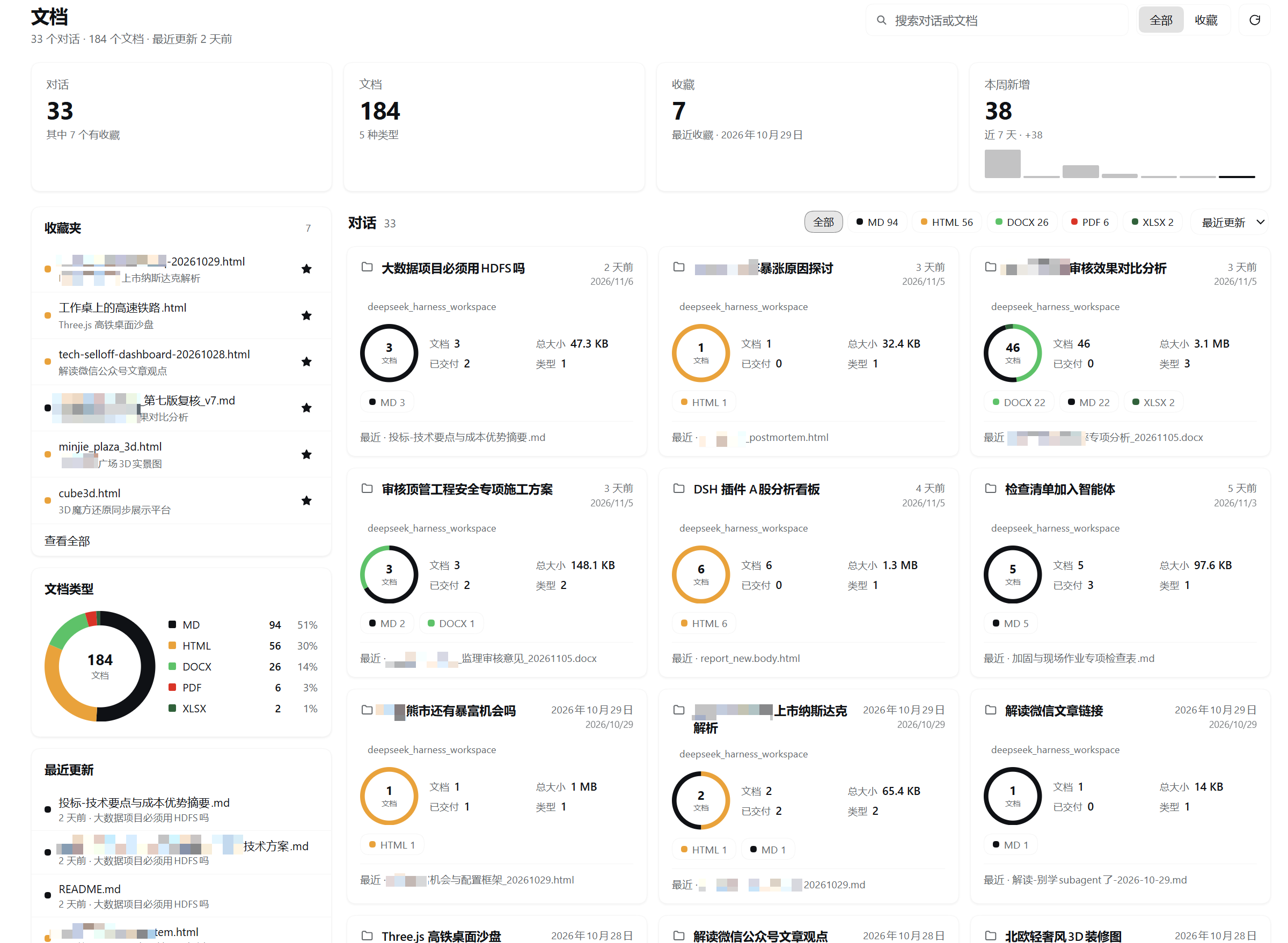
A conversation-scoped document browser for DeepSeek Harness: every document your conversations produce — organized by the conversation that produced it, searchable and previewable, without leaving the app.



English · 简体中文
Why
Agent conversations produce real deliverables: Markdown reports, single-file HTML dashboards, PDFs, spreadsheets, Word documents. They pile up in one workspace (or a few), and there is no built-in place to see what a particular conversation created, find last week's report, or keep the files you care about within reach.
dsh-doc-panel adds one Documents panel to the Harness sidebar. It indexes the documents each conversation produced, groups them under that conversation, and gives you the same three things a file manager gives you: a place to browse, a way to search, and a short list of favorites.
Features
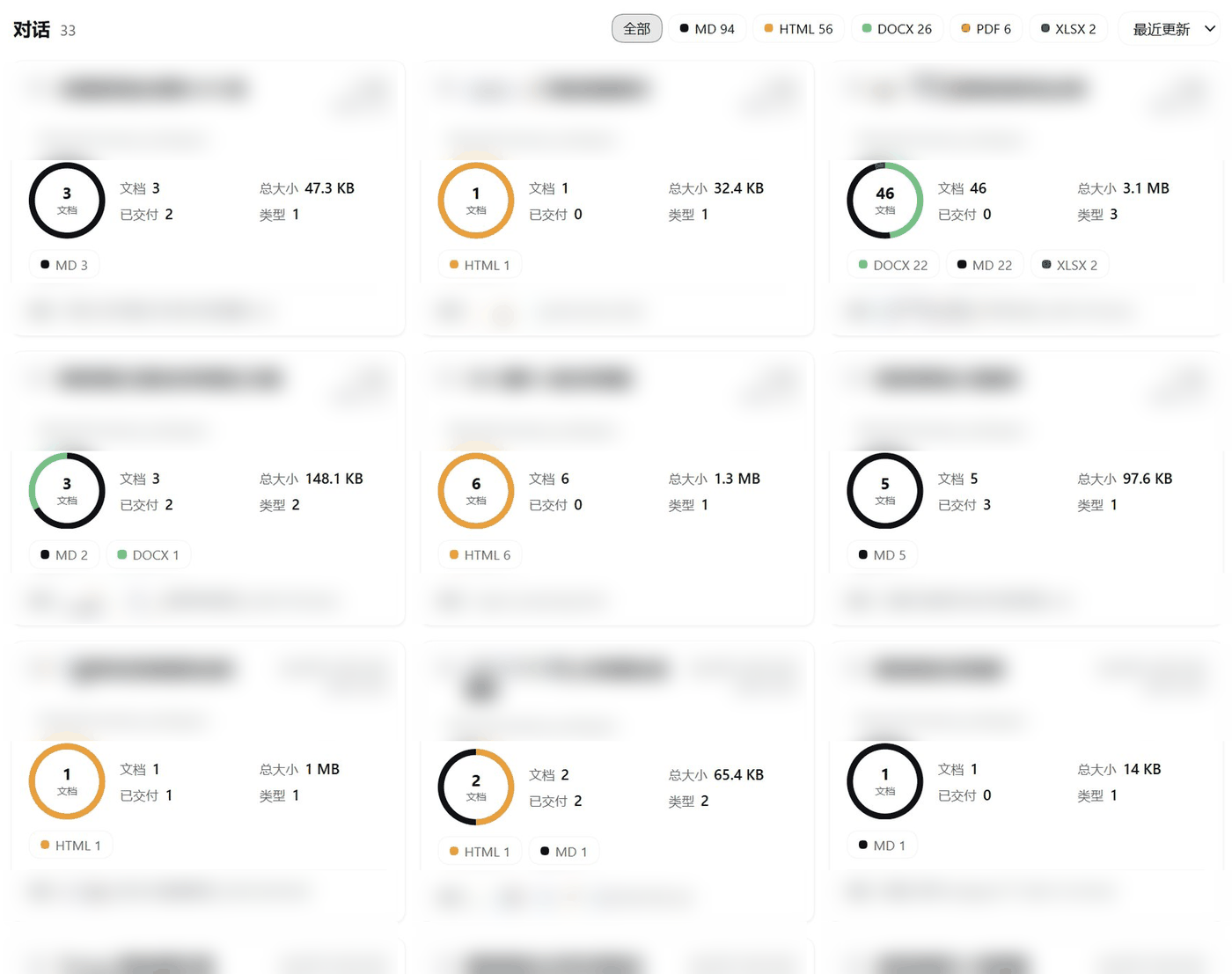
- Conversation folders — one card per conversation showing its summary outside the folder: document count, total size, relative update time and type mix.
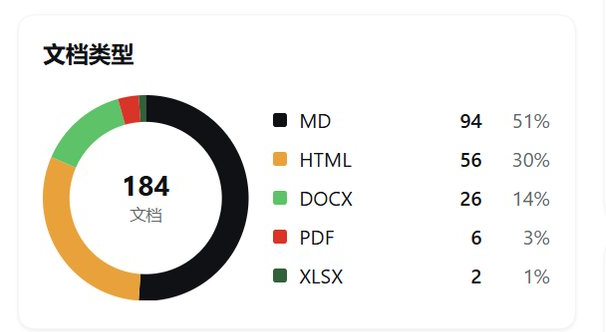
- Dashboard overview — KPI tiles for conversations, documents, favorites and the last seven days (with a small bar sparkline), a document-type donut, and a recently-updated list.
- Instant search — filters conversation titles, document names and paths as you type. It is client-side; document contents are not indexed or searched.
- Favorites — star a document from any list or from the preview header. Favorites persist to disk and survive restarts; files that disappeared stay listed as unavailable and cannot be opened.
- Inline previews — rendered Markdown, sandboxed HTML pages, embedded PDF, plain text/source view, and open/download cards for Office documents. Markdown and HTML have an explicit preview/source toggle.
- Accurate grouping — documents are discovered from session-log references
(
write,edit,present, write-capable tool arguments) plus a filtered workspace scan. Subagent sessions are folded into their root conversation. - Native look — styled only with Harness theme tokens, so light and dark themes both work and the panel sits naturally beside the other Harness pages. Charts are pure SVG/CSS; no chart library.
- Quiet by design — no network requests, no telemetry, no runtime dependencies, no build step. The Host half uses Node builtins only.
- Bilingual UI — English and Simplified Chinese, following the Harness locale.
Install
Prerequisites: a DSH installation with the plugin_manager tool. Tested on DSH Desktop
0.2.2-rc.1 with Node 24; Node.js 22+ in general. plugin_manager actions may require
Full access or an approval prompt.
Option 1 — local checkout (recommended)
git clone https://github.com/leobasic/dsh-doc-panel.git
Then install the bundle from its absolute path:
plugin_manager({ action: 'install_bundle', target: '/absolute/path/to/dsh-doc-panel' })
No build step is involved — the files are used as written. Uninstall with
plugin_manager({ action: 'remove_bundle', target: 'dsh-doc-panel' }).
Option 2 — directly from GitHub
If your DSH build supports installing from a git spec:
plugin_manager({ action: 'install_bundle', target: 'https://github.com/leobasic/dsh-doc-panel' })
Otherwise use Option 1 and point target at the checkout directory.
Option 3 — npm
Once the package is published to npm, install it by package name:
plugin_manager({ action: 'install_bundle', target: 'dsh-doc-panel' })
The npm package contains only the Harness bundle files; DSH is still required to run it.
Usage
- Click the documents icon in the left sidebar.
- The dashboard opens on the conversations that produced documents. Click a conversation card to open its folder.
- Click a document to preview it. Markdown renders as formatted content, HTML renders in a sandboxed frame, PDF embeds, Office files offer open/download. Use 预览 / 源码 to switch between rendered and source.
- Click the star on any document (or in the preview header) to favorite it; the 收藏 segmented control and the 收藏夹 card list favorites. Search filters everything and the refresh button reindexes.
The very first scan reads the session corpus and can take a little while; later loads use the cache and are fast.
Configuration
The plugin row accepts an optional config object. All keys are optional.
| Key | Default | Purpose |
|---|---|---|
extensions |
.md .markdown .html .htm .pdf .docx .doc .xlsx .xls .pptx .ppt |
Document types listed, scanned and previewed. .csv/.txt are opt-in: add them here if you want them. |
maxFiles |
5000 |
Total cap on files collected per scan. |
maxDepth |
6 |
Maximum directory depth walked below each conversation workspace. |
cacheTtlMs |
60000 |
How long the in-memory/persisted index is considered fresh. |
cachePath |
null |
Index cache override. null = <defaultDirectory>/.dsh-doc-panel/index.json. |
favoritesPath |
null |
Favorites store override. null = <defaultDirectory>/.dsh-doc-panel/favorites.json. |
timeoutMs |
180000 |
Hard deadline for one scan; on expiry a partial index is returned with diag.complete: false. |
warmOnStartup |
true |
Warm the index in the background shortly after activation. |
- id: dsh-doc-panel
  name: dsh-doc-panel
  config:
    extensions: ['.md', '.markdown', '.html', '.htm', '.pdf', '.docx', '.doc', '.xlsx', '.xls', '.pptx', '.ppt']
    maxFiles: 5000
    maxDepth: 6
    cacheTtlMs: 60000
    cachePath: null       # null = <defaultDirectory>/.dsh-doc-panel/index.json
    favoritesPath: null   # null = <defaultDirectory>/.dsh-doc-panel/favorites.json
    timeoutMs: 180000
    warmOnStartup: true
<defaultDirectory> is the Harness default working directory (the profile directory on
a normal install; ~/.dsh as a fallback). Full reference and file formats:
docs/configuration.md.
How it works
The plugin has a Host half (index.js, Node) and a Client half (client.js, React in the
Harness Web app), wired by cordis.patch.yml — no build step, no bundler.
- The Host reads the session corpus through the
sessionQueryservice and reduces each session log to compact signals: title, first/last time, turn windows and document path references. - It scans each conversation's workspace for files matching the configured extensions
(skipping harness internals such as
node_modules,.git,.asartrees, dot directories and scratch files). - Every file is attributed by a four-tier rule: explicit reference → reference path mentioned by a write-capable tool → turn time window around the file's mtime → whole session window. Files that cannot be attributed are not listed.
- Child/subagent sessions fold into their root conversation, so a delegated agent's documents appear under the conversation that spawned it.
- The resulting index is cached in memory, persisted atomically as JSON, and warmed on
startup;
POST api/dsh-doc-panel/listserves it, whileread/fileserve previews from an allow-listed set of indexed paths. - The Client registers one sidebar entry and one main panel, renders the dashboard and
previews, and runs HTML previews in a
sandbox="allow-scripts allow-downloads"iframe (no same-origin access).
Details and the data-flow diagram: docs/architecture.md.
Privacy & security
- No network, no telemetry. The plugin makes no outbound requests and embeds no analytics, crash reporting or update checks. Your browser only talks to your own Harness server over the existing authenticated session.
- Reads stay local. It reads session history through Harness services and workspace file metadata matching your extension list; file contents are read only when you preview a document.
- Writes are minimal. Only two files: an index cache and a favorites store, both
under
<defaultDirectory>/.dsh-doc-panel/(both overridable, both safe to delete). - Preview routes are allow-listed.
readandfileonly serve paths present in the current index; they cannot be used to read arbitrary files. - HTML is sandboxed. HTML previews run with
allow-scriptsbut withoutallow-same-origin, so a document cannot touch the Harness DOM, cookies, storage or authenticated API. Scripts inside a previewed HTML file can still make their own network requests under normal browser rules — preview only documents you trust.
Full threat model and the exact read/write surfaces: docs/privacy.md.
Screenshots
The hero above is the full dashboard: KPI tiles, the favorites card, the document-type donut and the conversation folders. Below: the conversation card grid and the document-type breakdown. Conversation titles, workspace names and file names in the card grid are intentionally blurred — the screenshots come from a real library and are redacted before publication.
| Conversation card grid | Document types |
|---|---|
 |
 |
Development
The repository is a DSH plugin bundle: plain ESM, no build step, no runtime dependencies.
index.js is the Host half, client.js the Web half, cordis.patch.yml wires the plugin
row.
node --check index.js      # Host syntax
node --check client.js     # client syntax
node scripts/test-all.mjs  # all test suites + static checks
Tests run fully offline against synthetic fixtures and do not need a running Harness. Developer-only real-corpus helpers, when present locally, are excluded from the published package and are not required for development. Layout, test descriptions, adding a document kind and debugging tips: docs/development.md.
Limitations
- The Markdown renderer is intentionally a pragmatic subset: no setext headings, no reference-style links, and raw inline HTML is displayed as text (never executed).
- Relative assets referenced from Markdown are not served; images resolve through the
raw-file route only for absolute paths (or
http(s)/data:URLs). - HTML previews run in a sandboxed frame without same-origin access, so pages that depend on same-origin storage or APIs can misbehave.
- Documents must still exist on disk: deleted or moved files drop out of the index, and a preview requires the file to be readable.
- Attribution is heuristic. A file copied in from outside the session, or renamed/edited long after the turn that created it, can be assigned to the wrong conversation — or not listed at all.
- Legacy v0 session logs may be unreadable by the current Harness; those scans return a
partial index with
diag.complete: false. .csvand.txtare not indexed by default (they are usually intermediate files); add them throughextensionsif you want them.
License
MIT — Copyright (c) 2026 leobasic. See LICENSE.
dsh-doc-panel is an unofficial community plugin. It is not affiliated with, or endorsed by, DeepSeek.
No comments yet. Be the first to write one.