DSH Trading Floor (P2)
A live, read-only trading-floor dashboard for DeepSeek Harness itself.
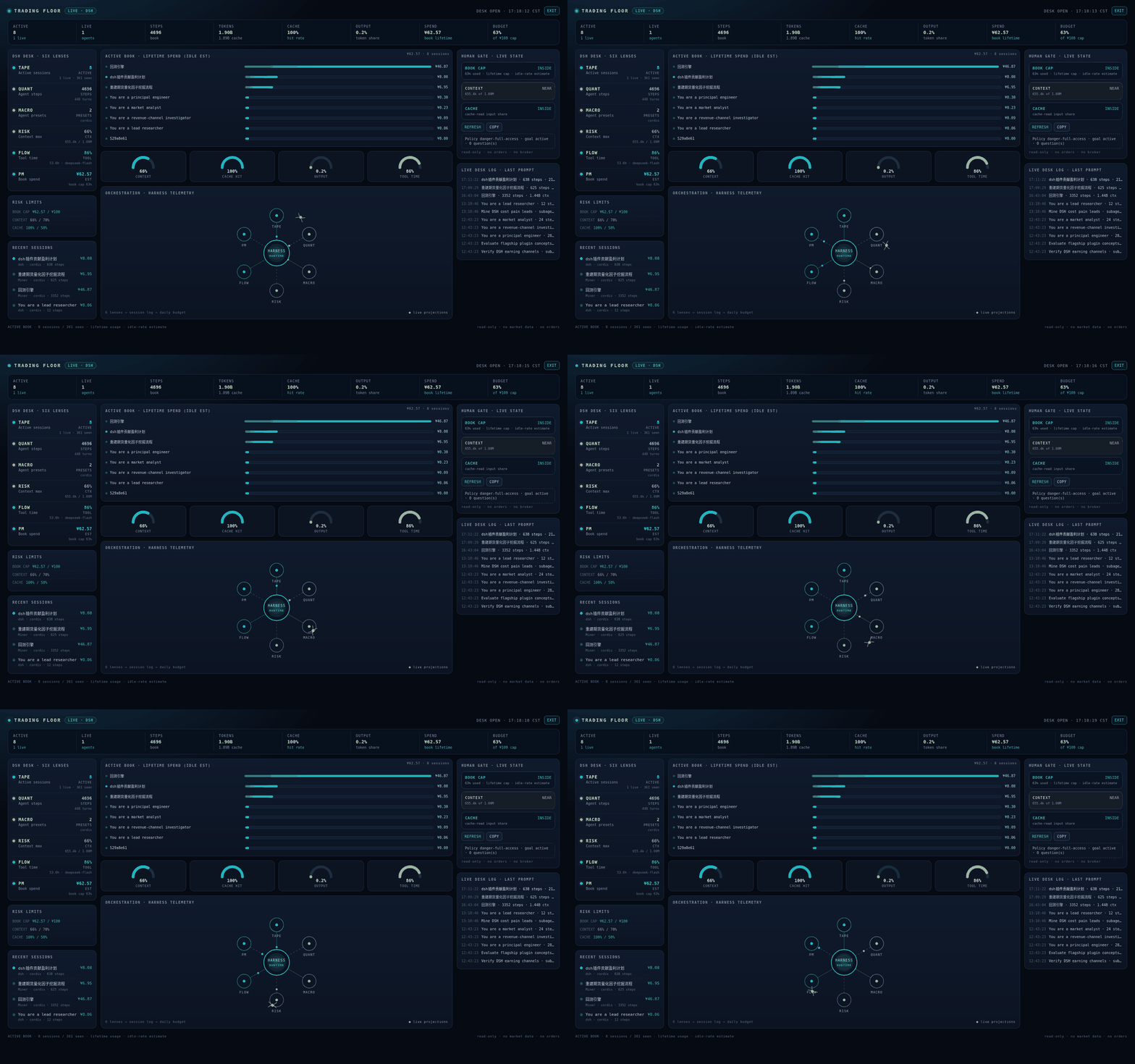
It turns the Session projections the Web UI already maintains into a desk view: active sessions, steps, token mix, cache hit, context pressure, tool time, per-session book bars, and a human risk gate. The visual language is a trading terminal; the data is DSH's own session telemetry.
No market data. No broker. No orders. No external network calls.
What is real
- Sessions with a prompt today (or running) and their projections
- Per-session steps, turns, LLM time, and tool time
- Cache-read, uncached-input, and output tokens
- Context pressure and context window
- Agent preset and model selection
- A per-session lifetime cost estimate at DeepSeek's idle rates
- Subagent labels and last-prompt activity
The dashboard polls the same same-origin Session RPC the Web UI uses, every 10 seconds. A snapshot renders in roughly 0.4–0.6 seconds on a 361-session corpus.
Scope and honesty
The Session projection exposes lifetime token usage per session, not call timestamps. The dashboard therefore calls its scope the active book:
- A session is in the book if its last prompt is today, or it is currently running.
- Spend is the lifetime cost of those book sessions at idle rates.
- It is not today's bill. For exact daily accounting use
dsh-token-audit.
The UI labels this everywhere: BOOK LIFETIME, IDLE EST, EST, BOOK CAP, and read-only. The ¥100 cap is a policy guard, not a daily bill. There are no fake P&L numbers or invented agents.
Screens
- Ticker: active, live, steps, tokens, cache, output share, book spend, book cap
- Six lenses: TAPE (sessions), QUANT (steps), MACRO (presets), RISK (context), FLOW (tool time), PM (book spend)
- Gauges: context, cache hit, output share, tool time
- Orchestration web: the harness at the center, six lenses around it
- Human gate: book cap (default ¥100 lifetime), context, and cache checks, with Refresh / Copy
- Desk log: last-prompt and subagent activity
- FULL DESK: full-viewport portal; Esc or EXIT returns to Settings
Install
Use the Plugin Manager (Plugins → Add plugin) or the plugin_manager install_bundle action with this absolute directory. Once the public repo exists:
dsh plugin --profile web add github:lengrufeng2008/dsh-trading-floor
Open Settings → Trading Floor. FULL DESK is in the top-right.
The live profile install is a local link, so client edits apply after a page refresh. A packed tarball is produced with npm pack and can be attached to a GitHub Release.
Verification
npm test: 4/4 pure projection-fold tests- Live Web UI: 1600×1000 and 1920×1080, 0 page errors, 0 console errors
- First data render: ~0.4–0.6 s
- Full-desk portal, Escape isolation, responsive Settings pane
- Read-only controls only: Refresh and Copy
- Fresh temp profile: installed the packed tarball with
dsh plugin --profile web add dsh-trading-floor-0.2.0.tgz;--dump-configcomposed thetrading-floorrow; the Plugins page listed Trading Floor with the locale description - Reviewer file tour:
REVIEW.md
Screenshots: docs/settings-1600.png, docs/full-desk-1600.png, docs/full-desk-1920.png.
Limits / next
- Exact daily bill needs event timestamps or a Host
wire.view; P2 intentionally stays on the already-maintained projection API. - Approval actions are not wired; the human gate reports live policy, goal phase, and pending questions.
- Market data and paper trading are deliberately out of scope.
Compatibility
DSH 0.2.1-rc.2, Web profile. The dashboard depends on the session/list client RPC and the settings.section slot.
MIT. The Grok Bot six-agent desk is a public use case; no code or assets were copied.
No comments yet. Be the first to write one.