插件分区系统 · Plugin Scopes
Switch plugins on or off per workspace and per conversation, with inheritance from parent scopes, master switches, saved archives, and a sidebar panel to inspect the current scope.
English
What it does
DSH keeps plugin activation at the profile level, so this plugin works one level below it: it decides, per agent (one agent per conversation), which tools each plugin contributes remain visible to the model, and applies that through agent.ctx.tools.restrict() on agent/created (plus a backfill for already-running agents). The result is per-conversation isolation for tool-carrying plugins without touching the profile.
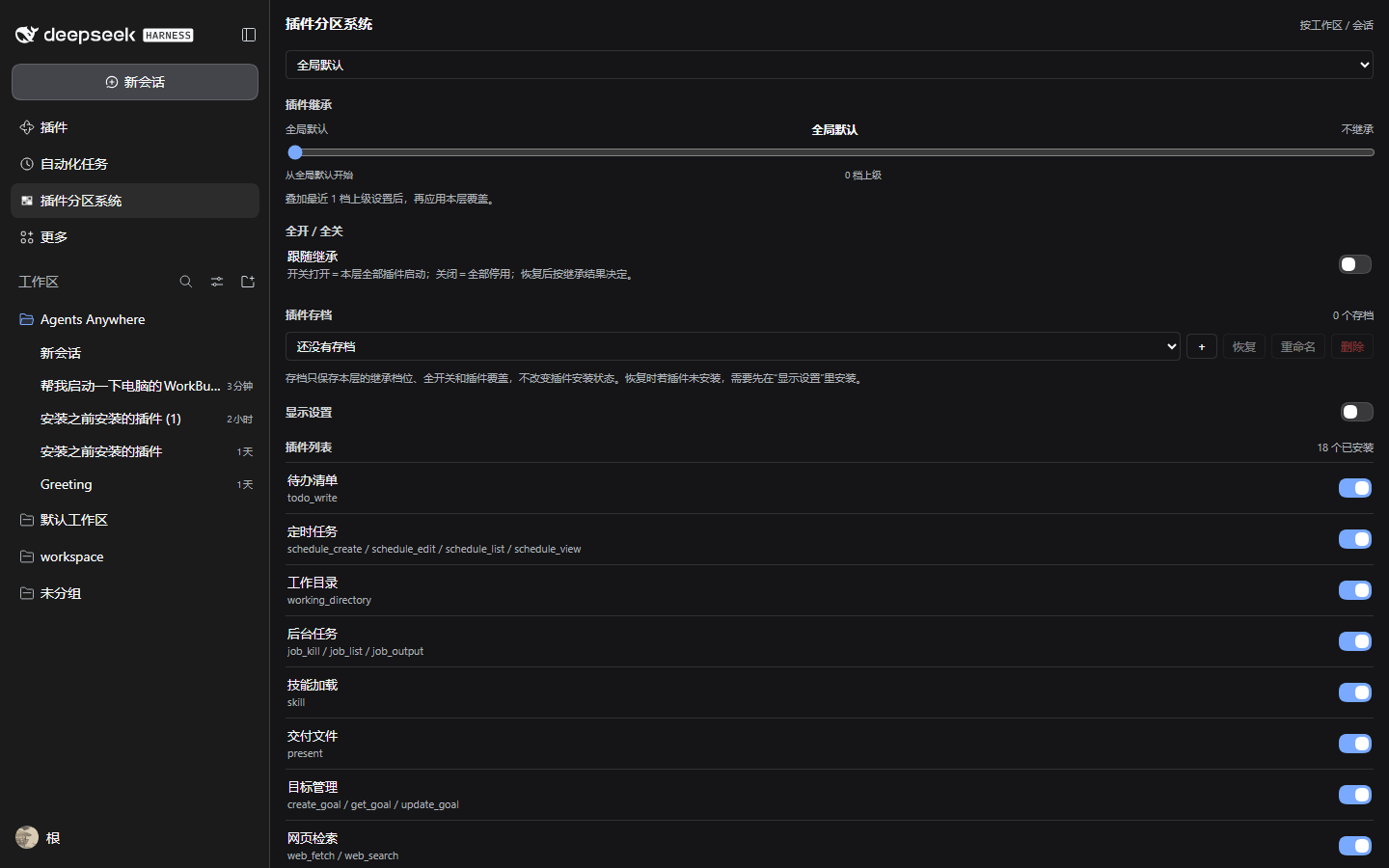
- Inheritance — each scope (global → workspace → nested workspace → conversation) has a slider:
0starts from the global default and ignores parents;1…nstacks the nearest n parent layers, then applies this scope's overrides;-1("do not inherit") starts blank.- Unset scopes default to
1(follow the nearest parent). - Workspace nesting is derived from directory containment, because DSH workspaces are a flat list.
- Master switch — turn everything on or off for the scope in one click; the switch shows "follow inheritance" when no master state is set.
- Archives — save the current scope's inheritance depth, master state and per-plugin overrides as a named archive; restore, rename or delete it later. Archives never change which plugins are installed.
- Display settings — show hidden entries and historical (uninstalled) plugins, then reveal or hide each one from the list.
- Plugin list — Chinese/English title, one-line description, the tools the plugin registers and a per-scope switch. Plugins without tools (wallpaper, skins, pure UI services) are marked global: DSH offers no per-session way to unload them.
Where to open it
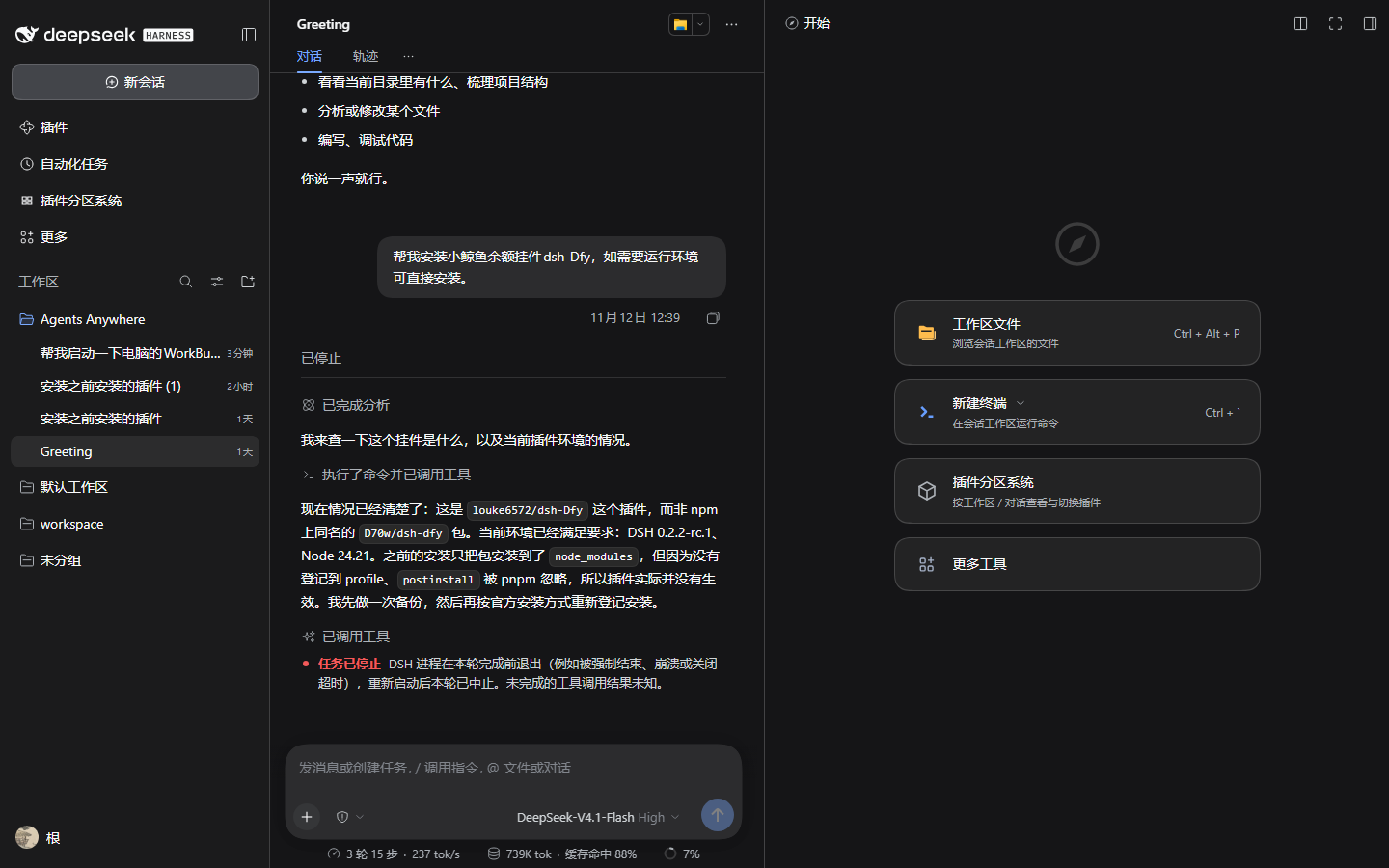
- Left sidebar → 插件分区系统 / Plugin Scopes panel; the dropdown selects the scope (global / workspace / conversation).
- Right sidebar → "new tab" guide → the plugin card opens the current conversation's scope.
- Every conversation gets its own right-sidebar tab layout, as usual.
Data
- State:
$DSH_HOME/storages/scope-plugins/<profile>.json(separate per profile). - Host HTTP API (same origin):
GET /scope-plugins/api/state?scope=global|workspace:<id>|session:<id>POST /scope-plugins/api/rule,/archive,/display,/install
Install
Install from the DSH plugin market (search 插件分区系统 / Plugin Scopes), or point plugin_manager's install_bundle at this repository directory. After changing code: reload the host plugin (include:scope-plugins off/on in the plugin manager) and refresh the page.
Limits
- Only installed plugins can be switched; removed plugins become "history" and can be reinstalled from display settings.
- Inheritance follows workspace directory containment and
parentSession, not workspace pin/recency order. - Switching applies to later turns; conversation history is untouched.
- Plugins without tools cannot be isolated per conversation.
License
MIT
中文说明
按工作区和对话独立开关插件,支持从上级继承、全开全关、插件存档,并在侧边栏查看当前作用域的启用情况。
做了什么
DSH 的插件启停本身是 profile 级,本插件在其下一层工作:在 agent/created(并对已有 agent 回填)时,用 agent.ctx.tools.restrict() 决定每个会话里各插件贡献的工具是否对模型可见,从而实现按会话隔离,而不改动 profile。
- 继承:每个作用域(全局 → 工作区 → 嵌套工作区 → 对话)有一个滑块:
0从全局默认开始,不读上级;1…n叠加最近 n 层上级设置,再应用本层覆盖;-1(不继承)从空白起算;- 未设置的层默认
1(跟随最近上级); - 工作区的嵌套关系按目录包含推导(DSH 的工作区是扁平列表)。
- 全开 / 全关:一键开关本作用域全部插件;未设置时显示“跟随继承”。
- 插件存档:把当前继承档位、全开关状态和单插件覆盖存成命名存档,之后可恢复、重命名、删除;存档不改变插件的安装状态。
- 显示设置:显示已隐藏项与历史(已卸载)插件,再决定哪些出现在列表里。
- 插件列表:中文名、一句话介绍、涉及的工具名、右侧开关。没有工具的插件(壁纸、皮肤、纯 UI 服务)标“全局”,因为 DSH 没有按会话卸载它们的手段。
入口
- 左侧栏「插件分区系统」面板:下拉切换作用域(全局 / 各工作区 / 各对话)。
- 右侧栏「新标签页」指南里的卡片:点开即当前对话的作用域。
- 每个对话各自一份右侧栏布局。
数据
- 状态文件:
$DSH_HOME/storages/scope-plugins/<profile 名>.json(按 profile 分隔)。 - 宿主 HTTP API(同源):
GET /scope-plugins/api/state?scope=global|workspace:<id>|session:<id>POST /scope-plugins/api/rule、/archive、/display、/install
安装
从 DSH 插件市场安装(搜索「插件分区系统」/ Plugin Scopes),或用 plugin_manager 的 install_bundle 指向本仓库目录。改代码后:在插件管理器里把 include:scope-plugins 关一次再开,然后刷新页面。
限制
- 只有已安装的插件能被开关;卸载后条目进入“历史”,可在显示设置里重新安装。
- 继承只沿工作区目录包含关系与
parentSession推导,不感知收藏/置顶顺序。 - 开关影响后续轮次,不改变会话历史。
- 无工具的插件无法按对话隔离。
许可
MIT
No comments yet. Be the first to write one.