English · 简体中文
dsh-stats-hud
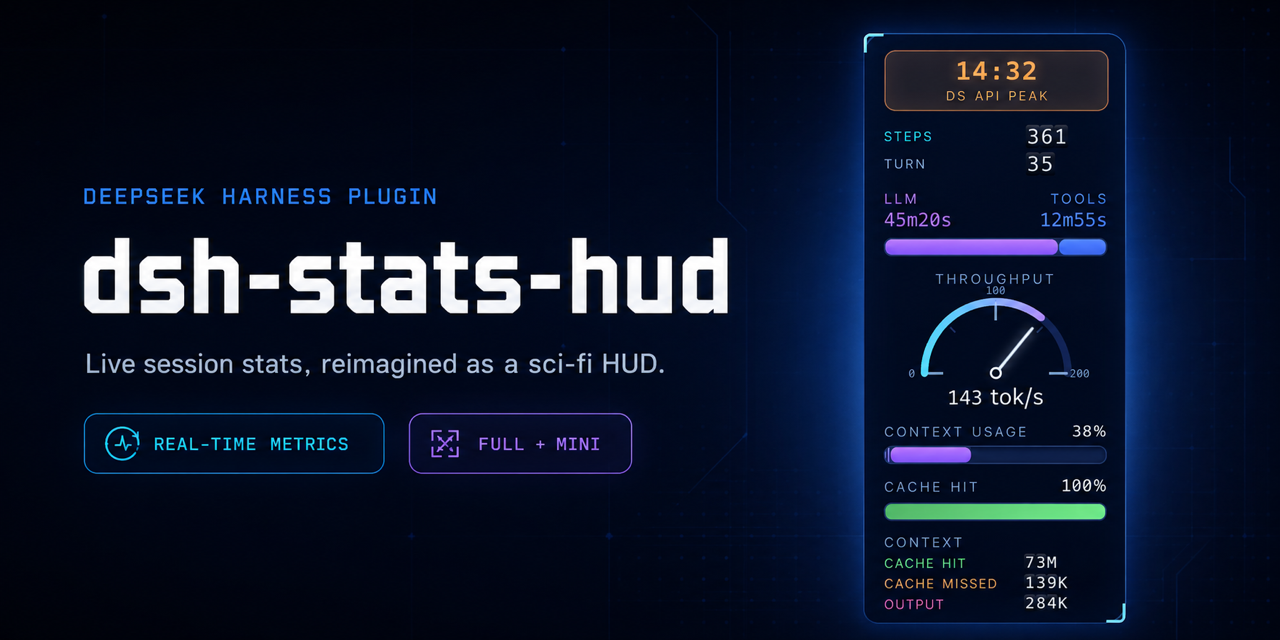
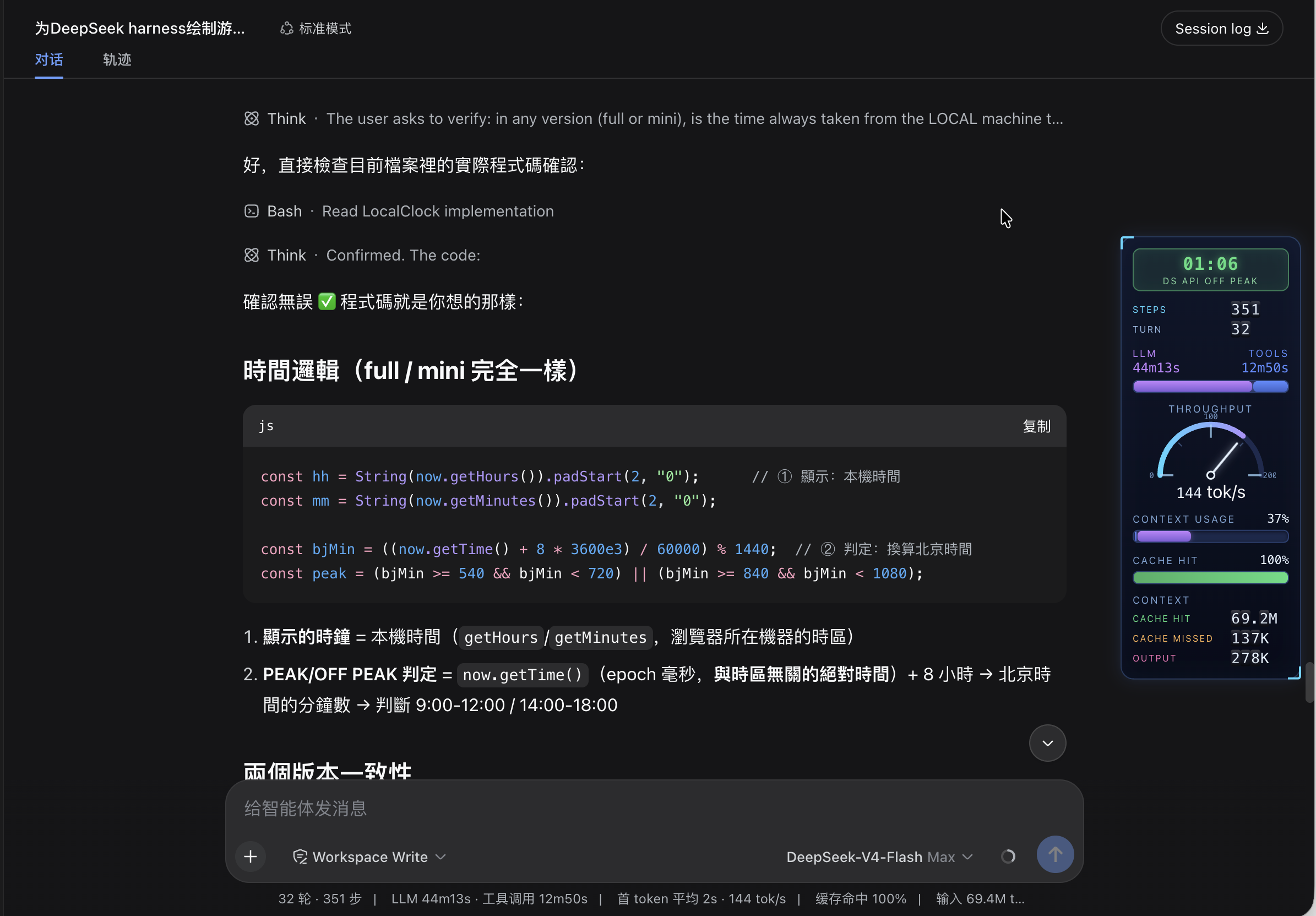
A sci-fi HUD for DeepSeek Harness: the session's stats become game-style level bars in a vertical column fixed to the far right edge of the web UI — without touching the original stats line.
Changelog
2026-09-11 — Verified against DSH 0.1.5-rc.1 (no code changes needed)
- Re-audited every interface the HUD touches against
dsh 0.1.5-rc.1(client packages0.1.5-rc.2):conversation.composer.dockis still declared by the composer bar and still renders declaration-gated, so thectx.slots.inject(...)registration stays as-is; the dock'sid/order/labeloptions, theuseSession/useProjectionstandard props (plus two new ones,useResource/usePanelInfo), all four projections (sessionStats,tokenUsage,contextPressure,contextBreakdown) and the[data-composer-card]/data-slotDOM markers are unchanged. - Manifest contract unchanged (
dsh.bundle.patch,dsh.client.platform,window.__ModuleLoader__.load({id, factory}));dsh pluginis still a pnpm forwarder. Removed a deaddsh.client.injectentry:@deepseek-ai/dsh-client-runtimeno longer exists in the tree (unknown names are ignored harmlessly). Package version bumped to0.1.1. - Docs: the Install section now distinguishes the two reload paths — client-half edits in a
link:checkout are hot-reloaded by the default@deepseek-ai/dsh-client-hmr, whileadd/remove/updatestill need adsh webrestart.
2026-09-08 — DSH 0.1.2-rc.1 compatibility (slot registration became declaration-gated)
- DSH
0.1.2-rc.1reworked the web client's slot system:slots.register()is now a pure attachment API and throws unless the target slot has already been declared by a parent entry's children table. The composer subtree — includingconversation.composer.dock— is declared lazily by the conversation UI tree, i.e. after plugin loader entries have applied, so the old directctx.slots.register(...)call inapply()failed withslot "conversation.composer.dock" is not declared (a parent entry's children table must declare it)and DSH showed Failed to load plugins at startup. - Registration now goes through
ctx.slots.inject("conversation.composer.dock", () => ctx.slots.register({ name, id, order }, …))— the same pattern the stock StatsLine uses for the very same slot.slots.injectruns the factory immediately when the slot is already declared, otherwise waits for its (re)declaration, and the whole wait + registration rides the plugin's own fiber for cleanup. - Nothing else needed to change: the dock slot's standard props (
useSession/useProjection), the[data-composer-card]/data-slotDOM markers and every projection the HUD reads are unchanged in0.1.2-rc.1(verified against the installed package sources). - Docs synced (this README and
README-CN.md).
2026-08-24 — Peak / off-peak windows updated
CLOCKbadge now follows the official DeepSeek API peak-valley pricing: peak = Mon–Fri Beijing 09:00-12:00 / 14:00-18:00 (i.e. Mon–Fri 01:00-04:00 / 06:00-10:00 UTC); weekends are always OFF-PEAK (previously weekends inside those windows were wrongly shown as PEAK).- Refactored the check into the pure
isDsApiPeak(date)helper (weekday resolved on the Beijing calendar, so it is correct in any timezone) and exposed it via the test-only__testexport. - Added 3 unit-test groups covering window edges, weekends and the Beijing/UTC day boundary (9 tests total, all green).
- Docs synced (this README,
README-CN.mdand theTuningsection).
Upgrading from an older DSH
After DSH moved to declaration-gated slots (0.1.2-rc.1), an install of this
plugin made before that change fails at startup with:
Failed to load plugins
dsh-stats-hud
failed to apply loader entry … (dsh-stats-hud): slot "conversation.composer.dock" is not declared (a parent entry's children table must declare it)
Update the plugin to the fixed version (the 2026-09-08 Changelog entry above), then reload it:
- Installed from a local checkout (
link:dependency): update the checkout (git pull, or copy the new files over). The client half is hot-reloaded by@deepseek-ai/dsh-client-hmrinto the running page; restartdsh webonly if the plugin's host half or itscordis.patch.ymlpatch changed. - Installed from GitHub or npm: re-resolve the latest version with
dsh plugin --profile web update dsh-stats-hud, orremoveandaddthe package again, then restartdsh web— a newly resolved install path is scanned at boot.
Quick sanity check that the fixed version is in place: the client code must
contain the new registration pattern ctx.slots.inject("conversation.composer.dock", …) (see lib/client.js).
If the alert still shows after the restart, hard-refresh the browser page
(Cmd+Shift+R) — the plugin's browser bundle is cached per page load.
Instruments (all-English, LLM terminology)
| Instrument | Data | Full scale | Past full scale |
|---|---|---|---|
CLOCK badge |
Local time (24h) + DS API PEAK / DS API OFF PEAK rate |
Peak = Mon–Fri Beijing 09:00-12:00 / 14:00-18:00 (i.e. Mon–Fri 01:00-04:00 / 06:00-10:00 UTC); weekends and all other hours are OFF-PEAK (half price) | PEAK orange tint, OFF-PEAK green tint |
STEPS / TURN rolling rows |
Steps / turns as odometer drums (like the CONTEXT rows) | — | Drums spin up on mount, roll on change |
LLM / TOOLS dual bar |
Two columns (labels over values), bar segments = raw LLM:TOOLS time ratio | No cap — 2:1 time means 2:1 bar | — |
THROUGHPUT gauge |
tokens/s (throughput), centered title, combined centered readout (146 tok/s) |
Redline auto-scales 200→300→400… (arc ticks follow) | — |
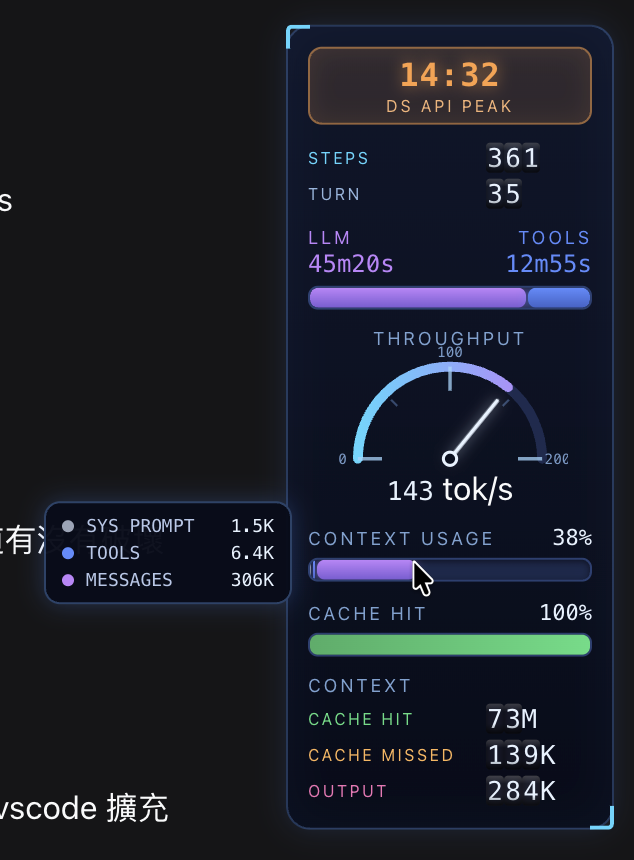
CONTEXT USAGE bar |
Context-window usage % with 3 segments: Sys Prompt (gray) / Tools (blue) / Messages (purple) by token ratio | 0-100% | ≥80% whole bar turns solid red; hover shows the three token counts |
CACHE HIT bar |
Cache-hit % | 0-100% | <50% red, <80% yellow, ≥80% green |
CONTEXT rolling counter |
Three odometer rows: CACHE HIT (green) / CACHE MISSED (orange) / OUTPUT (pink) | Drums spin up from 0 on mount; digits roll up on increase (carry 9→0), down on decrease | — |
While the agent is running the whole panel breathes and bars pulse.
Hovering the CONTEXT USAGE bar pops up a tooltip with the token breakdown:
Responsive layout
The HUD adapts to the free space right of the chat column (measured live with a ResizeObserver, so sidebar drags, the details drawer and window resizes all count):
| Tier | Condition | Shows |
|---|---|---|
full |
Window ≥ 800px and free space ≥ 180px | Everything |
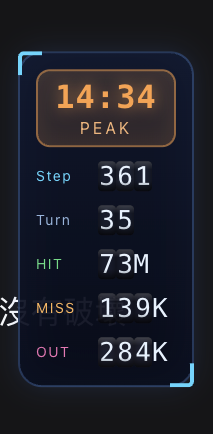
mini |
Window ≥ 800px and free space < 180px | Clock (short PEAK/OFF PEAK badge) + compact rolling rows (Step/Turn/HIT/MISS/OUT) |
hidden |
Window < 800px | Nothing (element stays mounted, display:none) |
The window width is a hard floor: below 800px the panel hides even with room to spare, and only the measured space decides full vs mini (the full panel needs 164px + 12px margin). mini may slightly overlap the chat on narrow windows — safe because the panel is click-through. If the chat column can't be measured, the panel falls back to full.
The mini tier in a narrow window:
Requirements
- DeepSeek Harness
dsh(tested on 0.1.0-rc.6 → 0.1.5-rc.1, macOS; since0.1.2-rc.1slot registration is declaration-gated and requires thectx.slots.injectpattern — see Changelog) - pnpm (for plugin management)
Install
# from a local checkout
dsh plugin --profile web add /path/to/dsh-stats-hud

# or straight from GitHub
dsh plugin --profile web add https://github.com/lauytgary/dsh_hud_plugin
Then restart dsh web (loader entries are scanned at boot) and refresh the page. The package is installed as a link: dependency, so local edits never need a reinstall — and the web profile mounts @deepseek-ai/dsh-client-hmr by default, which stat-polls the client bundle and re-applies the plugin: after editing lib/client.js, the HUD hot-reloads into the running page (no restart, no manual refresh). A restart is only needed when the plugin is added, removed or updated — i.e. when the loader entries themselves change.
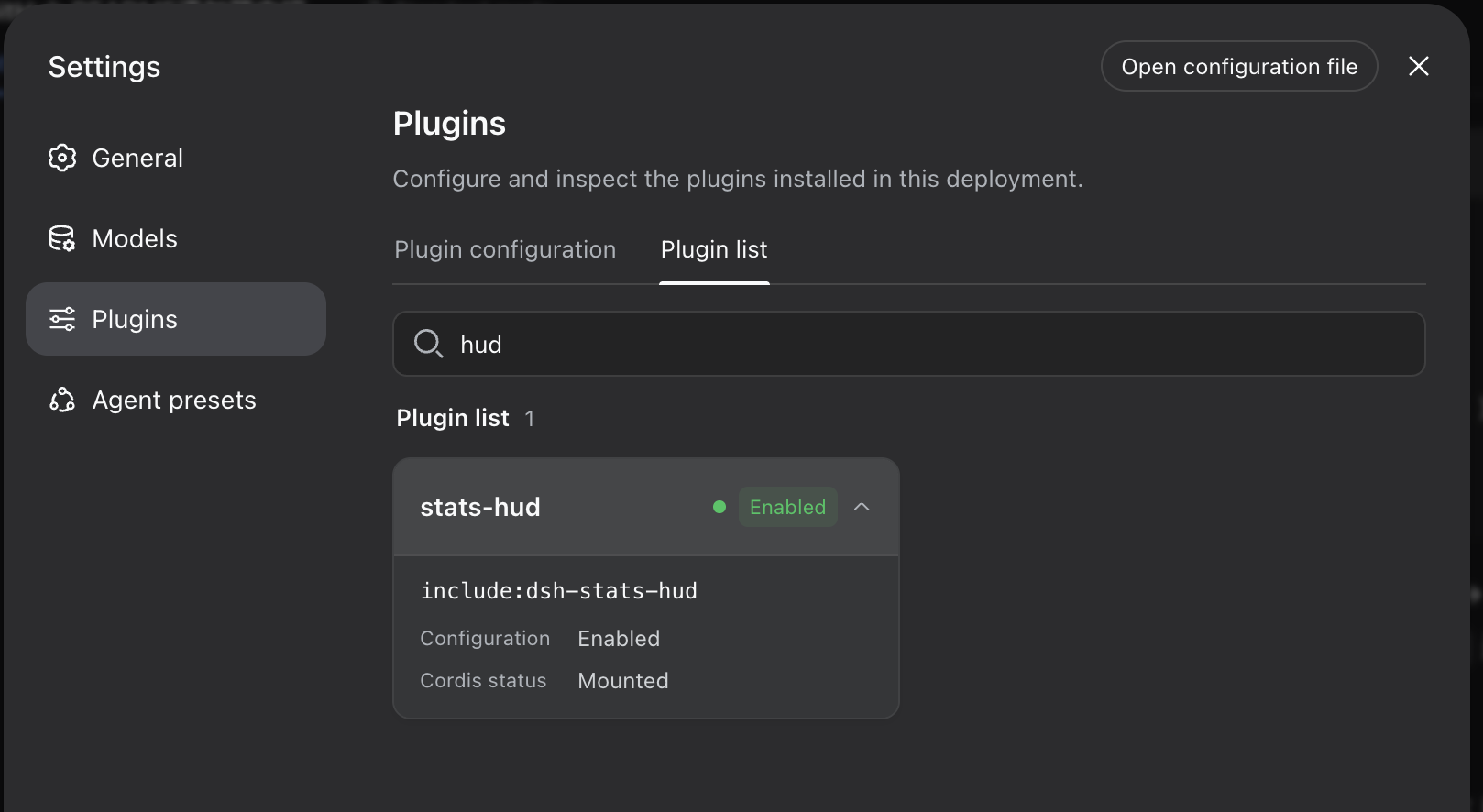
The plugin then shows up in Settings → Plugins:
Uninstall
dsh plugin --profile web remove dsh-stats-hud
How it works
- Registers into the
conversation.composer.dockslot (iddsh-stats-hud, order 1) — only to receive the session-scoped hooks (useSession/useProjection); the panel itself isposition: fixed, takes no layout space, and the stock stats line stays untouched. Registration goes throughctx.slots.inject(...), which waits for the slot to be declared by its parent entry (required since DSH made slot registration declaration-gated). - Data comes from the same projections the stock UI uses:
useProjection("sessionStats"),useProjection("tokenUsage"),useProjection("contextPressure")anduseProjection("contextBreakdown")— zero host-side changes. exports.inject = ["slots"]is mandatory: DSH's ctx is a strict proxy, and accessing an undeclared service throws (cannot get property "locale" without inject).- The panel is
pointer-events: none(click-through); only the CONTEXT USAGE bar re-enables pointer events so its hover tooltip works.
Files
dsh-stats-hud/
├── package.json          # dsh.bundle (patch layer) + dsh.client (browser entry)
├── cordis.patch.yml      # inserts the plugin into loader entries
├── lib/
│   ├── index.js          # host-side no-op (pure browser plugin)
│   └── client.js         # browser bundle: HUD components + slot registration
└── test/
    └── format.test.js    # pure-function unit tests (node:test, zero deps)
lib/client.js is a hand-written loader bundle (window.__ModuleLoader__.load) — no build step needed.
Development & testing
npm test # pure-function unit tests (node:test, no dependencies; Node ≥ 18)
The tests load lib/client.js in a Node VM with a stubbed loader (no DOM
needed) and exercise the pure helpers — formatTokens, formatDuration,
formatTps, tierOf, billedInputTokens, cacheHitPercent. The test-only
__test export is gated behind the DSH_HUD_TEST env var, so the browser
bundle is unaffected.
Tuning
All constants live in lib/client.js:
- Labels: the
Lobject (all-English LLM terminology) - Peak hours:
LocalClockdelegates toisDsApiPeak(date), which checks the Beijing (UTC+8) weekdaybjDow >= 1 && bjDow <= 5(Mon-Fri) together withbjMin >= 540 && bjMin < 720(9-12h) />= 840 && < 1080(14-18h), wherebjMin/bjDowcome fromnew Date(date.getTime() + 8*3600e3)— weekends are always off-peak MissionRolling: rolling drums for steps/turns (no full scale)ChannelBar: segment ratio =llmMs / (llmMs + toolMs)(no cap)SpeedGauge'sredline = 200(initial; auto-scales in 100 tok/s steps)ContextUsageBar: segment colors and the ≥80% solid-red threshold; the hover tooltip readssystemTokens/toolsTokens/messageTokensfrom thecontextBreakdownprojection- Rolling counter:
DRUM(3× 0-9),DRUM_H = 15(px per digit),RollingValue's carry/borrow formula and mount spin-up - CSS:
position:fixed; right:12px; tiers intierOf(space, width)—width < 800→hidden(window-width floor),space >= 180→full, elsemini(measurement failure falls back tofull) — plus the.gsh-root.gsh-*rules;@media (prefers-reduced-motion: reduce)disables pulses and transitions
Publishing to npm (optional)
# remove "private": true from package.json, then
npm publish
# users install with:
dsh plugin --profile web add dsh-stats-hud
Contact
Questions, ideas or issues? Open a discussion on GitHub:
License
MIT
No comments yet. Be the first to write one.