dsh-tab-status-light
Put the AI session state on your browser tab icon — a plugin for the DeepSeek Harness Web UI.

Listed on the community hub: https://dsh-plugin.org/plugins/kyle2241345145351324321/dsh-tab-status-light
English
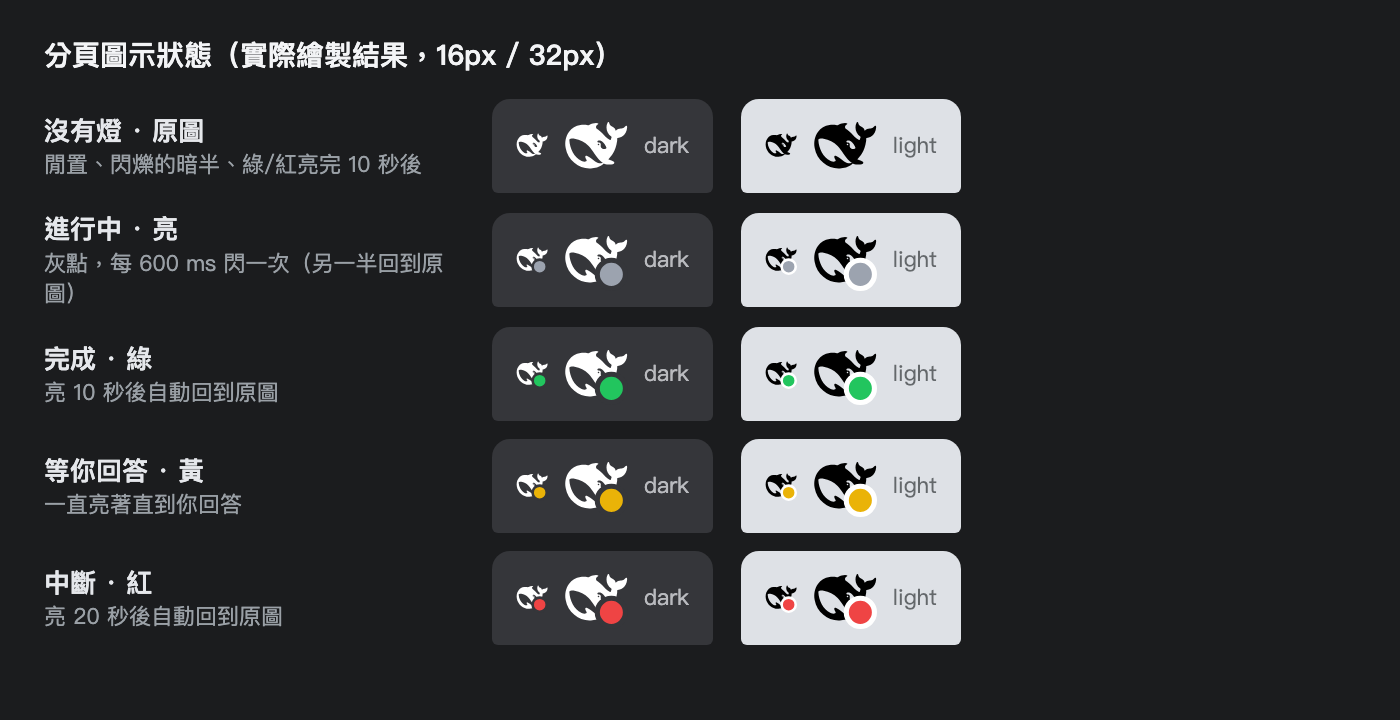
While a turn runs, the tab icon blinks gray; when the turn finishes it turns green; while the session waits for you it turns yellow; when a turn is interrupted it turns red. You can tell the state of the agent at a glance — even from another tab — without switching back to the app.
| State | Color | Animation | Derived from |
|---|---|---|---|
| Working | gray #9ca3af |
blinks every 600 ms: the plain whale ↔ whale + gray dot (the off half has no dot at all) | SessionStatus.running === true |
| Done | green #22c55e |
lit for 10 s, then back to the plain whale | a turn seen running here whose last turn/end reason is not an interruption |
| Waiting for you | yellow #eab308 |
stays lit until you answer | SessionStatus.pendingInteraction !== undefined (question / approval / plan review) |
| Interrupted | red #ef4444 |
lit for 20 s, then back to the plain whale | a turn seen running here whose last turn/end reason is aborted / blocked / error / interrupted |
The shipped whale is left untouched when no session is selected, when the session has
not finished a turn yet, or when you merely switch to a session that finished long ago
— green/red are news about something that just happened, not a replay of history.
SETTLE_MS (green, 10 s) and SETTLE_MS_RED (red, 20 s) control how long a settled
badge stays; any new finished turn lights it again. An interruption keeps the tab red for
its full 20 s even if the next turn finishes inside that window, so a cancel is never
silently overwritten by a completion.
Install
The plugin ships as a DSH bundle (dsh.bundle.patch). Install it with the harness
plugin_manager:
plugin_manager({ action: "install_bundle", target: "dsh-tab-status-light" })
Or from the CLI:
dsh plugin --profile web add dsh-tab-status-light
# straight from GitHub instead of npm
dsh plugin --profile web add github:kyle2241345145351324321/dsh-tab-status-light
Or point at a checkout (handy while developing — edits apply on page reload):
plugin_manager({ action: "install_bundle", target: "/path/to/dsh-tab-status-light" })
Reload the page (Cmd+R / Ctrl+R) after installing.
Requires the harness Web profile with the
@deepseek-ai/dsh-client-ui-sessionand@deepseek-ai/dsh-api-session-controllerclient packages available (a standard install has both).
How it works
- Pure Client plugin, occupies no slot: it reads
ctx.sessions.list(which session is the main view) andctx.uiSession.sessionStatus(running / pending interaction), and follows the session's event source for the newestturn/endreason. - The icon is redrawn from the live favicon: it
fetch()es the shippedfavicon.svg/favicon-dark.svg, splices one<circle>in before</svg>, and swaps thehrefof<link rel="icon">to a data URL (Chrome repaints the tab icon). The originalhrefis restored on teardown. - Because of that, the whale artwork is never copied into this plugin — upstream logo changes carry over automatically.
- Badge geometry inside the shipped 50×50 viewBox:
cx=37, cy=37, r=11, stroke-width=4; the ring uses the tab background (dark#35363a, light#ffffff) to separate the dot from the mark. - Blinking is driven by a tiny Web Worker, so it keeps blinking while the tab is in the background (Chrome throttles page timers in hidden tabs). It falls back to a page timer where workers are unavailable.
- Both blink halves are precomputed data URLs, so every swap paints on the tick — no file re-read, which is what made the pulse look uneven in earlier versions.
Tuning
All at the top of client.js:
| Constant | Default | Meaning |
|---|---|---|
BADGE |
{cx:37, cy:37, radius:11, ring:4} |
dot position / radius / ring width |
BADGE_COLOR |
gray / green / yellow / red | state colors |
BLINK_MS |
600 |
blink period while working |
SETTLE_MS |
10000 |
how long the green badge stays |
SETTLE_MS_RED |
20000 |
how long the red badge stays |
RED_TURN_END_KINDS |
aborted blocked error interrupted |
turn endings that count as interruptions |
Resource use
Blinking costs about 2 ms of JS per second (≈0.2 % of one core); when idle it costs nothing — no timers, no rescans.
Known limits
- The icon reflects the main view session only; background sessions are not shown.
- Switching to a session that finished earlier does not flash green (only a turn watched running lights up).
- Blinking continues in a background tab, but a frozen tab (Chrome Memory Saver /
battery saver) stops all page JS — no web API can bypass that. To keep it alive, add the
origin to
chrome://settings/performance→ "Always keep these sites active".navigator.wakeLockdoes not help: it only keeps the screen awake and is released as soon as the page is hidden. - When a frozen or backgrounded tab wakes up, the plugin resyncs and repaints immediately, so the icon is always correct when you look at it.
- It swaps SVG data URLs into
<link rel="icon">; very old browsers without SVG favicon support will show no change.
Development
// this repo *is* the installable bundle — there is no build step
plugin_manager({ action: "install_bundle", target: "/absolute/path/to/dsh-tab-status-light" })
Edit client.js, then reload the page: the Client module is served from disk.
License
繁體中文
把 AI 的狀態畫在瀏覽器分頁圖示上 —— 一個給 DeepSeek Harness Web UI 用的外掛。
AI 在做事時分頁圖示會灰色一閃一閃;這一輪完成變綠;在等你回答(提問/核准/計畫審查) 時變黃;這一輪被打斷變成紅。切到別的分頁也看得到現在是什麼狀態,不用切回來確認。
| 狀態 | 顏色 | 動畫 | 判定依據 |
|---|---|---|---|
| 進行中 | 灰 #9ca3af |
每 600 ms 切換:純鯨魚 ↔ 鯨魚+灰點(暗的那半完全沒有圓點) | SessionStatus.running === true |
| 完成 | 綠 #22c55e |
亮 10 秒後回到純鯨魚 | 這一輪被看到在跑,且最後一個 turn/end 原因不是中斷類 |
| 等你回答 | 黃 #eab308 |
一直亮著直到你回答 | SessionStatus.pendingInteraction !== undefined(提問/核准/計畫審查) |
| 中斷 | 紅 #ef4444 |
亮 20 秒後回到純鯨魚 | 這一輪被看到在跑,且最後一個 turn/end 原因是 aborted/blocked/error/interrupted |
沒選 session、該 session 還沒跑完任何一輪、或只是切到一個早就結束的 session 時,
不會動原本的鯨魚圖示 —— 綠/紅是「剛剛發生的事」的通知,不會把歷史重播一次。
綠燈停留由 SETTLE_MS(10 秒)控制、紅燈由 SETTLE_MS_RED(20 秒)控制。
中斷後紅燈會鎖住完整的 20 秒:即使這段時間內有新的回合完成,也不會被蓋成綠燈,
避免「明明按了停止卻變綠」。任何新的一輪結束都會讓燈重新亮起。
安裝
外掛以 DSH bundle 形式發佈(dsh.bundle.patch),用 harness 的 plugin_manager 安裝:
plugin_manager({ action: "install_bundle", target: "dsh-tab-status-light" })
或用 CLI:
dsh plugin --profile web add dsh-tab-status-light
# 也可以直接從 GitHub 安裝(不走 npm)
dsh plugin --profile web add github:kyle2241345145351324321/dsh-tab-status-light
開發時直接指到資料夾(改檔後重新整理就生效):
plugin_manager({ action: "install_bundle", target: "/path/to/dsh-tab-status-light" })
安裝後重新整理頁面(Cmd+R/Ctrl+R)。
需要 harness 的 Web profile,且具備
@deepseek-ai/dsh-client-ui-session與@deepseek-ai/dsh-api-session-controller這兩個 Client 套件(標準安裝即有)。
運作方式
- 純 Client 外掛、不佔用任何 slot:讀
ctx.sessions.list(哪個 session 是主視窗)與ctx.uiSession.sessionStatus(running/pendingInteraction),並訂閱該 session 的 event source 取得最新的turn/end原因。 - 圖示是即時重繪的:
fetch()原本的favicon.svg/favicon-dark.svg,在</svg>前插入一顆<circle>,把<link rel="icon">的href換成 data URL(Chrome 會跟著 重畫分頁圖示),unmount 時還原原始href。 - 因此鯨魚圖案不會被複製一份到外掛裡,上游換 logo 也會自動跟上。
- 圓點幾何(50×50 viewBox 內):
cx=37, cy=37, r=11, stroke-width=4; 外圈用分頁底色(深色#35363a、淺色#ffffff)把圓點跟鯨魚隔開。 - 閃爍由一個小型 Web Worker 計時,分頁切到背景仍會閃(Chrome 會節流隱藏分頁的 頁面計時器);不支援 Worker 時自動退回頁面計時器。
- 閃爍的兩幀都是預先算好的 data URL,所以每一次切換都在節拍上完成 —— 早期版本會回去 讀原始圖檔,那一幀就會慢半拍,看起來忽長忽短。
可調參數
都在 client.js 檔頭(BADGE、BADGE_COLOR、BLINK_MS、SETTLE_MS、
SETTLE_MS_RED、RED_TURN_END_KINDS),說明同上表。
資源用量
閃爍中約 2 ms JS/秒(單核約 0.2%);閒置時 0(沒有計時器、沒有重新掃描)。
已知限制
- 圖示只反映主視窗那個 session;其他背景 session 不會顯示。
- 切換到「早就跑完」的 session 不會亮綠燈(只亮真的看到跑完的那一輪)。
- 分頁在背景仍會閃;但被凍結(Chrome Memory Saver/省電模式)時任何網頁的 JS 都會停,
沒有 API 可以繞過。想讓它一直閃,把網址加進
chrome://settings/performance→ 「永遠讓這些網站保持運作」。navigator.wakeLock沒有用:它只防螢幕休眠,分頁一隱藏就被釋放。 - 分頁解凍/切回前景時會立刻重新同步並重畫,所以看到的時候一定是正確狀態。
- 用 SVG data URL 換
href,不支援 SVG favicon 的舊瀏覽器看不到變化。
開發
// 這個 repo 就是可直接安裝的 bundle,沒有 build step
plugin_manager({ action: "install_bundle", target: "/absolute/path/to/dsh-tab-status-light" })
改完 client.js 後在瀏覽器重新載入頁面即可生效(Client 模組是即時從磁碟供應的)。
No comments yet. Be the first to write one.