@kulebbb/dsh-git-tree
中文 · English
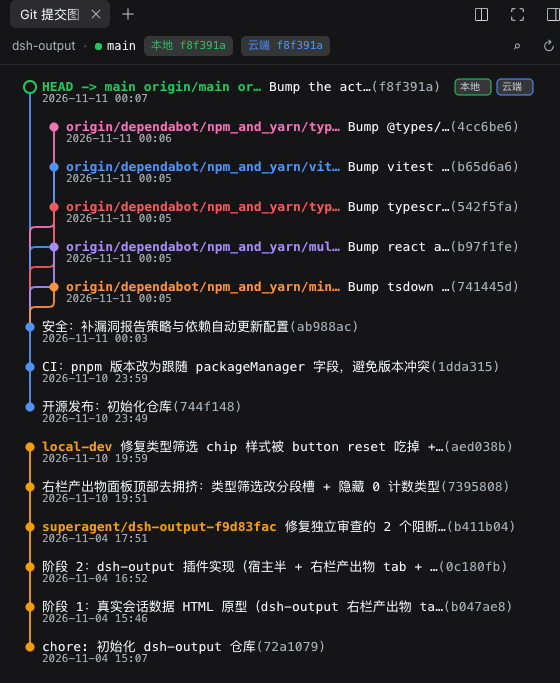
DSH 桌面端(DeepSeek Harness.app)右侧栏插件:在右侧栏的标签页里用图形展示当前会话所属项目的 git 提交/分支 DAG。它和文件、浏览器、终端是同一套 tab 机制——展开右侧栏 → 点「+」打开开始页 → 点「Git 提交图」卡片,或按 ⌘⇧G(Windows / Linux 为 Ctrl+Shift+G)。
项目不需要选择:面板直接跟随会话的工作目录,切换会话即切换项目;每个会话的右侧栏布局相互独立(在哪个会话打开过,就在哪个会话里出现)。
平台支持:自 v0.7.0 起只支持 DSH 桌面端,不再支持
dsh web。需要带右侧栏的 DSH 版本(0.2.x)。本插件由社区维护,不是 DeepSeek 官方组件。
仓库:https://github.com/kulebbb/dsh-git-tree · npm:https://www.npmjs.com/package/@kulebbb/dsh-git-tree
本包是一个 bundle(组合包):dsh.bundle.patch 指向自带的 cordis.patch.yml,因此可以被 DSH 桌面端的「插件」页直接安装、启用和卸载,不需要手工编辑 profile 的 cordis.patch.yml。
版本脉络见 CHANGELOG.md。
截图
安装(桌面端)
从 Git 安装的地址是 github:kulebbb/dsh-git-tree。要钉住一次提交,写成 github:kulebbb/dsh-git-tree#<40位commit>。仓库里的 lib/ 就是运行入口(已提交的 JavaScript,不是待编译的 TypeScript),没有 build / prepare。从 Git 安装不会编译,也不需要在 profile 的 pnpm-workspace.yaml 里为本包打开 allowBuilds。
npm 上的公开包名是 @kulebbb/dsh-git-tree(维护者即本仓库;0.7.0 起为桌面端专用版本,0.4.0 及更早会被插件页以「不是组合包」拒绝)。无作用域的 dsh-git-tree 是另一个作者的包,不要装那个。
桌面端 App 独占名为 desktop 的 profile。独立安装的 dsh CLI(已在 @deepseek-ai/dsh@0.2.2-rc.1 上核对)遇到这个名字会直接拒绝:profile "desktop" is managed exclusively by the Electron application。不要往 ~/.dsh/profiles/desktop 里 pnpm add,也不要用 CLI 启停 App。安装、更新、卸载走「插件」页:
- 侧边栏打开「插件」页 → 安装,填入下面任一地址:
- Git:
github:kulebbb/dsh-git-tree(也可粘贴https://github.com/kulebbb/dsh-git-tree;改动未发版时用这个) - npm:
@kulebbb/dsh-git-tree
- Git:
- 安装完成后按提示重启 DeepSeek Harness(桌面端没有 HMR,重启后新插件才生效)。
- 重启后展开右侧栏 → 点「+」打开开始页 → 点「Git 提交图」卡片。
自己的、名字不是 desktop 的 profile,可以用官方 CLI 装进组合层(界面仍然只在桌面端右侧栏出现,dsh web 不支持本插件):
dsh plugin --profile <profile> add github:kulebbb/dsh-git-tree
也可以用 agent 的 plugin_manager 工具安装:action: install_bundle,target 填 github:kulebbb/dsh-git-tree 或 @kulebbb/dsh-git-tree。
更新与卸载:桌面端没有「更新」按钮,更新=在「插件」页重新安装新版本(插件管理器会覆盖安装并提示重启);卸载也在「插件」页,若提示需要先停止 DSH,按提示退出 App 后再操作。
使用
面板顶部的状态条显示项目名、分支、领先/落后,以及本地与云端 HEAD。悬停提交行会看到完整提交说明和代码变动量;过长的标题会以省略号截断,提交图不会出现横向滚动条。
接口、payload,以及状态条与 tooltip 的实现细节见 docs/api.md。
新版本提示
插件启动时静默检查 npm registry 是否有新版本(不阻塞启动、离线时自动降级、不产生日志噪音):
- 打开 Git 面板后,状态行下方显示细横幅:「新版本 {latest}(当前 {current}),请在 DSH 侧边栏「插件」页重装以更新」。
- 桌面端不提供「更新」按钮:桌面 profile 由 App 独占管理,安装/更新都交给「插件」页(对非官方插件是「重装新版本」)。
- 横幅可 ✕ 关闭;关闭状态只保留在当前面板实例内,面板重新挂载时会重新检查。
从旧版本升级
从 v0.4.0(手工改过 profile 的 cordis.patch.yml)升级时,先删掉旧的 insert git-tree 行,再在「插件」页安装 0.7.2,否则同一 id 会有两条来源;v0.5.0 / 0.6.0 直接重装即可。若曾装在 dsh web 的 profile 里,0.7.0 起请移除(pnpm remove,并按当时的装法清理 patch 或 dsh.profile.bundles)。不要点 v0.4.0 自带的「更新」按钮。逐步说明(含要删除的 YAML)见 docs/upgrade.md。
🤖 Agent 一键安装
把下面任一段提示词(中文或英文)复制发给你的 AI 助手(DeepSeek / Claude / Cursor 等),它会自动完成安装。如需同时安装 dsh-vision,把两个插件的提示词一起发给助手,它会依次完成。
中文版
你是一个安装助手。请帮我把 DSH(DeepSeek Harness)桌面端插件 @kulebbb/dsh-git-tree 安装到桌面端 profile(desktop)。

【背景】
@kulebbb/dsh-git-tree 是一个 bundle:自带 cordis.patch.yml,会在 DSH 右侧栏注册一个「Git 提交图」标签页(与文件、浏览器、终端同级),打开后展示当前会话所属项目的 git 提交/分支图。无第三方运行时依赖,仅支持 DSH 桌面端(不支持 dsh web)。

【安装步骤】
1. 先检查桌面端 profile 的 cordis.patch.yml:如果里面已有 id 为 git-tree 的插入行(v0.4.0 的老装法),先删掉那段再继续,否则同一 id 会有两条来源。
2. 优先使用 plugin_manager 工具的 install_bundle,target 填 github:kulebbb/dsh-git-tree 或 @kulebbb/dsh-git-tree(未发版时用 Git 地址)。
3. 如果没有 plugin_manager 工具或调用被拒绝,告诉我用侧边栏「插件」页安装,并说明步骤。
4. 不要手工编辑桌面端 profile 的 package.json 或 cordis.patch.yml,也不要在 profile 目录里跑 pnpm——桌面端的 profile 由 App 独占管理。

【验证】
- 安装结果里 application 为 applied 或 restart-required;restart-required 时需要重启 DeepSeek Harness。
- 重启后:展开右侧栏 → 点「+」→ 点「Git 提交图」卡片,面板展示当前会话项目的提交/分支图。

【异常处理】
- 任何错误把完整信息原样转达给我,不要自行改配置或换方案。
- 需要我确认的信息先问我,再继续。
English
You are an installation assistant. Install the DSH (DeepSeek Harness) desktop plugin @kulebbb/dsh-git-tree into the desktop profile.

[Context]
@kulebbb/dsh-git-tree is a bundle: it ships its own cordis.patch.yml and registers a "Git commit graph" tab in the DSH right sidebar (alongside Files, Browser and Terminal) that renders the commit/branch graph of the current session's project. No third-party runtime dependencies. Desktop app only — `dsh web` is not supported.

[Install]
1. First check the desktop profile's cordis.patch.yml: if it already has an insert row with id git-tree (the v0.4.0 setup), delete that block first — otherwise the same id comes from two layers.
2. Prefer the plugin_manager tool with action install_bundle and target github:kulebbb/dsh-git-tree or @kulebbb/dsh-git-tree (use the Git target for unreleased changes).
3. If plugin_manager is unavailable or refused, tell me to install it from the sidebar Plugins page and give the steps.
4. Do not hand-edit the desktop profile's package.json or cordis.patch.yml, and do not run pnpm in the profile directory — the desktop app owns its profile.

[Verify]
- The install result reports application applied or restart-required; when it is restart-required, restart DeepSeek Harness.
- After restart: expand the right sidebar, click "+", and choose the "Git commit graph" card; the panel shows the current session project's commit/branch graph.

[On errors]
- Relay the full error verbatim; do not improvise config changes or fall back to other approaches.
- Ask me before continuing whenever you need information I have not provided.
安全说明
graph 只在宿主记录的当前会话工作区内执行 git:工作区根来自 ctx.workspaceRegistry.list() 中包含该会话的记录的 path;注册表没有这条会话时,回退到 ctx.sessions.get(sessionId).header.cwd。cwd 与工作区根都会做 realpath,结果必须等于根或位于其下(按路径边界判断,/a/b 不会误放行 /a/bc)。越界、目录不存在,或经 .. / 符号链接逃出工作区,返回 400 + invalid-cwd。请保持 web server 绑定在回环地址(默认 127.0.0.1);不要用 --host 0.0.0.0 暴露到网络。
结构
| 文件 | 职责 |
|---|---|
lib/index.js |
Node half:在 webserver 注册 GET /git-tree/graph?session=&cwd=&n= 与 GET /git-tree/update/status。两条路由先经 ctx.connection.admit();graph 的 cwd 限制在当前会话工作区内。只读,不写 profile |
lib/client.js |
Browser half:注册右侧栏 tab 类型(git-tree)+ 开始页卡片 + SVG 提交图(__ModuleLoader__ bundle) |
lib/git.js / lib/parse.js |
进程调用与纯解析器 |
lib/update.js |
版本比较与 npm registry 最新版本查询 |
cordis.patch.yml |
bundle patch:把本包插入为 git-tree 加载项 |
locale/*.json / icon.svg |
插件页展示用的标题、描述与图标 |
docs/decisions/ |
架构决策记录(含「只支持桌面端」的决定) |
test/ |
node --test 单测 + 夹具仓库脚本(仅仓库,不随 npm 包发布) |
测试
node --test # 在仓库根目录;零依赖,用系统 node 运行即可
No comments yet. Be the first to write one.