dsh-balance-monitor
Real-time DeepSeek account balance and low-balance alerts for the DeepSeek Harness Web GUI.
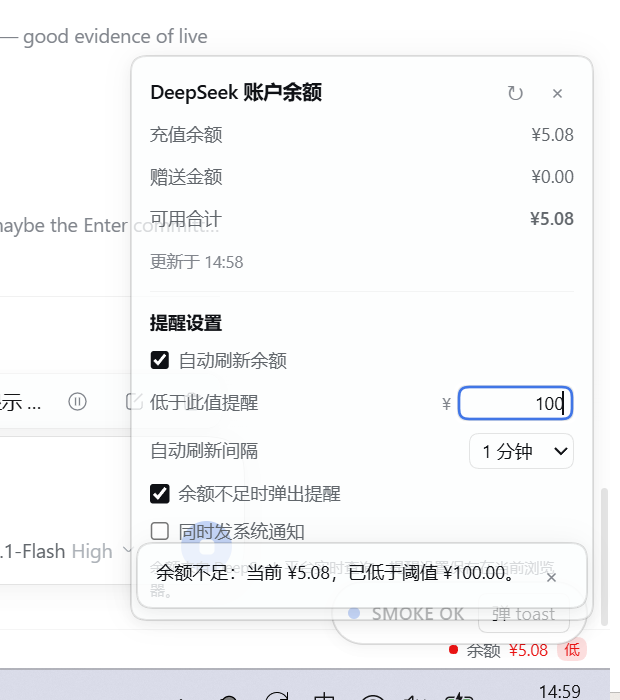
Features
- Always-visible balance bar: a slim status bar at the bottom of the DSH Web GUI shows
● Balance ¥x.xx. It refreshes every 60 seconds by default, and again when the window regains focus or the page becomes visible. - Detail panel: click the bar to see recharge balance, bonus credit, total available, and the last update time, plus a manual Refresh now button.
- Low-balance alert: set a threshold (default
¥5.00). When the total available balance drops below it:- the bar turns red and shows a Low badge;
- an in-app reminder appears (e.g.
Low balance: ¥4.19 left, below the ¥5.00 threshold.); - optionally, an operating-system notification is sent too (browser notification permission required).
- Settings: threshold, auto-refresh interval (30 s / 1 / 5 / 10 minutes), reminder toggle, and system-notification toggle — available both in the bar's panel and under Settings → Balance reminder.
- Persistent settings: reminder preferences are stored in the browser (
localStorage), so they survive page reloads and app restarts. - Bilingual UI: follows the DSH interface language (English / Chinese built in).
Requirements
- DeepSeek Harness desktop 0.2.2-rc.1 or a compatible release.
- Signed in with a DeepSeek account. The balance comes from account credits; API-key-only setups have no account balance to read.
Install
Option A — let a DSH agent install it (recommended, no restart)
In any DSH session, ask the agent to install this plugin, or call the tool directly:
plugin_manager install_bundle target = github:kousenlee/dsh-balance-monitor
A result with application: applied means the plugin is live in the running GUI immediately.
Option B — CLI, then restart the app
# For the desktop app, the CLI lives next to the executable:
#   <DSH install>\resources\runtime\cli\bin\dsh.cmd
dsh plugin --profile desktop add github:kousenlee/dsh-balance-monitor
Then add "dsh-balance-monitor" to dsh.profile.bundles in
<DSH_HOME>/profiles/<profile>/package.json (default %USERPROFILE%\.dsh) and restart DeepSeek Harness.
install.ps1 automates this option.
Option C — from a clone (local development)
git clone https://github.com/kousenlee/dsh-balance-monitor.git
cd dsh-balance-monitor
powershell -ExecutionPolicy Bypass -File install.ps1
install.ps1 auto-detects the DSH installation, home directory and profile. Override with
-Profile, -DshExe, -DshHome, -Spec, -Restart. Run it from the repo root, or pass a remote spec:
powershell -ExecutionPolicy Bypass -File install.ps1 -Spec github:kousenlee/dsh-balance-monitor
install.ps1/uninstall.ps1are Windows PowerShell helpers. On macOS or Linux, use Option A (DSH agent) or Option B (CLI); the plugin itself is cross-platform.
Usage
- The bottom status bar shows
● Balance ¥x.xxin every view:- green dot — read OK;
- amber dot — the last refresh failed and the previous value is shown;
- red dot + Low badge — total available is below your threshold.
- Click the bar to open the panel:
- top: recharge balance / bonus credit / total available / last updated time;
- bottom: Reminder settings — threshold, auto-refresh interval, reminder toggles.
- Edit the threshold and press Enter (or click elsewhere). If the balance is already below the new threshold, a reminder appears once; further reminders for the same low period are spaced at least 30 minutes apart.
- The same controls are also available from Settings → Balance reminder.
Data and privacy
- The balance is read through DSH's own account capability (
ctx.remote.account.getBalance(...)); the DSH Host queries the DeepSeek Platform and returns only wallet amounts. This plugin never sees, stores, or transmits your login token. - Amounts are displayed from the platform's original decimal strings (two decimal places, digit grouping,
<¥0.01handling) without floating-point rounding. - Reminder preferences are written only to the current browser's
localStorage.
Display rules
- Total available = recharge balance + bonus credit for the same currency. DeepSeek charges bonus credit first; the recharge wallet is consumed after the bonus runs out.
- Currencies (CNY / USD) are never converted or summed across currencies; the panel shows the selected currency and lets you switch when the data contains more than one.
- A failed read never becomes a zero balance: the previous successful value stays visible with a stale indicator.
Scope and limitations
- Account-login balances only; API-key installs have no account balance to display (the bar shows "signed out").
- Reminders require the GUI page to be open; nothing alerts while the app is closed.
- Polling is no faster than 30 seconds; the platform has no client-side cache.
- The balance is read live and is continuously consumed by model usage, so it can differ slightly from usage statistics shown elsewhere in DSH.
- Non-owner shared views (e.g. LiveShare viewers) lack the account remote grant, so the bar is not mounted for them.
- Settings are per browser profile, not synchronized across devices.
Uninstall
Remove it live through a DSH agent:
plugin_manager remove_bundle target = dsh-balance-monitor
Or run uninstall.ps1 and restart the app. The profile's bundle list and package dependency are restored.
Project layout
dsh-balance-monitor/
├─ package.json          # bundle + client manifest (dsh.bundle.patch, dsh.client.platform)
├─ cordis.patch.yml      # bundle layer: inserts the balance-monitor Loader row
├─ lib/
│  ├─ index.js           # Host half (no-op; makes the package a Loader row)
│  └─ client.js          # Browser half (hand-written __ModuleLoader__ bundle with all UI)
├─ docs/panel-and-alert.png
├─ install.ps1
├─ uninstall.ps1
├─ README.md
├─ README.zh-CN.md
└─ LICENSE
Development notes
- The browser half is a hand-written CommonJS bundle:
window.__ModuleLoader__.load({ id, factory }). Inside the factory only platform-baseline modules (react,react-dom) may be required; noimport/export/JSX is allowed in that file. - The always-visible bar registers in the
shell.bottomslot; the settings page registers insettings.section. Both registrations are gated byctx.remoteAccess.whenAccess("account/watch", …), so shared non-owner views never see a balance surface. - Styles are injected once as a
<style data-plugin-css>tag and use DSH's--dsw-*design tokens, so the UI follows the active theme. - After installation, editing
lib/client.jsreloads the client bundle through HMR; changingpackage.jsonor the Host half needs a reinstall/restart.
License
MIT © 2026 kousenlee
No comments yet. Be the first to write one.