📦 @knopki/dsh-prompt-profiles
Per-session prompt profiles for DeepSeek Harness: reusable system-prompt sections, grouped into named profiles, sealed into the session prompt




🇬🇧 English • 🇷🇺 Русский • 🇨🇳 中文
|
⭐ Star it on GitHub if it earns a place in your setup. It tells me the plugin is worth maintaining.
🐛 Found a bug or want a feature? Open an issue in any language. I read them all and ship the useful ones. |
Overview
@knopki/dsh-prompt-profiles adds a second axis to a DeepSeek Harness profile. Agent presets decide what an agent is: which tools and behaviors are available. Prompt profiles decide how that agent is told to work. The same agent with the same tools can run as a terse reviewer or as a specialist that follows a house style, and the only thing that changes is the profile you pick at session start.
A profile is an ordered list of references to reusable sections. Every reference carries its own position and scope, so a single section can appear in several profiles in a different place each time. The profile is chosen when a session starts, sealed into that session's prompt, and never revised afterwards. Choose no profile and the system prompt is not modified at all.
The editor and the composer chip live in the web GUI, so you build profiles without hand-editing a single prompt string.
Features
- Reusable sections: write a fragment once, reference it from any number of profiles, each reference with its own order and scope.
- Per-reference scope (
inherit,main-only,subagents-only): a subagent can receive guidance its parent session never sees, and the same section can be narrowed to one context in one profile while staying broad in another. - Deterministic ordering: sections emit in profile order and take a stable position among the platform's built-in prompt material.
- Sealed sessions: the profile is resolved while the session prompt is assembled and fixed from then on, so resuming a session reproduces exactly what it started with.
- Explicit opt-out: picking None is a recorded decision rather than a missing value, and it seals the same way a profile does.
- Zero footprint by default: with no profile selected, prompt assembly is untouched.
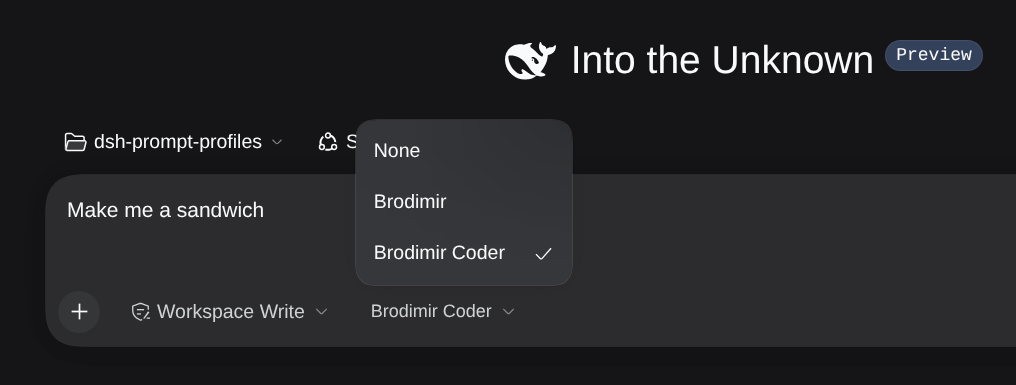
- Composer chip: choose the profile for the next session next to the permission and plan chips, and the choice is remembered per workspace.
- Graceful skips: an unknown, out-of-scope, disabled, empty, or unresolvable section is left out of the prompt instead of breaking the session.
- Editor with drag and drop and keyboard reordering, search, used-in and source details, a per-profile preview, and debounced autosave. A concurrent edit is detected and reloaded instead of silently overwriting your work.
- Profiles live as patch rows in your
cordis.patch.yml, so they diff and review like the rest of your configuration. - No second transport to secure: the web client reaches the host through the platform's Remote channel.
- UI in English, Russian, and Chinese.
Install
dsh plugin --profile web add @knopki/dsh-prompt-profiles
From a local checkout or a git URL:
dsh plugin --profile web add /path/to/dsh-prompt-profiles
lib/ ships prebuilt, so installing never runs a build. A first install can come up through hot module replacement, while replacing an installed copy needs a DSH restart.
Remove it with:
dsh plugin --profile web remove @knopki/dsh-prompt-profiles
Quick start
- Open Settings → Prompt profiles → Sections and create a section: an id, a title, and the body text you want in the prompt.
- Switch to Profiles, create a profile, and add sections to it. Drag the handles or use the arrow keys to set the order, and pick a scope on each row.
- Open a blank session. The chip next to
permissionandplanselects the profile for that new session, and the choice is remembered for the workspace.
Sessions already running keep the prompt they were sealed with, so a profile applies to sessions you start from now on.
The composer chip
- It renders only on a blank session and only when at least one profile exists.
Noneopts a session out explicitly and seals that decision.- The choice is remembered per workspace, so the next session in the same workspace starts with the same profile.
- In a complete mode (for example
minimal, whose preset setsconfig.complete: true) the engine discards every prompt section. The chip marks the trigger with a warning and the profile has no effect there.
The editor
Settings → Prompt profiles has three tabs: Profiles, Sections, and Preview.
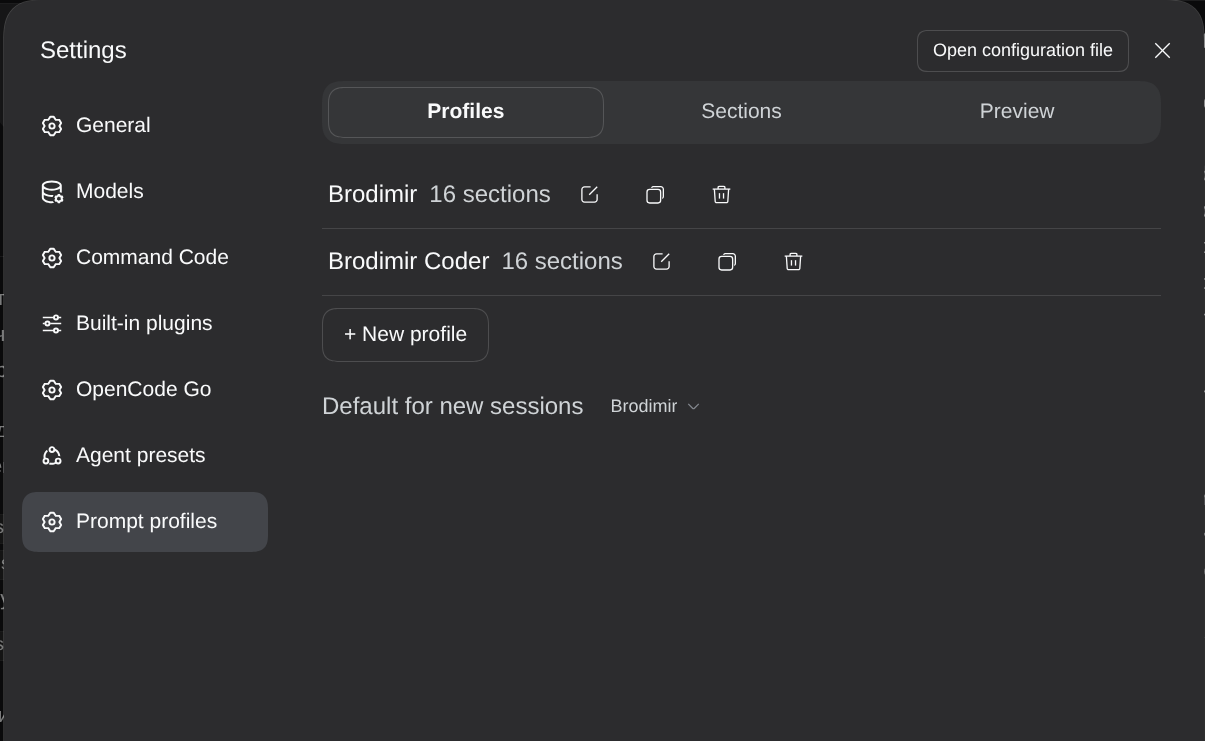
The Profiles tab lists every profile with its section count and sets the default for new sessions.
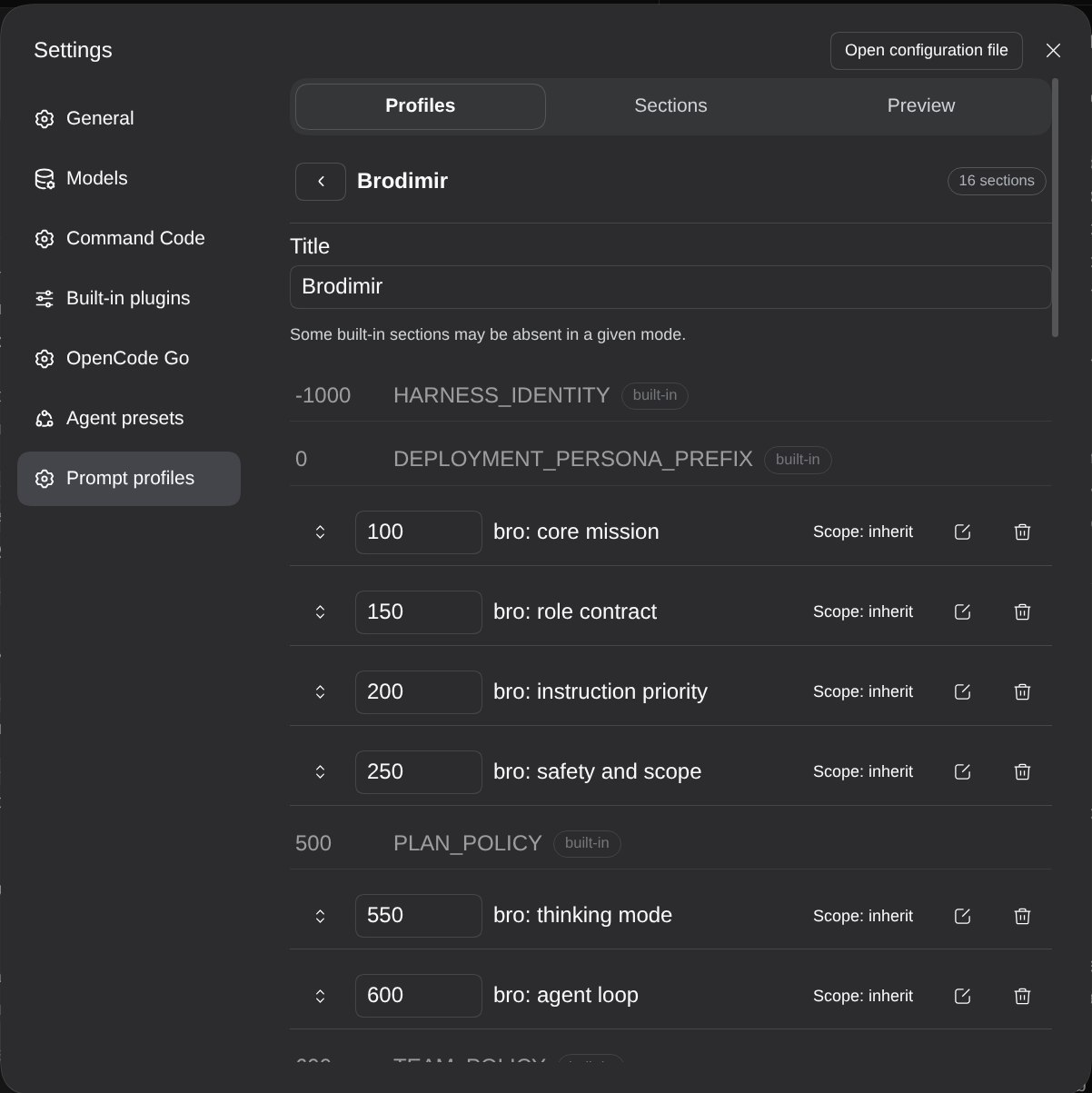
Opening a profile shows its sections in prompt order with the platform's built-in sections displayed in place among them, so you can see where your text lands in the assembled prompt. Drag the handle or type an order number to move a row, pick a scope on each row, and use the row icons to edit or remove a section. Duplicate and delete sit next to each profile in the list.
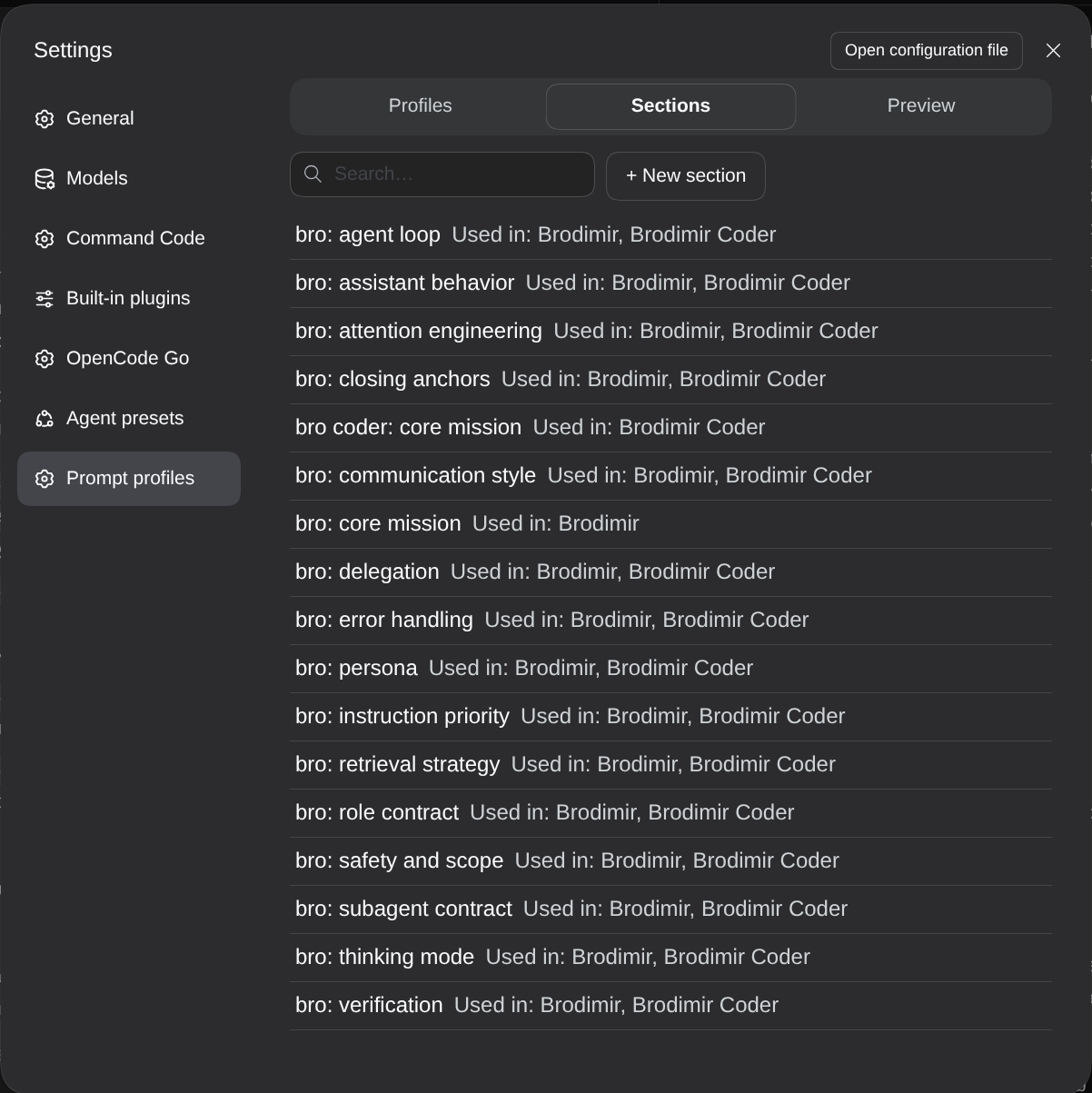
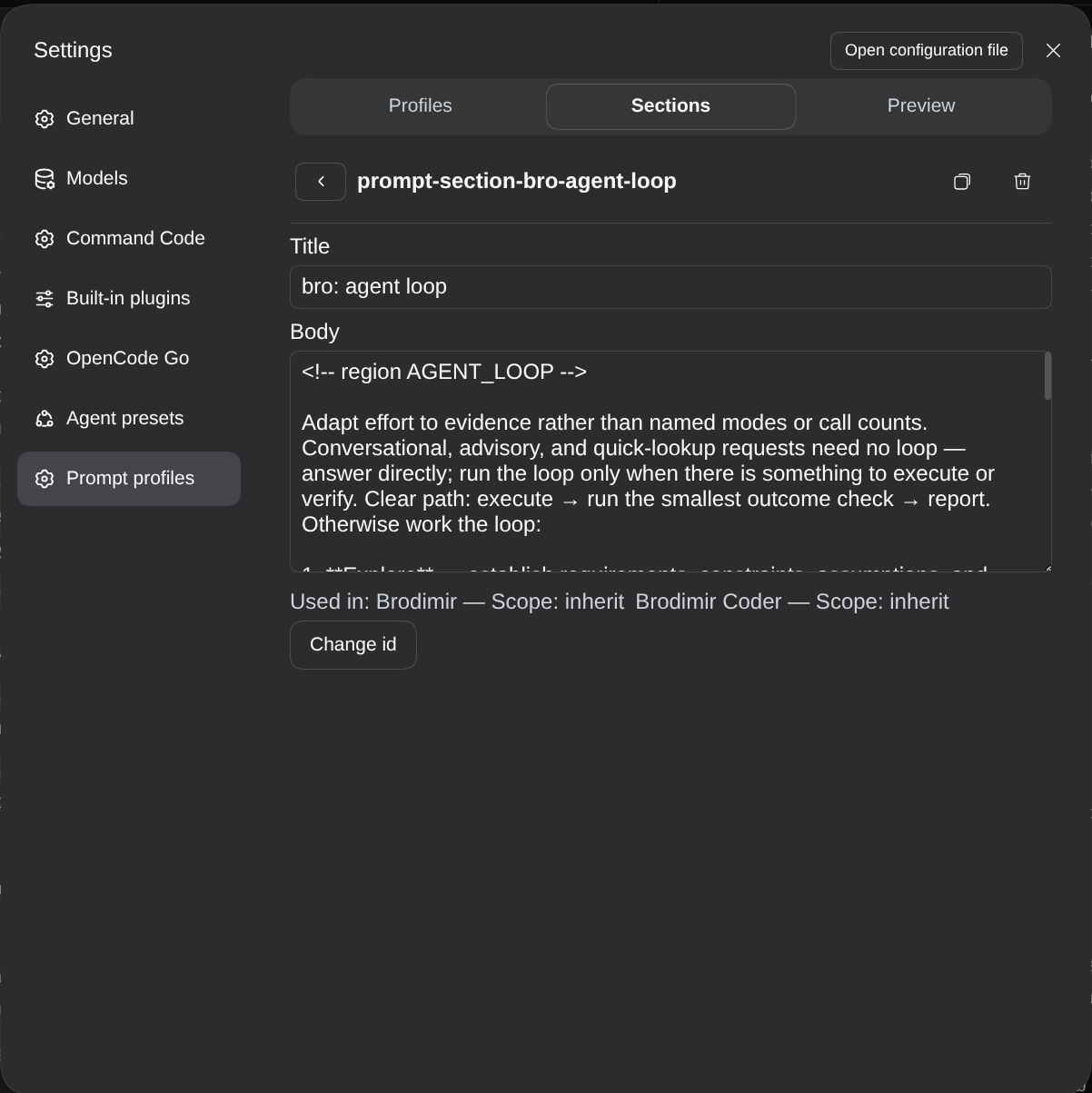
The Sections tab lists every section with the profiles that use it, and filters by id and title.
A section carries a title and a body, and edits save automatically after a short pause. A section owned by another bundle keeps its id locked and can only be disabled. Renaming an id never rewrites profile references; the response names the profiles that still hold the old id so you can fix them by hand.
The Preview tab shows the selected profile in position among the built-in prompt sections and lists everything it skipped, with the reason for each skip.
Prompt variables
Section bodies may contain {{name}} references, for example {{cwd}}. The runtime substitutes them strictly when the session prompt is sealed: an unknown or malformed reference makes the sealer drop that section rather than emit a broken prompt. The editor preview is deliberately lenient, and it reports such a section as skipped with the reason, so you see what the runtime would discard instead of text it would never produce.
Where data lives
| Data | Location |
|---|---|
| Section and profile definitions, per-row overrides | the profile's patch rows in cordis.patch.yml, written by this bundle's writer |
default and lastByWorkspace |
volatile settings of the prompt-profiles main row |
| Sealed per-session snapshots | $DSH_HOME/storages/prompt_profiles/sessions/<sessionId>.json, one record per session |
Requirements
- DSH in
>=0.1.7-rc.2 <0.2.1-0— the peer window this bundle declares;0.2.0-rc.2is the release it is verified on. - Outside that window DSH disables the plugin until you grant it the exact-version exemption (
dsh plugin allow-version). - The installed profile's own plugins: on the host
settings,configEditor,workspaceRegistry,storageDomain,typertandagentPresets; on the web client@deepseek-ai/dsh-client-ui-settings,@deepseek-ai/dsh-client-ui-conversationand@deepseek-ai/dsh-client-ui-primitives. - A missing optional service degrades one feature. It does not block the mount.
Develop
mise install          # Node, pnpm and the DSH release the bundle targets
pnpm install --store-dir ./.pnpm-store
pnpm run build        # esbuild bundles + tsc declarations into lib/
pnpm test             # host unit and differential tests (node --test)
pnpm run test:client  # client UI on React + jsdom (vitest project client)
pnpm run test:remote  # Remote path over the real gateway client (vitest project remote)
pnpm run lint         # biome
pnpm run typecheck    # tsc for src and test
pnpm run check        # typecheck + lint + test + test:client + test:remote + build
lib/ is build output and is committed on purpose: profile installs must not require a build. See SPEC.md for the product contract and the module contracts under src/ for implementation responsibilities.
Known limitations
- One DSH process. Writes from a single DSH process are coordinated; a second DSH process editing the same profile patch can overwrite rows or choices.
- Strict sealing. A session's decision is made once and never revised, an empty decision included. A session that started before its snapshot record existed keeps its result, so start a new session to get a profile into it.
License
MIT
No comments yet. Be the first to write one.