dsh-redline
English · Português (Brasil) · 简体中文





Point at any element on the page. Your agent fixes the code.
dsh-redline is a DeepSeek Harness plugin that puts visual review inside the harness browser: select an element, leave a comment, adjust styles live, and confirm — the annotations travel to your agent as structured context attached to your next message, with a cropped screenshot of exactly the region you marked.
dsh plugin --profile web add dsh-redline
Why this exists
Describing a UI problem in words loses the pointer. "The button in the middle section looks off" makes your agent guess. Redline keeps the feedback attached to the element: selector, role, text, your comment, a cropped screenshot, and every style tweak you tried — delivered in one structured block the agent can act on.
Product tour
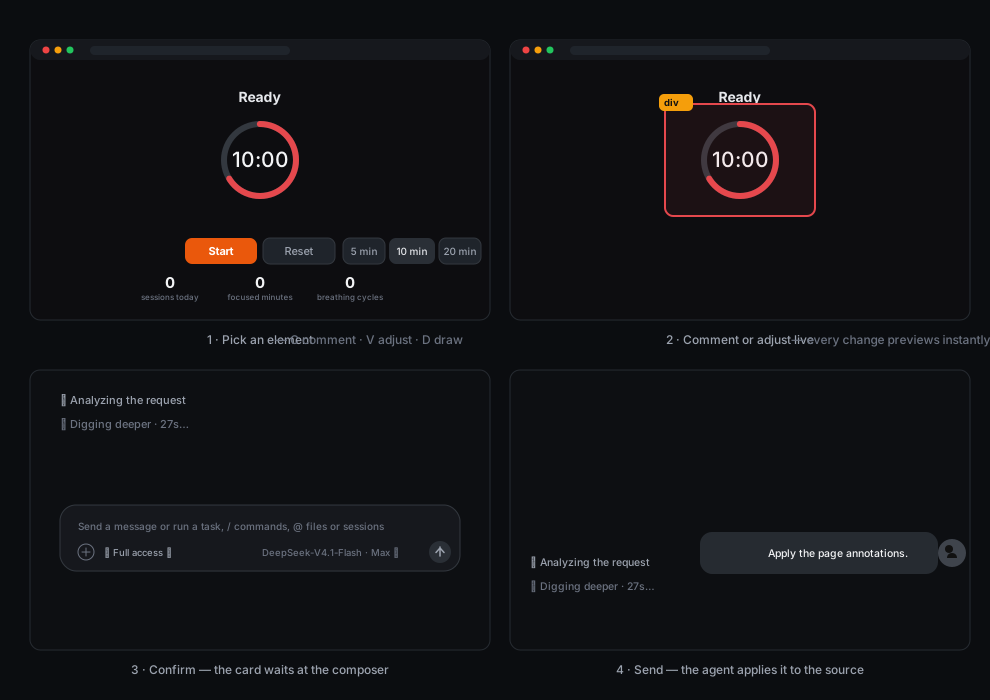
- Press C (comment) or V (adjust) in any page opened in the harness browser.
- Click an element. A popover opens anchored to it.
- Write the comment, or open the inspector and adjust text, colors, typography, size, spacing, borders and effects — every change previews live on the page.
- Confirm. The card above the composer collects your pins. Send, and the annotations reach the agent as a snapshot alongside your message — rendered natively in the chat.
- Press D for the free annotation canvas: brush, lines, arrows, rectangles, ellipses, numbered step markers and text — send the full page to the chat with every drawing composited into the screenshot.
What the agent receives
For each pin, one block in a single snapshot:
Target— tag, role, accessible labelTarget selector— a CSS path back to the elementTarget text/Component— content and framework hintsScreenshot (cropped around the target)— a JPEG of the marked region with surrounding contextComment— what you asked forRequested visual changes— every live adjustment asprop: before -> afterRequested text change— when you edited the element's text
Features
- Element picking with hover highlight on any page the harness browser renders
- Per-pin comments, editable in place, with resolve/reopen/delete
- Live style inspector with rollback: drag-to-scrub numbers, color pickers, presets, linked box-model and radius edits, shadow and transform composers, per-row reset
- Cropped screenshots per pin (not the whole viewport)
- Annotations attach to the next message of the session you are viewing, rendered as a native chat card
- Reconciliation: removing a pin from the card removes it from the page overlay too
- English, Português (Brasil) and 简体中文 in the overlay UI, chosen from the browser locale
Install
dsh plugin --profile web add dsh-redline
dsh web
For a private or unreleased build, install from a git URL or a local path:
dsh plugin --profile web add git+https://github.com/klaus-2/dsh-redline.git
dsh plugin --profile web add ./dsh-redline
Use
| Key | Action |
|---|---|
C |
Comment mode — pick an element, write what should change |
V |
Adjust mode — pick an element, open the live style inspector |
Esc |
Cancel the current mode, popover or preview |
Enter |
Save the annotation from the popover |
Pins collect in the card above the composer. Send dispatches them with your next message; the ✕ discards them, and the page overlay updates itself.
Security notes
The loopback server binds to 127.0.0.1 only and validates the Host header, so remote origins cannot reach it. Pages running in the harness browser can submit annotations by design — that is the plugin working as intended, so treat comments arriving through Redline like any other user-authored input. The status endpoint exposes recent activity summaries (no secrets; no cookies are forwarded through the proxy).
Configure
Nothing to configure by default. The plugin starts a loopback server (127.0.0.1:47477, falling back to the next 20 ports) that serves the overlay, the screenshot attachments and the annotation intake.
How it works
The client face injects the overlay into every page the harness browser renders. Annotations POST to the loopback server, which stores a pending snapshot keyed by the session you are viewing. When you send a message, the host attaches the snapshot to the agent's turn as a producer-owned context message with section metadata, and the chat renders it as a collapsible card.
Develop
npm install
npm run build
npm test
npm run strip-comments
overlay.template.js + tencil-overlay.css are the sources; lib/overlay.js is generated — never edit it directly. tools/smoke.mjs runs 33 checks (proxy, rewrite, intake, screenshots, context format, overlay integrity) against an isolated port.
Scope
One harness instance, pages rendered by its built-in browser, viewport-based crops. Remote browsers and full-page capture are out of scope for now.
Credits
Contains code from
tencil — the overlay design system in
tencil-overlay.cssis derived from tencil's overlay sources (Copyright 2026 Pixel Perfect Agency, licensed under Apache-2.0 and modified: accent palette, comment removal, inspector additions). Full notice: THIRD-PARTY-NOTICES.md.html2canvas —
vendor/html2canvas.min.jsbundles version 1.4.1 (Copyright 2022 Niklas von Hertzen, MIT) to render screenshot crops without any install-time dependency. Full notice: THIRD-PARTY-NOTICES.md.
Inspired by
- dsh-web-review — the delivery loop (annotations attaching to the agent's next message).
- dsh-annotate — the structured browser-facts shape and the update-check pattern.
No comments yet. Be the first to write one.