READMESource: master@2f1ee3e1
dsh-jupyter
English | 中文
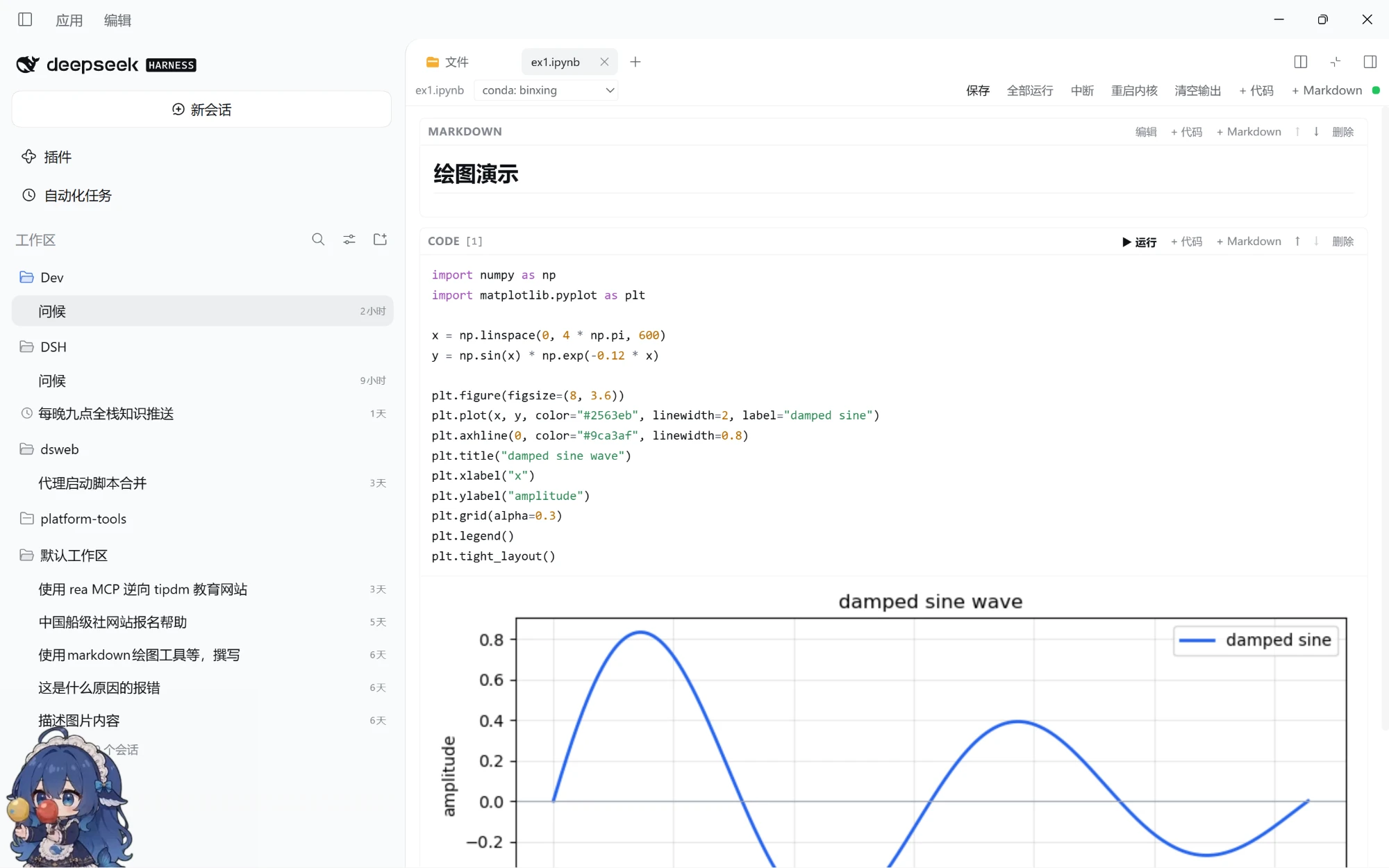
A Jupyter notebook (.ipynb) plugin for dsh: open, edit and run notebooks in the Web/Desktop GUI's right sidebar. Rebuilt for the dsh 0.2.x plugin model — plain JavaScript plus one Python script, with no native dependencies and no terminal.
Demo
Features
- Native right-sidebar tab: clicking a
.ipynbin the file tree opens it in the same tab system as the text preview. The tab strip, dragging, split view, fullscreen, layout persistence and theme all come from dsh; the plugin only contributes tab types. - Text/code file editing: common source, config and documentation extensions (
.py,.js,.ts,.json,.yaml,.toml,.sh,.sql,.md,.txt,.css, and more) are also handled by this plugin, with editing and saving in the right-sidebar tab. HTML, CSV, images, PDF and Office documents stay with the official preview so their richer read-only views are preserved. - Cell editing: code / markdown / raw cells; add, delete and move cells; run all; markdown preview (double-click to edit).
- Highlighting and indentation: Python syntax highlighting (keywords, strings, numbers, comments, builtins, decorators,
!magic lines); Tab / Shift+Tab to indent and dedent; Enter keeps the current indentation and adds a level after:. - Empty files and recovery: a 0-byte or whitespace-only
.ipynbopens as a new notebook; a file that is not valid notebook JSON shows an error with Reload / Open as empty notebook actions. - Real execution: cells run in a persistent Python kernel in the host process, sharing variables, imports and module state between cells. Output streams as it arrives (stdout/stderr, HTML, Markdown, PNG/JPEG/SVG, JSON, tracebacks), with interrupt and kernel restart.
- Kernel environment picker: choose the bundled Python or a conda environment registered in
~/.conda/environments.txtfrom the notebook toolbar. Switching restarts the kernel on that interpreter, and the choice is stored in the notebook metadata. - Saving: writes go through dsh's filesystem with its version guard. If the file changed on disk, saving reports a conflict instead of silently overwriting it.
- Rich output: pandas
DataFrameuses_repr_html_; PIL images and_repr_png_/_repr_svg_/_repr_json_/_repr_markdown_are rendered. matplotlib figures (when installed in that Python environment) are emitted as inline PNGs after the cell.
Install
From npm:
dsh plugin --profile web add @kikulmj/dsh-jupyter
The Desktop app uses the desktop profile:
dsh plugin --profile desktop add @kikulmj/dsh-jupyter
From GitHub (alternative):
dsh plugin --profile web add github:kikulmj/dsh-jupyter
Local development (edit code → pnpm build → restart dsh):
dsh plugin --profile web add link:/path/to/dsh-jupyter
- The dsh installer checks
engines.dsh(this plugin declares>=0.2.0-0) and accepts 0.2.x runtimes. - No pnpm
allowBuildsand no node-gyp are needed: the plugin has no native modules such asnode-pty. - Uninstall:
dsh plugin --profile web remove @kikulmj/dsh-jupyter.
Usage
- Open a project session.
- Open the right-sidebar file tree (default
Mod+P) and click any.ipynb. - The notebook opens as a tab on the right; press
Shift+Enterto run a code cell andCtrl/Cmd+Sto save. - Common IPython line syntax is supported:
!command(for example!pip list;pip/pythonresolve to the current kernel interpreter),%pip,%cd,%pwd. - Clicking a text file such as
.py,.jsonor.txtopens an editable tab;Ctrl/Cmd+Ssaves, with a version-conflict check. - Use the Kernel environment picker in the notebook toolbar to switch to a conda env (for example
conda: binxing).!conda activateinside a cell only affects that shell subprocess and cannot change the kernel; the picker restarts the kernel on the chosen interpreter and stores the choice in the notebook metadata. - Open
examples/plot-demo.ipynbfor a matplotlib demo and a dependency-free SVG fallback.
Kernel
- Interpreter priority for the bundled choice:
$DSH_PRIMARY_RUNTIME/dependencies/python/…→$DSH_HOME/dsh-runtimes/dsh-primary-runtime/dependencies/python/…→python3/pythononPATH. - Conda environments listed in
~/.conda/environments.txt(and~/.anaconda/environments.txt) appear in the picker. Selecting one runs itspythondirectly and setsPATH/CONDA_PREFIX/CONDA_DEFAULT_ENVto approximateconda activate. - The Python 3.12 bundled with Desktop already includes numpy, pandas and Pillow. The kernel bridge uses only the standard library and does not depend on
jupyter_clientoripykernel. - Python kernels only. A notebook's other kernelspec does not switch languages; it still runs on Python.
- On Windows,
!commands whose first token is a common POSIX tool (ls,cat,grep, …) run through Git Bash when it is installed; other commands (dir,conda) keepcmd.exe.
Architecture
src/
  index.ts              Host half: /dsh-jupyter/* routes + agent announcement
  core/types.ts         Wire types
  host/scope.ts         Session workspace resolution + filesystem boundary checks
  host/notebook-service.ts  nbformat 4 parse/serialize, reads and writes through ctx.fs (version guard)
  host/routes.ts        read / write / raw / text-read / text-write / execute / interrupt / restart
  host/python.ts        Locate dsh's bundled Python and list conda environments
  host/kernel.ts        One persistent Python kernel process per notebook (JSONL stdio)
  host/kernel_bridge.py Stdlib-only Python kernel bridge (persistent namespace, streaming, interrupt)
  client/index.ts       Register the `.ipynb` and text-file tab types and body slots
  client/panel.tsx      Notebook editor (native slot component)
  client/text-editor.tsx Text/code file editor
  client/code-editor.tsx Transparent textarea + highlight overlay
  client/highlight.ts   Python / JS / C / Shell / SQL tokenizer
  client/api.ts         /dsh-jupyter client
  client/styles.ts      Cell/output/editor styles over dsh's `--dsw-*` theme tokens
The browser half only requires react; the host half imports Node built-ins only. Every dsh service is declared as a peer dependency and provided by the profile at runtime.
Security
- Every route accepts loopback requests only and checks Host / Origin (the same-origin fence).
- Reads and writes are rooted at the Session's working directory, bounded with
ctx.fs.resolve+ctx.fs.contains, and written through dsh's sandboxed filesystem policy — the workspace limit is never bypassed. - The kernel runs cell code with the host user's privileges. That is the inherent semantics of a notebook; only run notebooks you trust.
Limitations
input()/ stdin interaction is not supported.!conda activateonly changes that one shell subprocess; it does not change the kernel. Use the toolbar's Kernel environment picker instead.- Inline magics
!,%pip,%cdand%pwdare supported;%%cell magics and other IPython magics (%time,%run, …) are not. !commands run with the host user's privileges; output written directly to file descriptors by C extensions or subprocesses is shown once the cell finishes, not streamed live.- Text editing supports UTF-8 text only, up to 8 MiB per file; binary files still go to the official preview.
- Host-half changes require restarting dsh; client-bundle changes reload through dsh HMR.
lib/is committed, so remote installs need no local build.
Development
pnpm install
pnpm build     # tsc → tsdown → copy kernel_bridge.py
No comments yet. Be the first to write one.