
dsh-bsb-ipynb
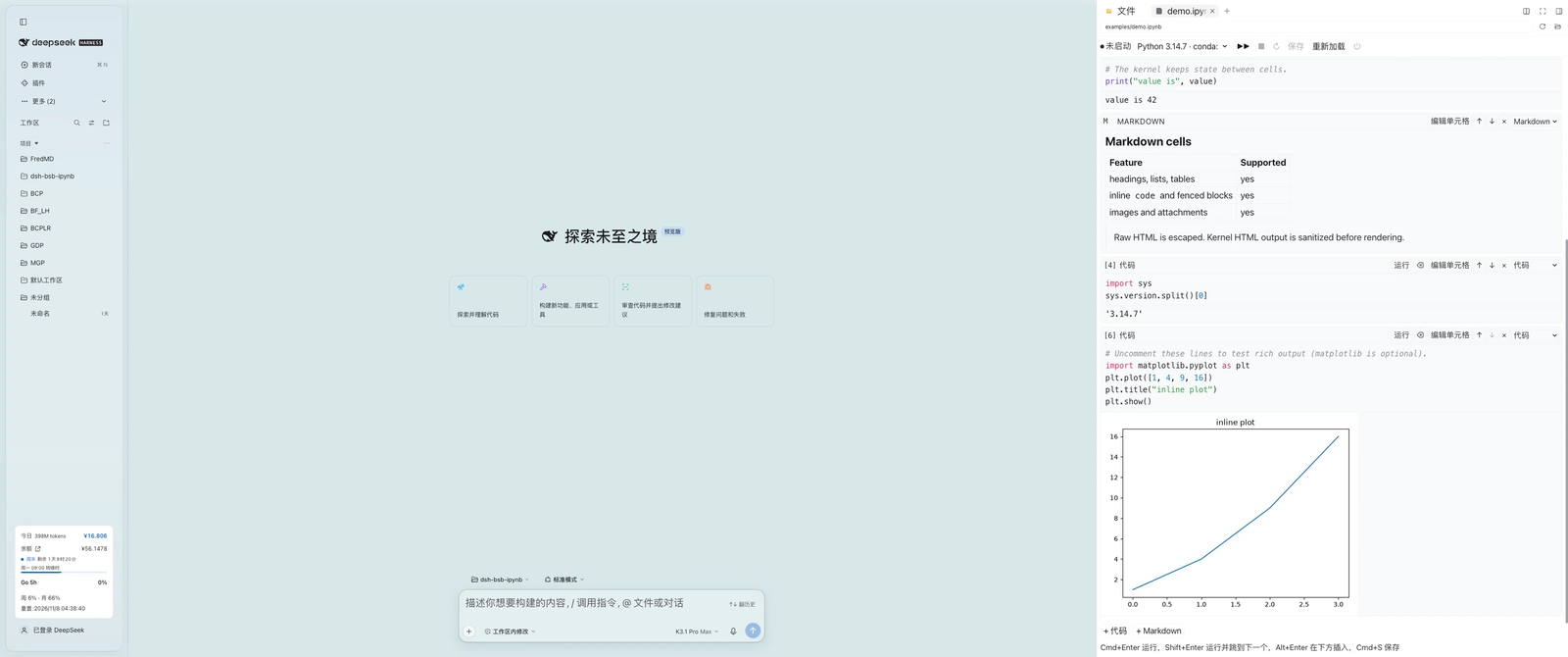
Read, edit, run and save Jupyter notebooks inside the DSH Better Sidebar.





中文 · English
dsh-bsb-ipynb is a DSH Better Sidebar plugin that turns the sidebar's file tree into a Jupyter notebook workspace. Click any .ipynb to read, edit, run and save it as you would in Jupyter. Kernels run in the host process through jupyter_client + ipykernel, so nothing Python-related runs in the browser and there is no build step.
✨ Features
- Notebook rendering — Markdown, code and raw cells with execution counts; streaming stdout/stderr,
text/html(sanitized against an allow-list), PNG/JPEG/SVG (image/jpgis accepted as an alias forimage/jpeg), Markdown, JSON and ANSI-colored tracebacks. Images in Markdown andtext/htmloutputs resolve the same way:attachment:, relative and Windows drive/UNC paths go through the host file route, whilehttp(s)anddata:imagesources load as-is (remote images are fetched from their origin). - Cell editing — click a cell to edit it; insert or delete cells, move them up/down, switch cell types, preview Markdown, and clear one cell's or all outputs.
- Execution — one persistent kernel per notebook, keyed by file path, keeps variables alive across cells; Run all, interrupt, restart and shut down.
- Saving — writes nbformat 4.5 with sha256-based optimistic concurrency (conflicts return 409 and never overwrite); atomic writes through a same-directory temp file and rename; autosave 1.5 s after edits.
- Interpreter discovery — checks
DSH_IPYNB_PYTHON, conda environments,python3/pythononPATH, then DSH's bundled Python, and selects only environments that providejupyter_client+ipykernel.DSH_IPYNB_PYTHONmust be an absolute path; a relative or unusable value is still listed by/ipynb/interpreterswith a reason but is never used. The launch config is built in-process, so a same-named system kernelspec cannot redirect the selected interpreter. - DSH integration — every colour follows the DSH theme: state colours, banners, links and Python syntax highlighting consume
--dsw-alias-*and Shiki variables, and cell/editor/output type follows the DSH text and code font settings (dark mode is the host palette for the theme setting × OS scheme, with no plugin-side theme detection). UI strings are registered under thedsh-bsb-ipynblocale namespace and follow DSH's Chinese/English language preference. - Contained access — paths are confined to the session workspace (realpath + relative checks); HTTP routes reuse DSH's admission fence; HTML output is sanitized with a DOMParser allow-list, and
<script>never runs.
🚀 Quick Start
| Requirement | Version / notes |
|---|---|
| DSH | Web GUI 0.2.2-rc.1 or newer |
| dsh-better-sidebar | 0.30.x (verified with 0.30.1; 0.28.x targets DSH 0.2.1 and is not recommended) |
| Python | jupyter_client + ipykernel; verify with python3 -c "import jupyter_client, ipykernel" (macOS/Linux) or python -c "import jupyter_client, ipykernel" (Windows) |
# if the dependencies are missing
python3 -m pip install jupyter_client ipykernel   # macOS / Linux
python -m pip install jupyter_client ipykernel    # Windows (or: py -3 -m pip ...)
- Open DSH's plugin manager and install this repository folder as a local bundle.
- Refresh the page (
Cmd+Ron macOS;Ctrl+RorF5on Windows). - Open any
.ipynbfrom the right-hand file tree; examples/demo.ipynb is a good first run.
Windows: interpreter discovery looks for
python.exe/python3.exeonPATH(Microsoft Store app-execution aliases underWindowsAppsare skipped), conda environments (<env>\python.exe) and DSH's bundled Python. SetDSH_IPYNB_PYTHONto an absolutepython.exepath when the interpreter lives elsewhere; read-only or locked notebooks reject saves withwrite-blocked(409) until the file is writable again, and reading a file locked by another program returnsread-blocked(409).
🖱️ Usage
| Action | Shortcut |
|---|---|
| Run the current cell | Cmd/Ctrl + Enter |
| Run and advance to the next cell | Shift + Enter |
| Insert a code cell below | Alt + Enter |
| Save | Cmd/Ctrl + S |
| Outdent the current line | Shift + Tab |
| Leave edit mode | Esc |
Run (Cmd/Ctrl + Enter) and save (Cmd/Ctrl + S) shortcuts also work in reading mode while the notebook view is visible: the target is the focused cell, otherwise the cell you last edited or ran, and Cmd/Ctrl + S is intercepted so the browser's save dialog does not open. While editing, Tab inserts four spaces and Shift+Tab removes one indent unit. Every action is also available from the toolbar (interpreter, Run all, interrupt, restart, save, reload, shut down kernel).
- Autosave pauses while a cell or Run all is running, so transiently cleared or partial outputs never reach disk.
- Reload waits for in-flight saves, then confirms discarding any unsaved changes before reading. It blocks new saves until the read finishes; new edits or a new Run cancel the read. Cancelling the plugin's confirmation leaves editing and saving available.
- A display handle can update matching outputs in other cells (
display(..., display_id=...)/handle.update(...)); updated results are included in the next save. - Switching interpreters restarts the kernel; an active run asks for confirmation first.
- A detected disk change produces a 409 conflict that can only be resolved by reloading; the remaining check-to-rename race is documented under Safe writes below.
- The notebook is measured in its on-disk form before upload; above 32 MiB the UI asks you to clear outputs or trim content instead of failing with a 413 after the fact.
🧱 Architecture
dsh-bsb-ipynb/
├── index.js          # host plugin entry: registers /ipynb routes and owns kernels
├── client.js         # browser bundle (hand-written, no build step)
├── lib/
│   ├── routes.js     # /ipynb/* HTTP API
│   ├── kernel.js     # one bridge process per notebook, event queue, idle sweep
│   ├── notebook.js   # nbformat 4 parse/normalize/serialize, sha256 versions, atomic writes
│   ├── gate.js       # session workspace resolution and path escape protection
│   ├── env.js        # Python interpreter discovery and probing
│   └── json.js       # JSON envelope, request body reader, ApiError
├── python/bridge.py  # JSONL kernel bridge over jupyter_client + ipykernel
├── locale/{en,zh}.json
└── test/             # node:test unit/integration tests (including real kernels)
Request path: browser client.js → better-sidebar webServer → /ipynb/* routes → KernelManager → python/bridge.py (JSONL) ↔ ipykernel.
🛡️ Reliability
- Serialized notebook I/O — within the process, reads and saves queued for the same canonical notebook path run in order. A reload waits for an earlier queued save even if its client disconnected; concurrent saves using the same base version still return
write-conflict(409) after the first succeeds. Hard-link aliases of the same inode are treated as different paths and are not serialized with each other. This does not acknowledge requests that have not yet reached the file queue after a network failure. - Reload ordering — the plugin's Reload pauses autosave, waits for pending saves, confirms discarding unsaved changes if needed, then reads. New edits or a new Run cancel that read; results from an execution already running at confirmation do not cancel it. Host Refresh and replacement viewers share pending-save tracking for the same host/session/path; a save from another view during a read triggers a fresh read. Unmounting does not cancel an accepted write. This coordination is local to one plugin instance, not shared across browser pages, and cannot confirm an ambiguous server commit after a network failure. An accepted save whose transport never settles keeps reads on that path blocked until the host aborts the load; the client has no internal timeout for it.
- Blocked saves — a read-only notebook, or one held open by another program (common on Windows), returns
write-blocked(409) with a fixable message instead of an internal error; autosave backs off up to 30 s and the response never embeds local paths or temp-file names. - Capacity-blocked saves — if client-side preflight blocks a notebook for exceeding 32 MiB, deleting cells or shortening source to bring it back under the limit does not resume autosave; click Save once manually. Existing recovery actions such as clearing outputs or reloading are unaffected.
- Safe writes — write a temp file in the same directory, check the version again, then rename it into place; this narrows the external-write race window (extreme interleavings remain a known race). If a crash leaves a
.dsh-bsb-ipynb-*.tmpbehind, the next save sweeps stale ones older than an hour. - No stalled streams — restart/shutdown, kernel death or
os._exit()always ends the NDJSON stream with a terminal failure event. - Complete output — after the kernel replies, the bridge waits for the matching IOPub idle; after 10 s it reports a failure and warns that output may be incomplete.
- Resource limits — 32 MiB of client-side output per cell, a 64 MiB server-side NDJSON queue and a 64 MiB cap per kernel output line; exceeding a limit cancels the run and interrupts the kernel.
- Kernel lifecycle — starts, restarts and interpreter switches are serialized per notebook. Interpreter changes check the current kernel's busy state; restarting the same interpreter can deliberately interrupt a running cell. Shutdown cancels pending starts/switches immediately; restart responses report the interpreter actually started.
- Kernel cleanup — idle kernels are swept after 30 minutes (
DSH_IPYNB_KERNEL_IDLE_MS); ready timeout is 30 s. Shutdown waits 2 s, sends SIGTERM, then SIGKILL 2 s later and allows 500 ms for exit confirmation. If the process still has not exited, the request fails and the stopping entry remains managed; no replacement is started on that path until exit is confirmed. Disposal failures are logged instead of becoming unhandled errors. - Shutdown failures — the viewer displays the failure and keeps a timed-out kernel in
stoppingstate. A failed request is not evidence that the process is off; status or a successful retry must confirm exit. Late messages from the old execution cannot overwrite a newer shutdown or restart result. - Process cleanup — the kernel connection file is removed on every exit path (the host owns its path, so a hard-killed bridge leaves nothing behind); on Windows a kill-on-close job object reaps the kernel and any subprocess a cell spawned.
- Restart resilience — a failed kernel restart reports
kernel_diedand tears the bridge down instead of busy-looping; restarts run off the control loop, so status/interrupt/shutdown stay responsive during a slow restart.
🎨 Theming & Typography
The notebook has no colour scheme of its own. client.js declares one token layer on .dsh-bsb-ipynb-root that maps plugin variables to the host theme, and every rule consumes that layer, so a DSH theme or dsh-web-ui skin that overrides the aliases re-skins the notebook automatically — including the kernel status dot, save/error text, banners, markdown links and Python syntax highlighting.
| Notebook role | Host token |
|---|---|
| Text, muted labels, borders, panel surface | --dsw-alias-label-primary / --dsw-alias-label-secondary, --dsw-alias-border-l1, --dsw-alias-bg-layer-1 |
| Cell/card surface, hover fill | --dsw-alias-bg-module-platform, --dsw-alias-interactive-bg-hover |
| Code block / inline code surface | --dsw-alias-markdown-code-block, --dsw-alias-markdown-inline-code |
| Kernel status (off / ready / busy) | --dsw-alias-label-tertiary (off), --dsw-alias-state-success-primary, --dsw-alias-state-warn-primary |
| Save failure, stderr, tracebacks | --dsw-alias-state-error-primary |
| Running-cell border, focus ring | --dsw-alias-state-business-primary (focus also honours --dsw-focus-ring-color) |
| Banners | color-mix() of --dsw-alias-state-business-primary / --dsw-alias-state-error-primary at 12% |
| Markdown links | --dsw-alias-link |
| Python syntax | --shiki-token-* (the Shiki palette shared with DSH markdown code blocks) |
| Text and code type | --dsh-content-font-size-secondary (+ delta), --dsh-code-font-size, --ds-font-family-code |
Font settings map as follows: text size scales the notebook body, markdown prose and the dense chrome labels; code size scales cell sources, the editor, execution prompts, outputs and fenced code blocks; the code font replaces the monospace stack; the text font is inherited from the host body. Defaults reproduce the previous pixel sizes (13 px root, 12 px code, 10–12 px chrome). When a host token is absent (unit tests, standalone rendering), each declaration falls back to its previous hardcoded value.
Intentionally not themed: ANSI 16-colour stdout painting (content, so the same notebook paints the same colours under every skin), inline styles inside HTML output (owned by pandas/plotly/…), and the white surface behind notebook images (keeps transparent PNG/SVG plots readable on dark themes).
🌐 HTTP API
All routes are mounted under /ipynb and return {ok:true,value} or {ok:false,error:{code,message,details?}}. POST bodies must be application/json; /execute responds with application/x-ndjson.
| Method | Path | Description |
|---|---|---|
| GET | /ipynb/health |
Version, kernel count, interpreter stats (non-blocking; interpreters.checked=false until warm) |
| GET | /ipynb/interpreters |
Interpreter list and default |
| GET | /ipynb/status?sessionId=&path= |
Kernel status for a notebook |
| POST | /ipynb/read |
Read and parse a notebook |
| POST | /ipynb/save |
{notebook, baseVersion}; a stale version returns 409 |
| POST | /ipynb/execute |
{cellId, code, python?}; NDJSON execution events |
| POST | /ipynb/interrupt |
Interrupt the current execution |
| POST | /ipynb/restart |
Restart the kernel, optionally switching python |
| POST | /ipynb/shutdown |
Shut the kernel down |
All routes except /health and /interpreters require a non-empty sessionId and path (query parameters for /status, JSON body for the rest). /execute reports pre-header errors as the JSON envelope; after headers, failures arrive as {type:'fatal',code,message} NDJSON events.
Error codes: bad-request, forbidden, workspace-unknown, path-outside-root, not-found, read-blocked, not-notebook, too-large, write-conflict, write-blocked, write-failed, kernel-busy, kernel-unavailable, interpreter-unknown, method-not-allowed, internal.
⚠️ Known Limitations
- Python kernels only (nbformat 4.x). Interactive JavaScript outputs (ipywidgets, plotly, bokeh, …) are not rendered; HTML is sanitized into static content.
- No
input(): kernels start withallow_stdin=False, so calls fail immediately rather than hanging.%%cell magics and!cmd,%pip,%cd,%pwdwork. - If the kernel is still unresponsive about 3 s after an interrupt, it is force-restarted and all variables and kernel state are lost.
- Results are written back by the client and persisted on save; the server never appends output in the background.
- No "new notebook" wizard yet: create an empty
.ipynbin the file tree or open an existing file. - Workspace containment uses the session cwd; when the active root is a linked git worktree, requests may return 403 (not supported yet).
- Path-error side channel — for a path outside the session workspace, an existing and accessible target generally returns 403, while a missing or inaccessible target returns 404 (possibly with a reason). An already-admitted same-user client can use this distinction to probe host path existence or accessibility; it does not allow reading or writing outside the workspace.
- Windows: an interrupt cannot reach ipykernel, so it force-restarts the kernel after about 3 s and clears all variables (the generic interrupt timeout above); read-only or locked notebooks reject saves with
write-blocked(409) and locked files fail reads withread-blocked(409). - Very large outputs make browser rendering slow; clear outputs or run in smaller chunks.
📊 Internal Limits and Environment Variables
| Item | Value |
|---|---|
| Notebook file size cap | 32 MiB (files above this are rejected with 413) |
| POST request body cap | 64 MiB (36 MiB on /ipynb/save) |
| Client output budget per cell | 32 MiB (UTF-8 bytes of the complete JSON) |
| Pending NDJSON queue / single kernel output line | 64 MiB / 64 MiB |
| Metadata | 100 levels / 10,000 nodes per value |
| JSON MIME values (outputs / attachments) | 100 levels / 250,000 nodes per value |
| Complete notebook structure | 128 levels / 1,000,000 nodes, including source lines on save |
| Autosave / kernel status polling / NDJSON ping | 1.5 s / 10 s / 15 s |
| Ready timeout / shutdown grace / interrupt grace | 30 s / 2 s + 2 s + 500 ms exit confirmation / 3 s |
| Execute stream drain timeout | 10 s (a client that stops reading is disconnected) |
| Kernel idle sweep | 30 minutes by default; DSH_IPYNB_KERNEL_IDLE_MS changes it (0 disables the sweep) |
Save preflight and server serialization count the pretty-printed UTF-8 bytes, including the final newline, before allocating the complete JSON string or encoded buffer. Node budgets count containers and values across cells; shared values count at every occurrence. Live JSON outputs and their rendered text are also checked before formatting. The 250,000-node JSON MIME limit is a structural budget, not a promise to open arbitrary Plotly payloads: in the x/y two-array shape, 124,994 points are accepted and 124,995 are rejected. A notebook whose compact form fits 32 MiB but whose pretty-printed form exceeds it can be opened but not saved.
🧪 Development & Testing
There is no build step. DSH caches registered bundles, so after changing client.js or host-side code, reload the dsh-bsb-ipynb plugin (or restart DSH) to apply it; after client changes also hard-refresh the page (Ctrl/Cmd+Shift+R).
for file in index.js lib/*.js client.js; do node --check "$file"; done
python -m py_compile python/bridge.py
npm test          # run the complete unit and integration suite
The theme tests in test/client-theme.test.mjs resolve the injected stylesheet against the stock palette fixture in test/fixtures/dsh-theme-tokens.json; update that fixture deliberately when the DSH palette changes. Real-kernel tests skip automatically when no candidate interpreter provides jupyter_client/ipykernel; schema tests that need nbformat skip as well. Set DSH_IPYNB_TEST_PYTHON to choose the interpreter used by tests; in CI, set it explicitly and check for unexpected skips. CI runs the suite on ubuntu-latest, windows-latest and macos-latest. The ~28 case-sensitivity regression tests in test/control-symlink.test.mjs run only on case-insensitive file systems (macOS APFS, Windows NTFS) that also allow symlink creation; on Linux or a Windows account without Developer Mode they skip through the capability probe. The access-control cases in test/routes.test.mjs that need a non-root user skip automatically when the suite runs as root.
See CODE_REVIEW.md for the combined macOS + Windows review and known-issue log.
🤝 Contributing
Issues and pull requests are welcome. See CONTRIBUTING.md for setup, tests and PR guidelines, and report security issues privately as described in SECURITY.md. Keep the client bundle hand-written and build-free (no bundler or new runtime dependencies).
📄 License
MIT © 2026 dsh-bsb-ipynb authors — see LICENSE.
python/bridge.py and parts of the rendering algorithms are adapted from the MIT-licensed dong-victor/dsh-better-sidebar-jupyter; the design references kikulmj/dsh-jupyter (Apache-2.0). Full attribution and upstream license texts are in NOTICE.

No comments yet. Be the first to write one.