
dsh-bsb-ipynb
Read, edit, run and save Jupyter notebooks inside the DSH Better Sidebar.





中文 · English
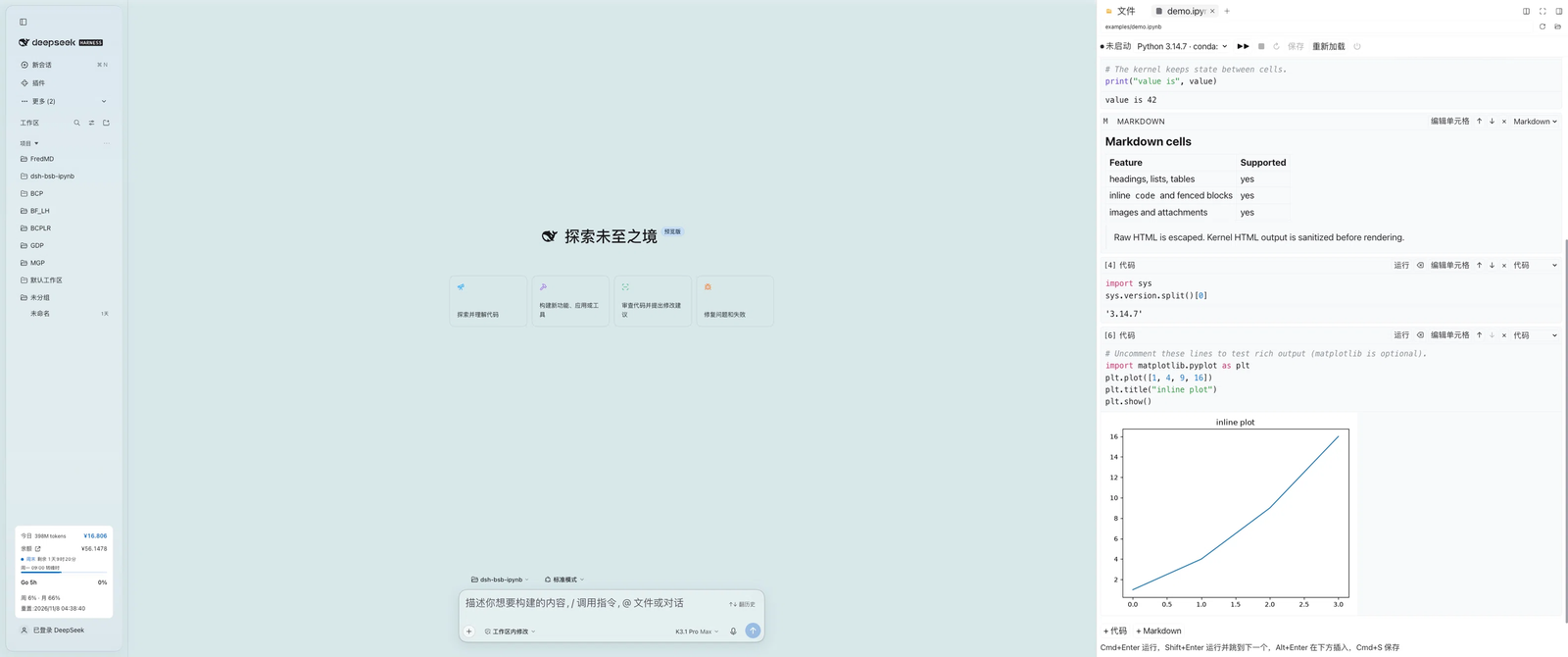
dsh-bsb-ipynb is a DSH Better Sidebar plugin that turns the sidebar's file tree into a Jupyter notebook workspace. Click any .ipynb to read, edit, run and save it as you would in Jupyter. Kernels run in the host process through jupyter_client + ipykernel, so nothing Python-related runs in the browser and there is no build step.
✨ Features
- Notebook rendering — Markdown, code and raw cells with execution counts; streaming stdout/stderr,
text/html(sanitized against an allow-list), PNG/JPEG/SVG (image/jpgis accepted as an alias forimage/jpeg), Markdown, JSON and ANSI-colored tracebacks. - Cell editing — click a cell to edit it; insert or delete cells, move them up/down, switch cell types, preview Markdown, and clear one cell's or all outputs.
- Execution — one persistent kernel per notebook, keyed by file path, keeps variables alive across cells; Run all, interrupt, restart and shut down.
- Saving — writes nbformat 4.5 with sha256-based optimistic concurrency (conflicts return 409 and never overwrite); atomic writes through a same-directory temp file and rename; autosave 1.5 s after edits.
- Interpreter discovery — checks
DSH_IPYNB_PYTHON, conda environments,python3/pythononPATH, then DSH's bundled Python, and selects only environments that providejupyter_client+ipykernel.DSH_IPYNB_PYTHONmust be an absolute path; a relative or unusable value is still listed by/ipynb/interpreterswith a reason but is never used. The launch config is built in-process, so a same-named system kernelspec cannot redirect the selected interpreter. - DSH integration — every colour follows the DSH theme: state colours, banners, links and Python syntax highlighting consume
--dsw-alias-*and Shiki variables, and cell/editor/output type follows the DSH text and code font settings (dark mode is the host palette for the theme setting × OS scheme, with no plugin-side theme detection). UI strings are registered under thedsh-bsb-ipynblocale namespace and follow DSH's Chinese/English language preference. - Contained access — paths are confined to the session workspace (realpath + relative checks); HTTP routes reuse DSH's admission fence; HTML output is sanitized with a DOMParser allow-list, and
<script>never runs.
🚀 Quick Start
| Requirement | Version / notes |
|---|---|
| DSH | Web GUI 0.2.2-rc.1 or newer |
| dsh-better-sidebar | 0.30.x (verified with 0.30.1; 0.28.x targets DSH 0.2.1 and is not recommended) |
| Python | jupyter_client + ipykernel; verify with python3 -c "import jupyter_client, ipykernel" (macOS/Linux) or python -c "import jupyter_client, ipykernel" (Windows) |
# if the dependencies are missing
python3 -m pip install jupyter_client ipykernel   # macOS / Linux
python -m pip install jupyter_client ipykernel    # Windows (or: py -3 -m pip ...)
- Open DSH's plugin manager and install this repository folder as a local bundle.
- Refresh the page (
Cmd+Ron macOS;Ctrl+RorF5on Windows). - Open any
.ipynbfrom the right-hand file tree; examples/demo.ipynb is a good first run.
Windows: interpreter discovery looks for
python.exe/python3.exeonPATH(Microsoft Store app-execution aliases underWindowsAppsare skipped), conda environments (<env>\python.exe) and DSH's bundled Python. SetDSH_IPYNB_PYTHONto an absolutepython.exepath when the interpreter lives elsewhere; read-only or locked notebooks reject saves withwrite-blocked(409) until the file is writable again, and reading a file locked by another program returnsread-blocked(409).
🖱️ Usage
| Action | Shortcut |
|---|---|
| Run the current cell | Cmd/Ctrl + Enter |
| Run and advance to the next cell | Shift + Enter |
| Insert a code cell below | Alt + Enter |
| Save | Cmd/Ctrl + S |
| Outdent the current line | Shift + Tab |
| Leave edit mode | Esc |
Shortcuts work while a cell is being edited; Tab inserts four spaces and Shift+Tab removes one indent unit. Every action is also available from the toolbar (interpreter, Run all, interrupt, restart, save, reload, shut down kernel).
- Autosave pauses while a cell or Run all is running, so transiently cleared or partial outputs never reach disk.
- Switching interpreters restarts the kernel; an active run asks for confirmation first.
- A file changed on disk produces a 409 conflict that can only be resolved by reloading — external edits are never overwritten.
- The notebook is measured in its on-disk form before upload; above 32 MiB the UI asks you to clear outputs or trim content instead of failing with a 413 after the fact.
🧱 Architecture
dsh-bsb-ipynb/
├── index.js          # host plugin entry: registers /ipynb routes and owns kernels
├── client.js         # browser bundle (hand-written, no build step)
├── lib/
│   ├── routes.js     # /ipynb/* HTTP API
│   ├── kernel.js     # one bridge process per notebook, event queue, idle sweep
│   ├── notebook.js   # nbformat 4 parse/normalize/serialize, sha256 versions, atomic writes
│   ├── gate.js       # session workspace resolution and path escape protection
│   ├── env.js        # Python interpreter discovery and probing
│   └── json.js       # JSON envelope, request body reader, ApiError
├── python/bridge.py  # JSONL kernel bridge over jupyter_client + ipykernel
├── locale/{en,zh}.json
└── test/             # node:test unit/integration tests (including real kernels)
Request path: browser client.js → better-sidebar webServer → /ipynb/* routes → KernelManager → python/bridge.py (JSONL) ↔ ipykernel.
🛡️ Reliability
- Serialized saves — within the process, concurrent saves to the same canonical notebook path run in order; only the first succeeds and the rest return
write-conflict(409). Hard-link aliases of the same inode are treated as different paths and are not serialized with each other. - Blocked saves — a read-only notebook, or one held open by another program (common on Windows), returns
write-blocked(409) with a fixable message instead of an internal error; autosave backs off up to 30 s and the response never embeds local paths or temp-file names. - Capacity-blocked saves — if client-side preflight blocks a notebook for exceeding 32 MiB, deleting cells or shortening source to bring it back under the limit does not resume autosave; click Save once manually. Existing recovery actions such as clearing outputs or reloading are unaffected.
- Safe writes — write a temp file in the same directory, check the version again, then rename it into place; this narrows the external-write race window (extreme interleavings remain a known race). If a crash leaves a
.dsh-bsb-ipynb-*.tmpbehind, the next save sweeps stale ones older than an hour. - No stalled streams — restart/shutdown, kernel death or
os._exit()always ends the NDJSON stream with a terminal failure event. - Complete output — after the kernel replies, the bridge waits for the matching IOPub idle; after 10 s it reports a failure and warns that output may be incomplete.
- Resource limits — 32 MiB of client-side output per cell, a 64 MiB server-side NDJSON queue and a 64 MiB cap per kernel output line; exceeding a limit cancels the run and interrupts the kernel.
- Kernel cleanup — idle kernels are swept after 30 minutes (
DSH_IPYNB_KERNEL_IDLE_MS); ready timeout is 30 s; shutdown waits 2 s, sends SIGTERM, then SIGKILL 2 s later. - Process cleanup — the kernel connection file is removed on every exit path (the host owns its path, so a hard-killed bridge leaves nothing behind); on Windows a kill-on-close job object reaps the kernel and any subprocess a cell spawned.
- Restart resilience — a failed kernel restart reports
kernel_diedand tears the bridge down instead of busy-looping; restarts run off the control loop, so status/interrupt/shutdown stay responsive during a slow restart.
🎨 Theming & Typography
The notebook has no colour scheme of its own. client.js declares one token layer on .dsh-bsb-ipynb-root that maps plugin variables to the host theme, and every rule consumes that layer, so a DSH theme or dsh-web-ui skin that overrides the aliases re-skins the notebook automatically — including the kernel status dot, save/error text, banners, markdown links and Python syntax highlighting.
| Notebook role | Host token |
|---|---|
| Text, muted labels, borders, panel surface | --dsw-alias-label-primary / --dsw-alias-label-secondary, --dsw-alias-border-l1, --dsw-alias-bg-layer-1 |
| Cell/card surface, hover fill | --dsw-alias-bg-module-platform, --dsw-alias-interactive-bg-hover |
| Code block / inline code surface | --dsw-alias-markdown-code-block, --dsw-alias-markdown-inline-code |
| Kernel status (off / ready / busy) | --dsw-alias-label-tertiary (off), --dsw-alias-state-success-primary, --dsw-alias-state-warn-primary |
| Save failure, stderr, tracebacks | --dsw-alias-state-error-primary |
| Running-cell border, focus ring | --dsw-alias-state-business-primary (focus also honours --dsw-focus-ring-color) |
| Banners | color-mix() of --dsw-alias-state-business-primary / --dsw-alias-state-error-primary at 12% |
| Markdown links | --dsw-alias-link |
| Python syntax | --shiki-token-* (the Shiki palette shared with DSH markdown code blocks) |
| Text and code type | --dsh-content-font-size-secondary (+ delta), --dsh-code-font-size, --ds-font-family-code |
Font settings map as follows: text size scales the notebook body, markdown prose and the dense chrome labels; code size scales cell sources, the editor, execution prompts, outputs and fenced code blocks; the code font replaces the monospace stack; the text font is inherited from the host body. Defaults reproduce the previous pixel sizes (13 px root, 12 px code, 10–12 px chrome). When a host token is absent (unit tests, standalone rendering), each declaration falls back to its previous hardcoded value.
Intentionally not themed: ANSI 16-colour stdout painting (content, so the same notebook paints the same colours under every skin), inline styles inside HTML output (owned by pandas/plotly/…), and the white surface behind notebook images (keeps transparent PNG/SVG plots readable on dark themes).
🌐 HTTP API
All routes are mounted under /ipynb and return {ok:true,value} or {ok:false,error:{code,message,details?}}. POST bodies must be application/json; /execute responds with application/x-ndjson.
| Method | Path | Description |
|---|---|---|
| GET | /ipynb/health |
Version, kernel count, interpreter stats (non-blocking; interpreters.checked=false until warm) |
| GET | /ipynb/interpreters |
Interpreter list and default |
| GET | /ipynb/status?sessionId=&path= |
Kernel status for a notebook |
| POST | /ipynb/read |
Read and parse a notebook |
| POST | /ipynb/save |
{notebook, baseVersion}; a stale version returns 409 |
| POST | /ipynb/execute |
{cellId, code, python?}; NDJSON execution events |
| POST | /ipynb/interrupt |
Interrupt the current execution |
| POST | /ipynb/restart |
Restart the kernel, optionally switching python |
| POST | /ipynb/shutdown |
Shut the kernel down |
All routes except /health and /interpreters require a non-empty sessionId and path (query parameters for /status, JSON body for the rest). /execute reports pre-header errors as the JSON envelope; after headers, failures arrive as {type:'fatal',code,message} NDJSON events.
Error codes: bad-request, forbidden, workspace-unknown, path-outside-root, not-found, read-blocked, not-notebook, too-large, write-conflict, write-blocked, write-failed, kernel-busy, kernel-unavailable, interpreter-unknown, method-not-allowed, internal.
⚠️ Known Limitations
- Python kernels only (nbformat 4.x). Interactive JavaScript outputs (ipywidgets, plotly, bokeh, …) are not rendered; HTML is sanitized into static content.
- No
input(): kernels start withallow_stdin=False, so calls fail immediately rather than hanging.%%cell magics and!cmd,%pip,%cd,%pwdwork. - If the kernel is still unresponsive about 3 s after an interrupt, it is force-restarted and all variables and kernel state are lost.
- Results are written back by the client and persisted on save; the server never appends output in the background.
- No "new notebook" wizard yet: create an empty
.ipynbin the file tree or open an existing file. - Workspace containment uses the session cwd; when the active root is a linked git worktree, requests may return 403 (not supported yet).
- Path-error side channel — for a path outside the session workspace, an existing and accessible target generally returns 403, while a missing or inaccessible target returns 404 (possibly with a reason). An already-admitted same-user client can use this distinction to probe host path existence or accessibility; it does not allow reading or writing outside the workspace.
- Windows: an interrupt cannot reach ipykernel, so it force-restarts the kernel after about 3 s and clears all variables (the generic interrupt timeout above); read-only or locked notebooks reject saves with
write-blocked(409) and locked files fail reads withread-blocked(409); images insidetext/htmloutput are not re-resolved. - Very large outputs make browser rendering slow; clear outputs or run in smaller chunks.
📊 Internal Limits and Environment Variables
| Item | Value |
|---|---|
| Notebook file size cap | 32 MiB (files above this are rejected with 413) |
| POST request body cap | 64 MiB (36 MiB on /ipynb/save) |
| Client output budget per cell | 32 MiB (UTF-8 bytes of the complete JSON) |
| Pending NDJSON queue / single kernel output line | 64 MiB / 64 MiB |
| Metadata nesting / node limit | 100 levels / 10,000 nodes |
| Autosave / kernel status polling / NDJSON ping | 1.5 s / 10 s / 15 s |
| Ready timeout / shutdown grace / interrupt grace | 30 s / 2 s + 2 s / 3 s |
| Execute stream drain timeout | 10 s (a client that stops reading is disconnected) |
| Kernel idle sweep | 30 minutes by default; DSH_IPYNB_KERNEL_IDLE_MS changes it (0 disables the sweep) |
🧪 Development & Testing
There is no build step. DSH caches registered bundles, so after changing client.js or host-side code, reload the dsh-bsb-ipynb plugin (or restart DSH) to apply it; after client changes also hard-refresh the page (Ctrl/Cmd+Shift+R).
for file in index.js lib/*.js client.js; do node --check "$file"; done
python -m py_compile python/bridge.py
npm test          # 344 tests at the time of writing
The theme tests in test/client-theme.test.mjs resolve the injected stylesheet against the stock palette fixture in test/fixtures/dsh-theme-tokens.json; update that fixture deliberately when the DSH palette changes. Real-kernel tests skip automatically when no candidate interpreter provides jupyter_client/ipykernel; schema tests that need nbformat skip as well. Set DSH_IPYNB_TEST_PYTHON to choose the interpreter used by tests; in CI, set it explicitly and check for unexpected skips. CI runs the suite on ubuntu-latest, windows-latest and macos-latest. The ~28 case-sensitivity regression tests in test/control-symlink.test.mjs run only on case-insensitive file systems (macOS APFS, Windows NTFS) that also allow symlink creation; on Linux or a Windows account without Developer Mode they skip through the capability probe. The access-control cases in test/routes.test.mjs that need a non-root user skip automatically when the suite runs as root.
See CODE_REVIEW.md for the combined macOS + Windows review and known-issue log.
🤝 Contributing
Issues and pull requests are welcome. See CONTRIBUTING.md for setup, tests and PR guidelines, and report security issues privately as described in SECURITY.md. Keep the client bundle hand-written and build-free (no bundler or new runtime dependencies).
📄 License
MIT © 2026 dsh-bsb-ipynb authors — see LICENSE.
python/bridge.py and parts of the rendering algorithms are adapted from the MIT-licensed dong-victor/dsh-better-sidebar-jupyter; the design references kikulmj/dsh-jupyter (Apache-2.0). Full attribution and upstream license texts are in NOTICE.

No comments yet. Be the first to write one.