dsh-approval-popups
Cross-session approval, question and completion popups for the DeepSeek Harness Web UI: answer a background Session's request from the bottom-right corner of the conversation you are already in.



English | 中文
Status: 0.1.2 preview. Built against DSH
0.2.2-rc.1. It reads a few runtime fields that are not part of the public pending-interaction type; see Known limitations.
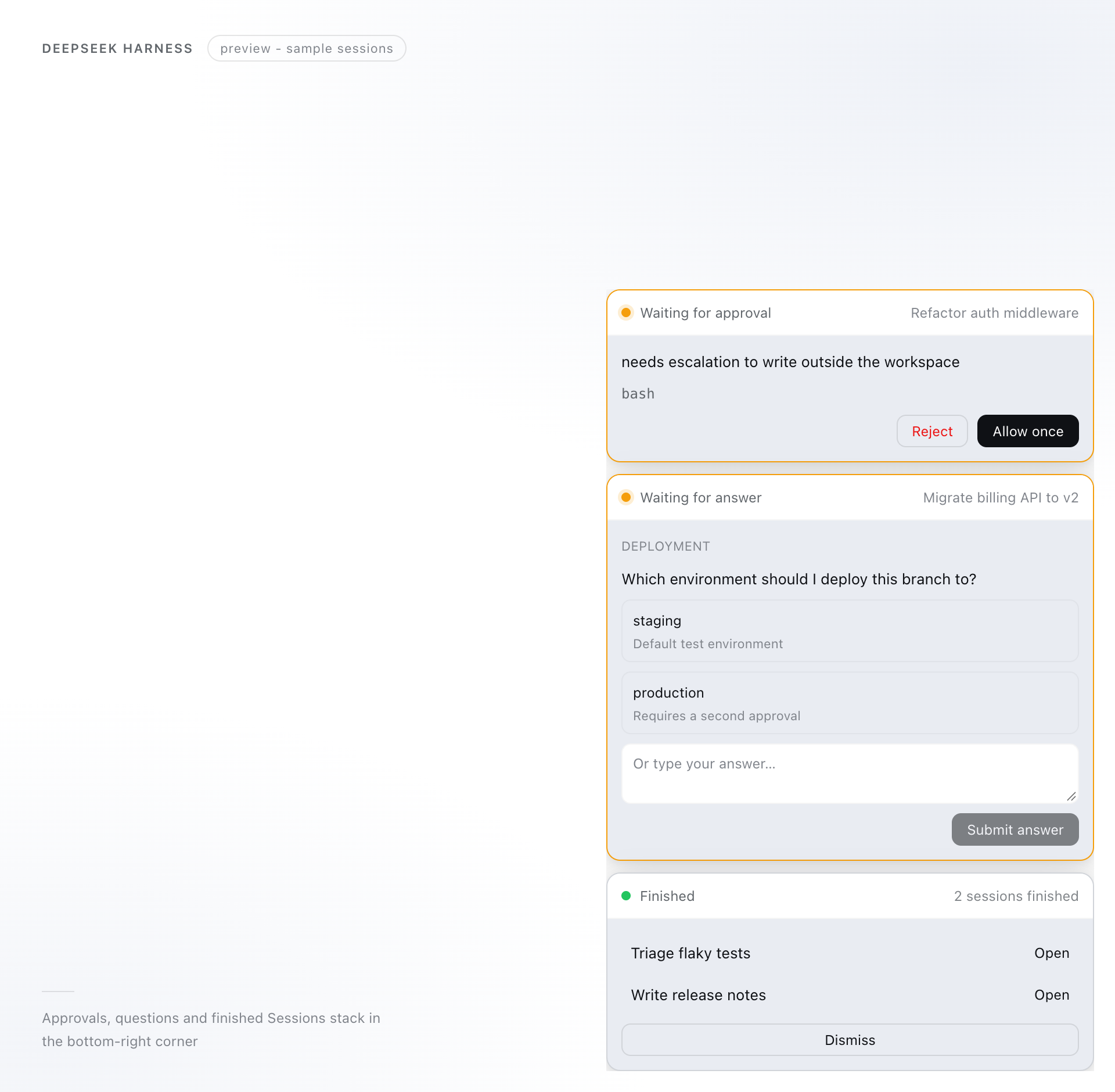
Sample Sessions rendered with the real component; colors follow the active theme.
Why dsh-approval-popups
DSH already shows an approval or a question inside the Session that asked it, and marks that Session with a small dot in the sidebar. While you are deep in one conversation, that is easy to miss — and switching Sessions to check loses your place.
This plugin reads the same live session status the Web UI uses and mirrors it into one always-visible place: pending approvals, questions, plan reviews, and Sessions that finished while you were elsewhere. Answering a card settles the original request, so the other Session continues instead of waiting.
Not for you if you want operating-system notifications, a tray icon, or a desktop pet; see Related projects.
What you get
| Surface | Where | What you can do |
|---|---|---|
| Approval card | Bottom-right stack | Check the tool and its reason, then Allow once or Reject. |
| Question card | Bottom-right stack | Pick options, type a custom answer, skip individual questions, and submit the batch. |
| Plan review card | Bottom-right stack | Read the plan, then Approve plan or Send back. |
| Completion card | Bottom-right stack | Up to four finished Sessions, aggregated; Open one or Dismiss the notice. |
| Chime | Your speakers | Two synthesized notes for a new request; one softer note when a Session finishes. No audio file is shipped. |
| Theme and locale | Everywhere | Follows DSH light, dark, and third-party themes; the copy follows the UI language (English / 中文). |
Details that matter in daily use:
- The Session on screen is not duplicated. The shipped composer already shows its approval or question, so the stack hides that Session's pending card and leaves the decision there.
- Answers are real answers. Cards call the same pending object the composer uses, so the Host waterfall settles exactly once and the original card disappears together with this one.
- Single-select questions treat the custom field as the alternative answer: focusing it moves the selected look off the options (typed text is kept but inactive), and clicking an option takes it back. Multi-select questions submit the chosen options and the custom text together.
- Tall stacks scroll. Cards never get taller than
72vh; the stack itself scrolls, and the page underneath stays clickable outside the cards. - Completion is the edge of
running. A Session that goes from running to idle is announced after a 1.6 s settle delay, skipping subagent Sessions, Sessions waiting for an interaction, and the Session you are looking at.
Quick start
1. Install
Plugin Manager (recommended). In DSH, open Plugins in the sidebar, choose Add plugin, and paste the package name:
dsh-approval-popups
The same install works from the CLI on a Web profile:
dsh plugin --profile web add dsh-approval-popups
Append @0.1.2 to pin the registry version, or paste the release tarball URL instead — it is the same build:
https://github.com/kevinxcw/dsh-approval-popups/releases/download/v0.1.2/dsh-approval-popups-0.1.2.tgz
DSH installs from the npm registry or from the tarball; then enable the bundle if DSH leaves it switched off. Both routes ship the built Client bundle, so DSH does not run build scripts.
From a checkout (developers). Clone, build, then install the directory:
git clone https://github.com/kevinxcw/dsh-approval-popups.git
cd dsh-approval-popups
pnpm install
pnpm build
Then choose Add plugin → the absolute path of that checkout, or run:
dsh plugin --profile <profile> add link:/absolute/path/to/dsh-approval-popups
<profile> is the profile that runs the Web UI: web for dsh web, desktop for the desktop app. The desktop app manages its own profile; use its Plugins page rather than the bundled CLI there. If dsh is not on your PATH, the desktop app can register its bundled CLI from the Manage dsh Command menu.
2. Reload the page
This is a Client-only plugin: after the first install, refresh the page (⌘R / Ctrl+R). Host restart is not required. Later rebuilds are picked up by dsh-client-hmr.
Check that the bundle is active:
dsh --profile web --dump-config | grep -n -A3 dsh-approval-popups
3. Try it
Open a second Session and leave something pending there, then come back to your first conversation:
Session B: run a bash command that needs approval, for example writing a file outside the workspace
→ Session A shows "Waiting for approval" in the bottom-right corner;
  click Allow once and Session B continues.
Session B: ask for a task that runs for about a minute, then switch back to Session A
→ when Session B stops, a "Finished" card appears; Open jumps to it.
Appearance
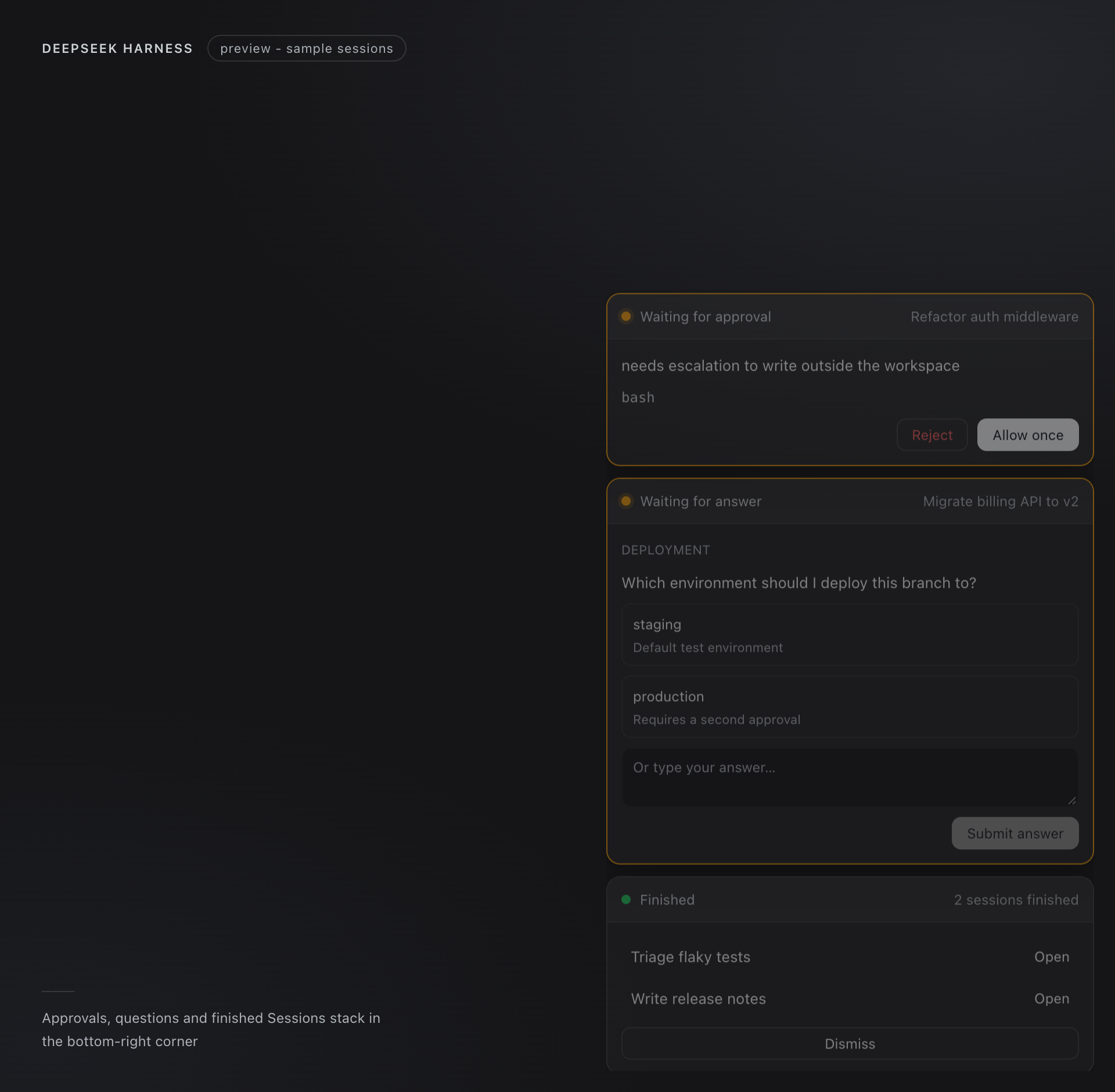
The same component in the dark theme — the card surface, primary button label, and hover states all come from theme tokens, so a third-party theme carries over too.
Configuration
There is nothing to configure in 0.1.2: the plugin exports no Config schema, and cordis.patch.yml needs no config:. These values are fixed by design:
| Constant | Value | Why |
|---|---|---|
| Completion settle delay | 1.6 s | A pause between turns is not a finished Session. |
| Completion rows | 4 shown, 12 retained | Keeps the aggregated card short; older notices fall off. |
| Stack width | min(420px, 100vw - 32px) |
Fits the card content without covering the composer on small windows. |
| Stack height | 72vh, scrollable |
A batch of questions stays reachable without pushing the first card off-screen. |
| Chime | Synthesized WebAudio, no asset | Browsers mute audio until the first click or keypress; notices before that stay silent. |
Compatibility
| Item | Value |
|---|---|
| DSH | 0.2.2-rc.1 (engines.dsh; a mismatch is refused instead of loading half-working) |
| Node.js | >=24.9.0 (inherited from the DSH runtime) |
| Distribution | npm dsh-approval-popups and the GitHub release tarball |
| Half | Client-only; the Host apply() is intentionally empty |
| Tested on | macOS 26.6.2 (arm64), DSH Desktop + Web UI at 0.2.2-rc.1 |
| Interface language | English and 中文 |
The Web Client uses light-dark() when the browser supports it and a plain layer token otherwise; both paths are covered by the palette test in test/render.smoke.mjs.
Permissions and safety
- Reads: the live
uiSession.sessionStatusprojection (running flag, pending interaction, completion flag), Session titles from the Client Session list, and the pending interaction objects of other Sessions. - Writes: nothing. No files, no
localStorage, no cookies, no settings. - Executes: no shell commands, no subprocesses, no network requests.
- Install-time network: only while DSH installs or updates the plugin — it downloads the package from
registry.npmjs.org(or the GitHub release URL you pasted). Once installed, the plugin makes no requests. - Credentials: none.
- Answers: never sent until you click Allow once, Reject, Submit answer, Approve plan, or Send back. The answer travels through the Host's own pending object.
- Audio: a short synthesized tone through the browser's audio context; no file is downloaded.
- Uninstall: Plugins page → uninstall, or
dsh plugin --profile <profile> remove dsh-approval-popups. - Left behind after uninstall: nothing.
Unofficial plugin: not maintained by, or bundled with, DeepSeek Harness.
Known limitations
- Semi-public pending API. The public
SessionPendingInteractiontype exposessessionIdandkind;questions,toolName,reason,displayReason, andanswer()are runtime fields of the shipped pending objects. The plugin reads them defensively and falls back to "open the Session" when they are missing. Re-verify after every DSH upgrade. - Completion does not know the outcome. Success, failure, and user interruption all surface as "Finished".
- Page lifetime. Sessions that finish while the Web UI is closed produce no notice.
- Current workspace only. Titles and navigation come from the Client Session list; a Session outside the current workspace falls back to an untitled label and may not open.
- One visible interaction per Session. The shipped projection elects a single interaction per Session by domain precedence, so an approval and a question pending at once appear one after another.
- Multiple windows each show their own stack; answering in one removes the card in the other on the next status publication.
- Audio needs one interaction. Under the browser autoplay policy, the chime is muted until you click or type once after loading the page.
Troubleshooting
| Symptom | Likely cause | Fix |
|---|---|---|
| Plugin is listed but no cards appear | Every other Session is idle; the Session on screen is intentionally excluded | Trigger an approval or question in another Session and switch back. |
incompatible-version or the bundle is refused |
engines.dsh does not match the running DSH |
Use DSH 0.2.2-rc.1, or update the plugin to a release built for your version. |
Install from a checkout fails with Cannot find module .../lib/index.js |
lib/ is not committed; the checkout was never built |
Run pnpm install && pnpm build in the checkout, then install the directory again. |
| Submitting from a card shows "This version cannot submit from here" | The DSH upgrade renamed the runtime pending fields | Open the Session and answer in the shipped composer; update the plugin. |
| No sound after loading the page | Browser autoplay policy has not seen a click or keypress yet | Click anywhere in the page once; the next notice rings. |
| A rebuilt Client bundle does not show up | HMR did not reload, or the build output is stale | Run pnpm build, then refresh the page. |
Development
pnpm install
pnpm build       # tsc for the Host entry, then copies src/client.js to lib/client.js
pnpm typecheck
pnpm test        # pretest builds, then runs 18 node:test cases
pnpm pack --dry-run
src/client.js is plain JavaScript on purpose: the Module Loader evaluates the bundle directly, and TypeScript is only used for the empty Host entry. The tests load the built bundle with a stubbed React/DOM and drive the session-status source, covering pending collection, completion debounce, subagent filtering, current-Session suppression, the multi-question layout, and the theme palette.
lib/ is not committed. Build before installing a local checkout with link:; after that, Client-only changes are picked up by HMR or a page refresh. pnpm pack --dry-run should list lib/, cordis.patch.yml, locale/*.json, README.md, docs/README.zh.md, LICENSE, and icon.svg.
Releases go to both channels from the same build: bump version, run pnpm build && pnpm test, then npm publish, and attach the pnpm pack tarball to a GitHub release tagged v<version>.
Related projects
- AnLifeX/dsh-attention — covers the same need from the Host side, with interactive cards, a desktop pet, and Windows system notifications.
dsh-approval-popupsis a smaller, Client-only overlay; pick that one if you want OS-level alerts.
License
MIT. See LICENSE.
No comments yet. Be the first to write one.