便利贴待办 · Sticker TODO

A bilingual sticky-note todo board for the DeepSeek Harness Web GUI. DeepSeek Harness Web GUI 里的一块便利贴待办板 —— 中英双语、随手贴、AI 帮忙整理。




English · 中文
Preview
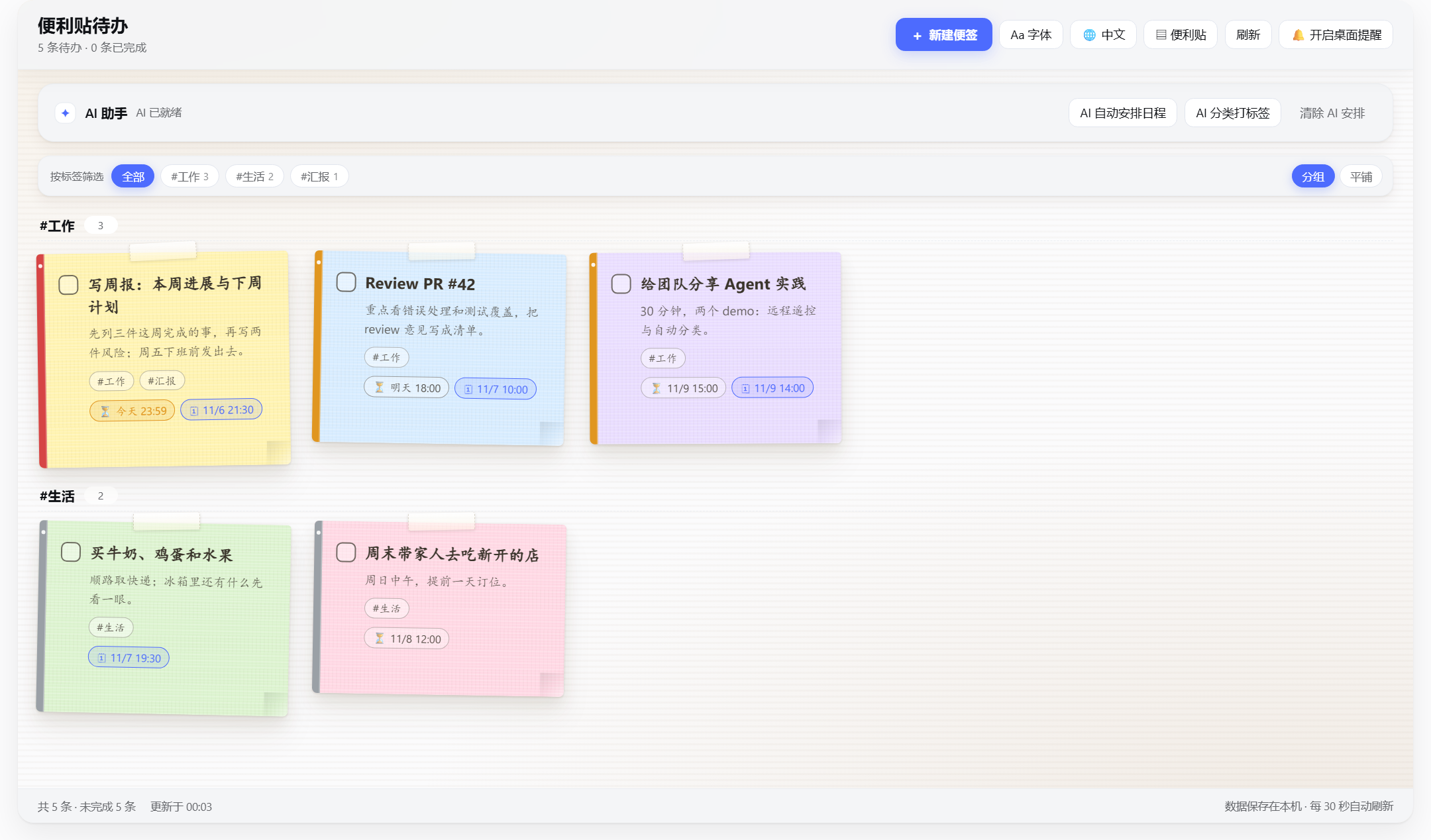
| Sticky board | Minimal list (click a row to expand) |
|---|---|
 |
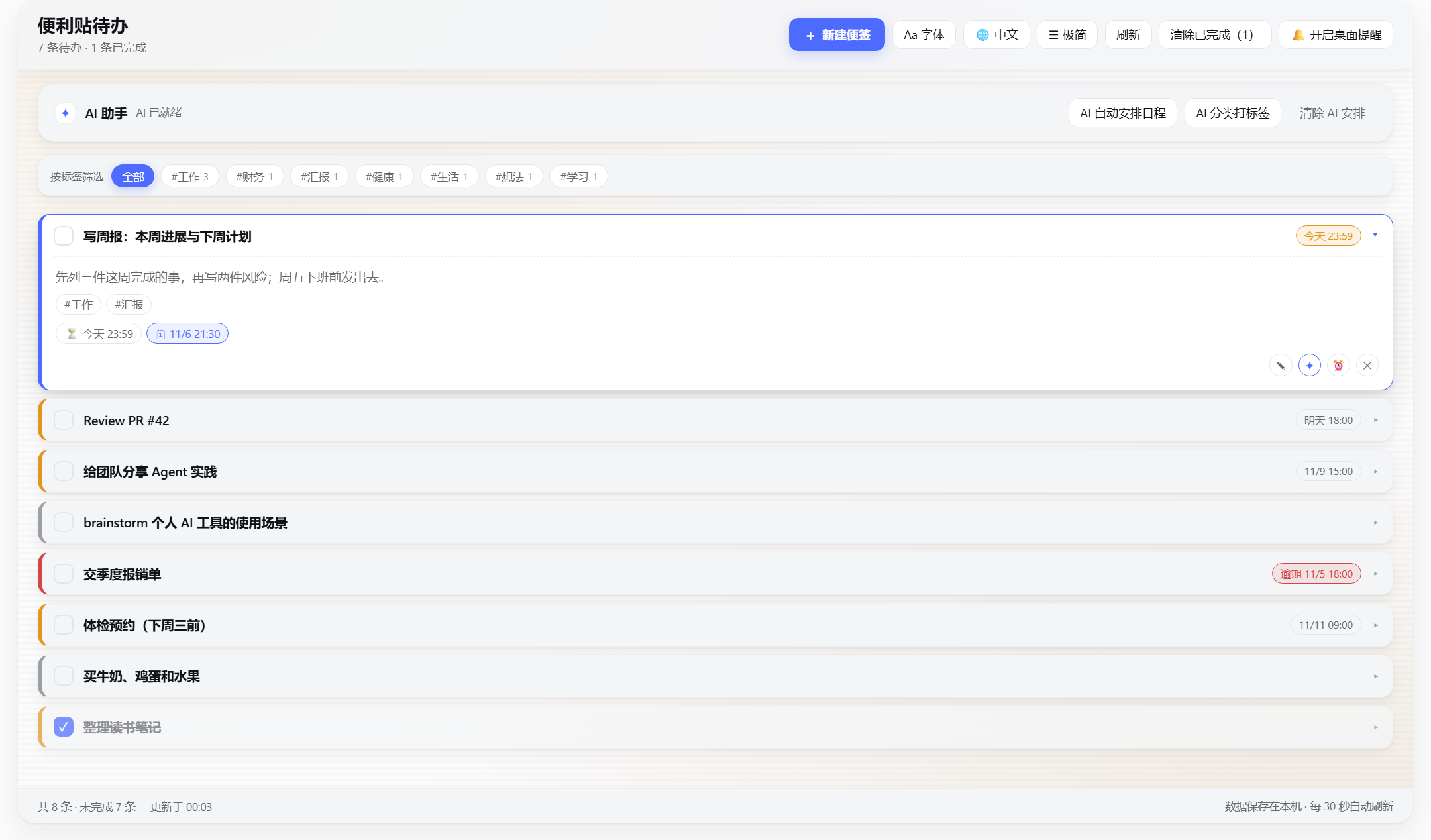 |
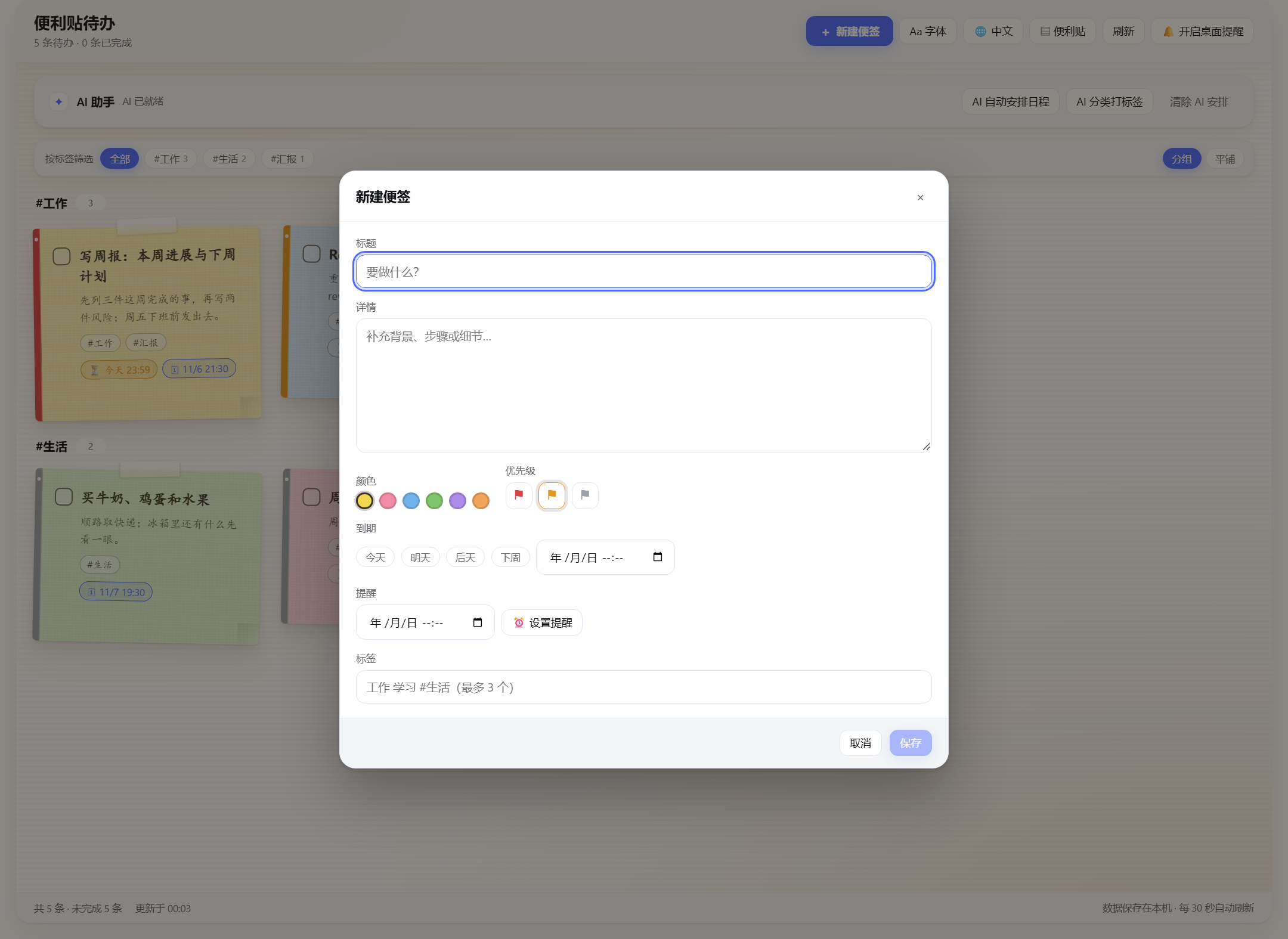
Screenshots use demo data; the UI is bilingual and switches from the header. · 截图为示例数据,界面支持中英双语切换。
What it is
dsh-sticker-todo is a DeepSeek Harness (DSH) Web plugin: it adds a 便利贴待办 (Sticker TODO)
entry to the left sidebar, opening a paper-walled board of sticky notes. Each note has a title,
details, colour, priority, deadline, timed reminder and tags; AI can plan the schedule, classify the
board into tags, and advise on one note at a time — asking a few pick-or-type questions first when
it needs context. The panel, the HTTP route and the agent tool share one Host implementation, so the
chat and the panel can never disagree.
Features
- Composer dialog — the header button
+ 新建便签opens a dialog with a title (required), a large details area, colour, priority, quick due dates, reminder and tags; editing reopens the same dialog. - Quick due dates — 今天 / 明天 / 后天 / 下周 one-click chips (that day at 23:59 local; 下周 = next Monday 23:59) plus a custom date-time control.
- Visual-only priority — a colour-coded edge and flag encode high/medium/low; no text on the board (screen readers still get the label).
- Timed reminders — in-panel banner, a frame-wide bottom-right card and (when permitted) a desktop notification; nothing is acknowledged until you dismiss it.
- Tags & grouping — up to three
#tagsper note, a tag filter, and an automatic per-tag grouped layout after AI classification (with a flat toggle). - Font presets —
default(UI font for Latin + handwritten KaiTi for CJK),hand,xingkai,ui; applied to note text only and remembered. - Bilingual UI — a header language switch:
自动(follow the DSH locale) /中文/English; every label and every date format follows it, and the choice is remembered. - Two display formats — a header view switch:
便利贴(the sticky board) and极简(a compact title-only list). In minimal mode a row expands in place to show its details, tags, dates and actions (one row at a time); the choice is remembered. - AI schedule planning — plans start times (
planAt) backwards from deadlines. - AI tag classification — assigns 1–3 category tags to every open note and returns a grouping summary.
- Per-note AI advice — the
✦button on each note: the model answers with one short, concrete suggestion when it has enough context, or asks up to three questions first. Every question comes with 2–4 pickable answers plus a free-text box; the final advice is editable and can be appended to the note's details with one click. - Motion & polish — staggered note entrances, dialog transitions, hover/focus micro-interactions,
AI loading shimmer; everything respects
prefers-reduced-motionand animates onlytransform/opacity. - Agent integration — the same board is exposed to the model through the
sticker_todotool.
Requirements
| Item | Requirement |
|---|---|
| DeepSeek Harness | Desktop app with its Web GUI |
| OS | Windows / macOS / Linux (the handwritten CJK default uses KaiTi; system fallbacks otherwise) |
| Node.js (verify scripts only) | ≥ 18 (developed on 24) |
| Model | Optional — every AI feature falls back to a deterministic local rule and reports source: "fallback" |
Install
The plugin is a standard DSH bundle (it ships dsh.bundle.patch and a dsh.client manifest) and is
published to npm as dsh-sticker-todo:
dsh plugin --profile web add dsh-sticker-todo
Then restart DSH (the Host half is loaded from disk only at startup) and open 便利贴待办 in the sidebar.
Install from source instead (GitHub / local checkout / manual profile link)dsh plugin --profile web add github:kevin-qiao/dsh-todo
or clone the repository and install that checkout:
git clone https://github.com/kevin-qiao/dsh-todo.git
- Install the cloned directory from the DSH Plugin Manager (
install_bundle, target = that local path), or adddsh-sticker-todotodsh.profile.bundleswith alink:<clone-dir>dependency. - Restart DSH.
- The sidebar entry appears; open it and start writing notes.
After that, client.js-only changes need a page reload (Ctrl+R); index.js / lib/* changes need a
DSH restart or a Plugin Manager reinstall.
Configuration
Optional plugin-row config:
| Field | Default | Meaning |
|---|---|---|
dataFile |
~/.dsh-sticker-todo/todos.json |
Where the board is stored |
aiTimeoutMs |
30000 |
Model-call timeout (3 s – 3 min) before the local fallback runs |
AI calls use the model selected as DSH's current default model.
Usage
- Create / edit —
+ 新建便签; fill title, details, colour, priority, due, reminder, tags; save. - Card actions — toggle done, edit,
✦AI advice, remind in 1 hour, focus, two-step delete. - Filter / grouping — the filter row narrows the board by tag;
分组/平铺switches the layout. - Font / language / view —
Aa 字体, the language switch (自动/中文/English) and the view switch (便利贴sticky board /极简minimal list with click-to-expand rows). - AI card — schedule, classify & tag, clear plan.
- AI advice —
✦on a card; pick a suggested answer or type your own, then edit the advice and append it to the note.
Data
- Default file
~/.dsh-sticker-todo/todos.json, rewritten atomically (temp + rename) after each change. - The document carries a
versionfield; since v1.1.0 every note hastags: string[]and older files load with[]. - Every timestamp is an ISO-8601 string (
dueAt/remindAt/remindFiredAt/planAt) ornull.
Project layout
dsh-to-do/
├── index.js            # Host entry: store, sticker_todo tool, /dsh-todo HTTP API
├── lib/
│   ├── store.js        # JSON document, validation, sorting, reminder selection, tag rules
│   ├── ai.js           # model planning / tagging / per-note advice + local fallbacks
│   └── tools.js        # the model-facing sticker_todo tool
├── client.js           # browser half: sidebar entry, board, dialogs, AI advice, motion
├── cordis.patch.yml    # bundle patch inserting the sticker-todo row
├── locale/{zh,en}.json # Plugin Manager title and description
├── icon.svg            # plugin icon
├── verify/             # offline manifest / offline host integration / client render / live HTTP smoke
├── docs/               # README preview images
├── CONTRACT.md         # shared Host ↔ Client contract
└── HANDOFF.md          # maintainer hand-off notes
Architecture
Browser (client.js)                      Host (index.js)
  panel / sidebar icon                     store (lib/store.js) ⇄ todos.json
  POST /dsh-todo/action  ────────────▶     runAction()  ──▶ store / lib/ai.js
  GET  /dsh-todo/state   ◀────────────     readState()  ──▶ sorted todos + reminders + ai status
                                                     ▲
                                          sticker_todo tool (lib/tools.js) ── agent
- The browser half never owns data: it reads
GET /dsh-todo/stateand writesPOST /dsh-todo/action. - Panel buttons, HTTP routes and the
sticker_todotool all run the samerunAction, so they cannot diverge. - Reminders are polled at plugin scope every 30 s and fire from any panel.
AI & fallbacks
| Capability | Route | On failure |
|---|---|---|
| Schedule planning | POST {action:'aiPlan'} |
deterministic local scheduler, source: "fallback" |
| Tag classification | POST {action:'aiTag'} |
local keyword classifier, source: "fallback" |
| Per-note advice | POST {action:'aiNoteAdvice'} |
local advice text, source: "fallback", asks nothing |
Per-note advice asks at most three questions; a fourth model question is rejected by the Host and answered with advice. Questions always carry 2–4 options — a question without valid options is rejected and degraded to advice, so the UI never shows empty choices.
Agent tool
The sticker_todo tool exposes the board to the model:
list · add · update · complete · remove · clear_completed · plan · advice · tag
Examples: “plan my week”, “group my todos by topic”, “mark 写周报 as done”.
HTTP API
One prefix route: GET /dsh-todo/state and POST /dsh-todo/action, with the actions
add / update / toggle / remove / clearCompleted / ackReminders / aiPlan / aiAdvice /
aiClearPlan / aiTag / aiNoteAdvice. Full shapes and error codes live in
CONTRACT.md.
Development & verification
No build step (client.js is a plain browser module; the Host is native ESM). After a change:
node verify/check-static.mjs      # manifest / patch / locales / icon / syntax
node verify/host-actions.mjs      # offline Host integration (real apply() + scripted model)
node verify/client-render.mjs     # client render smoke (real components, shimmed React)
node verify/api-smoke.mjs http://127.0.0.1:55609   # live HTTP smoke (use the actual port)
All four scripts are dependency-free and use Node built-ins only. The first two never touch the
network or files outside the repo; api-smoke only creates and removes its own test notes, restores
pre-existing tags after the aiTag check, and never deletes the user's finished notes.
Baseline (v1.5.0): check-static 51 checks, host-actions 25, client-render 41, api-smoke 24 —
all passing (api-smoke varies a little with the board contents; one check SKIPs to protect user data).
FAQ
- AI buttons give local-rule results? No default model is configured, or the call timed out; check
source: "fallback". - “Restart DSH to enable this”? The running Host still predates the feature; the Host reloads only at DSH startup.
- Chinese is handwritten but English is sans-serif? That is the
defaultfont preset; switch touifor a uniform UI font. - How do I change the language? Use the header language switch;
自动follows the DSH locale. - Where are the notes?
~/.dsh-sticker-todo/todos.json(override withdataFile).
Contributing
- Development setup, verification commands and code conventions: CONTRIBUTING.md
- Please report security issues privately per SECURITY.md, not in a public issue;
- Questions, setups and ideas are welcome in Discussions; use the issue templates for bugs and feature requests;
- Version history: CHANGELOG.md.
License
MIT © 2026 Kevin. Not published to npm (private: true in package.json prevents an
accidental publish). The icon is original artwork; the plugin runs inside DeepSeek Harness, which is
licensed separately.
No comments yet. Be the first to write one.