Prompt Optimizer · dsh-composer-prompt-optimizer
A resident Optimize prompt / Revert button inside the DeepSeek Harness composer. One click rewrites your draft with the model you already selected, and the original stays one click away.
English | 中文


1. What it solves
Most "bad prompts" are not the model's fault — the draft itself is vague: no output format, no constraints, no context. People usually notice after sending, and then have to rewrite from scratch.
This plugin turns "say it clearly" into one button in the composer:
- No new page, no second conversation, no copy-paste to another tool;
- It only rewrites the prompt — it never does the task, and costs no extra chat turn;
- The result is written back into the same editor, and the original is always restorable;
- It uses the model you already selected in that composer — no plugin-owned model and no plugin-owned API key.
2. Design
2.1 Shape: the Host does the inference, the Client only draws
The plugin is split in two halves with strict responsibilities:
┌─────────────────────── Browser (client.js) ────────────────────────┐
│ conversation.input.right slot                                      │
│  PromptOptimizerButton                                             │
│   ├─ useInput          draft / input phase / draft revision        │
│   ├─ useProjection     the session model: provider + model         │
│   ├─ inputActions.setDraft(text)  replace the whole draft          │
│   └─ state: idle → loading → done(before, after) / error           │
│                        │ POST /prompt-optimizer/api/enhance        │
└────────────────────────┼───────────────────────────────────────────┘
                         ▼
┌─────────────────────── Host (index.js) ────────────────────────────┐
│ ctx.webServer.register (prefix route on the local server)          │
│  ├─ GET  /health    capability + resolved model                    │
│  └─ POST /enhance   cleanInput → resolveSelection → llm.stream     │
│                     → collect text-delta → cleanOutput → JSON      │
│  60s timeout / abort on disconnect / error classification + hints  │
└────────────────────────┬───────────────────────────────────────────┘
                         ▼
       Harness `llm` service → the adapter and credential YOU configured
Why split it: a browser must not hold a key or pick a provider. The Host calls Harness's own ctx.llm.stream(), so credentials, retry policy and gateways all reuse the user's existing Harness setup. The plugin itself is credential-free.
2.2 Trade-offs (each maps to real code)
| Decision | Choice | Real reason |
|---|---|---|
| Interaction | Replace in place + snapshot revert | Fewest clicks, and the before snapshot guarantees user input is never lost |
| Model source | The composer session's modelSelection |
The model you see is the model used, so the credential matches too. Pre-0.1.2 wrongly used the global default; fixed |
| Reasoning effort | Never sent | A leftover max after switching models caused does not support reasoning effort. Rewriting needs no high reasoning |
| Output budget | maxTokens defaults to 2048 |
Reasoning models burn the budget on hidden reasoning; 1024 often truncated the answer |
| Truncation | Auto-retry once with a doubled budget | Turns an intermittent failure into automatic recovery |
| Plugin config | No provider / model |
Allowing a plugin to pin a model means it could pin someone else's model/credential — a privilege it must not have |
| Text scope | Replace text only | Attachments stay in the rail; quote chips may be flattened to text |
| Error surface | A popover above the composer | A tooltip nobody reads is the bug; the popover shows cause, hint, code, model, details |
2.3 State machine and four safeguards against losing input
| Safeguard | Trigger | Behaviour |
|---|---|---|
| Discard on draft change | draft differs from the request's base while loading |
Abort and return to idle; never overwrite new input |
| Invalidate on manual edit | After optimization, draft !== after |
Drop the snapshot; the button returns to Optimize |
| Cancel | Click Cancel while loading | Abort the fetch; the draft is untouched |
| Fail soft | Timeout / model error / unavailable | Keep the original, show a retryable state and the error popover |
2.4 How the prompt is designed
The prompt lives in prompts/system-prompt.txt (~4.5 KB, 76 lines). It comes from a reverse-engineering of WorkBuddy's "enhance prompt" and was then patched against over-expansion. It is not a one-liner like "improve this"; it has six layers:
① One role, one output
You are a Prompt Enhancement Agent. Your only job is to rewrite a draft prompt... You never carry out the request itself.
Rewriting and executing are separated, so the model does not start answering.
② Language matching is the top priority
Chinese→Chinese, English→English, any other language→same language, mixed stays naturally mixed — and it is forbidden to explain the language (no User input is in Chinese). This is a hard rule in the LANGUAGE block.
③ An explicit rewrite checklist
Not "make it better", but a checklist:
- state the task and scope precisely;
- carry the context the target assistant needs;
- make parameters and constraints explicit;
- specify the output format when it matters;
- add an example only when it removes real ambiguity;
- match tone and complexity to the use case;
- remove redundancy;
- keep the original goal, topic, constraints and output type.
④ Hard prohibitions (the most important layer)
HARD RULES and WHAT NOT TO ADD list the most common ways rewriting goes wrong:
- return only the rewritten prompt — no preamble, heading, explanation or fence;
- never answer the request — "how do I fix this bug" becomes a better request to fix the bug, never the fix;
- never invent scope — no technologies, tools, facts, requirements or sections the user did not ask for;
- no clarification steps, confirmation requests or extra deliverables;
- no language labels;
- always improve something, but "improvement" can be sharper wording and tighter scope, not more content;
- never end with an unfinished list, a dangling conjunction or a trailing colon.
⑤ Output hygiene
Plain text, no wrapping quotes, no code fences. The Host cleans again: strip zero-width/BOM → trim → unwrap one pair of quotes → unwrap a code fence; an empty result is a failure (empty_result), not an empty draft written back.
⑥ Few-shot calibration
Seven examples (Chinese / English / mixed). The "make a website" example only sharpens it to "state target users, core pages, main features, page structure, interaction flow, visual style" — it does not expand into a project spec. This directly bounds the over-expansion problem.
Why not wrap the user message in a template too? A template would duplicate the language rules and examples in the system prompt, nudging the model to write more instead of more precisely. Now the user message is just the draft, and the system prompt carries every constraint.
2.5 Error model: failures must be explainable
classifyFailure() maps a provider's free-form error to a stable code with an actionable hint:
| Code | Meaning | Hint | HTTP |
|---|---|---|---|
rate_limited |
Model rate/quota limit | Switch model or wait for the quota to reset | 429 |
unsupported_effort |
Model rejects the reasoning level | Retried once without it | 503 |
unknown_model |
Model not configured | Pick another model | 503 |
unknown_provider |
Provider not registered | Check model settings | 503 |
auth_failed |
Authentication failed | Check API key / sign-in | 401 |
empty_result |
Only reasoning or empty content | Switch model | 502 |
output_truncated |
Output hit the length cap | Auto-retries with a larger budget; else shorten | 502 |
timeout |
Request timed out | Retry / shorten / faster model | 408 |
no_model |
No model selected | Select a model in the composer | 503 |
unavailable / network |
Service unavailable | Enable the plugin / reload | 503 |
empty_input / input_too_long |
Empty / over 30,000 chars | Type content / shorten | 400 |
3. What it actually does
Everything below is real output from this plugin running locally (model workbuddy/deepseek-v4.1-flash, temperature 0.3, single turn, no tools).
3.1 Short Chinese draft
| Input | 做个网站 |
| Output | 请设计并实现一个网站,先说明目标用户和核心用途,再列出主要页面与功能模块,并给出页面结构、交互流程和视觉风格要求。 |
| Latency | ~1.9 s |
3.2 Medium Chinese draft
| Input | 帮我写个周报 |
| Output | 帮我撰写一份本周工作周报,按以下三部分组织:本周完成的工作、遇到的问题、下周计划。每部分用条目式表述,语言简洁,突出结果和关键数据。 |
| Latency | ~2.0 s |
3.3 English draft (language preserved)
| Input | Please explain what this code does |
| Output | Explain what this code does, covering its main purpose, key control flow, and any important edge cases or potential issues. |
| Latency | ~1.3 s |
3.4 Mixed draft (stays mixed, no forced translation)
| Input | 这段代码有 bug,can you help me fix it? |
| Output | 请分析这段代码中的 bug,说明问题的根本原因,并给出最小范围的修复方案及必要的验证步骤。 |
| Latency | ~1.6 s |
3.5 Behaviour you can verify against the prompt
- Short stays short:
做个网站(4 chars) becomes one structured sentence, not a project spec. - Never answers: a "how do I fix this bug" draft stays a request to fix, with no code.
- Never invents stack: no framework was mentioned, so none is added.
- Language locked: English in → English out; mixed in → mixed out.
- Revertible: after writing, the button becomes Revert and restores the original byte-for-byte.
- Edit invalidates: change one character after optimizing and the button returns to Optimize; your new input is never overwritten.
3.6 What a failure looks like
When a model hits its rate limit, a popover appears above the composer (observed text):
! Model rate limit reached The current model hit a rate or quota limit. Switch to another model in the composer, or wait for the quota to reset. Code:
rate_limited| Model:magpie/workbuddy/deepseek-v4.1-flash[Retry] ▸ Technical details
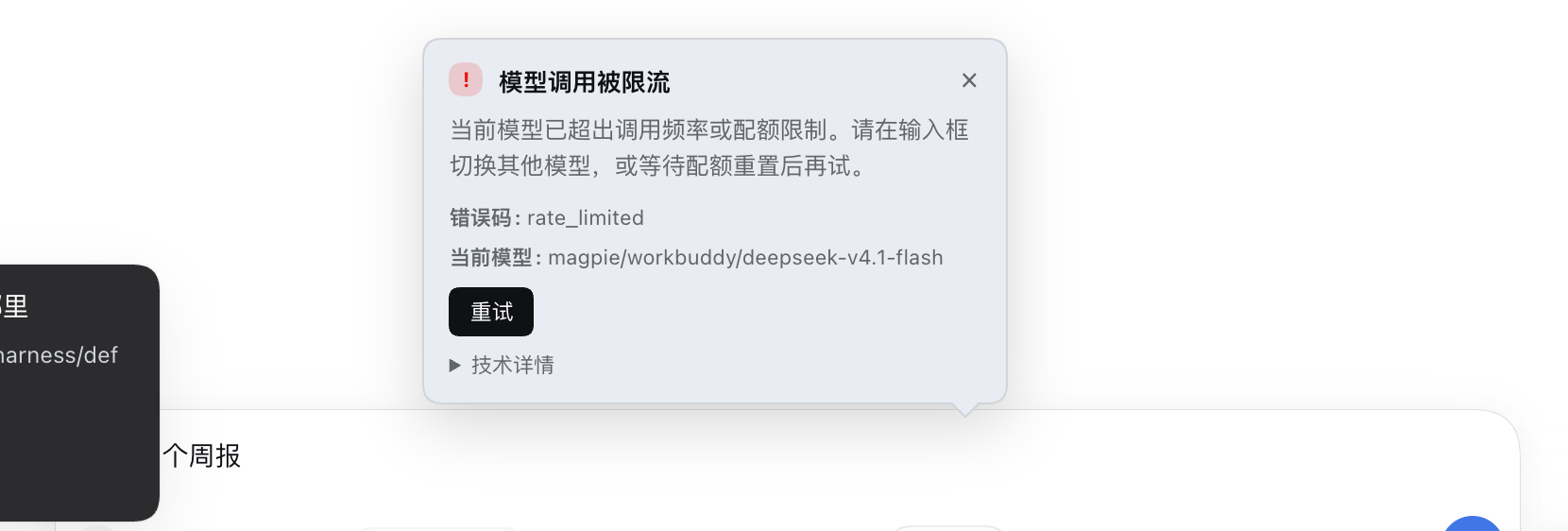
The popover never covers the editor, closes on outside click or Escape, and the draft stays editable.
4. Install
4.1 From npm (recommended)
# Install into the profile your DSH entry actually uses
dsh plugin --profile desktop add dsh-composer-prompt-optimizer   # desktop app
dsh plugin --profile web     add dsh-composer-prompt-optimizer   # self-hosted web

# Pin the version
dsh plugin --profile desktop add dsh-composer-prompt-optimizer@0.2.0
Restart Harness once. A Optimize prompt button appears at the right of the composer.
4.2 From a local directory (development)
dsh plugin --profile desktop add /absolute/path/to/dsh-composer-prompt-optimizer
You can also add it as a link: dependency of the profile, or install a local bundle from the Plugin Manager.
4.3 From the GitHub Release tarball
dsh plugin --profile desktop add https://github.com/keshaoqin/dsh-composer-prompt-optimizer/releases/download/v0.2.0/dsh-composer-prompt-optimizer-0.2.0.tgz
4.4 Uninstall
dsh plugin --profile desktop remove dsh-composer-prompt-optimizer
5. How to use it
5.1 Basic flow
- Type a draft, e.g.
帮我写个周报; - Click Optimize prompt at the right of the composer;
- Within a few seconds the draft is replaced and the button becomes Revert;
- Send it, or click Revert to restore;
- If you edit the draft after optimizing, the button returns to Optimize prompt and the snapshot is discarded.
5.2 Button states
| State | Label | Click |
|---|---|---|
| Idle | Optimize prompt ✦ | Start |
| Loading | Cancel (spinner) | Abort; draft unchanged |
| Optimized | Revert ↺ | Restore the original draft |
| Error | Retry ↻ | Retry; the error popover explains why |
Below 560px of composer width the label collapses to an icon; it stays clickable.
5.3 Relation to other composer content
- Attachments: untouched; images/files stay in the attachment rail;
- Quote chips: optimization replaces the whole draft as plain text, so chips may be flattened (known limitation);
- Sending: the button is disabled while the composer is sending/locked.
5.4 Quick self-check
curl -s http://127.0.0.1:<port>/prompt-optimizer/api/health
# {"ok":true,"plugin":"dsh-composer-prompt-optimizer","version":"0.2.0","llm":true,"model":{...}}
llm:true means the Harness LLM service is available; model is the resolved model.
6. Configuration
- id: prompt-optimizer
  name: 'dsh-composer-prompt-optimizer'
  config:
    temperature: 0.3      # 0–2, lower stays closer to the original intent
    maxTokens: 2048       # 256–8192; reasoning models need a larger budget
    timeoutMs: 60000      # 1000–300000
    # reasoningEffort: high   # optional; omitted by default for compatibility
    # systemPrompt: '...'     # optional; override the built-in prompt (debug)
There is no provider / model setting. The optimizer always uses the model selected for the composer's current session, and therefore the credential you configured for that provider. Only a session without a selection falls back to the Harness default model.
7. Compatibility
- DeepSeek Harness
>= 0.2.0-rc.2; - Web client only (
dsh.client.platform: web): works in the Web GUI and the desktop app, no button in pure CLI; - Uses the standard
conversation.input.rightslot and thesetDraftinput action; - Never reads or modifies another plugin's DOM.
8. Privacy and security
- No data collection or upload;
- Credential-free: no API key, no environment reads, no direct request to any model service;
- Two network paths only:
- browser → the local Harness route
/prompt-optimizer/api/*; - Host → Harness's internal
ctx.llm.stream()(the adapter you configured makes the real request);
- browser → the local Harness route
- No file access, no command execution, no tool registration, no session-log writes;
- The route is served by the Harness local web server. If you bind Harness to a non-loopback address, review that deployment's access control.
The plugin sends your draft to the model service you configured for rewriting. If a draft contains sensitive data, decide whether to use it based on how much you trust that service.
9. Layout
dsh-composer-prompt-optimizer/
  package.json                 # dsh.bundle + dsh.client
  cordis.patch.yml             # Host row + default config
  index.js                     # Host: route, model resolution, call, classification
  client.js                    # Browser: button, state machine, error popover
  prompts/system-prompt.txt    # the rewrite prompt (six layers)
  locale/{zh,en}.json          # marketplace title/description
  icon.svg                     # original icon
  docs/
    DESIGN.md                  # requirements + architecture
    MARKETPLACE.md             # end-to-end publishing steps
    screenshot-*.png           # real screenshots
  test/
    prompt.test.mjs            # cleaning, config, error classification
    host.test.mjs              # Host end-to-end with a fake llm stream
10. Develop and check
node --check index.js
node --check client.js
node --test test/*.test.mjs     # 16 tests, all passing
npm pack --dry-run              # inspect the package
11. Publishing (npm and the plugin marketplace)
Full steps and required configuration are in docs/MARKETPLACE.md and PUBLISHING.md. Summary:
① npm
npm pack --dry-run
npm publish --access public     # publishConfig.access = public is already set
With 2FA enabled you need a Bypass 2FA + Read and write (not stage-only) Granular Access Token. Keep the token on your machine; never write it into the repo.
② Marketplace (awesome-dsh-plugin)
- Repo: https://github.com/LingHXiao/awesome-dsh-plugin
- Add one file:
data/plugins/keshaoqin__dsh-composer-prompt-optimizer.yml - Content (prepared at docs/marketplace-entry.yml):
url: https://github.com/keshaoqin/dsh-composer-prompt-optimizer
name: keshaoqin/dsh-composer-prompt-optimizer
category: ui
tarball: https://github.com/keshaoqin/dsh-composer-prompt-optimizer/releases/download/v0.2.0/dsh-composer-prompt-optimizer-0.2.0.tgz
description:
  en: 'A resident Optimize / Revert button in the DSH composer: one click rewrites the draft with the model selected in that composer, keeps the original restorable, and explains any failure with a cause, an error code and how to recover.'
  zh: 'DSH 输入框常驻「优化提示词 / 回退原文」按钮:用输入框当前选中的模型就地改写草稿,原文随时可回退,失败时说明原因、错误码与处理办法。'
- Hard gate: the repo must be at least 1 day old (created 2026-11-11) — satisfied;
- Requires
dsh.bundle, an npm publish or a tarball, and thedsh-plugintopic — all present; - Open a PR (at most 3 entries per PR; this is 1); the READMEs are generated after merge.
12. Known limitations
- Web client only; no button in pure CLI;
- Replaces the whole draft as plain text, so quote chips may be flattened (attachments unaffected);
- Depends on the Harness LLM service and model selection; switch models when a model is rate-limited;
- Rewrite quality depends on the selected model; reasoning effort is not forwarded by default to avoid compatibility issues.
License
MIT · Author: muxiaoke
No comments yet. Be the first to write one.