dsh-visual-plugin






Give your text-only model eyes: forward user images to any OpenAI-compatible vision model and see the results in a Web UI right panel.
A plugin for DeepSeek Harness.
Features
- Automatic description — the wrapper adapter recursively describes uploaded images and image-bearing tool results in a model-bound copy while the visible chat keeps the originals.
- In-conversation lifecycle cards — automatic analysis appears immediately below its source image and settles in place as success or failure; one logical analysis produces one card.
- Intent-aware prompts — send an image with a question and the description is generated from your own words.
vision_describetool — the model can answer a later follow-up question when the automatic description lacks the requested detail.- Right-side panel — configure endpoint / model / key, test the connection, watch one latest description per image with thumbnails (2s auto-refresh), read remaining balance.
- Secrets stay secret — the API key lives in the harness credentials seam (write-only, never echoed).
How it works
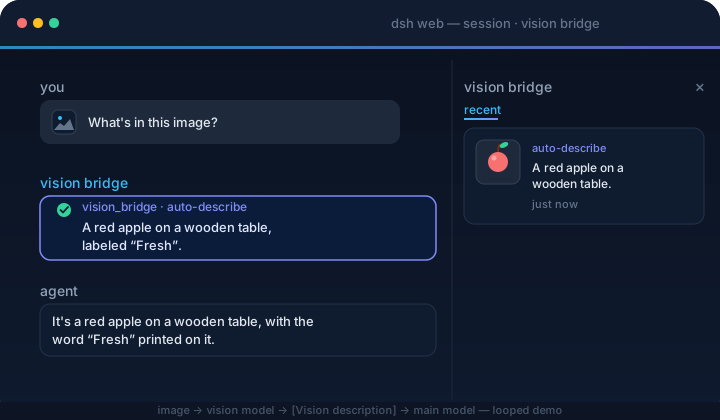
image in composer or tool result → wrapper finds it at any content depth → visible message keeps the image
  → adapter stream → readImage → vision API → "[视觉描述] …" in the private model request only
  → text-only model answers → /vision-bridge/recent → panel thumbnail + description (2s poll)
Unconfigured or failed calls degrade to a [视觉描述失败] <reason> placeholder, so the conversation never breaks.
Quick start
dsh plugin --profile web add dsh-visual-plugin # or: github:jyh20030112/dsh-visual-plugin
When developing this checkout against a local DeepSeek Harness source tree, install the local package instead:
cd /absolute/path/to/dsh-visual-plugin
npm run bootstrap
dsh plugin --profile web add link:/absolute/path/to/dsh-visual-plugin
bootstrap automatically finds a sibling or ancestor-adjacent Harness checkout.
For another layout, set its location explicitly:
HARNESS=/absolute/path/to/deepseek-harness npm run bootstrap
Restart dsh web, then:
Open Settings → Plugins → Plugin configuration and expand the Vision Bridge card:
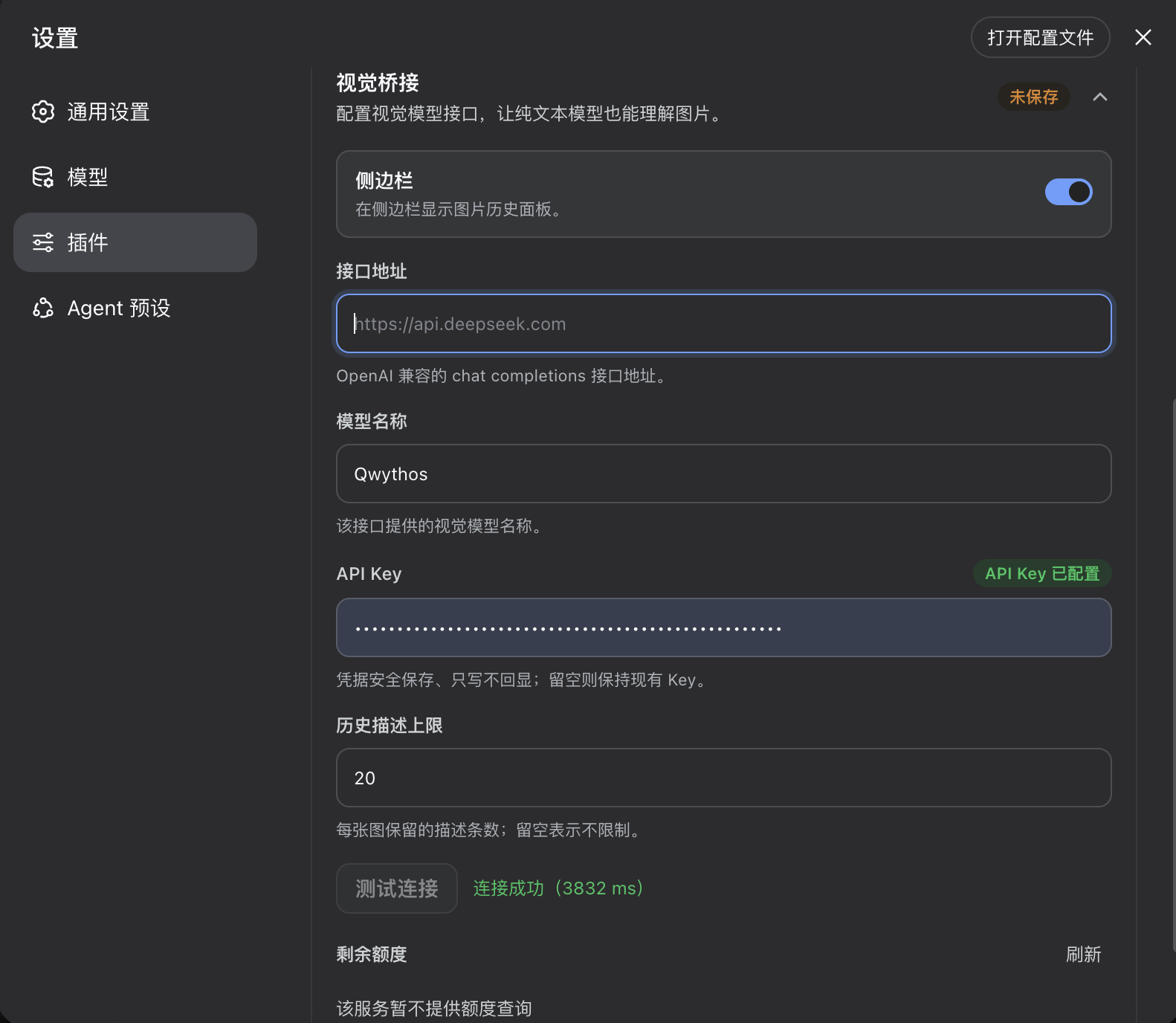
Fill in the endpoint URL, the vision model name, and the API key. The 侧边栏 / Sidebar toggle shows or hides the image-history panel; the history limit defaults to 20, and leaving it empty means unlimited. Click 保存 / Save, then 测试连接 / Test connection.
In the model picker, select provider DeepSeek (Vision) — the plugin's wrapper adapter declares image input so the gateway admits uploads.
Send an image (optionally with a question). The model answers from the generated description, and the image-history panel shows the thumbnail + description within ~2s.
Reference local model
This project is developed and tested with a locally deployed
Empero AI Qwythos-9B
as the vision backend. Its SGLang deployment can expose an OpenAI-compatible
/v1 endpoint; enter the endpoint URL and the server's registered model name
(for example, Qwythos) in the Vision Bridge panel. The plugin is not tied to
Qwythos-9B and can use any compatible vision model.
Uninstall
dsh plugin --profile web remove dsh-visual-plugin
Restart dsh web. The command forwards to pnpm remove inside the profile, and the bundle layer list reconciles to drop the plugin automatically.
Project layout
src/
  index.ts      host plugin: vision orchestration + vision_describe + HTTP routes
  vision.ts     OpenAI-compatible vision calls (describe / test / balance)
  model-messages.ts  model-bound image rewrite + per-attachment cache
  description-policy.ts  intent-first prompt + low-information retry
  config.ts     settings namespace `vision-bridge` + schema
  adapter.ts    deepseek-vision wrapper adapter (admission + private rewrite boundary)
  client/       browser half: panel / sidebar toggle / automatic + tool cards / locales / css
cordis.patch.yml  bundle patch layer
Build
npm run bootstrap && npm run typecheck && npm run build # needs a local harness checkout
Prebuilt lib/ is committed, so consumers never build.
CI/CD
ci.yml verifies artifacts and the pack contents on every push/PR. release.yml (tag v*) checks the version, packs, creates a GitHub Release, and publishes to npm.
Resources
- DeepSeek Harness — the plugin host this project extends.
- Qwythos-9B on Hugging Face — the local vision model used for development and testing.
- awesome-dsh-plugin — the curated DSH plugin list where this plugin is registered.
Thanks
- HsiangNianian — for their help and insights during development.
- tingfeng347 — for the build-stability and local-harness-setup fixes.
- dsh-auto-continue — a DSH Web UI plugin that auto-resumes interrupted requests with 「继续」 (error classification, adaptive backoff, browser notifications); a handy companion.
No comments yet. Be the first to write one.