Calendar Board for DeepSeek Harness
English · 中文
A month-view calendar board for DeepSeek Harness desktop: your daily notes, the reminders you scheduled inside DSH, inline editing right in the grid — and a little celebration every time you finish something.
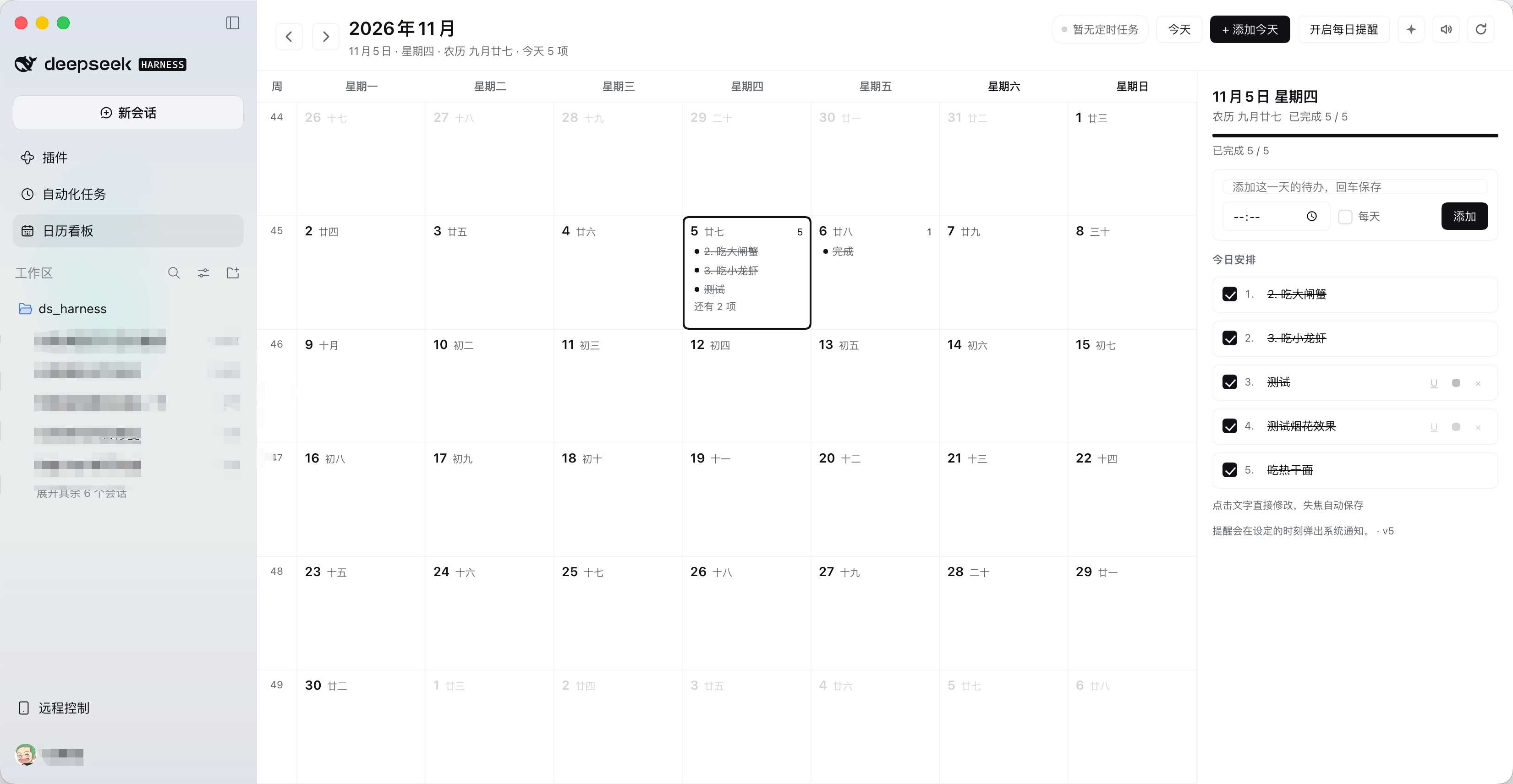
Pure front-end plugin. No build step, no third-party dependencies, no network calls. Your entries live in the page's localStorage; scheduled reminders are read-only.
Features
Month view
- Whole-month grid starting on Monday, with ISO week numbers, lunar dates (via
Intl's Chinese calendar), a highlighted today, and trailing days from the adjacent months - Each cell shows the first 3 entries plus a remaining count; colors, underlines and strikethroughs are preserved
Inline editing
- Click any day cell to edit it in place: an input appears inside the cell, Enter adds another entry and keeps the caret there
- Every line is directly editable and saves as you type; Esc or clicking elsewhere exits, and an uncommitted draft is still persisted
- Clear a line and leave it to delete the entry
Per-entry controls
- Check an entry to complete it — it gets a strikethrough and dims; uncheck to revert
- Hover the end of a row:
Utoggles underline,●cycles the text color (default / red / amber / green / blue),×deletes - The day panel numbers entries
1. 2. 3.and shows a completion progress bar
This Mac's calendars (zero setup)
- On macOS the board reads Calendar.app through AppleScript — every calendar already synced there, Google and Feishu/Lark accounts included — so nothing has to be registered or pasted
- Open + 连接日历, pick the calendars to show, done. The first read raises the system Automation prompt for Calendar
- Reads run in the background and are cached, so a big calendar never blocks the month view
Calendar subscriptions
- Subscribe to any iCalendar feed — the secret iCal address Google Calendar, Feishu/Lark, Outlook or Apple Calendar hands out — and its events appear beside your own tasks
- Every source has its own color; the legend under the header toggles each source on or off
- Recurring events (daily / weekly with
BYDAY/ monthly / yearly,COUNT,UNTIL,EXDATE), all-day events,TZIDwall times and UTC times are expanded into the visible month - Feeds are fetched by the Host and cached for ten minutes; no third-party script runs in the page
Scheduled reminders
- Reads DSH's
scheduleservice and expands daily / weekly / one-shot / every / cron reminders into the calendar - A header badge shows the sync state; the Host half also exposes a read-only
/calendar-board/schedulesroute as a fallback source
Completion celebration
- Finishing an entry plays a three-note arpeggio (synthesized with WebAudio), draws canvas fireworks, adds CSS confetti and shows a toast
✦in the header previews the effect at any time; the speaker toggles sound (remembered locally)- Respects the system "reduce motion" preference
Extras
- Daily nudges through system notifications, fired at the time you set
- Chinese and English UI, built entirely on DSH theme tokens so light and dark both work
Install
One-liner (recommended)
Open a new session in DSH and tell your agent:
Install the plugin github:jy007/dsh-calendar-board
The agent calls the plugin manager's install_bundle. A calendar icon appears in the sidebar afterwards; if it does not, reload the window or restart DSH.
Manual
git clone https://github.com/jy007/dsh-calendar-board.git ~/plugins/dsh-calendar-board
Then ask your DSH agent to install ~/plugins/dsh-calendar-board as a bundle, or pick that directory in the plugin manager.
Use the calendars already on this Mac
Click + 连接日历 and pick from the 本机日历(macOS) list. The first read asks macOS to let DSH control Calendar (System Settings → Privacy & Security → Automation); allow it once.
Update
cd dsh-calendar-board && git pull
Then install github:jy007/dsh-calendar-board again in DSH. The plugin installs a snapshot copy, so it does not follow the repository by itself; the vX.Y.Z in the panel footer is the version currently running.
Uninstall
Remove dsh-calendar-board in the plugin manager. Your entries stay in the browser's local storage.
Usage
- Click the calendar icon in the sidebar to open the board
- Click a day and start typing right in the cell (Enter keeps going, Esc exits)
- Check an entry to complete it → chime + fireworks; hover for color, underline, delete
- Header:
‹ ›month,Today,+ Add for today,Daily nudge,✦preview the fireworks, speaker to mute,⟳resync scheduled reminders
Agent access
The Host half is the canonical store, so every DSH session can read and edit the board through one tool — no browser scraping, no screenshots:
{ "action": "list", "from": "2026-11-02", "to": "2026-11-08" }
{ "action": "add", "date": "2026-11-06", "title": "给 adon 发邮件", "time": "10:00" }
{ "action": "complete", "id": "itmw3c6bd3c83xd" }
{ "action": "remove", "id": "itmw3c6bd3c83xd" }
| action | arguments | meaning |
|---|---|---|
list |
date or from/to, includeDone |
entries with id, date, time, title, done, repeat, color |
Every action answers with the same envelope: { "ok": true, ... } — list adds today, count and items; the others return the touched item or removed.
| add | title, optional date (defaults to today), time, repeat:"daily" | create an entry |
| update | id + any of title/date/time/repeat/color/underline | edit in place |
| complete | id, optional date, done | tick or untick one day of one entry |
| remove | id | delete an entry |
| sources | – | the local, scheduled and subscribed calendars with their colors |
| events | from/to | events of every subscribed feed in a window |
| subscribe | name, url | add an iCal subscription (webcal:// is normalised) |
| unsubscribe | id | remove a subscription |
| toggleSource | id, enabled | hide or show one source |
| calendars | – | the calendars this Mac already syncs (with the ones on the board marked) |
| subscribe | provider:"local", calendarId, color | add one of this Mac's calendars |
Things you can simply say to your agent:
- 今天还剩哪些事没做?
- 帮我加一条:明天 10 点给 adon 发邮件
- 把「吃小龙虾」标记完成
Other plugins can call the same implementation through the calendarBoard Host service.
Data and privacy
| What | Where |
|---|---|
| Your entries | <DSH_HOME>/storages/calendar-board/items.json on the Host; the page keeps a localStorage cache |
| Subscribed iCal addresses | <DSH_HOME>/storages/calendar-board/sources.json; their events are cached in memory only |
| Which legend chips are off | browser localStorage: dsh-calendar-board.hidden-sources.v1 |
| Sound preference | dsh-calendar-board.sound.v1 |
| Daily nudge preference | dsh-calendar-board.notify.v1 |
| Scheduled reminders | read-only, from the DSH schedule service, never stored |
The page itself makes no network requests beyond DSH's own local HTTP port. The Host fetches a subscribed iCal URL only when a month is displayed (cached for 10 minutes), so the calendar provider sees a request from this machine — treat the secret iCal address like a password. The panel footer shows 已同步 Host / 仅本机保存 so you can see whether it is talking to the Host store.
Compatibility
- DSH Desktop NEXT (the
desktop-nextprofile, Web GUI) - Registers the Client slots
sidebar.panellist(icon) andmain(panel) - Optional Host services:
schedule(without it the header shows "Scheduled reminders unavailable" and everything else still works) andwebServer(without it only the remote channel is used)
Publishing / using this repo as an index source
This repository ships its own format-1 market index at dsh-index.json, so it can be added to DSH as a plugin source without any server:
https://cdn.jsdelivr.net/gh/jy007/dsh-calendar-board@main/dsh-index.json
Open Plugins → Discover → Add index source, paste that URL, and the plugin shows up searchable with a one-click install.
To reach the wider community market, submit the repo to awesome-dsh-plugin (PR against its list); its catalog is republished daily as the index most DSH markets consume.
Every market-listed version must declare engines.dsh; this package declares >=0.2.1-rc.2 (the DSH runtime bundled with DSH Desktop NEXT 2.0.19).
Development
dsh-calendar-board/
├── package.json        # dsh.bundle / dsh.client manifest
├── cordis.patch.yml    # inserts the calendar-board row
├── index.js            # Host half: read-only schedules route
├── client.js           # Client half: panel + sidebar icon (classic script, IIFE)
├── locale/{zh,en}.json # title and description shown by the plugin manager
└── icon.svg
client.js is loaded by the page as a classic script, and HMR evaluates the same file more than once, so every declaration is wrapped in an IIFE — otherwise the second evaluation throws Identifier '...' has already been declared.
To develop against a checkout, link the directory into your profile:
Install the plugin /absolute/path/to/dsh-calendar-board
Edits to client.js hot-reload; edits to index.js (the Host half) need a DSH restart.
Changelog
- 1.5.1 — works on DSH 0.2.2 (2.0.22-next): services must be declared in
export const injectas a name array, so the tool and HTTP routes register again; the local calendar picker no longer throws when opened - 1.5.0 — scheduled reminders now appear only for today and tomorrow, coloured by run state (due today red, tomorrow amber, ran/expired grey) and refreshed every 30s; the legend's "My entries" and "Scheduled" chips now really hide their layer; the Google OAuth provider is removed, so calendar sources are iCal subscriptions and this Mac's calendars only
- 1.4.0 — local calendar reading on macOS through Calendar.app (no OAuth client, no iCal address), with a picker in the connect panel and background caching
- 1.3.0 — Google Calendar sign-in: OAuth 2.0 + PKCE with a loopback redirect, token refresh,
calendarList+events.listsync, andconnect/disconnect/accounts/calendarstool actions - 1.2.0 — calendar subscriptions: iCal feeds (Google / Feishu / Outlook / Apple) with per-source colors, a legend that toggles each source, and
sources/events/subscribe/unsubscribe/toggleSourcetool actions - 1.1.2 — the panel-independent migration runs on page load, so pre-1.1 localStorage entries reach the Host store without opening the panel
- 1.1.1 — the panel retries the Host connection every 15s instead of staying local after one failed attempt
- 1.1.0 — Host-side store +
calendar_boardagent tool +calendarBoardservice; the panel syncs to the Host store instead of living only in localStorage - 1.0.1 — README screenshot; the panel footer now shows the package version
- 1.0.0 — first public release: month view, inline editing, complete / underline / color / delete per entry, scheduled-reminder overlay, completion chime + fireworks + confetti
License
MIT © 2026 jy007
No comments yet. Be the first to write one.