额度总览 · dsh-quota-overview


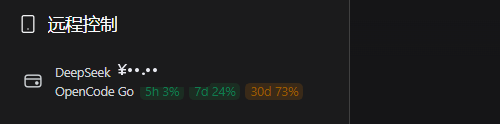
DSH(DeepSeek Harness)Web 插件:在侧边栏底部、用户头像上方新增一整行「额度」入口,同时展示 DeepSeek 账户余额与 OpenCode Go 套餐用量;点击入口弹出详情弹窗,可查明细、重置倒计时, 并在缺失密钥时直接填入 API Key。
功能
- 侧边栏入口(整行两排摘要):
- 第一排:
DeepSeek ¥余额; - 第二排:
OpenCode Go的 5 小时 / 本周 / 本月三档用量徽章(<60% 绿 / 60–85% 黄 / ≥85% 红); - 悬停显示完整摘要;侧边栏折叠成窄栏时自动变为图标。
- 第一排:
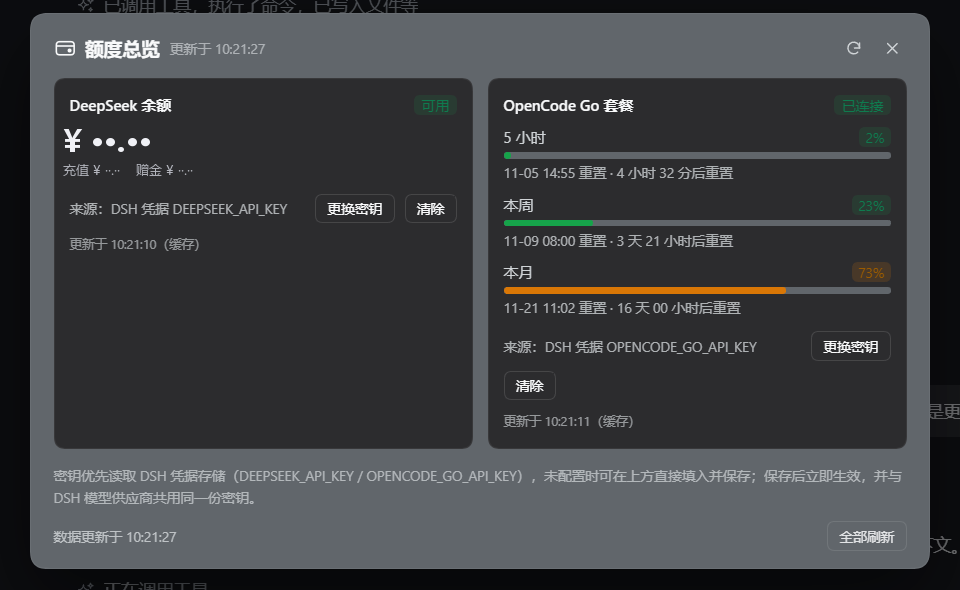
- 详情弹窗(点击入口打开;Esc / 点击遮罩 / 右上角 ✕ 关闭):
- DeepSeek:总额、充值余额、赠金、可用状态、数据来源;
- OpenCode Go:三条进度条(5 小时 / 本周 / 本月)、百分比、重置时刻与每秒跳动的倒计时;
- 右上角刷新(
?fresh=1绕过 30 秒缓存)与「全部刷新」。
- 密钥解析顺序(默认先读凭据,通常零配置):
- DSH 凭据存储:
DEEPSEEK_API_KEY/OPENCODE_GO_API_KEY(也覆盖启动环境变量提供的值); - 同名进程环境变量;
- OpenCode CLI 登录文件
~/.local/share/opencode/auth.json中的opencode-go条目。
- DSH 凭据存储:
- 缺失即提示填入:两类 Key 都没找到(或返回 401)时,弹窗内对应卡片直接显示密码输入框,
保存即写入
DEEPSEEK_API_KEY/OPENCODE_GO_API_KEY两个 DSH 凭据,与 DSH 模型供应商共用 同一份密钥,保存后立即重新查询。
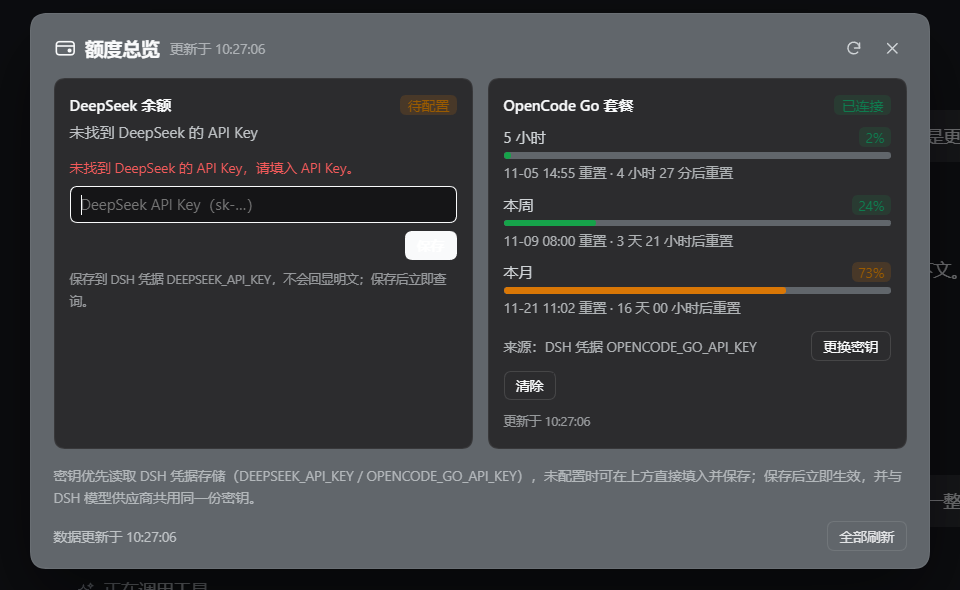
- 支持「更换密钥」「清除」已保存的 Key(清除为二次确认);环境变量提供的只读密钥会被拒绝并提示原因。
安装
# 从 npm 安装(发布后)
dsh plugin add dsh-quota-overview

# 或指定 profile
dsh plugin --profile desktop add dsh-quota-overview
也可以在 DSH 的「设置 → 插件」中通过插件市场搜索 dsh-quota-overview 安装(收录后)。
结构
| 文件 | 说明 |
|---|---|
index.js |
Host 半:解析凭据、查询上游、注册 /api/dsh-quota-overview/status 与 /api/dsh-quota-overview/key 路由 |
client.js |
Client 半:sidebar.footer.action 入口 + shell.overlay 详情弹窗(手写 __ModuleLoader__ bundle,无需构建) |
cordis.patch.yml |
Bundle 层:插入 dsh-quota-overview 行 |
locale/zh.json / locale/en.json |
插件显示名称与描述 |
icon.svg |
原创图标 |
docs/preview-*.png |
预览截图 |
数据来源
- DeepSeek:
GET https://api.deepseek.com/user/balance(BearerDEEPSEEK_API_KEY) - OpenCode Go:
GET https://opencode.ai/zen/go/v1/usage(BearerOPENCODE_GO_API_KEY)
密钥只在 Host 进程内使用,不会返回浏览器;浏览器只看到余额/百分比与来源描述。
English
dsh-quota-overview is a DSH (DeepSeek Harness) Web plugin that adds a full-width "Quota" entry to the
sidebar footer, right above the user row. It shows the DeepSeek account balance and OpenCode Go
quota windows (5h / weekly / monthly) together. Clicking the entry opens a dialog with details, live
reset countdowns and inline API-key setup.
Keys are resolved from DSH credential refs DEEPSEEK_API_KEY / OPENCODE_GO_API_KEY first (which also
covers values supplied by the launching environment), then the same process environment variables, then
the OpenCode CLI auth file (~/.local/share/opencode/auth.json). When a key is missing or rejected, the
dialog renders a password field and saves the value back to the same DSH credential ref.
dsh plugin add dsh-quota-overview
License
MIT © 2026 joyboy-yy
No comments yet. Be the first to write one.