Open with Finder / IDE — DSH 工作区快捷打开插件
DSH 侧边栏插件:把每个工作区文件夹行变成一键直达入口——悬停即现 访达 / Zed / Ghostty 三个图标,点一下就在本机对应应用中打开该目录。



安装(一键命令)
dsh plugin --profile web add "github:johnsonspirit/open-with-finder-ide"
Open workspace folders in Finder / Zed / Ghostty from the DSH sidebar (macOS). 安装后重启 DSH(
dsh web)即生效。纯 JS 无构建步骤,无需allowBuilds。
目录
特性
- 🖱️ 行内悬停按钮 — 每个
workspace:<id>侧边栏行右侧自动追加三个 16px 图标按钮,与原生···菜单并排,不遮挡原有操作。 - 🔍 可用性感知 — 启动时请求
/status,只渲染本机真实存在且配置允许的应用按钮(没装 Zed 就不显示 Zed 按钮)。 - 🌐 中英双语 — 跟随 DSH locale,中文显示「在访达中打开」,英文显示 "Open in Finder"(含
title+aria-label无障碍标签)。 - 🔔 操作反馈 — 成功/失败均有右下角 toast 提示(
已在 Finder 中打开/打开失败:…),按钮在请求期间置灰并脉冲动画,防止重复点击。 - 🛡️ 服务端解析路径 — 浏览器只发送
workspaceId + app,真实目录由服务端workspaceRegistry解析,客户端无法伪造路径打开任意目录。 - 🚫 无 shell、无 PATH 查找 — 统一
execFile('open', [...固定参数]),不存在命令注入面。
运行要求
| 依赖 | 版本 / 说明 |
|---|---|
| Node.js | ≥ 18(package.json → engines 已声明) |
| 操作系统 | macOS(darwin)——打开目录走系统 open 命令,非 macOS 下接口返回 mac: false 且按钮不渲染 |
| DSH host | 提供 webServer(路由注册)与 workspaceRegistry(get(id) → { path })注入 |
| 可选应用 | Zed(/Applications/Zed.app 或 ~/Applications/Zed.app)、Ghostty(同上),Finder 为系统自带 |
本机实测(2026-09-27):
/Applications下Zed.app与Ghostty.app均已安装,三按钮全亮。
安装
推荐用顶部的一键命令安装(Store 上架要求格式):
dsh plugin --profile web add "github:johnsonspirit/open-with-finder-ide"以下为开发/本地调试备选方式:
方式 A — 作为 DSH 本地插件引入(开发用)
# 1. 克隆
git clone https://github.com/johnsonspirit/open-with-finder-ide.git
cd open-with-finder-ide

# 2. 自检(语法检查)
npm run check
然后在你的 DSH bundle(cordis.patch.yml)中挂载本插件,dsh.client.platform: web 会自动加载 client.js。
方式 B — 直接复用补丁片段
把本仓库的 cordis.patch.yml 内容合并进你现有 DSH 工程的补丁文件:
- insert:
    - id: folder-open
      name: 'dsh-folder-open'
      config:
        finder: true
        zed: true
        ghostty: true
配置
插件配置(Config["~standard"] 标准 schema,可缺省,全缺省即三项全开):
| 字段 | 类型 | 默认 | 说明 |
|---|---|---|---|
finder |
boolean | true |
是否启用「在访达中打开」 |
zed |
boolean | true |
是否启用「在 Zed 中打开」 |
ghostty |
boolean | true |
是否启用「在 Ghostty 终端中打开」 |
示例——只保留访达和 Zed:
config:
  finder: true
  zed: true
  ghostty: false
非布尔值会在加载期被 schema 拒绝并提示 {key} must be a boolean。
使用方法
- 启动 DSH,打开任意带工作区文件夹的侧边栏视图。
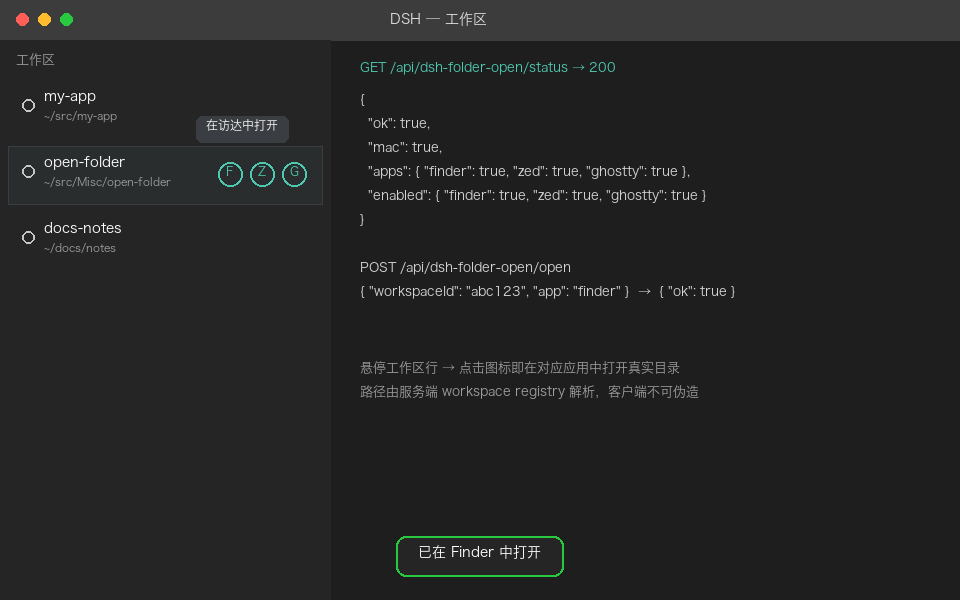
- 把鼠标悬停到某一工作区行(例如
open-folder ~/src/Misc/open-folder)。 - 行右侧出现三个图标:笑脸(访达)/ 方块 Z(Zed)/ 小幽灵(Ghostty),悬停有中文 tooltip。
- 单击图标 → 对应应用打开该目录 → 右下角 toast 确认。
- 若某应用未安装,对应图标自动隐藏,无需任何配置。
API 参考
基址:/api/dsh-folder-open。全部接口仅限 loopback(127.0.0.1 / ::1 / localhost,且 Origin 必须与 Host 同源,Sec-Fetch-Site: cross-site 直接拒绝)。
GET /api/dsh-folder-open/status
查询本机能力与插件开关(支持 HEAD,不返回 body)。
curl http://127.0.0.1:PORT/api/dsh-folder-open/status
{
  "ok": true,
  "mac": true,
  "apps": { "finder": true, "zed": true, "ghostty": true },
  "enabled": { "finder": true, "zed": true, "ghostty": true }
}
apps.*:本机是否真实可用(含*.appbundle 存在性探测)。enabled.*:插件配置开关。
POST /api/dsh-folder-open/open
打开指定工作区目录。
curl -X POST http://127.0.0.1:PORT/api/dsh-folder-open/open \
  -H 'content-type: application/json' \
  -d '{"workspaceId":"abc123","app":"finder"}'
| 字段 | 约束 |
|---|---|
workspaceId |
非空字符串,长度 ≤ 80,必须能在 workspaceRegistry 中解析出 path |
app |
仅限 finder / zed / ghostty |
| body 上限 | 16 KiB,超限按 invalid request 处理 |
状态码对照:
| 状态码 | 含义 |
|---|---|
| 200 | { ok: true, app },已唤起应用 |
| 400 | 非法请求(参数缺失/超长/未知 app) |
| 403 | 非 loopback、或该 app 在插件配置中被禁用 |
| 404 | workspace 不存在、或目录已不存在 |
| 405 | 方法不允许 |
| 500 | registry 不可用、唤起失败(含 Zed is not installed / Ghostty is not installed 等友好文案) |
底层唤起命令(execFile,无 shell):
| app | 实际执行 |
|---|---|
| finder | open <dir> |
| zed | open -a Zed <dir> |
| ghostty | open -na Ghostty.app --args --working-directory=<dir> |
安全设计
- 路径永不信任客户端 —
workspaceId → path只走服务端workspaceRegistry.get(),POST body 里根本没有 path 字段可供伪造。 - Loopback 强校验 —
remoteAddress+Host+Origin+Sec-Fetch-Site四重检查,局域网其他机器与跨站页面无法调用。 - 固定 argv — 所有唤起走
execFile('open', [...]),目录作为单个 argv 元素传递,不经过 shell,分号/反引号/$()等一律无害。 - 输入上限 — body 16 KiB 封顶,
workspaceId限长 80 字符。 - 能力探测不走 PATH — 只检查
/Applications与~/Applications下的固定*.app,避免 PATH 劫持误报。
项目结构
open-with-finder-ide/
├── index.js            # 服务端:一半——loopback bridge(/status + /open),路径解析与应用唤起
├── client.js           # 浏览器端:一半——装饰侧边栏 workspace 行、渲染按钮与 toast
├── cordis.patch.yml    # DSH bundle 挂载片段(默认三开关全开)
├── icon.svg            # 插件图标(文件夹 + 外开箭头)
├── package.json        # 包元信息(engines/node>=18、check 脚本、dsh 声明)
├── docs/
│   └── screenshot.png  # 效果示意(悬停按钮 + tooltip + toast + API 预览)
├── LICENSE             # MIT
└── README.md
数据流(一句话):悬停行按钮 → POST {workspaceId, app} → 服务端 registry 解析 path → execFile('open', …) → toast 反馈。
开发与自检
npm run check # node --check index.js + client.js,输出 OK 即通过
修改 client.js 后无需构建——DSH 以源码形式加载。注意保持以下约定:
- CSS 注入键固定为
openFolder/buttons.css(data-plugin-css去重)。 - 行选择器依赖 DSH DOM 约定:
div[data-row-key^="workspace:"],最后一个含<button>的<span>即原生操作区。 - 状态接口失败会自动重试 6 次(间隔 2s),覆盖"页面先于服务端桥就绪"的竞态。
兼容性
| 环境 | 行为 |
|---|---|
| macOS + 三应用齐全 | 三按钮全显(本机实测状态) |
| macOS 仅 Finder | 只显示访达按钮 |
| 非 macOS(Linux/Windows) | mac: false,按钮全部隐藏,/open 返回错误 |
| 插件配置关闭某项 | 该按钮隐藏,服务端同时返回 403 双保险 |
故障排查
| 现象 | 排查 |
|---|---|
| 按钮一个都不出现 | 打开 DevTools 看 GET /api/.../status 是否 200;确认 Config 三项至少开一项;确认行 DOM 仍是 data-row-key="workspace:*" 约定 |
点击提示 Zed is not installed |
确认 /Applications/Zed.app 存在(聚光灯安装位置若不同,需移到标准路径) |
点击提示 Ghostty is not installed |
同上,检查 Ghostty.app |
提示 folder no longer exists |
工作区目录已被删除或卸载(HTTP 404),重新绑定工作区路径 |
提示 loopback only(403) |
页面不是经由 127.0.0.1/localhost 访问,或经过了跨站 iframe/代理 |
| 页面先出来、按钮延迟几秒才出现 | 正常:loadStatus 有 2s×6 次重试,服务端桥就绪后自动补渲染 |
更新日志
v1.0.0(2026-09-27)
- ✨ 初始开源:访达 / Zed / Ghostty 行内一键打开。
- 🛠️ 修复:
POST /open错误状态码扁平化问题——目录缺失返回 404、未知 app 返回 400(此前一律 500);补齐HEAD /status空 body 语义;catch复用launchErrorMessage友好文案(含缺失应用提示)。 - 🛠️ 补齐工程文件:
repository/license(MIT)/author/keywords/engines(node>=18)/check脚本 /.gitignore/LICENSE。 - 📸 新增
docs/screenshot.png效果示意(含 tooltip + toast + API 预览)。 - 📖 重写本 README(中文为主,附英文摘要)。
License
MIT © 2026 johnsonspirit,详见 LICENSE。
English Summary
A DSH sidebar plugin that appends Finder / Zed / Ghostty quick-open icon buttons to every workspace folder row on hover. The browser sends only { workspaceId, app } to a loopback-only bridge (GET /status, POST /open); the server resolves the real path via the host workspaceRegistry and launches it with execFile('open', …) — no shell, no client-supplied paths. Buttons auto-hide when the app isn't installed or is disabled in config; UI is bilingual (zh/en) with toast feedback. Requires macOS + Node ≥ 18. See Features and API above; screenshot: docs/screenshot.png.
No comments yet. Be the first to write one.