dsh-code-review
English | 简体中文
A DeepSeek Harness code review plugin built on alibaba/open-code-review: a sidebar entry plus a full-page code review workbench that brings the
ocrCLI's AI review, local repository structural analysis and review history together into one actionable, traceable review center.
Four review types are supported: current project changes / a specific commit / branch comparison, project architecture, code modules, and business data-flow workflows. Every review has live stage progress and an activity stream; open one to read the per-finding results grouped by severity, the suggested-code diffs and the coverage. The overview page shows the past year's commit and review rhythm as a GitHub-style heatmap and summarizes the projects and hotspot modules reviewed recently — all on one screen.
The implementation contract is documented in docs/CODE-REVIEW-CONTRACT.md, and the delivery and acceptance records in docs/CODE-REVIEW-DELIVERY.md.
Screenshots
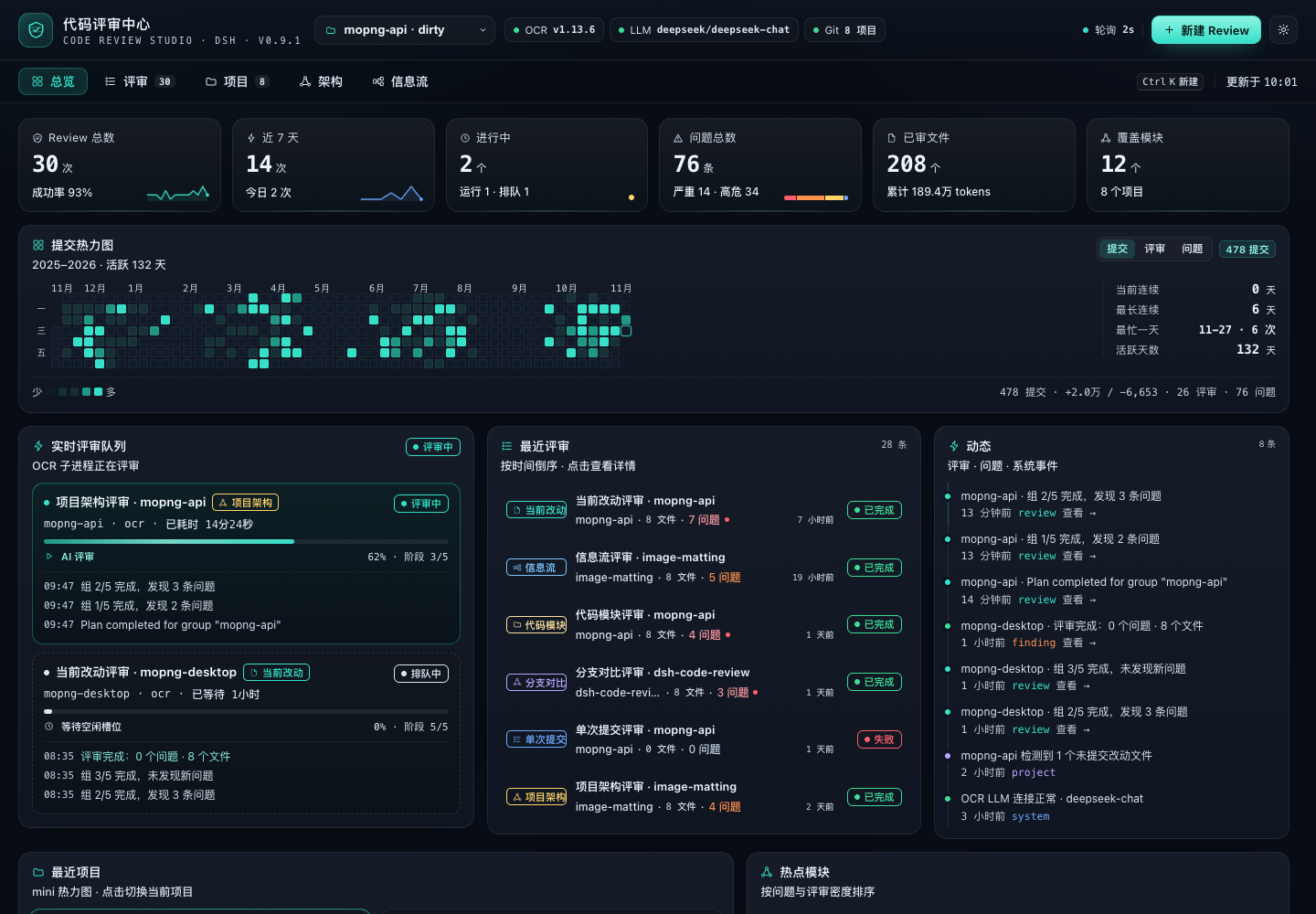
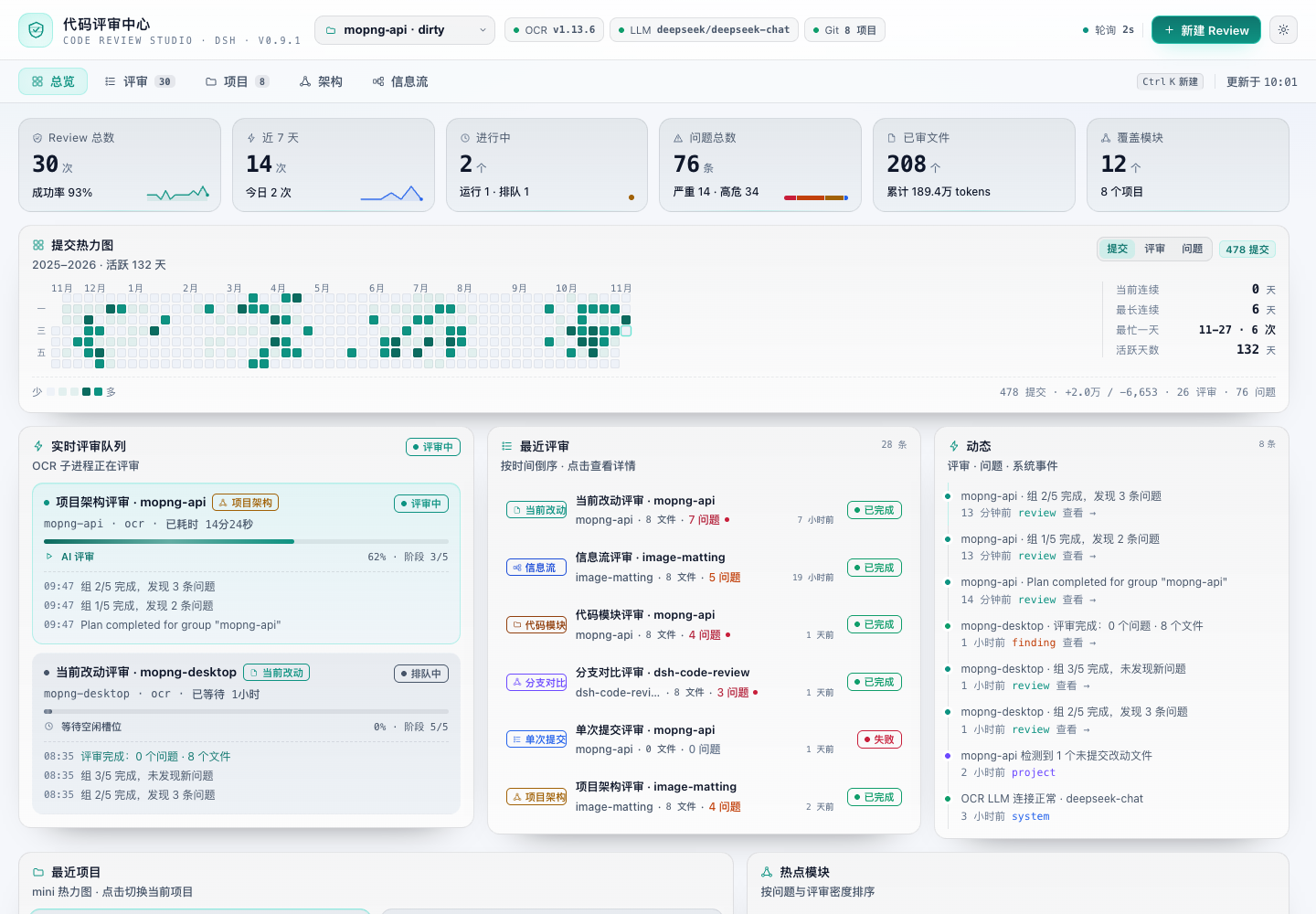
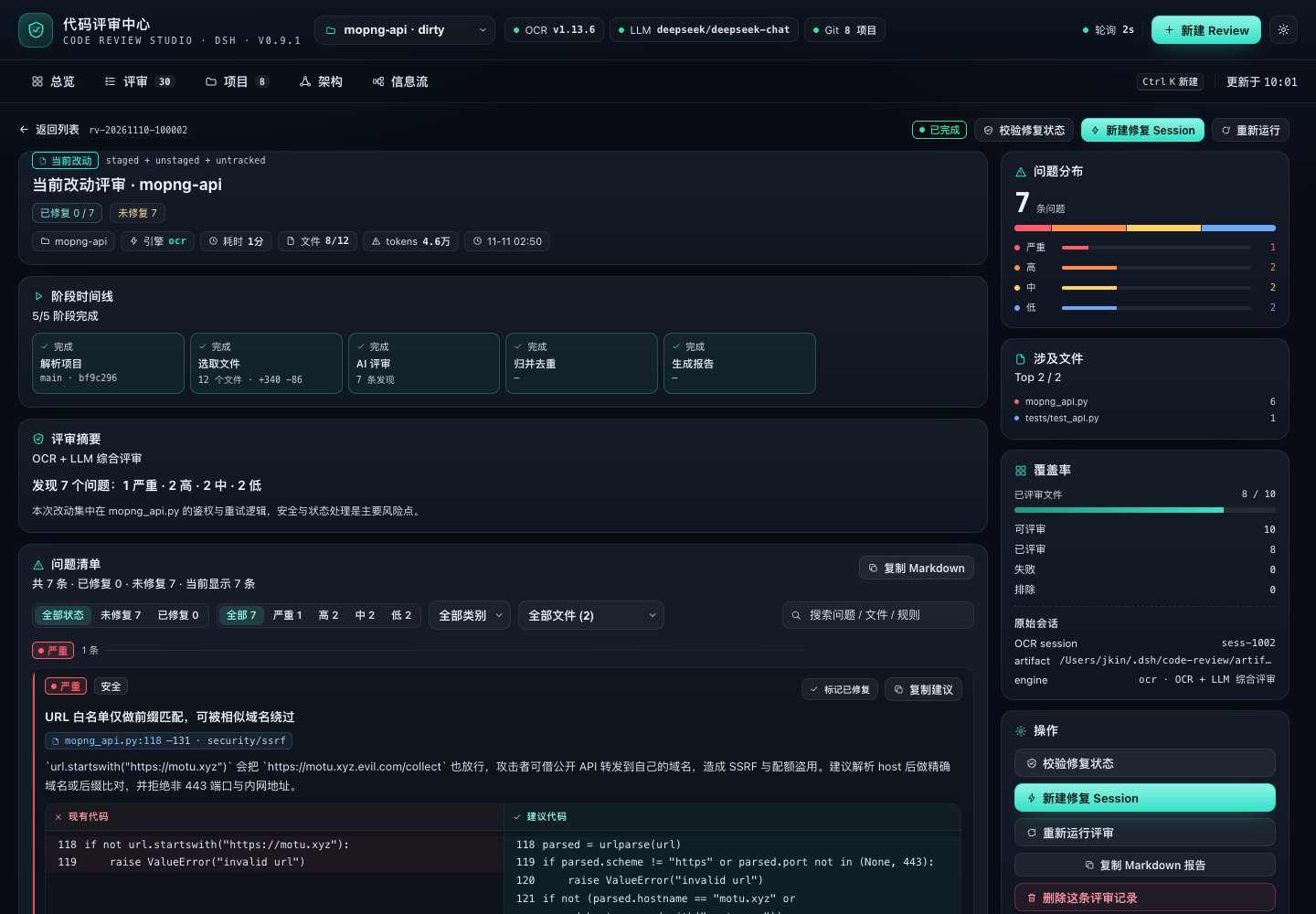
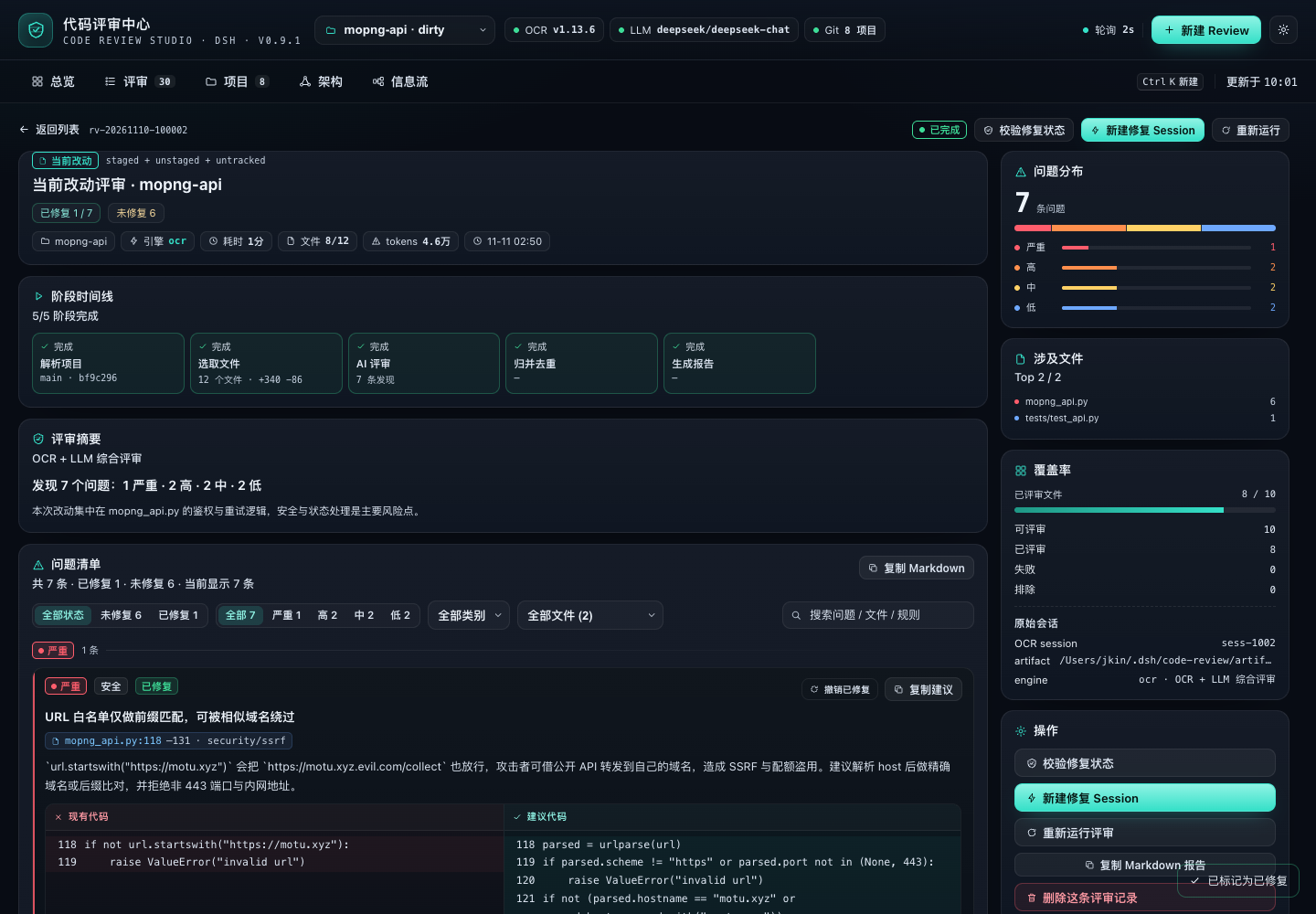
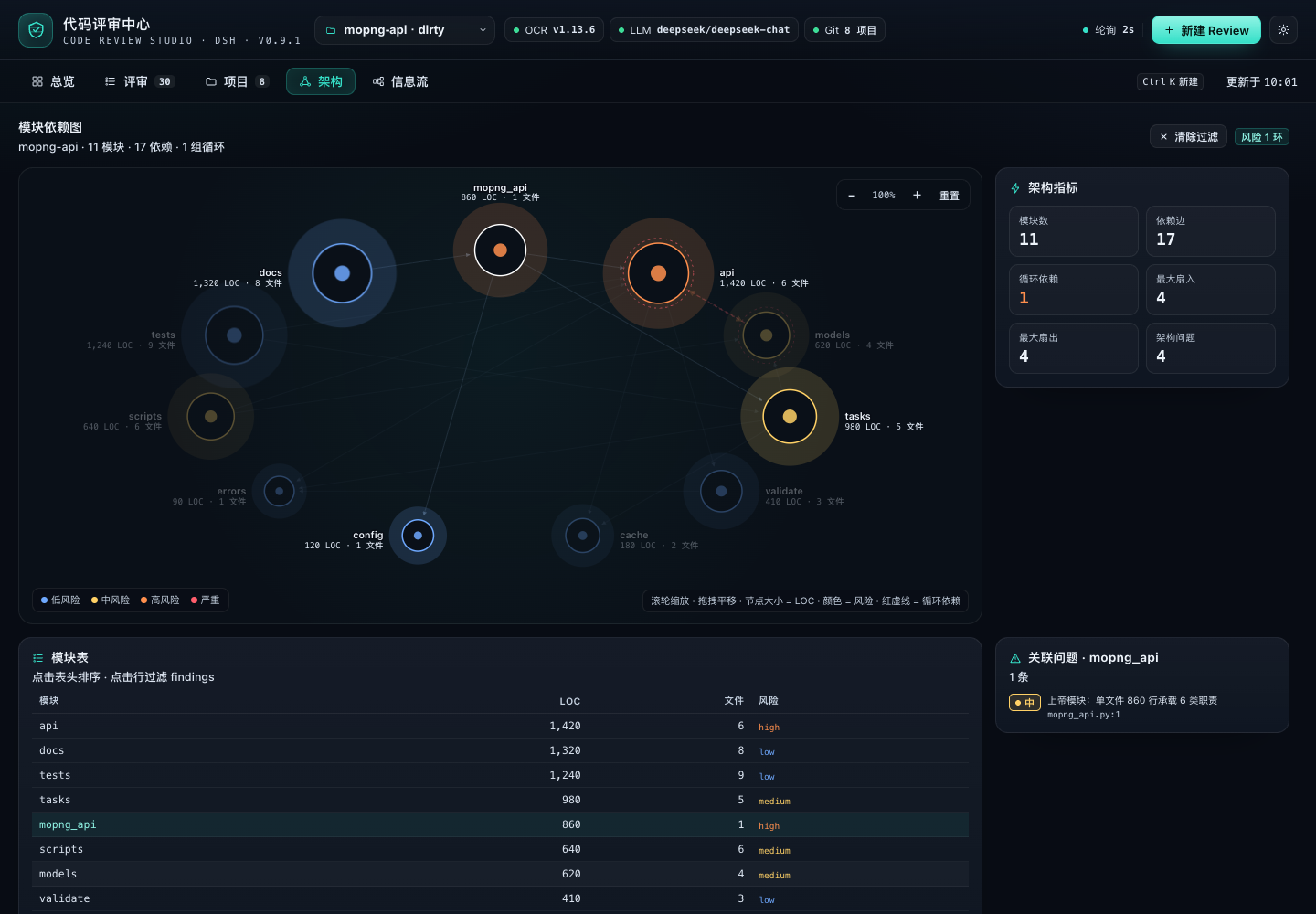
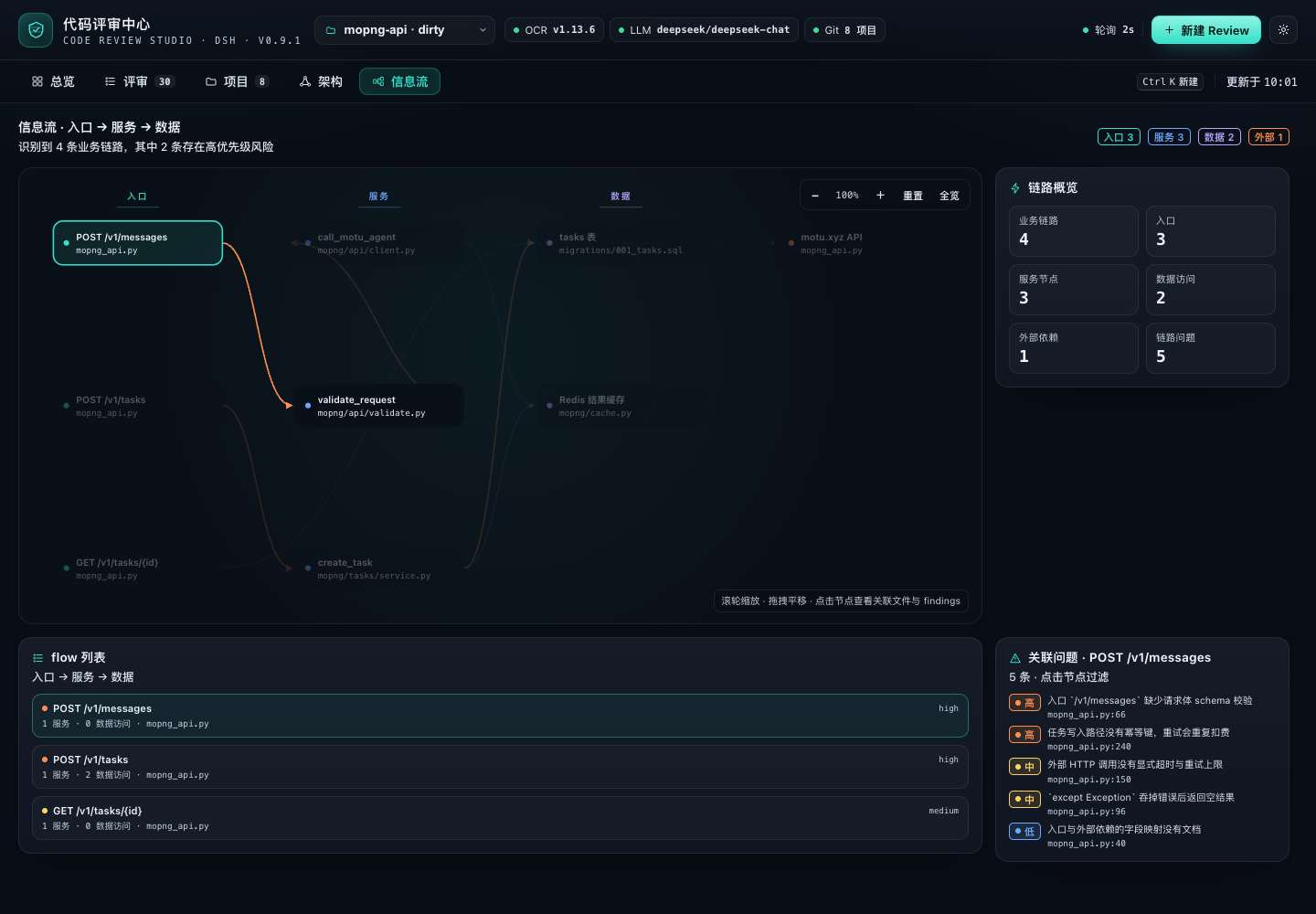
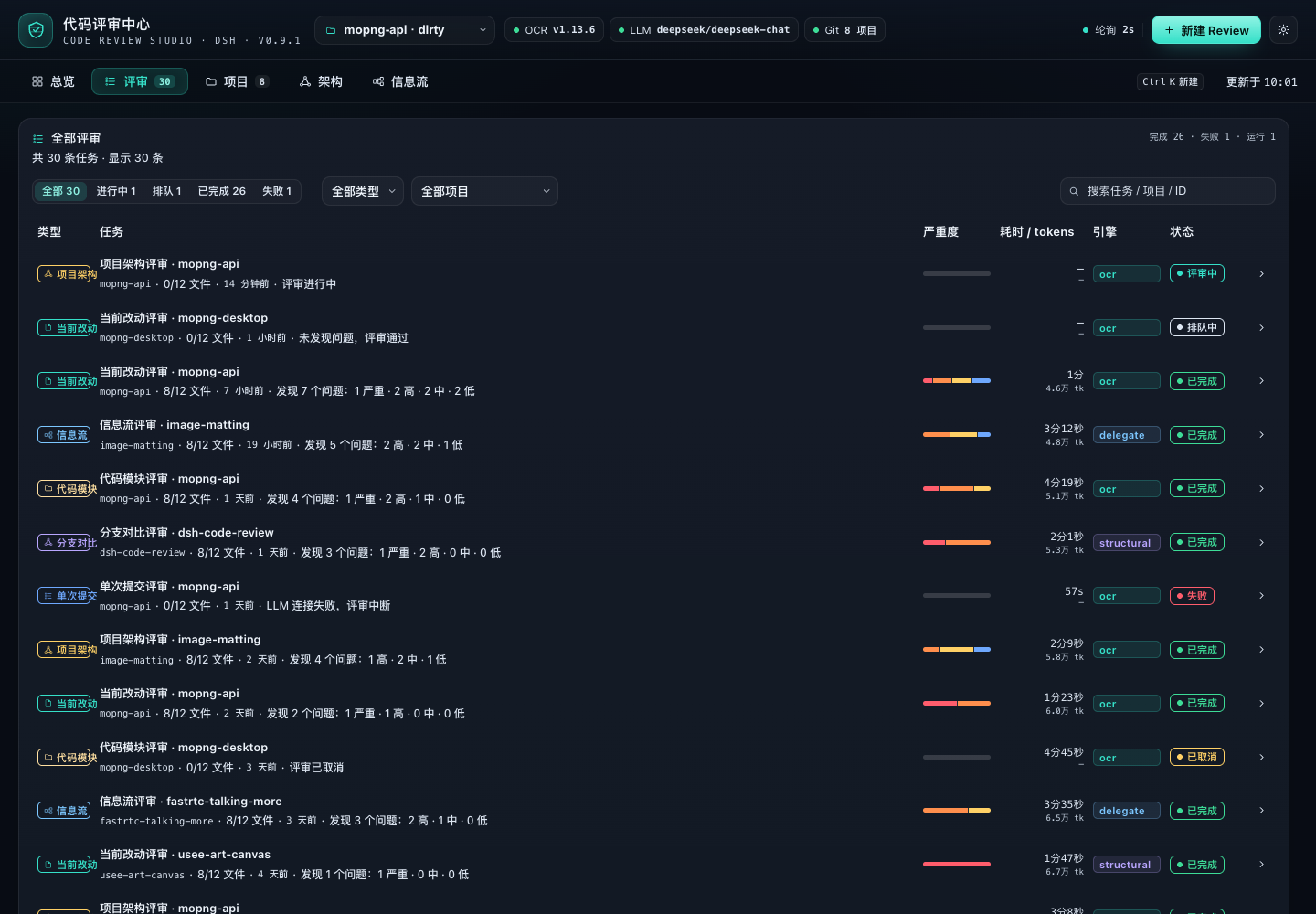
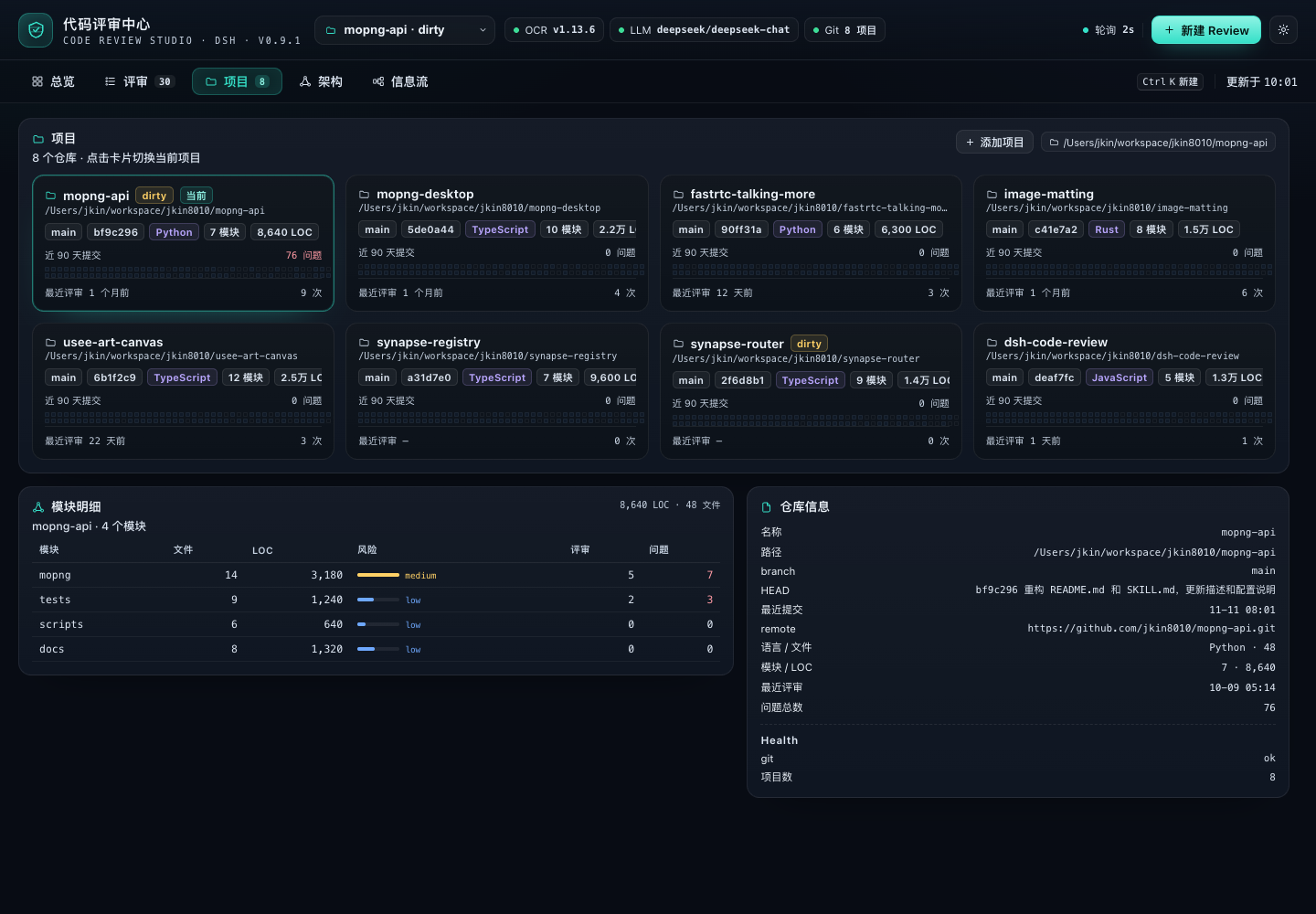
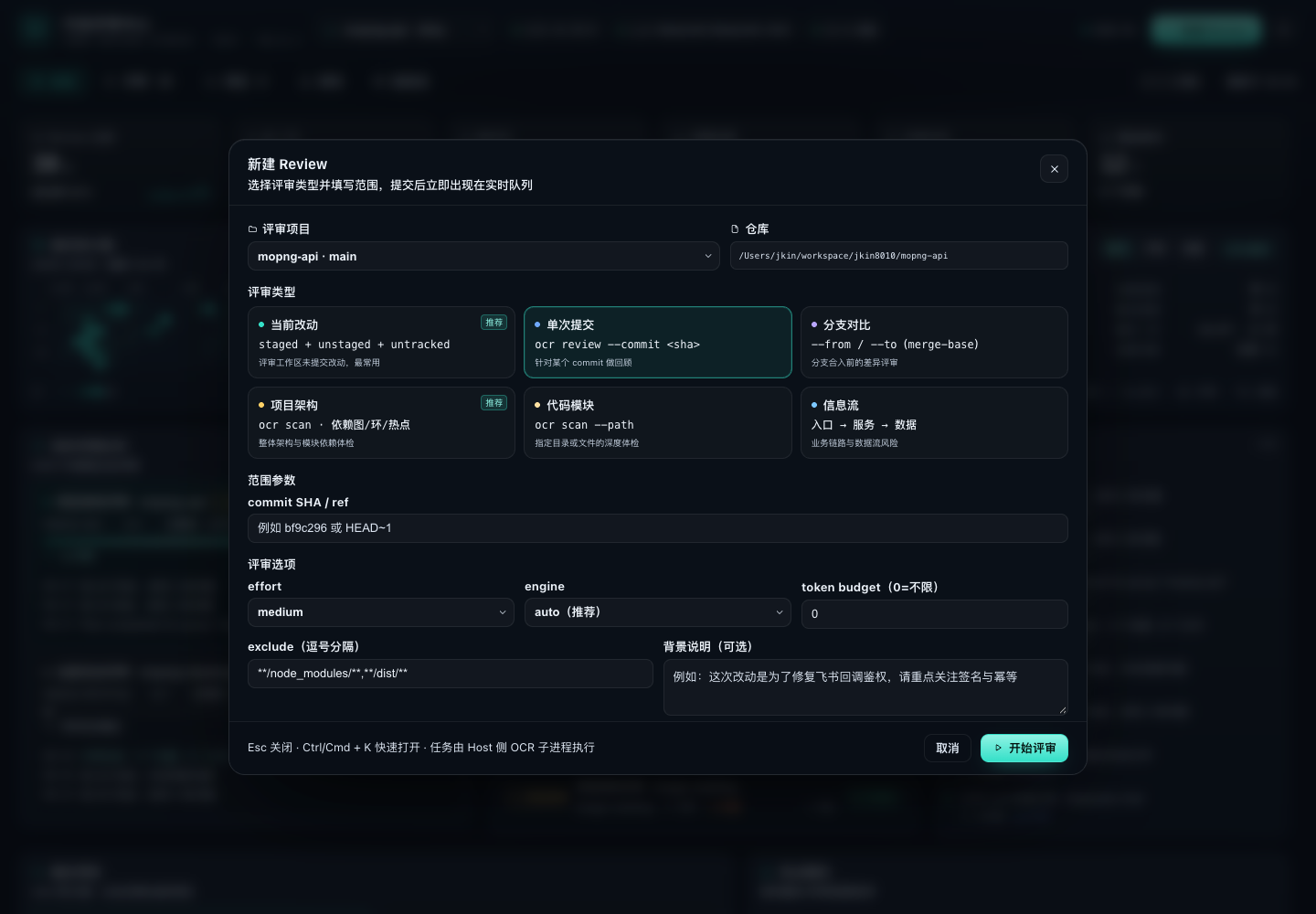
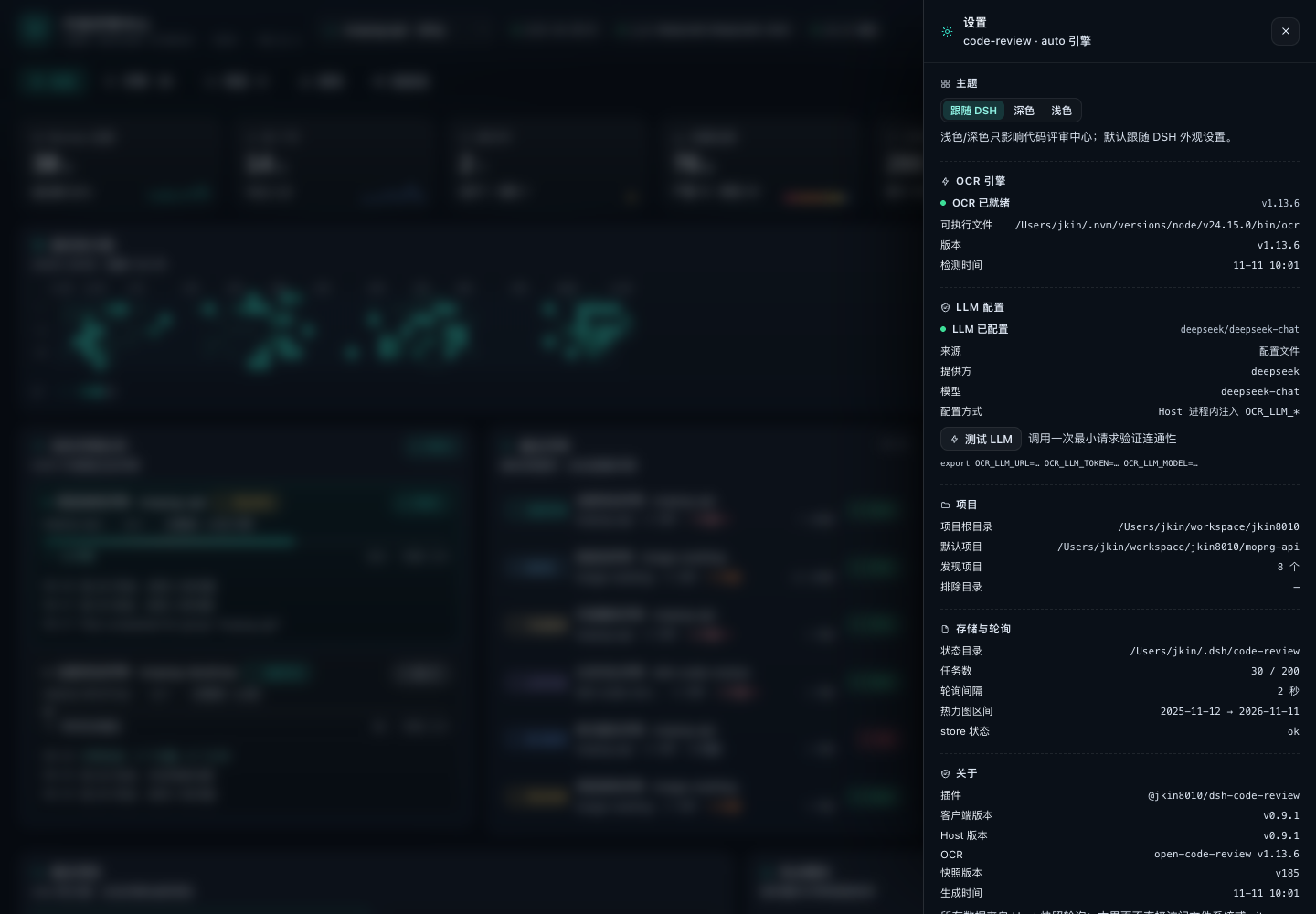
The screenshots are rendered by the standalone preview harness in
tests/code-review/preview/(it loads the realclient.jswith contract mock data). The project list uses public repository names from @jkin8010, and the review data is demo data.
Features
- Four review types
- Current changes: staged + unstaged + untracked (
ocr review) - Single commit / branch comparison:
ocr review --commit,--from/--to - Project architecture: multi-language import dependency graph, Tarjan cycle detection, layering / god modules / missing tests (local analysis +
ocr scan) - Code module: whole-file review of a specified directory or file (
ocr scan --path) - Business data-flow workflow: entry → service → data/external dependencies, checking validation, authorization, transactions, idempotency, timeouts and swallowed exceptions
- Current changes: staged + unstaged + untracked (
- Three engines, selected automatically:
ocr(OCR's bundled LLM),delegate(OCR selects files and resolves rules, the review runs on the current DSH session model — no extra API key) andstructural(offline, zero LLM dependency, used automatically when no model is available). See Engines. - Live and traceable: a six-stage state machine per review, stage progress, activity stream, cancel and retry, plus automatic "interrupted" marking after a Host restart
- GitHub-style heatmap: 53 weeks × 7 days, three metrics (commits / reviews / findings), hover for that day's commits, additions and deletions, reviews and findings, plus streaks and the busiest day
- Details and stats: findings grouped by severity, file:line, side-by-side original vs. suggested code, copy suggestion; recently reviewed projects, hotspot modules, severity/category distribution, coverage
- Light / dark themes: follows the DSH appearance setting automatically; can be pinned to dark or light in the settings drawer. See Themes.
- Data-flow depth: resolves TS/monorepo path aliases (
@/,~/) and.js→.tsESM imports, so it can trace into services and data access; when there are many entries the service/data nodes are kept first, and when a downstream link cannot be resolved the graph says why - Graph zoom / large-graph noise reduction: the architecture dependency graph and the data-flow pipeline support wheel zoom, drag pan, reset / fit; very large data-flow graphs show at most 20 nodes per column with a "…" to expand the next batch
- All-in-one page: project page, architecture dependency graph, data-flow swimlane diagram, new-review dialog and settings drawer
The page
- Overview: 6 core metrics (total reviews / last 7 days / in progress / findings / files reviewed / modules covered), a one-year commit heatmap (GitHub style, 53 weeks × 7 days, 5 color levels; hover for that day's commit count, added/deleted lines, review count and finding count, switchable between "commits / reviews / findings"), review streaks and the busiest day, a live review queue (stage progress bar + current stage + elapsed time + the latest 3 activity entries), recent reviews, recent projects (mini heatmaps), hotspot modules (risk color bars), and a cross-review activity timeline.
- Reviews: every review record, filterable and searchable by status / type / project; expand a row for its latest activity; click through to the details.
- Details: a stage timeline (resolve project → select files / structural analysis → AI review → merge and dedupe → generate report), the summary and coverage, findings grouped by severity (file:line, category, side-by-side original vs. suggested code, copy suggestion), a ranking of the files involved, the OCR session number, and rerun / cancel / delete.
- Projects: a grid of project cards (branch / HEAD / workspace status / primary language / module count / lines of code / mini heatmap / latest review); click to switch the current project.
- Architecture: module dependency graph (node size = lines of code, color = risk, cycles highlighted), module metrics table and structural findings.
- Data flow: a pipeline graph from entry → service → data/external dependency; click a node to see its related files and risks, plus a risk note for each pipeline.
- New review: project, the 6 review types, scope (commit / from-to / module path), effort, engine, exclusion rules, background notes.
Review types
The four categories break down into six concrete review types:
| Type | Engine call | Description |
|---|---|---|
Current changes workspace |
ocr review |
staged + unstaged + untracked; clearly reported when the working tree is clean |
Single commit commit |
ocr review --commit |
the commit relative to its parent |
Branch comparison range |
ocr review --from --to |
merge-base semantics |
Project architecture architecture |
local module graph + ocr scan |
module dependencies, cycles, layering, god modules, missing tests; the scan anchors are entry points and manifest files |
Code module module |
local module metrics + ocr scan --path |
whole-file review of the specified directory/file |
Data flow flow |
local pipeline extraction + ocr scan |
entry→service→data/external dependency; checks validation, authorization, transactions, idempotency, timeouts, swallowed exceptions and data leaks |
Engines
- OCR (AI) — needs a working LLM. The plugin probes
OCR_LLM_URL/OCR_LLM_TOKEN/OCR_LLM_MODEL,~/.opencodereview/config.jsonorANTHROPIC_*; they can also be supplied in the plugin config or a token file, and the token only exists in the Host process and is never sent back to the frontend. - Delegate mode (
delegate) — when OCR has no LLM configured but the current DSH session has a usable model, the plugin follows open-code-review's official delegation semantics: OCR still handles file selection and rule resolution, while the review is done by the DSH model (ctx.llm.stream+ the default model), so no extra API key is needed. It works out of the box, and the results use the same finding structure as OCR. - Offline structural analysis (
structural) — zero LLM dependency, always available. When model-based review is unavailable it degrades to structural analysis automatically, says so in the review summary, and never fabricates AI conclusions.
With engine: auto (the default) the engine is resolved per review in this order: ocr when OCR owns a working LLM; delegate when OCR has no LLM configured but the current DSH session has a usable model; and structural otherwise. The engine config option accepts auto, ocr or structural.
Themes
- Follows the DSH appearance (
data-theme) by default and switches dark/light automatically - The settings drawer can pin Follow DSH / Dark / Light; the choice is stored locally
- The light theme covers the whole page: background, cards, text, severity colors, charts, modals and inputs
Host module boundaries
| Module | Responsibility |
|---|---|
index.js |
Assembly only: config normalization, service references, store/jobs/snapshot construction, tool/command/RPC registration, lifecycle |
host/rpc.js |
/api/code-review method dispatch and error envelope |
host/engine-plan.js |
Review engine selection (ocr / delegate / structural) |
host/service-refs.js |
Per-apply lazy references to sessionController / workspaceRegistry |
host/fix.js |
Fix session creation and prompt (shared by RPC and --fix) |
host/commands.js |
/code-review command parsing and execution |
host/llm-review.js |
Delegation-mode reviewer: asks the DSH session model for strict-JSON findings and degrades to the structural pass on failure |
host/snapshot.js / host/jobs.js / host/store.js |
Snapshot projection, job execution, on-disk persistence |
Installation
DeepSeek Harness (with the Web UI), the ocr CLI ≥ 1.13, git and Node 22+ are required.
The repository root package.json is the single DSH bundle manifest (dsh.bundle → cordis.patch.yml), and the plugin code lives at the repository root — there is no plugins/ subdirectory — so the plugin can be installed straight from the Git URL.
One-click install (paste the prompt below into DSH)
Please install the DSH plugin https://github.com/jkin8010/dsh-code-review: use plugin_manager's install_bundle to install this Git repository directly. When it finishes, check whether the plugin is enabled, run ocr --version, check the LLM engine status, and tell me whether DSH needs a restart.
If
plugin_managerreturnsrestart-required, restart DSH to apply it; if it reports the change as applied, just refresh the page.
Manual installation
# 1) Install the open-code-review CLI (optional; without it the plugin uses offline structural analysis)
npm i -g @alibaba-group/open-code-review

# 2) Install it in DSH (Plugins in the Web sidebar, or via the agent tool); these two targets are equivalent:
#    - Git URL:          https://github.com/jkin8010/dsh-code-review
#    - local clone root: /absolute/path/dsh-code-review
plugin_manager → action: install_bundle, target: https://github.com/jkin8010/dsh-code-review
This plugin is a profile bundle; with HMR enabled it hot-loads (refresh the page and the sidebar entry appears), otherwise it takes effect after restarting DSH. The plugin itself has no third-party dependencies, so no extra
pnpm installis needed.
System dependencies
ocrCLI ≥ 1.13:npm i -g @alibaba-group/open-code-review(the plugin also looks for it in the PATH / nvm / Homebrew directories)git(needed for repository-based reviews; non-Git directories can still use architecture / module / data-flow reviews)- For AI review you also need to configure an LLM for OCR (see below; optional — without one the plugin uses
delegateor offline structural analysis)
Configuring an LLM for OCR (optional)
By default ocr needs an LLM to do AI review; when none is configured the plugin automatically uses delegate (the current DSH model) or structural (offline analysis).
ocr config provider    # pick a provider and enter the API key
ocr config model
ocr llm test           # verify connectivity
Configuration (cordis.patch.yml, all optional)
- insert:
    - id: qise-code-review
      name: '@jkin8010/dsh-code-review'
      config:
        projectRoots: [/Users/you/workspace]     # repositories to auto-discover (2 levels deep by default)
        projectDepth: 2                          # directory scan depth, 1-3
        maxProjects: 40                          # maximum number of projects to include
        extraProjects: [/Users/you/current/repo] # extra projects to include (may be non-Git)
        defaultProjectPath: ''                   # empty = the most recently committed discovered project
        excludeProjects: []
        stateDir: ~/.dsh/code-review             # review history / artifacts
        engine: auto                             # auto | ocr | structural
        pollSeconds: 2
        heatmapDays: 365
        maxJobs: 200
        ocr:
          command: ''            # empty = auto-detect
          provider: ''           # passed through as --provider
          model: ''              # passed through as --model
          llmUrl: ''             # injects OCR_LLM_URL
          llmToken: ''           # injects OCR_LLM_TOKEN (llmTokenFile works too)
          llmTokenFile: ''       # read the token from a file instead of writing it into the config
          effort: medium         # low | medium | high
          concurrency: 8
          timeoutMin: 15
          maxTokens: 0
          maxTokensBudget: 0
          extraArgs: []
The block above is the full option reference (values are examples). The cordis.patch.yml shipped in this repository only sets the project-discovery and OCR basics — every option is optional, and anything you omit falls back to the built-in default. Override what you need in your profile config.
Usage
Review directly from a project conversation (recommended)
The plugin registers the model tool code_review (active after install/restart). In any project session you can simply say:
- "Review the architecture of the current project with the code review center"
- "Review the current changes, only high and above"
- "Review the
hostmodule" - "Review this project's message pipeline from a data-flow perspective"
- "Show me the details of the most recent review"
Copy the line below to kick off a full review in one go:
Review the current project with the code review center: start with the project architecture, then review the host module, and finally review the message pipeline from a data-flow perspective; anything below high can be skipped.
The Agent calls code_review → start (waiting for the review to finish by default) → and returns the issue summary and findings in the conversation; the full grouping, code suggestions and coverage remain available in the "Code Review Center" in the sidebar.
action=status/detail/list queries progress and history, and wait:false runs in the background so you can fetch the result afterwards.
Tool arguments (the Agent fills them in automatically, but you can also ask for them directly):
| Argument | Description |
|---|---|
action |
start / status / detail / list |
project_path |
Omitted = the current session working directory (the current project) |
type |
workspace / commit / range / architecture / module / flow; when omitted, supplying paths means a module review, otherwise a project architecture review |
scope |
paths (module) / commit / from+to |
options |
effort, background, exclude, max_tokens_budget |
wait |
Defaults to true and waits for completion; false returns a job id immediately |
job_id / severity / limit |
Used when querying details |
If you would rather not wait, say "run it in the background and tell me when it's done"; the Agent will use
wait:falseand fetch the result later withstatus/detail.
Slash command /code-review
Besides having the Agent call the tool, you can also use slash commands right in the input box (mirroring the ocr CLI review types):
/code-review workflow @test/                    # add test/ as a project and run the data-flow review
/code-review workflow --fix @test/              # same as above, then open a fix session automatically
/code-review architecture @/Users/me/proj       # project architecture
/code-review module src/server,src/db --fix     # code module + fix session
/code-review module --paths src/server,src/db --fix   # equivalent form
/code-review module @host                       # the host directory inside the current project
/code-review changes --effort high              # current changes
/code-review commit abc123
/code-review range main feature/login
/code-review fix [jobId]                        # open a fix session for the most recent review
/code-review list / status [jobId]
@pathor--project path: works even when the project is not in the list yet — the command adds it as a project first, then runs the review; relative paths resolve against the current session directory--fix: opens a fix session in the project directory and sends it the findings once the review finishes--async: returns immediately after starting;--effort/--background/--exclude/--budgetmap to the review options- With no subcommand, or with
help, it prints the full usage
Using it in the page
- Open "Code Review Center" in the left sidebar and pick a project at the top (
projectRootsauto-discovery +extraProjects). - Click "New Review" and choose a type:
- Current changes / single commit / branch comparison: fill in the commit or from/to
- Project architecture / code module / data flow: for a module review fill in the directory path; the data-flow review can be left empty for auto-discovery
- After submitting, watch the stage progress and activity in the overview's "Live review queue", then click through to the details for the findings.
- The overview heatmap and "recent projects / hotspot modules" track the review rhythm; the project page lets you switch the current project.
- The project list automatically includes: Git repositories under
projectRoots(default/Users/jkin/workspace, 2 levels deep), DSH workspaces, and projects that have already been reviewed (even if they are not underprojectRoots).
Any project
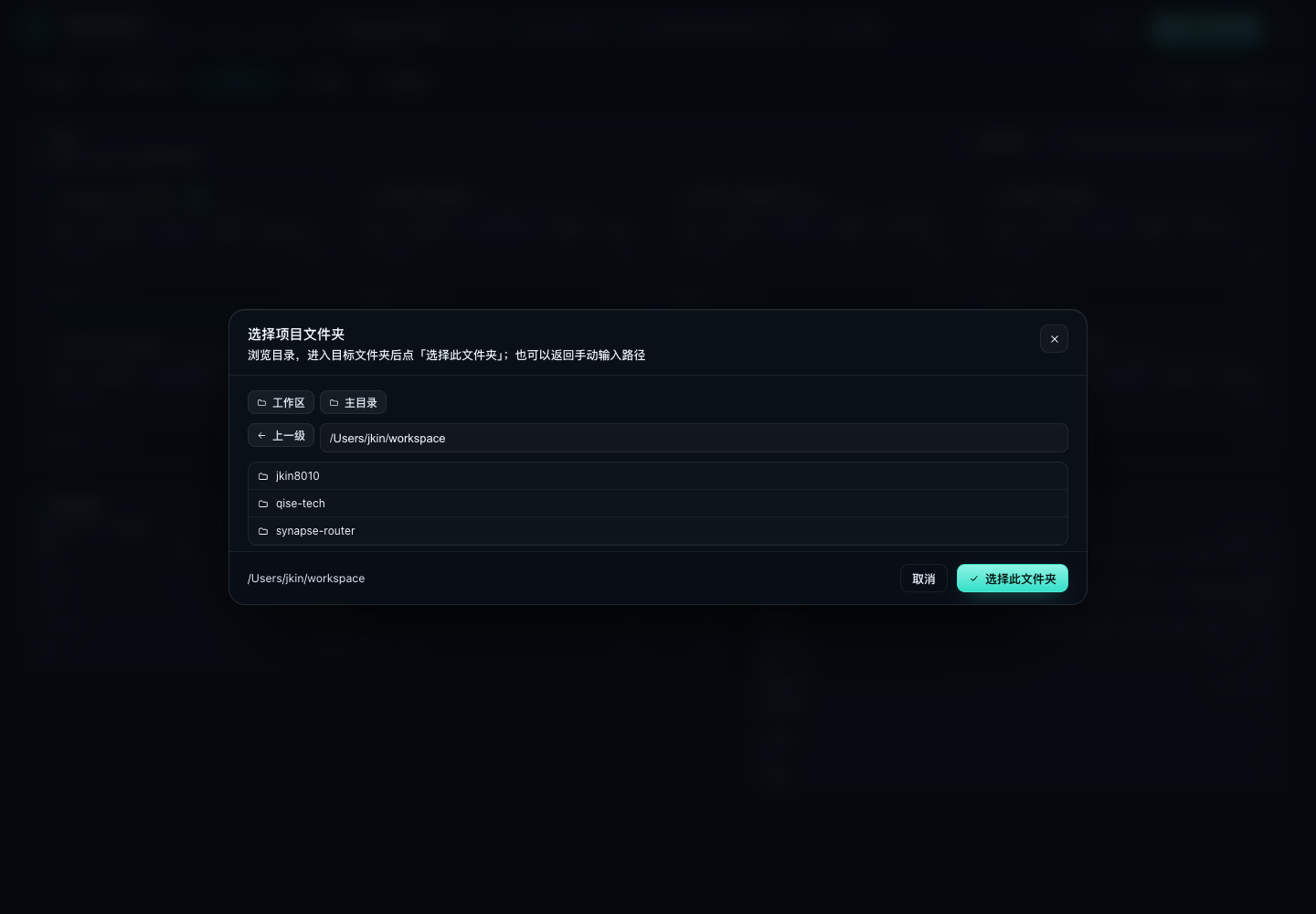
- The project dropdown, "Add project" on the project page, and the project dropdown in New Review all offer "+ Add project path…"
- Either the built-in folder browser (list directory / go up one level / select the current folder) or a manually typed absolute path; both Git repositories and plain directories work
- Project sources are also merged automatically: repositories found 2 levels below
projectRoots, DSH workspaces, and already reviewed projects; additions are persisted in<stateDir>/projects.json
Fixed markers
- Every finding on the review details page has "Mark as fixed / Unmark fixed", and the filter on the right switches between All / Unfixed / Fixed
- The header and the list show
Fixed X / Unfixed Y, finding cards carry a green "Fixed" badge, and the Markdown export includes the fix status - Markers are persisted in the job file (
resolutions) and survive refreshes and restarts - When a new review with the same project, review type and scope no longer reports an old finding, the old report is marked as fixed automatically
- After a fix session was started from a report, reopening it automatically re-runs the same scope to verify fixes (or use the "Verify fixes" button); findings that no longer appear are marked fixed
One-click fix session
The review details page offers "New fix session": it creates a session in the project Workspace and fills the findings
(critical/high first, including files and line numbers, with the suggested code) into the composer as a fix prompt draft;
press Enter to send (edit first if needed). /code-review --fix and the fix-session RPC use the Host auto-send path.
This requires DSH to provide
sessionController; when the Host is older (not restarted yet) the client falls back to DSH Client Remote'ssession.create/session.promptto create the session, and prompts you to restart DSH to enable the full mode. The settings drawer also shows any client/Host version mismatch — fully quit and reopen DSH to load the new Host.
Repository structure
package.json                    # single DSH bundle manifest: dsh.bundle → cordis.patch.yml
cordis.patch.yml                # bundle default config
icon.svg                        # plugin / sidebar icon
index.js                        # Host entry: /api/code-review RPC, lifecycle, dependency wiring
client.js                       # full-page Web UI (React.createElement, no build step)
host/                           # Host implementation
  rpc.js                        # /api/code-review dispatch + failure envelope
  engine-plan.js                # engine selection (ocr / delegate / structural)
  service-refs.js               # per-apply sessionController / workspaceRegistry refs
  lifecycle.js                  # startup, timers, disposal
  fix.js                        # fix-session creation and prompt
  commands.js                   # /code-review slash command
  tool.js                       # code_review model tool
  config.js                     # config normalization / ocr probing / env injection
  shared.js                     # Finding normalization, date and stat helpers
  store.js                      # review history persistence (index + details + stats + activity)
  files.js                      # source file traversal
  prompts.js                    # OCR background / rule / title prompts
  jobs.js                       # review state machine (6 stages) and engine merge
  llm-review.js                 # delegation-mode reviewer (DSH session model)
  snapshot.js                   # snapshot construction (projects / heatmap / stats / health)
  git.js                        # project discovery, git metadata, one-year heatmap, module tree
  ocr.js                        # ocr CLI adapter (preview/review/scan/cancel/progress/failure classification)
  analyze.js                    # architecture / module / data-flow / diff offline analysis
locale/                         # sidebar and settings copy (en / zh)
screenshots/                    # UI screenshots
tests/code-review/              # self-tests (real git/ocr + fake Cordis/LLM) and the screenshot harness
docs/CODE-REVIEW-CONTRACT.md    # field/API contract between the plugin and the front/back end
docs/CODE-REVIEW-DELIVERY.md    # delivery and acceptance records, plus known limitations
docs/RELEASE-HISTORY.md         # archived notes for releases whose tags were cleaned up
assets/icon-512.png             # 512px icon
LICENSE                         # Apache-2.0
Verification
All test commands run from the repository root:
node tests/code-review/engine-selftest.mjs     # four review types + snapshots + persistence (fake adapters, no LLM needed)
node tests/code-review/delegate-selftest.mjs   # delegate mode: OCR file selection + DSH model review (fake llm)
node tests/code-review/host-selftest.mjs       # real git/ocr/analyze + a fake Cordis router, exercising the full RPC chain
node tests/code-review/git-ocr.test.mjs        # git/heatmap + ocr preview (real repository; 33 cases)
node tests/code-review/analyze.test.mjs        # architecture/module/data-flow/diff analysis (node:test; 10 cases)
node tests/code-review/tool-selftest.mjs       # conversational code_review tool start/status/detail/list
node tests/code-review/preview/shoot.mjs       # render the real client.js, screenshots + DOM assertions
Data sources (all read-only except the plugin's own stateDir)
| Source | How it is read |
|---|---|
| Projects / commit heatmap | git log --numstat --date=short (one pass, aggregated by day, missing days filled with 0), git ls-files, git status --porcelain |
| Changes / branch / commit range | ocr review --preview (no LLM call), then the real review |
| Whole-file review | ocr scan --path |
| Architecture / data flow | local static analysis (import graph, Tarjan cycles, entry detection, ORM/SQL/external call detection) |
| Review history | <stateDir>/index.json, jobs/<id>.json, stats.json, activity.json |
Polling: the frontend pulls a snapshot every 2s by default; the Host caches project info (5min), the current project's heatmap (1min) and OCR health (1min), so polling never re-hits git / ocr.
Reliability
- A missing
ocr, an unconfigured LLM, a non-Git project or an unreadable repository all degrade into a readable state with a next step, never a blank screen. - Review jobs can be cancelled (subprocess SIGTERM→SIGKILL), failures can be retried, and jobs left running after a Host restart are marked interrupted automatically.
- Finding dedupe: when structural analysis and the AI hit the same problem, the two are merged and the AI wording is kept.
- Persistence uses atomic writes (tmp + rename); the index stores summaries only and findings are loaded on demand.
Design notes
- The Host owns all I/O:
git/ocrsubprocesses / persistence; the frontend only polls a single authenticated RPC snapshot (every 2s), and the Host caches projects, the heatmap and OCR health so polling never re-hits the upstream. - Six-stage review state machine:
resolve → plan → structure → ai → merge → report; if the AI stage fails or is unconfigured, it degrades to offline structural analysis and never fabricates conclusions. - Review history is written atomically to
~/.dsh/code-review/(index + details + daily stats + activity) and restored automatically on restart. - Cancellation:
SIGTERM → 2s → SIGKILL; retrying creates a new job; failure classes are actionable.
Known limitations
- Offline analysis is heuristic (not AST), so call chains in dynamic languages are only linked one level deep; the data-flow graph is capped at 40 nodes.
- Current-change/commit/branch reviews need a Git repository; non-Git directories can still get architecture/module/data-flow reviews.
- The heatmap window is
today-(days-1)in local time, so crossing a timezone boundary can be off by one day. languageonly recognizes the built-in extension table; full inspect is capped at 4000 files, and LOC skips binaries and files larger than 2MB.
License
Apache-2.0. The ocr engine comes from alibaba/open-code-review (Apache-2.0).
No comments yet. Be the first to write one.