READMESource: main@8e58aa25
dsh-ext-vision-proxy
External vision proxy plugin for DeepSeek Harness, enabling text-only LLMs (such as DeepSeek-V3 / DeepSeek-R1) to inspect, analyze, and understand images via OpenAI-compatible vision model APIs.
📸 Screenshots
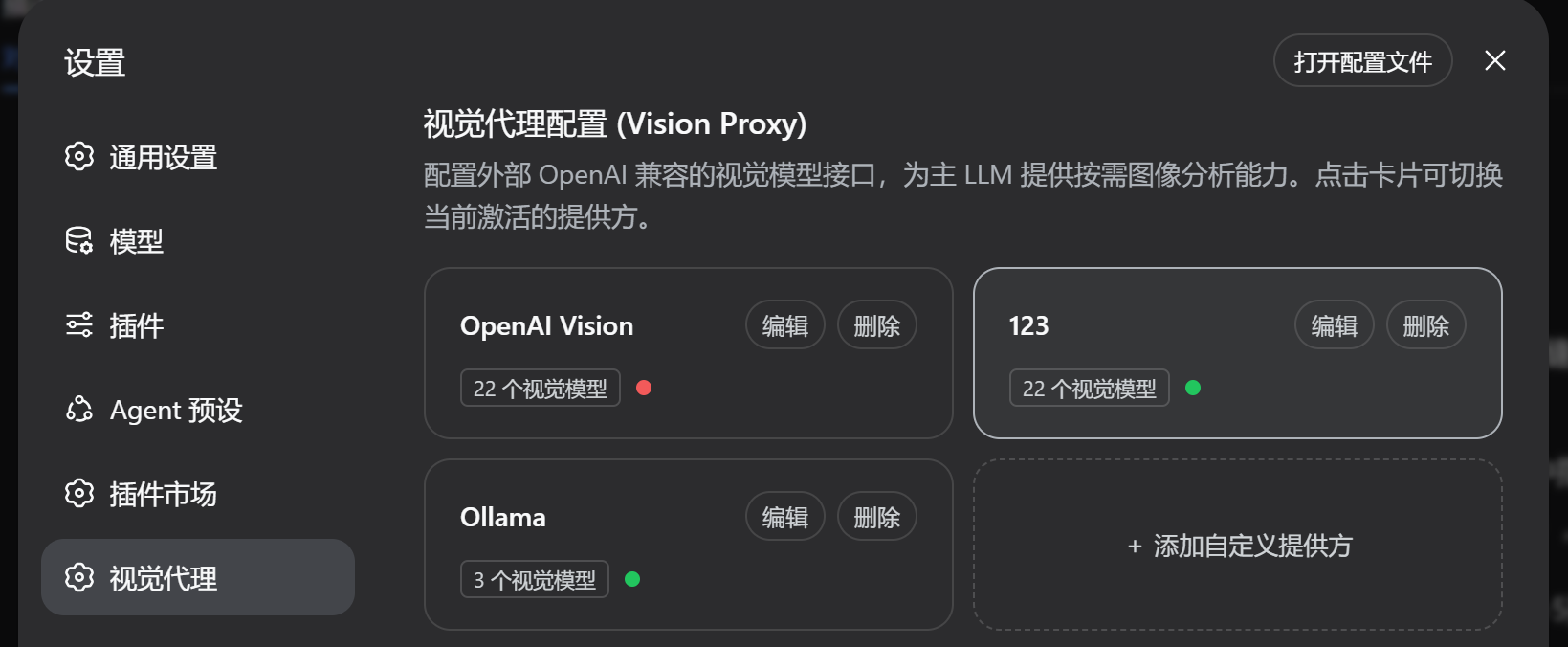
1. Settings Panel (Configuration & Provider Management)
2. Chat Composer Switch (Pill-shaped Toggle & Model Selector)

🌟 Key Features
- 🖼️ Multimodal Power for Text-Only Models: Allows text-only LLMs to autonomously invoke the
vision_describetool to inspect and answer questions about images, screenshots, diagrams, and attachments. - 🔘 Native Composer Switch: Integrates seamlessly into the chat input bar (
conversation.input.left) with a pill-shaped toggle switch and an interactive model dropdown selector. - ⚙️ Dedicated Settings & Connectivity Testing: Provides an intuitive configuration panel in the Settings page supporting custom Base URLs, API Keys, vision model filtering, and one-click connectivity testing.
- 🎛️ 4-State Session Matrix:
- Multimodal LLM + Switch ON:
vision_describetool is visible. Model can choose native or delegated recognition. Prompts confirmation dialog upon image attachment. - Multimodal LLM + Switch OFF: Tool is stripped. Model processes images natively via standard DSH image messaging with zero proxy interference.
- Text-only LLM + Switch ON: Tool is visible. Images are admitted without rejection; the LLM automatically invokes
vision_describewith the attachment ID or file path. - Text-only LLM + Switch OFF: Tool is invisible. Behavior is 100% identical to not having the plugin installed.
- Multimodal LLM + Switch ON:
- 🔍 Intelligent Attachment & Image Resolution: Resolves content-addressed hashes (
sha256:...), local file paths, HTTP/HTTPS URLs, and automatically detects MIME types using binary magic bytes.
🏗️ Architecture
- Host (Node.js):
src/index.ts- Registers the
vision_describetool schema and execution handler. - Dynamically filters tool exposure via the Cordis
system-prompt/assemblewaterfall hook based on session state. - Exposes REST API endpoints on
webServerfor settings, model probing, and session state sync.
- Registers the
- Client (React / Browser):
src/client/- Registers the
settings.sectionslot (VisionSettingsSection) for provider configuration. - Registers the
conversation.input.leftslot (VisionComposerButton) for composer toggling and fast model switching.
- Registers the
📦 Installation & Setup
Option 1: Link in DSH Profile (Recommended for Development)
Add the dependency and bundle entry in your ~/.dsh/profiles/web/package.json:
{
  "dependencies": {
    "dsh-ext-vision-proxy": "link:/path/to/dsh-ext-vision-proxy"
  },
  "dsh": {
    "profile": {
      "bundles": [
        "@deepseek-ai/dsh-base",
        "@deepseek-ai/dsh-web-app",
        "dsh-ext-vision-proxy"
      ]
    }
  }
}
Option 2: Build & Pack
# Install dependencies and build bundles
npm install
npm run build

# Pack tarball
npm pack
🚀 Getting Started
- Start DSH Web:
dsh web - Configure Vision API:
- Open DSH Web in your browser (
http://127.0.0.1:3080). - Navigate to Settings -> 视觉代理 (Vision Proxy).
- Enter your OpenAI-compatible Vision API Base URL (e.g.,
https://api.openai.com/v1or local endpoint) and API Key. - Click 获取模型列表 (Fetch Models) and select your desired default vision model (e.g.,
gpt-4o,gemini-2.5-flash,qwen-vl-max). - Click 测试连通性 (Test Connection) to verify API connectivity, then save settings.
- Open DSH Web in your browser (
- Chat & Inspect Images:
- In any conversation with DeepSeek-V3 or DeepSeek-R1, turn the 视觉代理 switch ON.
- Upload or paste an image and ask questions (e.g., "What is shown in this image?").
- The LLM will call
vision_describebehind the scenes and respond with detailed answers.
📄 License
MIT © 2026 Fan Yuejin
No comments yet. Be the first to write one.