READMESource: main@05c0336d
dsh-explorer-editor
由于之前工作主要用 Cursor,习惯了 Cursor 可以直接手动编辑的能力,所以写了个让 DSH 可以直接手动编辑文件内容的小插件
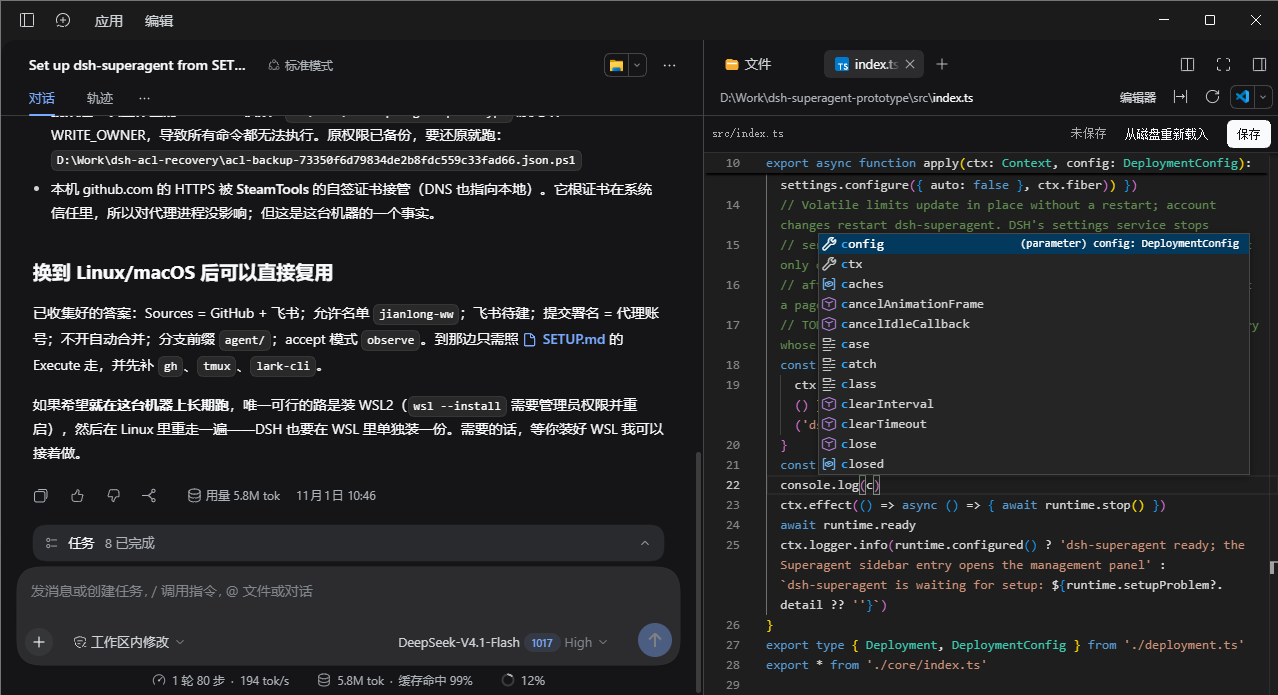
功能
打开右侧栏里的文本文件,预览面板本身就是编辑器,不再是只读文本。集成 Monaco 的能力:高亮、行号、多光标、撤销栈、括号匹配、查找替换、快捷键等
支持的文件类型
| 类别 | 后缀 |
|---|---|
| 代码 | ts tsx mts cts js jsx mjs cjs py go rs java kt kts rb php cs swift c h cpp cc cxx hpp hh m mm |
| 标记与数据 | json jsonc json5 css scss less html htm xml vue svelte graphql gql |
| 文档 | md markdown mdx txt text rst adoc |
| 配置与脚本 | yml yaml toml ini conf cfg env properties sh bash zsh fish ps1 psm1 bat cmd gradle sql lock log |
| 点文件 | gitignore gitattributes gitmodules npmrc nvmrc yarnrc editorconfig prettierrc eslintrc babelrc dockerignore clang-format tool-versions 等(按点后面的名字匹配,例如 .gitignore 的后缀是 gitignore) |
DSH 的匹配规则是「文件名以 . + 后缀结尾」,因此没有后缀的文件(Makefile、LICENSE)和未列出的后缀仍由内置只读视图打开。图片、PDF、Office 文档不会被接管;Markdown 默认进编辑器,但内置的渲染视图仍在视图菜单里可切回。
要求
- DSH
0.2.1-rc.5及以上
安装
dsh plugin --profile desktop add @jianlong-ww/dsh-explorer-editor # 桌面应用
dsh plugin --profile web add @jianlong-ww/dsh-explorer-editor     # 浏览器端
不建议用 github: 或 git+https:// 安装:仓库不包含编译产物,pnpm 会把 git 依赖当成待构建的包去装它的 devDependencies(含 monaco-editor),在 Windows 上还会因跨盘符号链接而报 EPERM。
装完重启 dsh,然后刷新页面。
卸载:
dsh plugin --profile desktop remove @jianlong-ww/dsh-explorer-editor
从源码安装
git clone https://github.com/jianlong-ww/dsh-explorer-editor.git
cd dsh-explorer-editor
pnpm install && pnpm build
dsh plugin --profile desktop add .
License
MIT,见 LICENSE。内置的 Monaco 构建来自 monaco-editor(MIT)。
No comments yet. Be the first to write one.