Backlog.md for DeepSeek Harness
Native Backlog.md task management inside DeepSeek Harness. The plugin adds a Backlog launcher beside Source Control, renders the task view in Harness's native right-side panel, and starts and manages the official Backlog.md local server for the active workspace.
Backlog.md remains the single source of truth. The plugin never creates a second task database and never writes task Markdown itself.
Features
- Native launcher — a
ListTodobutton beside Source Control, with the same dimensions, hover treatment, tooltip, focus ring, and panel-toggle behaviour. It highlights while Backlog is active. - Native right-side panel — registered as a sidebar tab type, so it uses Harness's resizing, collapse, fullscreen, focus, and per-session persistence. The chat and agent session stay mounted.
- Zero server setup — detects the workspace's Backlog.md project, finds the installed CLI,
allocates a loopback port, starts
backlog browserwhen needed, waits for health, and connects. Users never runbacklog browserby hand. - Safe reuse and ownership — one managed server per canonical workspace; multiple Harness sessions share it. A server the plugin did not start is never terminated.
- Official API only — task and milestone reads and writes go through Backlog.md's HTTP API.
- Live synchronization — the Host subscribes to Backlog.md's WebSocket notifications and relays change scopes to the panel, which invalidates TanStack Query caches. No duplicate filesystem watcher.
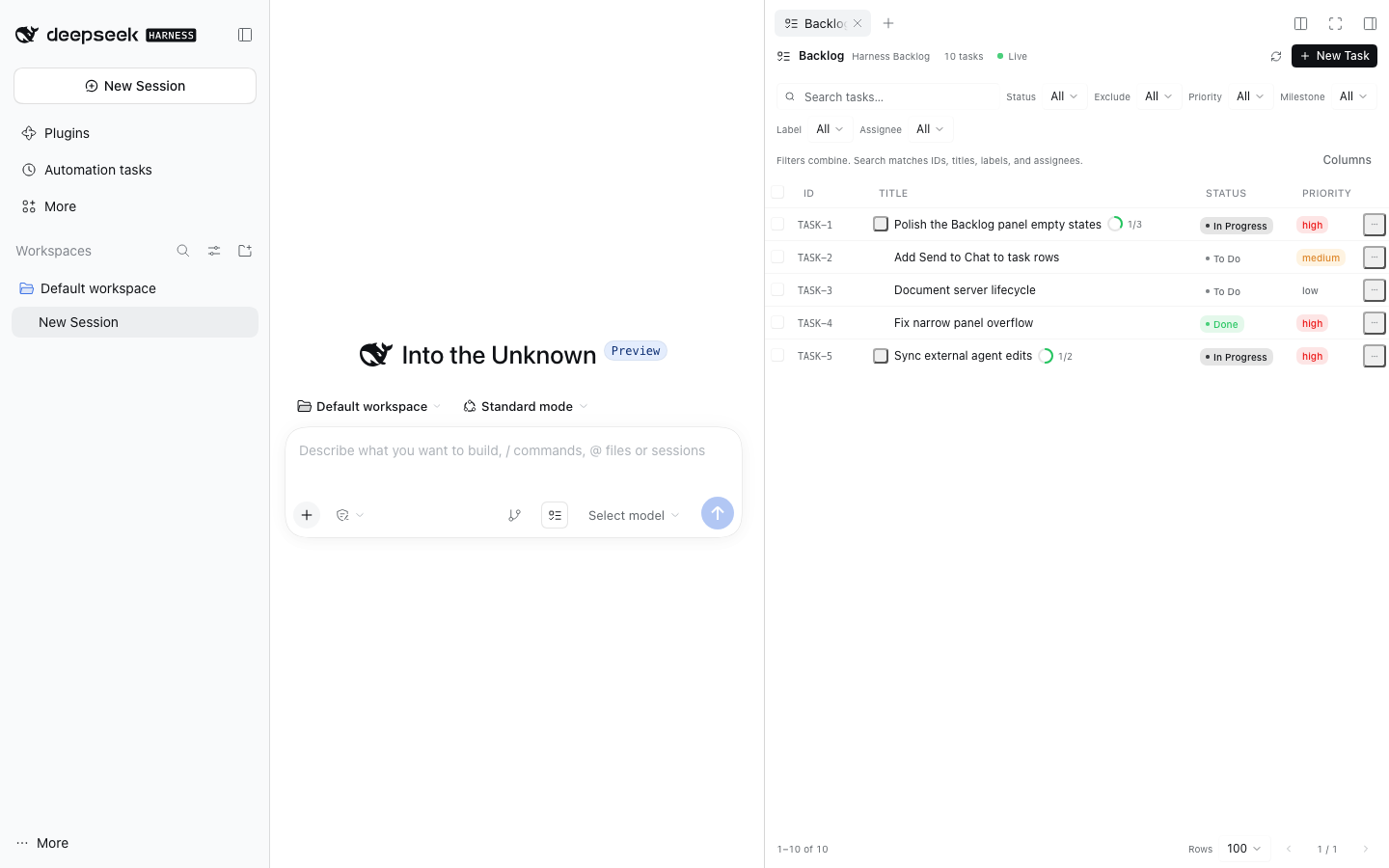
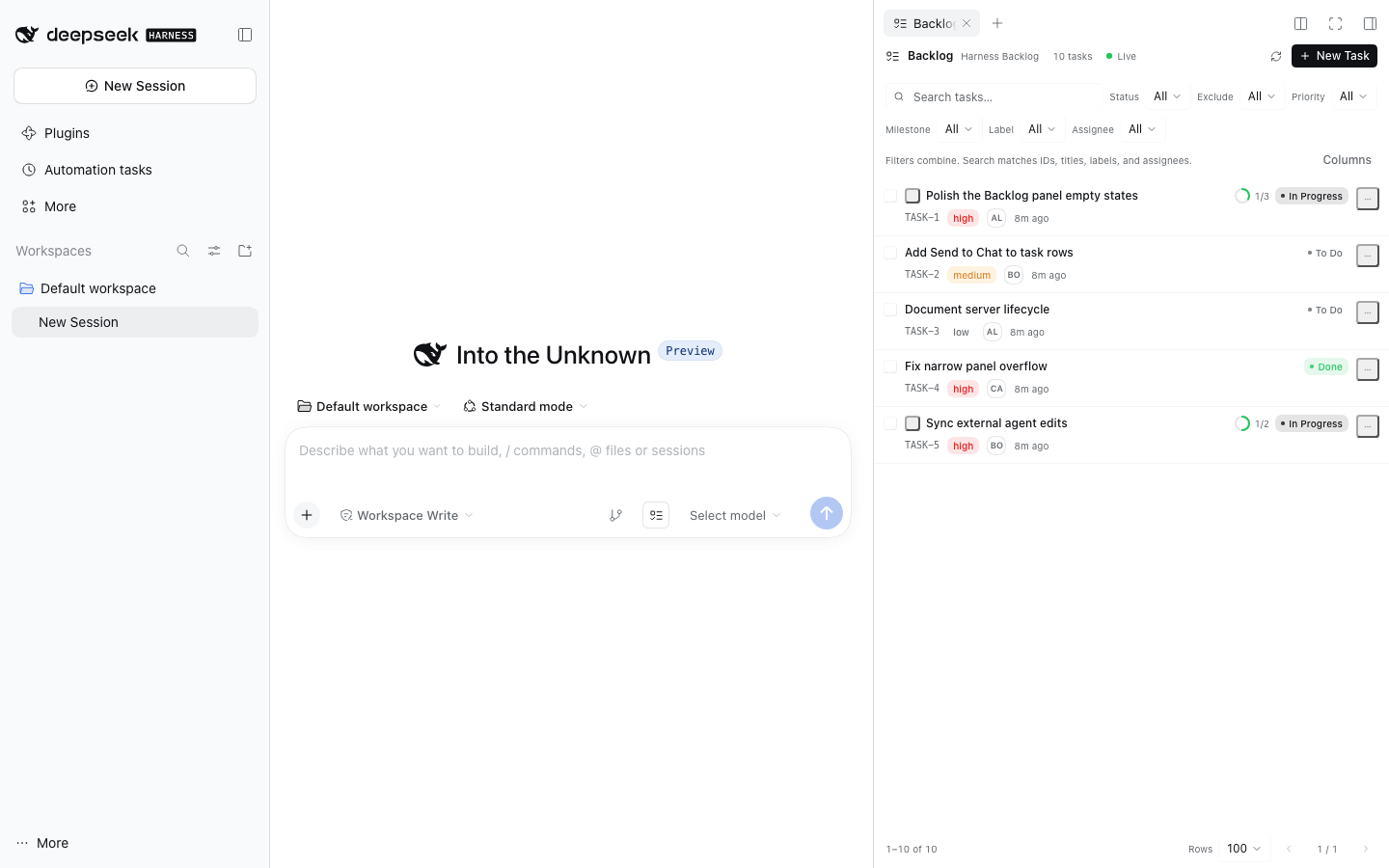
- Wide table and compact list — one TanStack Table instance drives both presentations. CSS container queries switch at the panel's real content width, never the viewport. Filtering, sorting, selection, expansion, and detail navigation survive the switch.
- Full task workflows — create, edit, change status or priority, assign, label, milestone, dependencies, acceptance criteria, Definition of Done, subtasks, archive, and permanent delete.
- Conflict-aware editing — unsaved edits survive background refreshes; external changes are detected before saving, with explicit reload or merge choices. No silent overwrites.
- Send to Chat — puts a ready-to-edit prompt into the current Harness composer. It never sends the message automatically.
- Agent-friendly — changes made by the Backlog.md CLI, MCP server, Codex, or another editor appear through the same WebSocket notifications. No agent-side plugin integration is required.
Screenshots
| Full table | Narrow panel |
|---|---|
|
 |
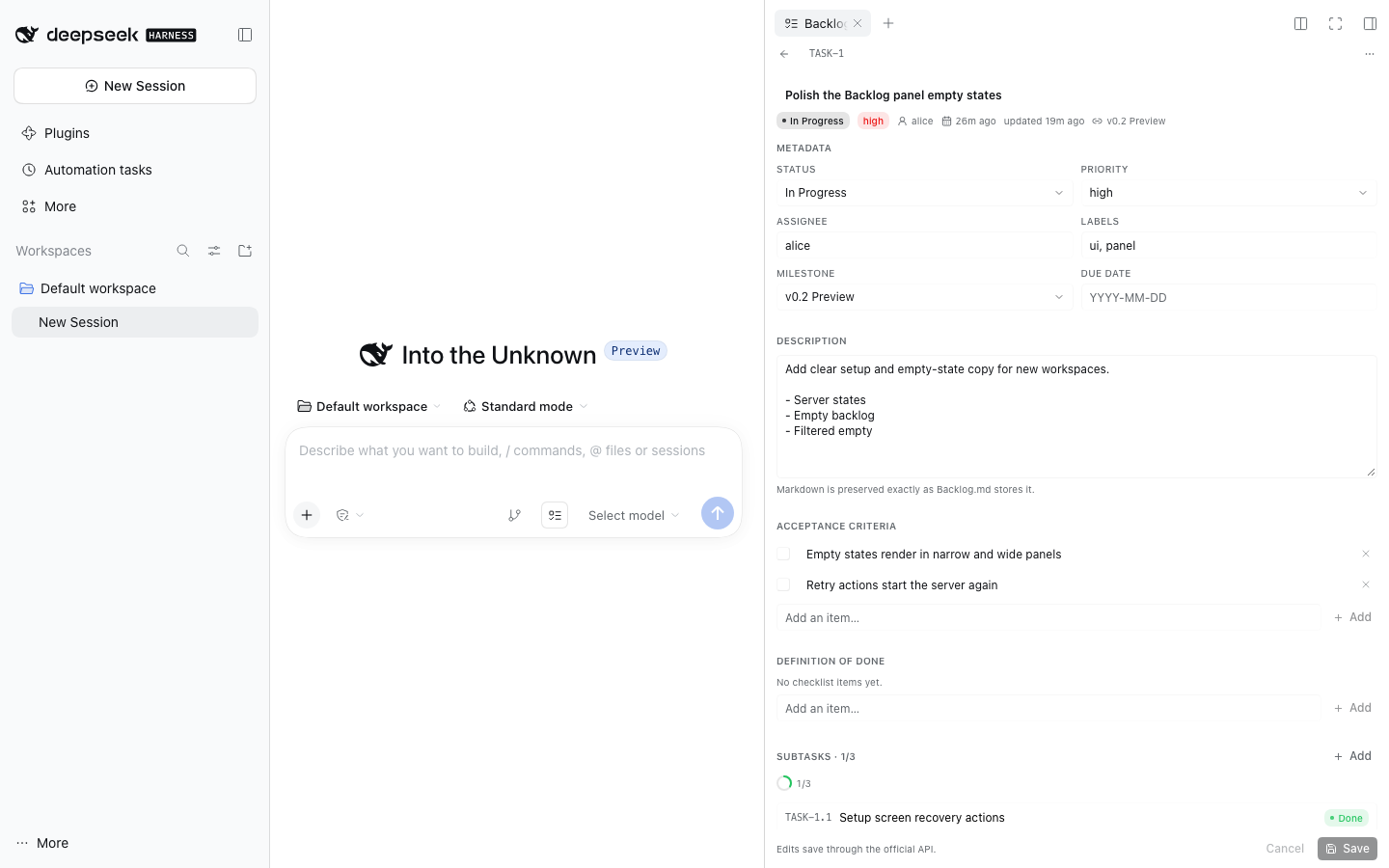
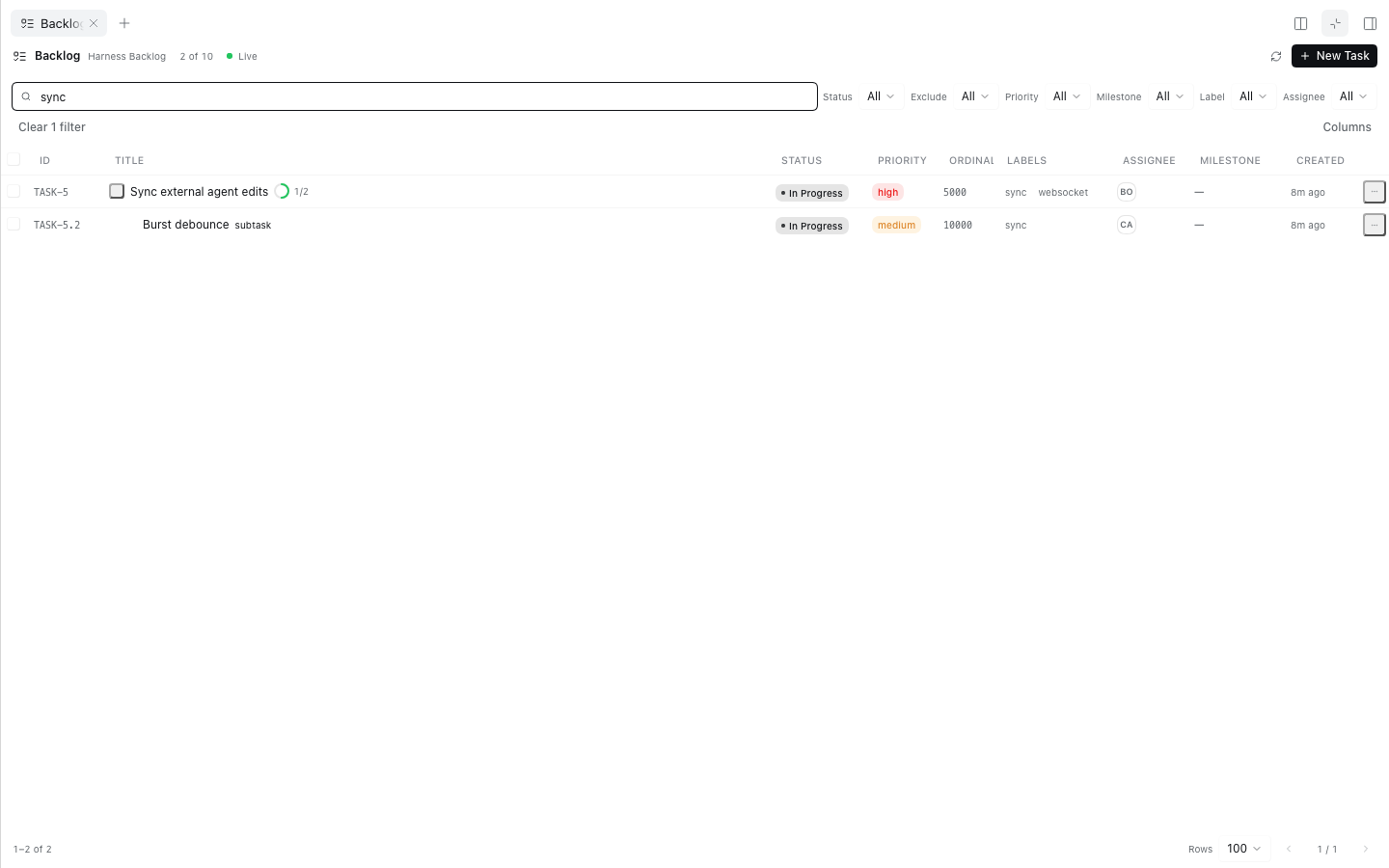
| Task details | Filtered table |
|---|---|
 |
 |
The launcher sits directly beside Source Control in the composer:

Requirements
| Component | Supported |
|---|---|
| DeepSeek Harness | 0.2.1-rc.3 tested. The plugin uses the public Cordis lifecycle, slots, locale, sidebarRightTabs, sidebarRight, webServer, subprocess, sessions, and workingDirectory services. |
| Backlog.md | 1.55.3 tested; 1.54.0 also verified in the Harness UI. Supported range: >=1.30.0 <2.0.0. |
| Node | 22 or newer on the Host. The shipped plugin has no runtime npm dependencies. |
| OS | macOS, Linux, and Windows where Backlog.md's native CLI runs. |
Backlog.md must be installed in the workspace (node_modules/.bin/backlog) or available on
PATH. A workspace-local install wins. An initialized Backlog.md project is required; the panel
shows the exact backlog init commands when it is missing.
Install
Desktop app (recommended)
- Open Settings → Plugins.
- Choose Add plugin and enter the local directory path (or the GitHub repository).
- Make sure the plugin is enabled, then reload the page or restart the Host.
The desktop profile is managed by the Electron application, so the Settings flow is the supported installation path there.
CLI
Clone the repository and add it to a profile:
git clone https://github.com/jeremytenjo/dsh-plugin-backlog-md.git
dsh plugin --profile <profile> add ./dsh-plugin-backlog-md
A GitHub spec also works:
dsh plugin --profile <profile> add github:jeremytenjo/dsh-plugin-backlog-md
Use the profile that serves your Harness instance (for example web). The package ships its built
client.js, so installation does not need a build step.
First run
Install Backlog.md in the workspace or on
PATH:npm install --save-dev backlog.md # or: pnpm add -D backlog.md # or: npm install -g backlog.mdInitialize the project once, if it is not already:
backlog init
# or non-interactive defaults:
backlog init --defaults
Open a Harness session in that workspace and click Backlog beside Source Control.
The panel starts the server itself. No backlog browser command is needed.
Usage
Launcher and panel
The Backlog button is registered in the composer's conversation.input.right slot at order 11,
immediately after the Source Control trigger (order 10). Clicking it opens the backlog-md tab in
the native right sidebar. Clicking again when Backlog is active follows Harness's native panel
toggle. The panel is registered with keepMounted: true, so closing and reopening it preserves its
state.
Filters
Search, Status, Exclude status, Priority, Milestone, Labels, and Assignee combine without reloads.
The filtered count appears in the header; Clear filters resets everything. Filter, sorting,
column visibility, and page size are persisted per workspace in localStorage; no task data is
stored there.
Wide table
Columns: ID, Title (with subtask progress), Status, Priority, Ordinal, Labels, Assignee, Milestone, Created, and row actions. The table has sticky headers, compact rows, hover and focus states, column sorting, row selection, expandable subtasks, and configurable column visibility. At narrower panel widths, fixed-layout columns leave the DOM and become available again as the container grows.
Compact list
Below the panel container's 600px breakpoint, the compact list shows the title, ID, subtask progress, status, priority, assignee, and relative creation time. It never requires horizontal scroll. Both presentations read the same TanStack Table instance, so switching widths keeps the same filter, sort, selection, expansion, pagination, and detail handlers.
Task details
Clicking a row drills into details inside the same panel. The header has a back button, task ID, editable title, and actions. Metadata includes status, priority, assignee, labels, milestone, parent task, dependency links, created and updated dates, and the server ownership/source. Content includes the Markdown description source, acceptance criteria, Definition of Done checklist, subtasks, and dependencies. Comments are shown read-only.
The footer shows unsaved state and provides Save/Cancel. The detail view:
- keeps local edits through background refetches;
- detects external changes before saving;
- offers Reload latest or Merge my edits with a per-field explanation;
- never silently overwrites an external change;
- confirms archive and permanent deletion.
Send to Chat
The row menu and detail menu include Send to Chat. It identifies the current Harness session, builds a prompt such as:
Implement TASK-20.4 "Wire real-time sync" using its Backlog.md task definition. Follow AGENTS.md,
update task status as work progresses, and verify all acceptance criteria.
and calls the official composer inputActions.setDraft(...). It does not submit. The full prompt is
visible and editable before the user sends it.
External agent changes
A coding agent can keep using the Backlog.md CLI or MCP server normally:
- The CLI edits the Markdown file.
- Backlog.md's
ContentStoredetects the change. - The Backlog.md server broadcasts a WebSocket notification.
- The Host relay receives it and exposes the change scope to the panel.
- TanStack Query invalidates the affected task, milestone, task-detail, or config queries.
- The panel refetches and rerenders.
Rapid bursts are debounced. A reconnect requests a full resync so missed events are recovered.
Architecture
┌──────────────────────────── DeepSeek Harness ────────────────────────────┐
│                                                                          │
│  React panel (client.js)                  Host plugin (index.js)         │
│  ┌────────────────────────┐   same-origin  ┌──────────────────────────┐  │
│  │ BacklogPanel           │   POST /__dsh/ │ BacklogBridge            │  │
│  │  TanStack Query        │   backlog-md   │  session → workspace     │  │
│  │  TanStack Table        │ ─────────────► │  fixed action allowlist  │  │
│  │  shadcn/ui + Tailwind  │ ◄───────────── │  typed validation        │  │
│  └────────────────────────┘   JSON + long  └──────────┬───────────────┘  │
│             │                       poll              │                  │
│             │                                         ▼                  │
│             │                              ┌──────────────────────────┐  │
│             │                              │ BacklogServerManager     │  │
│             │                              │  one record per realpath │  │
│             │                              │  port allocation         │  │
│             │                              │  health + version gate   │  │
│             │                              │  crash budget + cleanup  │  │
│             │                              └──────────┬───────────────┘  │
│             │                                         │ spawn            │
│             │                                         ▼                  │
│             │                              ┌──────────────────────────┐  │
│             │                              │ backlog browser          │  │
│             │                              │ 127.0.0.1:<dynamic port> │  │
│             │                              └──────────┬───────────────┘  │
│             │                                         │                  │
│             │         WebSocket notifications         │                  │
│             │                              ┌──────────▼───────────────┐  │
│             └──────────────────────────────│ BacklogEventHub          │  │
│                                            │ ring buffer + long poll  │  │
│                                            └──────────────────────────┘  │
└──────────────────────────────────────────────────────────────────────────┘

                    Backlog.md Markdown files (single source of truth)
Host-side workspace resolution
The browser never sends a filesystem path. It sends the active Harness session ID. The Host resolves
the Session with ctx.sessions.get, then the working directory with
ctx.workingDirectory.get, canonicalizes it with realpath, and walks up to the nearest
Backlog.md project (backlog/config.yml, .backlog/config.yml, backlog.config.yml, or
backlog.json). The canonical project root is the server-ownership identity.
BacklogServerManager
Allocates a free loopback port with
netand starts the official CLI:backlog browser --port <port> --no-openIf the CLI selects a different port because of a race, the manager parses the URL it prints and uses the actual port.
Probes
GET /api/statusandGET /api/versionuntil healthy, validating the reportedprojectPathagainst the canonical workspace and the version against the supported range.Reuses a healthy managed server. Concurrent calls share a single in-flight start.
Checks the project's configured
default_portfor an already-running compatible server and adopts it withowned: falsewhen its project identity and version match. It is never terminated.Tracks crashes with a bounded restart budget, removes dead records, and lets the next panel request start a fresh server.
Binds servers to
127.0.0.1only. Dynamic ports are never exposed to the browser.Stops only owned processes on plugin disposal and idle cleanup (30 minutes by default).
HTTP bridge
One exact route, POST /__dsh/backlog-md, is the plugin's only browser-facing surface. It:
- accepts only
POSTwithapplication/json; - requires a loopback socket and the Harness origin (
ctx.webServer.getOrigin()), and rejectsSec-Fetch-Site: cross-site; - limits request bodies to 512 KiB and responses to 16 MiB;
- resolves the workspace from the Session, never from the request;
- exposes a fixed action set (
status,tasks.list,tasks.get,tasks.create,tasks.update,tasks.archive,tasks.delete,tasks.reorder,milestones.list,milestones.create,search,server.restart,events); - validates task IDs, arrays, lengths, and types at the trust boundary;
- strips
filePathandrawContentfrom task responses andmcp,onStatusChange, and other command-bearing configuration from/api/config.
events is a long poll (12 second waiting window) over the Host's WebSocket relay. This keeps the
browser on one same-origin, validated transport and works through Harness's Electron fetch bridge.
API surface used
| Purpose | Official endpoint |
|---|---|
| Project identity / health | GET /api/status |
| Version gate | GET /api/version |
| Configuration | GET /api/config |
| Statuses | GET /api/statuses |
| List tasks | GET /api/tasks |
| Task detail + dependency graph | GET /api/task/:id |
| Create task / subtask | POST /api/tasks |
| Update task | PUT /api/tasks/:id |
| Archive task | POST /api/tasks/:id/archive |
| Reorder task | POST /api/tasks/reorder |
| Milestones | GET /api/milestones, POST /api/milestones |
| Search | GET /api/search |
Backlog.md has no HTTP hard-delete endpoint. Delete permanently archives through the official API,
then invokes the official CLI (backlog task delete <id>) with an argv array and no shell. The
default destructive action is Archive, which preserves the Markdown record, ID, and links.
Real-time relay
BacklogEventHub owns one WebSocket client per managed server. It understands the messages the
current server publishes: tasks-updated, milestones-updated, config-updated, loaded,
loading-state JSON, and pong. Events are stored in a 200-entry ring with monotonic sequence
numbers. A cursor older than the ring returns resync, and every reconnect also requests a full
resync. Waiters are bounded by timeout and cancellation. The React hook debounces invalidation by
150 ms, reconnects with bounded exponential backoff (1 s to 15 s), and refetches all affected caches
after a gap.
Why the browser never talks to Backlog.md directly
The Backlog.md server is a powerful local HTTP service with no built-in authorization. Exposing its port to the page would make it reachable from any local script or browser origin and would bypass Harness's session authorization. The bridge keeps the server on loopback and gives the browser only the actions the panel needs, for the workspace belonging to the active Harness session.
Development
pnpm install
pnpm typecheck   # TypeScript, tests included
pnpm lint        # Biome
pnpm test        # 21 client tests + 20 host tests (real Backlog.md CLI)
pnpm build       # regenerates client.js (Tailwind + esbuild bundle)
pnpm verify      # lint, typecheck, test, build
src/client.tsx is the browser entry. src/server/** is the Host half. client.js is generated and
committed; update it with pnpm build whenever client source changes.
The host integration tests install and exercise the pinned backlog.md dev dependency. They create
temporary projects, start real servers on dynamic ports, test reuse/adoption/crash recovery/port
conflicts/workspace isolation, exercise every mutation, verify the WebSocket relay, and confirm the
loopback and origin fences. Tests were executed with DeepSeek Harness 0.2.1-rc.3 and Backlog.md
1.55.3 on macOS.
Layout
index.js                     Host plugin entry: route + manager lifecycle
src/server/                  workspace, CLI, API client, manager, event hub, bridge
src/client.tsx               Cordis client registration
src/client/components/       panel, table, list, details, dialogs, shadcn/ui primitives
src/client/hooks/            TanStack Query hooks, connection relay, persisted UI state
src/client/api/bridge.ts     typed bridge client
src/client/lib/              task tree, filters, formatting, utilities
test/                        client (Vitest) and host (node:test) suites
docs/                        screenshots
Security summary
- Managed servers bind only
127.0.0.1; no public API exposure. - Browser actions use one same-origin, loopback-only Host route.
- The request never supplies a workspace path, server URL, executable, or command.
- Process execution uses argv arrays, never a shell. Task IDs are validated before the one CLI call.
- Response bodies and task IDs are bounded; malformed responses fail closed.
- Configuration is sanitized; MCP tokens and command fields never reach the browser.
- Unknown task metadata is preserved by the API mutations (the plugin sends only changed fields).
- Presentation state is the only localStorage data; there is no task cache database.
Troubleshooting
| Panel state | Action |
|---|---|
| Backlog.md is not installed | Install backlog.md in the workspace or on PATH, then press Retry. |
| Initialize Backlog.md | Run backlog init in the workspace, then press Retry. |
| Backlog.md needs an update | Install a 1.x release at or above 1.30.0. |
| Backlog.md is unavailable / crashed | Press Retry or Restart server. Retry also resets the crash budget. |
| Server starts but tasks never sync | Check that the workspace is the intended project and that no firewall blocks loopback. Reopen the panel to force a resync. |
| A port is occupied | The manager lets the CLI choose the next free port automatically. |
Compatibility notes
- Backlog.md
1.54.0returns naiveYYYY-MM-DD HH:mmtimestamps from some HTTP endpoints; the UI parses those as UTC. ISO timestamps withZare handled normally. - Backlog.md
1.55.3is the pinned test version. The manager refuses 2.x and versions older than1.30.0with an actionable error. - The plugin does not publish to npm. Install from a local checkout or GitHub.
- A compatible manually started server is reused only when it listens on the project's configured
default_portand reports the same canonicalprojectPathand a supported version. Arbitrary ports are not scanned.
Known limitations
- Markdown is preserved, not parsed. Descriptions are displayed and edited as Markdown source in a monospace textarea. The plugin deliberately does not add a second Markdown parser. Renderers elsewhere in Harness still own rich rendering.
- Permanent delete needs the CLI. Backlog.md exposes archive, not hard delete, over HTTP. The
permanent delete action is therefore archive plus the official
backlog task deleteCLI; it can refuse a task that still has subtasks or links, and the panel reports that refusal. - External server discovery is bounded. The manager can verify an existing server only on the project's configured default port. Servers on arbitrary ports are not probed.
- One Host, one manager. Servers are shared across sessions in the same Harness Host. Separate DSH processes each manage their own server; the plugin does not coordinate across processes.
- Agent activity is not inferred. The panel shows task state. It does not claim an agent is working on a task merely because its status is In Progress.
- Send to Chat depends on the composer. It uses the official
inputActions.setDraftwhen the panel receives it, with a launcher event fallback. If the composer is unavailable, the panel reports that it could not reach it.
License
MIT. See LICENSE.
Backlog.md is a separate MIT-licensed project by Alex Gavrilescu. This plugin is an independent integration and is not affiliated with the Backlog.md maintainers.
No comments yet. Be the first to write one.