dsh-plugin-always-on-top

Pin the DeepSeek Harness desktop window above every other app, straight from the composer.
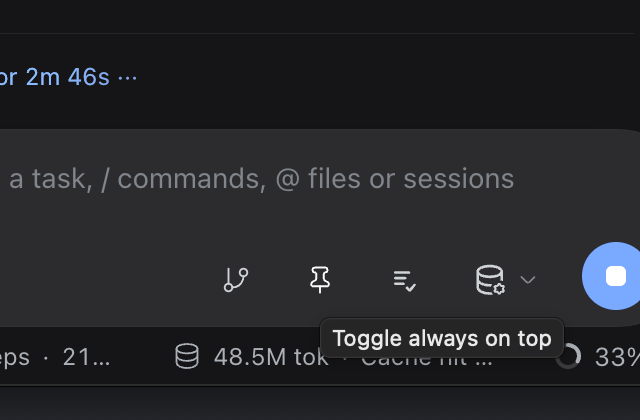
A pin button sits between the source-control and backlog triggers. It is a grey outline while the window is normal. Click it and the icon becomes a filled white pin; the Harness window now floats above other windows. Click again to release it.
| Off | On |
|---|---|
 |
 |
Hovering shows a native title, matching the other composer actions:
Features
- One 28 × 28 button in the composer, right beside source control.
- Outline pin when off; filled white pin when on.
- Native hover title ("Toggle always on top").
- Reads the real
BrowserWindow.isAlwaysOnTop()state, not a UI-only flag. - Survives a page reload while the window is pinned.
- No app.asar rewrite, no re-signing, no restart after the plugin is loaded.
- English and Chinese labels.
Install
The desktop app does not ship a dsh command, so the reliable path is a local checkout plus a
profile link.
git clone https://github.com/jeremytenjo/dsh-plugin-always-on-top.git
cd dsh-plugin-always-on-top
python3 scripts/install-local.py
The script:
- backs up
~/.dsh/profiles/desktop/package.json, - adds
"dsh-plugin-always-on-top": "link:/path/to/this/checkout"todependencies, - appends
dsh-plugin-always-on-toptodsh.profile.bundles, - creates the
node_modulessymlink.
Then quit DeepSeek Harness completely (tray icon → Quit; closing the window only hides it) and reopen it. The pin appears in the composer.
Set DSH_DESKTOP_PROFILE to point at a different profile.
Manual install
If you prefer editing by hand, add the dependency and append the bundle name to the existing
dsh.profile.bundles array in ~/.dsh/profiles/desktop/package.json — do not replace the array:
"dependencies": {
  "dsh-plugin-always-on-top": "link:/absolute/path/to/dsh-plugin-always-on-top"
}
"bundles": [
  "…your existing bundles…",
  "dsh-plugin-always-on-top"
]
ln -s /absolute/path/to/dsh-plugin-always-on-top \
  ~/.dsh/profiles/desktop/node_modules/dsh-plugin-always-on-top
Quit and reopen the app.
Uninstall
cd dsh-plugin-always-on-top
python3 scripts/install-local.py --uninstall
Quit and reopen the app. The package.json.bak-always-on-top backup is left in place for reference.
How it works
The Desktop Host is a Node-mode child process and has no BrowserWindow access. The shell also ships
no IPC channel for window levels. Patching app.asar is the usual workaround, but on macOS it
invalidates the app's code signature and needs two launches.
This plugin takes a smaller route:
client button
   │  GET/POST /__dsh/always-on-top
   ▼
Host half (Node-mode child)
   │  SIGUSR1  (asks the Electron main process for its Node inspector)
   ▼
Electron main inspector
   │  BrowserWindow.setAlwaysOnTop(value, 'floating')
   │  BrowserWindow.isAlwaysOnTop()
   ▼
inspector.close()
The expression evaluated in the main process is fixed and only interpolates a boolean. The inspector
is opened for the few hundred milliseconds a toggle takes and is closed in a finally block. If an
inspector was already open before the plugin touched it, the plugin leaves it alone.
Nothing under /Applications is modified.
Security
This is a local power-user tool, and it deliberately uses a debugger as its control channel.
While a toggle is in flight, the Electron main process exposes its Node inspector on
127.0.0.1:9229 (or the next free port). Any local process that connects during that short window
could evaluate code in the main process. The plugin closes the inspector as soon as the toggle
finishes, and it never leaves a long-lived eval endpoint behind.
If that trade-off is not acceptable to you, do not install this plugin. A plugin such as
dsh-window-control takes the app.asar route
instead and comes with its own signing caveats.
The bridge reads Electron's fuse wire before it signals anything. The current build (0.2.1-rc.3,
Electron 44) has EnableNodeCliInspectArguments enabled. If a future build disables it, the plugin
refuses to send SIGUSR1 — which would terminate the app — and the button reports that window
debugging is unavailable.
Limitations
- Desktop app only.
dsh webstarted from a terminal has no Electron parent; the button renders disabled with an explanation. - macOS and Linux are the primary targets. Windows uses
process._debugProcessand is untested. - The level is not persisted: after quitting and reopening Harness, the window starts normal.
setAlwaysOnTopcontrols the window level, not Space membership. A full-screen app on another Space can still cover Harness.- The state is read on mount and after each toggle. If something else changes the window level while the page is open, reload the page to resync.
- If another debugger occupies the inspector port range, the toggle fails with an error tooltip.
Tested with DeepSeek Harness 0.2.1-rc.3 and Electron 44.7.0 on macOS (Apple silicon).
Development
pnpm install
pnpm test      # host helpers
pnpm build     # src/client.js -> client.js
client.js is generated by scripts/build-client.mjs; do not edit it by hand. CI runs the tests,
rebuilds the client, and fails if the committed bundle is stale.
Layout:
| Path | Role |
|---|---|
index.js |
Host half: loopback route and the inspector bridge |
src/client.js |
Browser half: the composer button |
client.js |
Generated browser bundle |
cordis.patch.yml |
Bundle layer that inserts the Host plugin |
scripts/install-local.py |
Links a checkout into the Desktop profile |
test/bridge.test.mjs |
Pure-function tests for the bridge |
License
MIT © 2026 Jeremy Tenjo
No comments yet. Be the first to write one.