dsh-plugin-git-status
A DeepSeek Harness plugin that shows the git status of the current workspace. It is read-only: it never creates, modifies, or deletes any file.
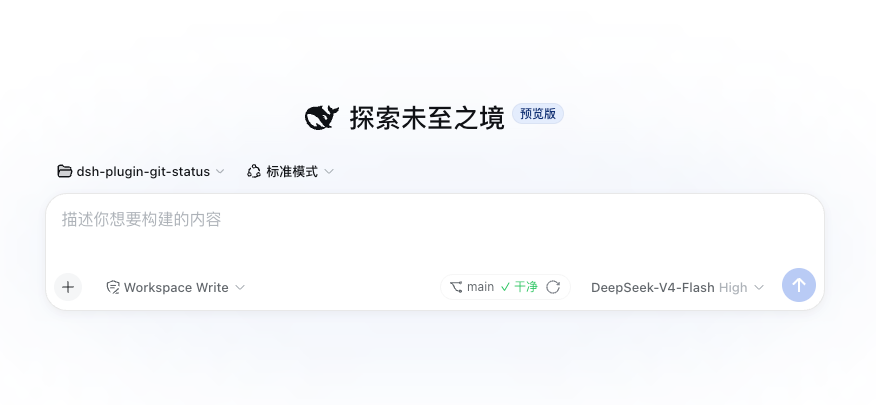
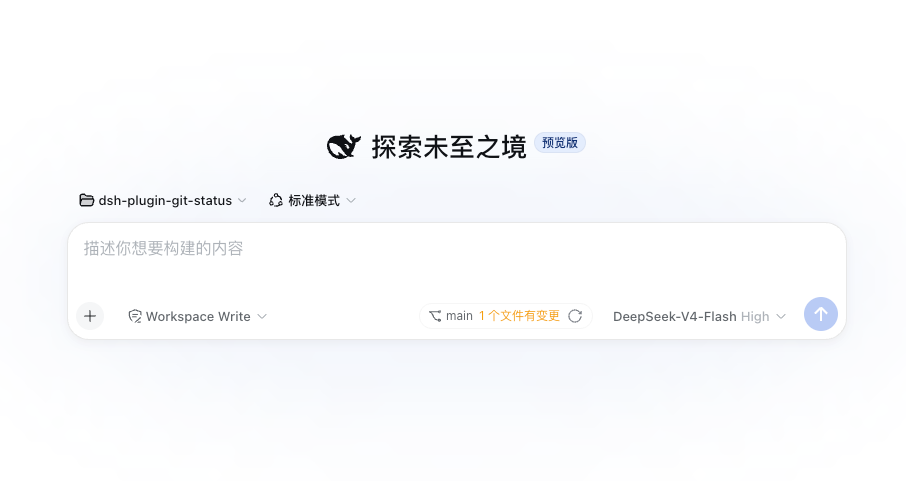
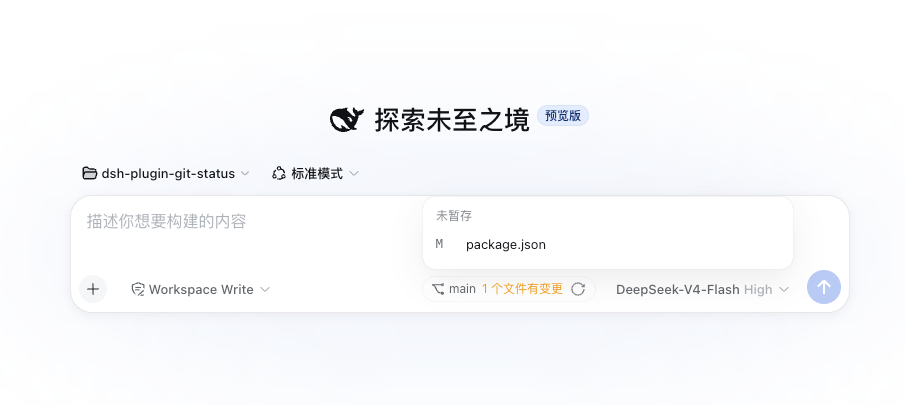
- Git status panel — a small chip in the composer tool row, to the left of the model selector. It shows the branch name, a clean/dirty summary, and a manual refresh button. When the working tree has changes, the change count is clickable and expands into a grouped file list (conflicted / staged / unstaged / untracked) with porcelain status codes and rename origins. The panel refreshes every 30 seconds and hides entirely when the workspace is not a git repository.
git_statusmodel tool — callable through the normal tool pipeline. Returns structured JSON with the branch, commits ahead/behind upstream, grouped change counts, the file list, and the most recent commit. It accepts an optionalcwd; when omitted it inspects the current session workspace.
Screenshots
Clean workspace — the chip shows the branch and a green "✓ clean" summary:
Workspace with changes — the change count is a clickable text that opens the grouped file list:
Workspace with changes, file list expanded — grouped by conflicted / staged / unstaged / untracked; each row shows the porcelain status code, the path, and the original path for renames:
Supported Harness version
0.1.0-rc.7 (the plugin peer-depends on the same @deepseek-ai/* package
versions).
Install
dsh plugin --profile <name> add dsh-plugin-git-status
If the CLI is not installed globally:
npx @deepseek-ai/dsh plugin --profile <name> add dsh-plugin-git-status
Replace <name> with your profile name (e.g. web). Restart the Harness
process after installing, then hard-refresh the browser page.
For a reproducible install, pin a commit (replace the example with the real commit SHA):
dsh plugin --profile <name> add github:<owner>/dsh-plugin-git-status#0123456789abcdef0123456789abcdef
Configuration
The panel auto-refresh cadence is configurable at runtime from the browser:
open Settings → Plugins and edit the Git status card
(refreshIntervalMs), like the terminal plugin's command-timeout card. The
change is written to the Host settings document and takes effect live (the
panel re-reads it when the tab becomes visible again).
It can also be set through the plugin's Cordis row. Add a config block for
the dsh-plugin-git-status row in your profile's cordis.patch.yml:
- id: dsh-plugin-git-status
  name: dsh-plugin-git-status
  config:
    refreshIntervalMs: 60000
refreshIntervalMs— milliseconds between automatic refreshes (default30000). Set it to0to disable auto-refresh entirely; the panel then only updates on the manual refresh button or when the workspace changes.- Auto-refresh is also paused while the browser tab is hidden, and resumes (with an immediate refresh) when the tab becomes visible again.
Update / remove
Use the CLI's update and remove commands:
dsh plugin --profile <name> remove dsh-plugin-git-status
dsh plugin --profile <name> add dsh-plugin-git-status
Data storage
The plugin stores nothing. Git status is computed on demand by running
read-only git status / git log commands in the inspected directory.
Known limitations
- The panel is session-scoped and reflects the active session's workspace. If the session has no workspace directory, the panel is not shown.
- Paths with two or more consecutive spaces are read from
git status -z, so they are preserved exactly. - The panel does not offer inline file operations; it only reports status.
Development
pnpm install
pnpm typecheck
pnpm test
pnpm build
pnpm build emits lib/index.js (Host), lib/typert.js (Remote descriptor),
and lib/client.js (browser bundle).
No comments yet. Be the first to write one.