Completo
A community bundle for DeepSeek Harness that makes it a vibe-coding workspace: one calm theme, a nine-skill build loop, and a small MCP pack that lets the agent actually look at the app it is building.
Not affiliated with DeepSeek. "DeepSeek Harness" is named only to say what this plugs into.
Built and verified against DeepSeek Harness 0.2.2-rc.1. engines.dsh is
>=0.2.2-rc.1 <0.3.0; the harness refuses to import the bundle outside that
range.
What you get
| Part | What it does | On by default |
|---|---|---|
| Completo Studio theme | Warm paper + mint, light and dark, wired into the harness theme service. | Registered; pick it under Appearance |
| Nine skills | spec-flow, prompt-crafting, react-vite-base, live-preview, checkpoint-rails, debug-loop, design-pass, release-checklist, ship-audit |
On |
| Playwright browser (MCP) | A real Chromium the agent drives: navigate, click, screenshot, read console errors. This is what makes live-preview more than words. | On |
| Chrome DevTools (MCP) | Performance traces and network waterfalls when a page misbehaves. | Off |
| Context7 docs (MCP) | Current docs for the exact library versions in your project. | Off |
| GitHub (MCP) | Issues, PRs and repo reads from the conversation. Needs a token. | Off |
| Postgres (MCP) | Read-only SQL against a dev database. Needs a URL. | Off |
| Completo page | Settings → Plugins → Completo: what is installed, what is on, and how to remove it. | On |
| Providers & API keys card | On that page: where a model provider and its key are added (the harness's own Settings → Models), and how the optional MCP rows get their environment variables. Guidance only; no key is stored by Completo. | On |
Nothing is fetched at install time except the package itself. The Playwright server downloads Chromium on its first run.
What it looks like
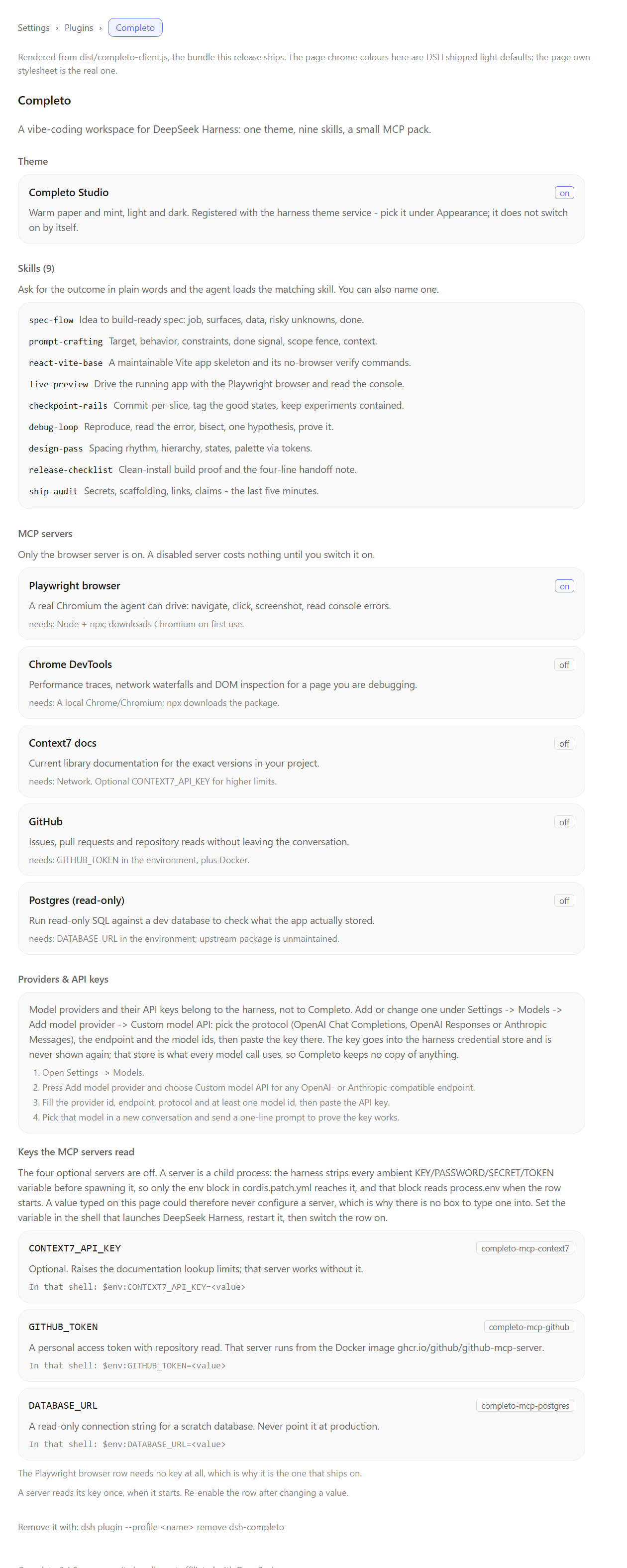
This is the page the bundle adds under Settings → Plugins → Completo, rendered
from the shipped dist/completo-client.js with the harness's light-theme page
chrome. docs/screenshots/completo-page.html
is the same render as plain HTML, and
docs/screenshots/ says how the image is regenerated.
The screenshot is generated from the built bundle, not taken from a live window: see Status and known limitations for what that does and does not prove.
Install
Completo is a profile bundle: one entry in your profile's
dsh.profile.bundles. Use the plugin CLI, which writes the profile for you.
From a git tag (this is the release install)
dsh plugin --profile my-profile add 'github:itsnotalwin/dsh-completo#v0.1.2'
Pin the tag, not the branch: main moves, v0.1.2 does not.
Installing from git runs the prepare script (node scripts/build.mjs). pnpm
refuses to run it until you allow that build; it prints the exact key in the
error. Add it to your profile's pnpm-workspace.yaml (e.g.
~/.dsh/profiles/my-profile/pnpm-workspace.yaml), then re-run the command:
onlyBuiltDependencies:
  - dsh-completo
Older pnpm versions call the same idea allowBuilds: { dsh-completo: true } —
use whatever key the error message names. The build needs only Node: it copies
src/ to dist/, inlines the palette and the shipped summary, and validates
the skill pack and the patch.
If you would rather not allow a build at all, download the release tarball
(dsh-completo-0.1.2.tgz) and add it — prebuilt, no scripts:
dsh plugin --profile my-profile add ./dsh-completo-0.1.2.tgz
From a local checkout (how it was verified)
git clone https://github.com/itsnotalwin/dsh-completo.git
dsh plugin --profile my-profile add ./dsh-completo
dsh --profile my-profile --dump-config | grep completo
--dump-config should show the # == dsh-completo block with the completo
row and the five completo-mcp-* rows.
There is exactly one Completo row on purpose: the browser module registry
rejects two active composition sources for the same npm package, so the theme
and the Settings page are delivered through that row's single
exports["./client"] bundle instead of separate rows.
npm: the package is not published to npm yet. When it is, the same command becomes
dsh plugin --profile my-profile add dsh-completo, and it needs no build step becausedist/is published.
Switching the theme on
Registering a theme does not switch it on. In the web app:
Settings → General → Appearance — the appearance row only offers
light/dark/system, because that is the shipped control. The two Completo Studio
themes (completo-studio-light, completo-studio-dark) are registered with the
theme service and selectable through it; until a picker lists non-shipped
themes, the reliable way to use one is a profile patch:
- id: ui-theme
  config:
    preference: light   # or dark / system
Fonts are not applied by Completo. The client theme service exposes no
font-family setter to plugins, so the suggested stacks from src/theme/palette.js
are for copy-paste into Appearance → Font settings:
Aptos Display, Aptos, Segoe UI Variable Display, Segoe UI Variable Text, Segoe UI, system-ui, -apple-system, BlinkMacSystemFont, Inter, Helvetica Neue, Arial, sans-serif
Aptos ships with recent Microsoft 365 installs; on a machine without it this falls back to Segoe UI. Completo does not bundle or download a font.
The skills
Ask for the outcome in plain words; the agent loads the matching skill. You can also name one.
| Skill | Use when |
|---|---|
spec-flow |
An idea is still a sentence and you want a build-ready spec. |
prompt-crafting |
A prompt keeps producing almost-the-right thing. |
react-vite-base |
Starting or extending a React + Vite + TS app. |
live-preview |
You need to see the running app, not guess at it. |
checkpoint-rails |
Long builds where a bad slice could lose a good state. |
debug-loop |
Something broke and the cause is not obvious. |
design-pass |
Working, but it looks like a prototype. |
release-checklist |
Before handing the app to anyone. |
ship-audit |
Last five minutes: secrets, scaffolding, links, claims. |
The pack is read-only and offline: nine SKILL.md files under skills/.
The MCP rows
Each row is its own composition entry, so you can flip one without touching the
rest. In your profile's cordis.patch.yml:
- id: completo-mcp-chrome-devtools
  disabled: false
Secrets are never written into this bundle. The rows that need them read the
environment at boot through !!js:
| Variable | Used by |
|---|---|
CONTEXT7_API_KEY (optional) |
completo-mcp-context7 |
GITHUB_TOKEN |
completo-mcp-github (passed as GITHUB_PERSONAL_ACCESS_TOKEN, Docker required) |
DATABASE_URL |
completo-mcp-postgres |
They are written as !!js process.env.X ?? '', so a missing variable yields an
empty string instead of undefined — the MCP client validates each field
against a string schema and would otherwise reject the row.
Tool names arrive as mcp__completo-mcp-playwright__<tool> and so on.
Why these five, and not more
- Playwright is on because it is first-party, needs no account, and closes the loop that vibe coding actually needs: change → look → judge.
- Everything with a credential or a network dependency is off. Turning those on is a deliberate act, not a side effect of installing a theme.
- Skipped on purpose: filesystem and git MCP servers (the harness already
has better native tools), Figma/Linear/Stripe (nice, but this bundle is about
building, not project admin), and any checkpoint/rewind plugin — use a
dedicated one and keep Completo's
checkpoint-railsskill for the git discipline around it. @modelcontextprotocol/server-postgres@0.6.2is the last release (2024-12) and is unmaintained. The row is off by default and the skill set never depends on it.
Providers and API keys
Completo does not keep a provider list, a key store, or any input box for a secret. The harness already owns both, so re-implementing them would mean a second place for a key to live and a second thing to keep in sync. What the bundle adds is a card that says where that place is.
Adding a model provider
The harness owns this: Settings → Models → Add model provider → Custom model API. Give it a provider id, an endpoint, a protocol (OpenAI Chat Completions, OpenAI Responses or Anthropic Messages) and at least one model id, then paste the API key. The key goes into the harness credential store and is never sent back to the browser.
The Completo card lists those four steps in order, so nobody has to hunt for where the key input lives. It reads nothing and stores nothing.
Variables the MCP rows read
| Variable | Used by |
|---|---|
CONTEXT7_API_KEY (optional) |
completo-mcp-context7 |
GITHUB_TOKEN |
completo-mcp-github (passed as GITHUB_PERSONAL_ACCESS_TOKEN, Docker required) |
DATABASE_URL |
completo-mcp-postgres |
There is deliberately no box to type these into, and this is the reason: an MCP
server is a child process. The harness strips every ambient variable matching
KEY|PASSWORD|SECRET|TOKEN before spawning it, so only the row's own env: block
reaches the child, and that block reads process.env when the row starts. A value
typed into a plugin page is stored in the harness credential store, which the
spawn path never reads — so a key box could accept a key and still never configure
a server. It would only look like it worked.
The path that does work is the shell:
# PowerShell
$env:GITHUB_TOKEN = 'ghp_...'
# POSIX
export GITHUB_TOKEN=ghp_...
Then restart DeepSeek Harness and switch the row on. The card prints the exact line for each variable, with the server that reads it.
The Playwright row — the one that ships enabled — needs no key at all.
Turning it off / removing it
dsh plugin --profile my-profile remove dsh-completo
or delete dsh-completo from dsh.profile.bundles in the profile's
package.json and restart. Removing the bundle removes its rows; nothing else
in the profile is touched. Because --from-default-profile profiles are
throwaway, the safest way to try Completo is a fresh profile:
dsh plugin --profile completo-try add ./dsh-completo
dsh --profile completo-try web
Development
npm run build   # src/ -> dist/, inlines palette + summary, validates skills + patch
npm run check   # syntax check every module, verify the patch/env contract
npm test        # node:test suites (skills parse, palette contrast, patch rows)
No dependencies, no toolchain: the bundle ships plain ESM so that verifying it never needs anything installed into your profile.
Layout:
cordis.patch.yml      loader rows: 1 plugin row + 5 MCP servers
src/index.js          the host half: registers the skill provider
src/client-root.js    the browser bundle entry (module-loader wrapper)
src/client/theme.js   registers Completo Studio light + dark
src/client/page.js    the "Completo" settings page (one shared en dictionary)
src/client/providers.js  the Providers & API keys card + Models footer card
src/skills/           provider shaped like the shipped dsh-skill-office plugin
skills/<name>/SKILL.md the curriculum
scripts/              build + contrast + browser-half checks
scripts/render-page.mjs  renders the settings page to docs/screenshots/ for the README
docs/screenshots/     the README image, the HTML it is rendered from, and how to regenerate it
dist/                 built output (checked in so git installs behave; rebuilt on prepare)
Status and known limitations
- Verified on a freshly initialised harness home (
DSH_HOMEpointed at a clean directory, profilesmokecreated withdsh plugin --profile smoke add ./dsh-completo):--dump-configlists every Completo row; booting that profile through the harness boot path mounts the plugin with no activation failure; the live skill registry lists 49 skills of which 9 come from providercompleto, and loadingspec-flowreturns its full 2665-character body; enabling the Playwright row registers 25mcp__completo-mcp-playwright__*tools (browser_navigate,browser_click,browser_take_screenshot,browser_console_messages,browser_evaluate, …) into the live tool set. - Skill loading is verified through the model-facing tool, not only the
registry: executing the
skilltool on a live boot returns the fullSKILL.mdbody (2898 characters forspec-flow, read fromskills/spec-flow/) in about 600 ms, and an unknown name is rejected. - Tool calling is verified:
mcp__completo-mcp-playwright__browser_navigatewas executed on a live boot (8273 ms) againsthttps://example.comand returned the real page title. - The browser half was verified against the harness's real client
composition and module system: the registry resolves
dist/completo-client.js, accepts the package (no "multiple composition sources" error), the composed graph listsdsh-completoonce, and importing the bundle yields{name: "completo", inject: ["theme","slots","locale"], apply}. It registers both themes (14 tokens each), the one English dictionary (28 strings), the Settings → Plugins tab and the Settings → Models footer card. - Completo touches no credential store. The bundle injects no
remoteservice, renders no password input and calls nocredentials/*method; a gate asserts all three against the built bundle. - Page appearance is verified from the shipped bundle, not from a live window.
scripts/render-page.mjsrenders the real component with the real stylesheet todocs/screenshots/completo-page.html, and a headless browser turns that into the README image; regenerating it is how the three layout bugs it exposed were found and fixed. It does not prove how the page sits inside a running Harness window (live tokens, real fonts, sidebar). - Not verified here: the visual result of the theme in a running web UI (no browser session was attached — the themes are contract-checked and registered through the real theme service, not seen on screen), and a complete model-driven conversation in a headless profile (the desktop app signs in with an account credential such a profile cannot use). Skill and tool calling were exercised directly through the harness's own execution path instead.
- No Projects sidebar. Making the sidebar read like ChatGPT/Claude projects is the planned v0.2.0 milestone; the harness already models workspaces as projects, so it is presentation work, not new storage.
- No plugin-browser restyling. Completo adds its own page under Plugins and leaves the harness's own screens alone.
- No icon replacement set. The shipped icon sprite contract (
ICON_SYMBOLS) could not be verified from the installed app, so v0.1.0 ships no icons rather than guessing names.
Licence
MIT — see LICENSE. Attribution notes in NOTICE. Changes in CHANGES.md.
No comments yet. Be the first to write one.