dsh-login
English | 简体中文
Adds a login page, user accounts, and per-user conversation isolation to the DeepSeek Harness Web GUI: every visit requires sign-in, ordinary users cannot see each other's conversations, and an admin manages all accounts from inside the GUI.
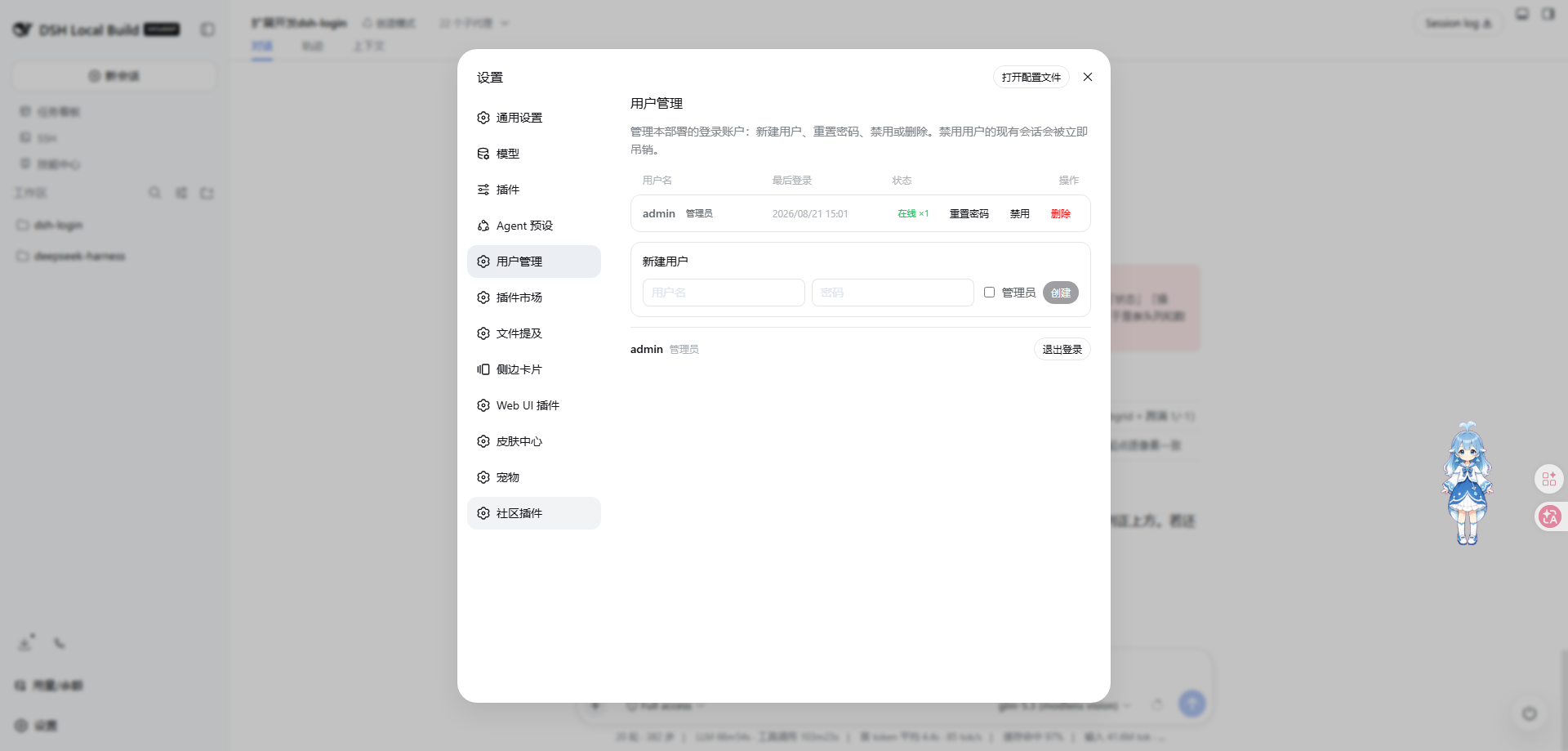
| Login page | User management (设置 → 用户管理) |
|---|---|
 |
 |
⚠️ Development on this repository is paused. See Current status →.
Current status — development paused
Work here is paused. What shipped — the login wall, multi-account user management, per-user conversation/workspace isolation, remote-web-ui compatibility, capability discovery, and quiet read-denials — is complete and in service. The one thing that could not be finished is per-role control of third-party UI-plugin features (hide the no-permission ones, don't render them, don't let them request), and that is blocked on upstream DSH support, not on something this package can fix alone.
Delivered and working
- Login wall + multi-account user management (设置 → 用户管理) + per-user conversation/workspace isolation.
- Capability discovery (
GET /api/auth/capabilities, session-authenticated) and quiet read-denials (204for a no-permission read probe,403for writes; toggle viaquietDenials), so ordinary-user browsers stop getting "forbidden" walls and retry storms. - dsh-login's own settings contribution is already per-user: admins see 设置 → 用户管理, ordinary users see 账户 (identity + logout); ordinary users never call the admin API.
Known limitation — why per-role control of the whole UI could not ship
- DSH's settings panel renders a single global section list (
SettingsRoot→useSections, aHostObservable<readonly SettingsSectionRow[]>with no identity dimension), so a plugin's settings section cannot be shown/hidden per user from insidedsh-login. - DSH's WebServer route priority is exact-beats-prefix and exposes no pre-routing hook, so a plugin that self-registers exact routes (e.g.
@linxin666/dsh-petserving/api/pet/pets,/api/pet/state, …) cannot be intercepted or silenced per user bydsh-login. - DSH's client runtime activates every bundled plugin with no per-user activation gate, so an unchanged third-party plugin still fires its mount-time probes for every user.
Waiting for: upstream DSH to expose per-identity slot/section filtering or conditional plugin activation at the client and route layers. Once that exists, per-role feature control (hide without permission / don't render / don't request) can be implemented here on top of the already-shipped capability surface.
The problem it solves
The DSH Web GUI ships with no login — it assumes a single user on localhost. The moment you bind it to 0.0.0.0 (phone access, LAN sharing, a small team), anyone on that network can open your GUI: read every conversation, burn your configured model API keys, even change host settings.
dsh-login turns that exposure into a multi-user deployment:
- 🔐 Login wall — pages, static assets, SPA routes, the API, and WebSockets all require a valid session; unauthenticated visitors are redirected to
/login - 👥 Multiple accounts — the first visit creates the administrator account; further users are added by an admin right inside the GUI, no CLI needed
- 🙈 Conversation isolation — ordinary users see and act on their own conversations only (including their subagents/forks); other users' sessions, messages, and workspaces are invisible; credentials, host settings, and other admin domains are forbidden wholesale
- 🛠 User management — 设置 → 用户管理: last-login time, online session count, reset password, disable, remove; disabling/removing/password-changes immediately revoke that user's live sessions
- 👑 Admin exception — the admin is not isolated: all sessions visible, full configuration access
- 🚪 Logout — every user gets a logout entry in their settings panel
- 🌐 Remote access friendly — reach the GUI through frp/隧道/tunnels or a LAN IP without hand-editing
trustedHosts: the/apihost-trust fence uses a live set (LAN literals +trustedHosts+ auto-learned hosts), and any successful login learns its Host into a persisted whitelist you can manage in 设置 → 用户管理
Quick start
No environment variables, no config edits — three steps:
# 1. Install (web is the profile that boots the Web GUI)
dsh plugin --profile web add github:islibaodong/dsh-login
- Initialize: restart
dsh weband open the GUI — the first visit shows a one-time "create administrator account" page; pick a username and password - Add users: sign in as admin → 设置 → 用户管理 → 新建用户
Uninstall:
dsh plugin --profile web remove @islibaodong/dsh-login
Why
--profile web? DSH installs plugins per profile directory ($DSH_HOME/profiles/<name>);webis the profile that boots the Web GUI. Use your profile's name if you run a custom one.
FAQ
- Do I have to log in again after restarting DSH? No — login sessions are persisted to
<dataDir>/sessions.json(0o600), so an existing cookie keeps working across a process restart (the cookie otherwise lasts 7 days by default). Only an actual log-out, password change, user removal, or TTL expiry invalidates it. - What can an ordinary user do? Use the chat normally: create/open/continue their own sessions, run subagents, manage their own workspace content. Everything else (other people's sessions, credentials, plugins/presets/host settings, model-key management) is refused.
- Upgrading from the old single-password version? The old single password no longer logs anyone in; the first visit after upgrading bootstraps a fresh administrator account (details in the migration note below).
Technical details
For contributors, security reviewers, and troubleshooting. You don't need any of this to use the plugin.
What installation does
dsh plugin add reads this package's declared cordis.patch.yml (a bundle patch) and automatically:
- mounts the
dsh-loginplugin row (config defaults are sensible;distIndexresolves the frontend dist automatically) - disables the
web-runtimerow (where dsh-web-app mounts the frontend-static fallback); dsh-login takes over the fallback seat and re-provides thewebRuntimeservice (LAN trust for the/apifence + theDSH_WEB_URLvariable) - disables the shipped
connectionrow (the/apicarrier); dsh-login mounts its own identity-aware takeover and ships the matching browser bundledist/client.js
Manual installation (alternative)
If you prefer managing the patch file yourself, add these rows to your profile's cordis.patch.yml:
- insert:
    - id: dsh-login
      name: '@islibaodong/dsh-login'
      config:
        password: DSH_LOGIN_PASSWORD   # credential ref name; namespaces the user store (<name>_USERS)
        distIndex: ''                  # empty resolves the frontend dist automatically
        dataDir: ''                    # empty resolves to <DSH_HOME>/.dsh-login (ownership index)
        sessionTtl: 604800             # 7 days (default)
        autoTrustHosts: true          # learn the Host of any successful login into the /api whitelist
        enabled: true                 # set false to disable without uninstalling
        defaultWorkspace: true        # auto-provision a per-user default workspace on first /api access (on by default; toggleable live in 设置-用户管理)
        workspaceRoot: ''             # default-workspace sandbox root; empty => <DSH_HOME>/workspaces

# IMPORTANT: dsh-login takes over the fallback seat, so the web-runtime row
# (which mounts frontend-static) must be disabled. dsh-login re-provides the
# webRuntime service, so the rest of the composition is unaffected.
- id: web-runtime
  disabled: true

# IMPORTANT: the WebServer rejects duplicate /api prefix registrations, so the
# shipped connection row must stay disabled; dsh-login mounts its own
# identity-aware takeover (and ships the browser bundle dist/client.js).
- id: connection
  disabled: true
Note: new rows must live under
- insert:— a bare top-level row is treated as an override of an existing row and is a silent no-op for new ids; and the disable key isdisabled(notdisable).
First-time setup flow
- First visit (no users yet) ->
/loginshows a "Create administrator account" page (username + password) - User picks credentials ->
POST /api/auth/setupcreates the forced-admin account (scrypt-hashed, stored under the${password}_USERScredential ref, defaultDSH_LOGIN_PASSWORD_USERS) and logs it in - Subsequent visits ->
/loginshows the normal username/password login form - User management -> admins open 设置 → 用户管理 in the GUI to list (last login/online status), create, disable/enable, remove users and reset passwords (
/api/auth/admin/*JSON routes; removing the last admin is refused) - Security ->
/api/auth/setupreturns 403 once any user exists, preventing hijacking
Migration note: the legacy single-password credential (default ref
DSH_LOGIN_PASSWORD) no longer logs anyone in. It stays configured but is unused for authentication — thepasswordconfig key now only namespaces the user store credential ref (${password}_USERS). Upgrading an existing single-password deployment therefore requires the first visit to bootstrap a fresh administrator account.
How it works
Request -> WebServer
  ├─ /login (exact)            -> setup page (if no users) OR login page
  ├─ /api/auth/setup (exact)  -> POST: create admin on first use (403 if users exist)
  ├─ /api/auth/login (exact)  -> POST: verify {username,password}, set cookie
  ├─ /api/auth/logout (exact) -> POST: revoke session, clear cookie
  ├─ /logout (exact)          -> GET: same revocation, redirect to /login
  ├─ /api/auth/me (exact)     -> GET: current session identity
  ├─ /api/auth/admin/* (exact) -> admin JSON API (users, password, disable, remove)
  ├─ /api/* (prefix)          -> dsh-login connection takeover:
  │                             ├─ untrusted host -> 403
  │                             ├─ no valid cookie -> 401
  │                             ├─ GET on event paths -> 426 (upgrade required)
  │                             └─ per-user dispatch through a filtered proxy
  ├─ /api/events.mux + /api/events.host (WS upgrade) -> same trust + cookie checks,
  │                             then ownership-filtered per-user downlinks
  └─ fallback                  -> dsh-login: auth gateway + static files
                                  ├─ no valid cookie -> 302 /login
                                  └─ valid cookie   -> serveStatic()
- Cookie:
dsh_session, HttpOnly, SameSite=Strict, Path=/ - Session: 32-byte random token (256-bit) with TTL expiry; sessions carry the username and admin flag and are persisted across restarts (/sessions.json, 0o600), so an in-flight SPA keeps working after a process reload instead of turning every /api call into a 401
- Password storage: scrypt hashes (per-user salt) in the DSH credentials system under
${password}_USERS
Multi-user permission model
- Ordinary users are conversation-only. Through the
/apitakeover they see and act on their own sessions plus lineage children (subagents/forks — ownership followsparentSessionId), and workspace views are filtered down to owned sessions. Everything else is off limits:- physical allow-list: a fixed set of
session.*,subagent.*,workspace.*,goal.*methods plusskill.list,host.describe,llm.providers/llm.modelsandrespond; any other wire method is a 403 before it reaches the harness - admin-only domains:
credentials.*,settings.*,agentPresets.*are forbidden wholesale - also forbidden:
llm.discoverModelsand the privilegedhost.*directory dialogs (pickDirectory,listDirectory,createDirectory,openPath) - workspace-scoped mutations are ownership-guarded by
workspaceId: a non-admin may onlyrename/delete/insertBeforea workspace that holds at least one of their own sessions, andcreateis confined to their own sandbox (workspaceRoot/<username>) — so they cannot touch other users' workspaces or register a workspace pointing at an arbitrary host directory - the physical
session.exportchannel (target in the query string, outside the envelope) is ownership-guarded at the carrier - event streams (mux/host WebSocket frames) are filtered by ownership, so other users' traffic never reaches the browser
- physical allow-list: a fixed set of
- Default user workspace (
defaultWorkspace, on by default): non-admin users get a per-user isolated default workspace on first/apiaccess —mkdirtheir sandbox (workspaceRoot/<username>, default<DSH_HOME>/workspaces/<username>) → register it in the durable workspace registry → attach one session (sessions.create({ workspaceId }), the grouping shape) and record its ownership, so the workspace is immediately visible in the user'sworkspace.listand ready to use. This solves ordinary users being unable to add a workspace on public/FRP deployments (the frontend flow needs the privileged, non-admin-forbiddenhost.pickDirectory) without loosening that security boundary. Admins can toggle it live from the 设置 → 用户管理 panel's 默认用户工作空间 switch (persisted to<dataDir>/settings.json, effective immediately, no restart); turning it off does not remove existing workspaces. Provisioning is idempotent (once per user per process) and best-effort (failures never fail the triggering request). - Remote access compat (
remoteWebUiCompat, on by default): accommodates@linxin666/dsh-remote-web-uiunchanged. That popular plugin's/remotedevice-pairing gate 401s non-loopback (public FRP) desktop traffic — the model dialog, history, composer — independently of dsh-login's /api auth. When this flag is on, dsh-login writes remote-web-ui'senabled:true(which is what actually mounts its host routes; without it the server answers nothing and the client fail-closes onto a dead/remote405 wall) andrequirePairingForLan:false(a live, settings-backed flag re-read per request), so non-loopback traffic rides dsh-login's/apichannel gated by thedsh_sessioncookie instead. It also writespublicBaseUrlfrom theremoteWebUiPublicBaseUrlconfig when that is set — required for a public FRP/tunnel host so remote-web-ui's Host-header-based/api/pair/*fence trusts the ordinary-user origin (otherwise the browser there gets 403 on/api/pair/statusand the client still fail-closes onto/remote). No-op when remote-web-ui is not installed; admins toggle it live from the 设置 → 用户管理 panel's 远程访问兼容 switch (persisted, effective immediately). Note: withremoteWebUiCompatdefaulting to on, the pairing barrier is off for every dsh-login + remote-web-ui deployment — intended, since dsh-login's own /api auth still sits in front. - Capability discovery + quiet denials (
quietDenials, on by default): stops the browser-splashing "forbidden" walls that installed UI plugins (task-board, plugin-manager, agentPreset, doctor, …) trigger on an ordinary-user session when they probe/api/*they cannot use. Three layers: (1)GET /api/auth/capabilitiesreturns the authenticated identity's method/domain/UI-plugin surface (ordinary = theUSER_ALLOWEDallow-list + core plugins; admin = everything), and dsh-login injects a static non-admin baseline intowindow.__DSH_SESSION__at index-render time so clients that read it render no unauthorized feature instead of probing; (2) the physical/apilayer answers a side-effect-free read probe (credentials.list, a GET on a forbidden path, a QUIET_DENY_METHODS verb) with 204 No Content instead of 403, so the browser does not error/retry; (3) side-effecting writes keep 403 unchanged. Authorization is never loosened — only the shape of a denied read is quieter. Admins can flipquietDenialsoff to restore plain 403 everywhere. - Admin sees and does everything: unfiltered API access, all sessions/workspaces visible, and the 设置 → 用户管理 settings section.
- Logout: the settings panel's 用户管理/账户 section carries a logout entry for every user (POST
/api/auth/logout→/login);GET /logoutworks as a plain link. - Admin user management (设置 → 用户管理): ships inside the GUI settings panel via the browser bundle — no separate page. Inside it, the Allowed Hosts / Trusted Hosts card lists the
/apiwhitelist (learned + manually added) with add/remove — removing takes effect immediately. A 默认用户工作空间 switch toggles the per-user default-workspace provisioning live (persisted, no restart), and a 远程访问兼容 switch toggles the remote-web-uirequirePairingForLanbypass. The user list reports each account's last-login time (stamped on every successful login;neverbefore its first login after the feature shipped), online session count, and disabled flag; per-row actions reset passwords, disable/enable, and remove users (single non-wrapping line, right-aligned). Ordinary users get an 账户 section (identity + logout). The panel styles itself entirely through the framework's--dsw-alias-*theme tokens, so it follows the app skin (light/dark) automatically.
Data locations
| Data | Location |
|---|---|
| User accounts (scrypt hashes) | DSH credentials system, ref ${password}_USERS (default DSH_LOGIN_PASSWORD_USERS) |
| Session→user ownership sidecar | <DSH_HOME>/.dsh-login/ownership.json (configurable via dataDir; DSH_HOME env or ~/.dsh) |
| Auto-learned / admin Host whitelist | <DSH_HOME>/.dsh-login/trusted-hosts.json (configurable via dataDir) |
| Default-user-workspace toggle | <DSH_HOME>/.dsh-login/settings.json (configurable via dataDir) |
| Remote-web-ui compat toggle | <DSH_HOME>/.dsh-login/settings-remote-web-ui.json (configurable via dataDir) |
| Login sessions | <DSH_HOME>/.dsh-login/sessions.json (0o600; persisted across restarts, TTL drops stale) |
/api carrier takeover & the client bundle
This plugin replaces the shipped /api connection row: cordis.patch.yml disables it (the WebServer rejects duplicate /api prefix registrations, so the shipped row must stay off) and dsh-login mounts its own identity-aware carrier (src/connection.ts) as a child plugin — same host-trust fence, but every request is resolved from the session cookie and dispatched per user.
Host trust is evaluated live per request. Instead of a static list, the fence checks a deduped effective set — LAN literals from the web runtime + trustedHosts + the persisted whitelist (src/hosts.ts). A successful login/setup auto-learns the request Host (gated by autoTrustHosts, default true), so a public host reached through frp/隧道/tunnels is trusted after one login; learned hosts bind immediately and removals apply without a restart.
The browser half is untouched protocol-wise, but the GUI's wire client must keep coming from this package: the client-modules scanner drops browser halves of disabled rows from the boot graph. dsh-login therefore declares its own dsh.client and ships the bundle dist/client.js — a re-stamped copy of the shipped connection client (src/connection.client.ts re-exports it verbatim) plus a second module registration: the settings-panel wrapper (src/settings-panel.client.js) that applies the wire client verbatim and registers the 设置 → 用户管理/账户 settings section (styled via the framework's --dsw-alias-* theme tokens; stylesheet pre-tagged data-plugin/data-plugin-css the way the framework's own bundle preset does). The dsh.client.inject field follows the ecosystem convention — it lists the PACKAGE ids behind the services the browser half needs (@deepseek-ai/dsh-client-ui-settings, @deepseek-ai/dsh-client-locale), not service names; the runtime fiber's exported inject stays authoritative. React and the UI primitives resolve through the platform module-table seeds every bundle may require. Regenerate it with:
npm run build:client # node scripts/build-client.mjs; uses node_modules or $DSH_HARNESS_CHECKOUT
You must re-run this after upgrading @deepseek-ai/dsh-client-connection or editing src/settings-panel.client.js, or the browser bundle goes stale against the new carrier.
Security notes
Protected by the gateway
| Asset | Protection |
|---|---|
Page navigation (/) |
302 redirect to /login if unauthenticated |
Static assets (/assets/*.js, .css, etc.) |
Same gateway check |
SPA routes (/conversations, /settings, etc.) |
Same gateway check |
Protected by the carrier takeover
| Asset | Protection |
|---|---|
API requests (/api/*) |
isTrustedApiRequest host trust and a valid dsh_session cookie (401 without one); non-allowed methods 403 for ordinary users |
WebSocket (/api/events.mux, /api/events.host) |
Same host-trust + cookie checks on upgrade; frames ownership-filtered per user |
Recommendations for public exposure
- With
autoTrustHostson (default), any successful login learns its Host into the whitelist (/api/auth/admin/hosts, manageable in 设置 → 用户管理), so an frp/tunnel host is trusted after one login — notrustedHostsediting needed. Keep it on unless you want only loopback + an explicittrustedHostsset to be accepted. - Use a reverse proxy (nginx/caddy) with TLS termination in front of DSH.
- The gateway cookie is
SameSite=Strict, protecting against CSRF on the login/logout endpoints.
Troubleshooting: a non-admin user "cannot add a workspace" over a public tunnel?
Diagnosis quick reference: this is almost never the host whitelist (autoTrustHosts already learns the public host and login succeeds). The real blocker is that ordinary users are denied the privileged directory picker host.pickDirectory by design (api-filter.ts deliberately 403s it for non-admin users, together with listDirectory/createDirectory/openPath). The frontend's add-workspace flow must call pickDirectory to choose a host directory, so non-admins get stuck — e.g. transport failure for /api/host.pickDirectory: HTTP 403.
- This is isolation-by-design, not a broken deployment. Do not "fix" it by allowing
host.pickDirectoryfor ordinary users (that would let them browse/choose arbitrary host directories and break multi-user isolation). - The correct fix is this plugin's default user workspace (
defaultWorkspace, on by default): a non-admin's first/apiaccess auto-provisions a per-username-isolated sandbox workspace (with a starter session, immediately visible inworkspace.listand usable), entirely bypassing the blocked picker. Admins toggle it live from the 设置 → 用户管理 panel's 默认用户工作空间 switch. - If autoTrustHosts is on, public login works, yet /api still 403s, it is almost certainly this pickDirectory method-level permission rather than the trust fence.
Architecture note: fallback vs prefix /
The gateway uses registerFallback() (not register({ kind: 'prefix', path: '/' })) because the DSH WebServer's prefix matching checks pathname.startsWith(prefix + '/'). For prefix /, this becomes //, which no normal path starts with -- a prefix / route only matches the exact path /. The fallback handler catches everything no named route claims, which is the correct catch-all behavior for the authentication gateway.
The WebServer has a single fallback seat. dsh-web-app's web-runtime row mounts frontend-static over it unconditionally, so the web-runtime row must be disabled when using dsh-login; dsh-login re-provides the webRuntime service that row owned (LAN trust, DSH_WEB_URL), leaving the rest of the composition intact.
Running tests
# Canonical full suite (185 tests; requires the DSH checkout for package
# resolution — set DSH_HARNESS_CHECKOUT or run beside the default path)
npx vitest run
The .spec.ts files are the canonical vitest definitions, including the multi-user suites (users, ownership, hosts, api-filter, connection, admin-api, multiuser-e2e, client-bundle, settings-panel, remote-web-ui-compat). tests/runner.mjs and tests/integration-runner.mjs are sandbox-compatible harnesses for the original single-password core only; they were not extended for the multi-user feature.
Project structure
src/
├── index.ts          # Cordis plugin entry: registers routes, fallback, ownership + connection child plugin
├── config.ts         # schemastery config schema (password, distIndex, dataDir, sessionTtl, ...)
├── users.ts          # UserStore: user records, scrypt hashing, credentials-backed persistence
├── session.ts        # SessionStore: sessions (user + admin flag) with TTL expiry, persisted across restarts
├── ownership.ts      # OwnershipIndex: sessionId → username sidecar (debounced JSON file)
├── hosts.ts          # TrustedHosts: /api host-trust whitelist (live set + debounced JSON persistence)
├── api-filter.ts     # per-user ApiProxy decorator: allow-list, ownership guards, frame filtering
├── connection.ts     # dsh-login-connection: /api carrier takeover + WS downlinks (child plugin)
├── connection.client.ts  # browser half: re-exports the shipped connection client verbatim
├── settings-panel.client.js  # settings-panel browser half (plain JS): 用户管理/账户 section, theme-token styled
├── workspace-setting.ts  # 默认用户工作空间 runtime toggle (extends BooleanSetting)
├── boolean-setting.ts  # live + persisted {enabled} runtime flag shared by admin switches
├── remote-web-ui-compat.ts  # writes remote-web-ui's enabled+requirePairingForLan+publicBaseUrl (settings-backed, live) to mount its routes & bypass pairing / trust the public host
├── capabilities.ts  # capability discovery (deriveCapabilities) + read-probe classifier (isReadProbe/QUIET_DENY_METHODS)
├── admin-api.ts      # /api/auth/me + /api/auth/capabilities + /api/auth/admin/* JSON routes (settings-panel backend)
├── auth.ts           # Cookie management + constant-time compare helpers
├── gateway.ts        # Auth gateway handler (fallback + serveStatic)
├── login-api.ts      # POST /api/auth/login + logout + setup
├── login-page.ts     # Login and setup page HTML
├── http-json.ts      # readBody/sendJson helpers + resolveDshHome
└── web-runtime.ts    # webRuntime takeover: LAN trust + DSH_WEB_URL
dist/client.js        # built browser bundle (npm run build:client)
scripts/build-client.mjs  # regenerates dist/client.js: shipped carrier bundle + settings panel
tests/
├── *.spec.ts         # vitest test definitions
└── memory-credentials.ts   # Test-only in-memory credential provider
License
MIT
No comments yet. Be the first to write one.