dsh-scheduled-message
Schedule the message you are already writing in the DSH composer — text, images and files — to be delivered later by the Host. Because the timer and the store live in the Host, closing the tab or the window does not cancel anything, and a message whose time passed while DSH was closed is sent at the next start and marked sent late.
Normal sending is untouched: Enter, Shift+Enter, Ctrl/Cmd+Enter and the Send button keep exactly their current meaning.
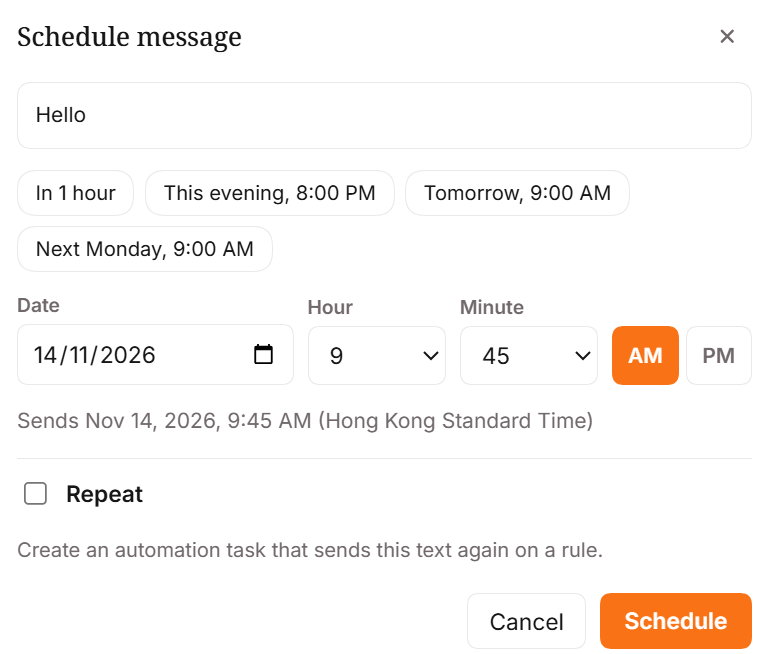
What you get
| Surface | Behaviour |
|---|---|
| Schedule button | Orange pill beside Send in the composer tool row. Disabled while the draft is empty or the composer is busy. |
| Alt+Enter (Option+Enter on macOS) | Opens the same dialog. Registered as an editable-region shortcut, editable in Settings › Shortcuts. |
| Dialog | Date, hour 1–12, minute, AM/PM, quick picks, a "Sends …" summary, and an optional Repeat row. Backdrop/Escape close, focus returns to the composer. |
| Strip | Above the composer: 2 scheduled · next Fri, 14 Nov, 9:00 am, expandable to rows with Send now, Change time, Cancel, and Retry for a failed delivery. |
| Repeat | Creates a task in DSH's own Automation service and opens its task page. Blocked when the draft has images or files. |
| Peak-price hint | When the chosen time lands in DeepSeek's peak window and the session runs a DeepSeek model, the dialog adds one orange line naming the window in your own time zone. Weekends and off-peak hours are half price. |
| Phone | Bottom sheet under 640 px, 44 px targets, 16 px inputs (no zoom-on-focus), safe-area padding. |
| Theme | Host tokens for every surface and text colour; the accent orange is the only literal colour. English and Chinese dictionaries ship complete. |
Install
Published on npm as dsh-scheduled-message. The package is a normal DSH plugin bundle: a Host half
(index.js), a browser half (client.js), and one patch entry.
dsh plugin --profile <profile> add dsh-scheduled-message
Replace <profile> with the profile your host runs — web for a plain dsh web. DSH Desktop keeps
its own profile, so install there from Settings → Plugins instead of the command line.
The command forwards to pnpm in the profile directory and, because the package declares dsh.bundle,
adds it to dsh.profile.bundles as well. Then restart DSH.
The market card does the same thing in one click: Plugins → Discover, search scheduled message.
Needs DSH 0.2.2-rc.2 or newer (engines.dsh).
Without a package manager
Put the folder where the profile can resolve it, list it in that profile's package.json, and
restart:
cp -r dsh-scheduled-message ~/.dsh/profiles/<profile>/node_modules/dsh-scheduled-message
"dependencies": { "dsh-scheduled-message": "file:./node_modules/dsh-scheduled-message" },
"dsh": { "profile": { "bundles": [ …, "dsh-scheduled-message" ] } }
With the plugin manager available, install_bundle with this directory as the target does the same
thing and reports application: applied.
Registering the row directly, without touching dsh.profile.bundles, also works — the bundle ships
cordis.patch.yml:
- insert:
    - id: dsh-scheduled-message
      name: dsh-scheduled-message
Using it
- Type the message and attach anything you want.
- Press Alt+Enter, or click Schedule.
- Pick a date and a time on the 12-hour clock, or use a quick pick.
- Press Schedule. The draft and its attachments are cleared and the message appears in the strip.
- Close the tab whenever you like. Delivery is the Host's job.
Tick Repeat instead to create an Automation task: daily, weekdays, weekly on the chosen weekday, or monthly on the chosen day. Monthly rules on the 29th–31st skip months that are too short.
What it does not do
- No repeating messages with attachments. The Automation service delivers text only, so the UI and the Host validator both refuse that combination.
- No auto-retry. A failed delivery is reported with its reason; Retry is a user action.
- No polling. The strip refreshes on mount, after an action, on window focus, and once shortly after the next due time.
- No cross-zone surprise. The browser's IANA zone is captured at create time and only used for display and for the 12-hour reading; the Host stores one absolute instant.
- Disabling the plugin does not delete anything. Pending records stay in storage and resume when the plugin is enabled again.
Layout
index.js              Host half: durable store, six /api routes, timer, delivery
client.js             browser bundle (generated — see scripts/build-client.mjs)
client.src.js         browser half source (button, dialog, strip, shortcut, styles)
lib/core.js           dependency-free shared logic: 12-hour clock, zone resolution,
                      validation, RRULE text, timer chunking, retention
locale/en.json        English dictionary
locale/zh.json        Chinese dictionary
scripts/build-client.mjs   inlines lib/core.js + locale/*.json into client.js
scripts/check.mjs     static gates (parse, bundle freshness, locale coverage, exports)
scripts/host-smoke.mjs     end-to-end Host test against in-memory services
test/*.test.mjs       node --test suites
docs/DETAIL.md        design notes, API evidence, and what is still unverified
Development
npm run build     # regenerate client.js after editing client.src.js, lib/core.js or locale/*.json
npm test          # unit + bundle + Host smoke tests
npm run check     # static gates
Status
0.2.1. 37 automated tests and the static gates pass. 0.2.1 is a packaging release: 0.2.0's tarball still
carried this README's old 0.1.1 status line, so the npm listing now matches the repository exactly.
0.2.0 added the DeepSeek peak-price hint — when the session runs a DeepSeek model and the chosen time
falls in its weekday peak window, the dialog adds one line naming the window in your own time zone;
off-peak hours are half the rate. 0.1.1 fixed the composer button: it reads the draft through the composer
slot's standard useInput hook, so it enables as soon as you type (0.1.0 read a props.input that
conversation.input.right never passes and stayed disabled).
The plugin was also booted inside an isolated DSH 0.2.2-rc.2 web instance: it loaded, its client
bundle was served into the page's boot graph, a real scheduled message was created, stored, delivered
on time and, in a second cycle with the Host stopped past the due instant, delivered at startup and
marked sent late; Repeat created a real Automation task. The dialog itself renders in a live composer —
the screenshot above is the real thing, not a mock — while Alt+Enter and the strip have not been
separately observed. See
docs/DETAIL.md for the exact list.
No comments yet. Be the first to write one.