DSH Session Colors
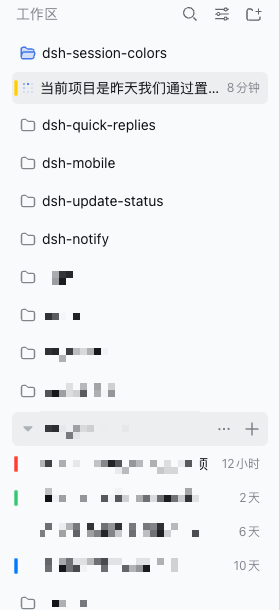
Give any Session a colour and spot it at a glance in the sidebar.


English | 中文
Features · Install · Usage · Compatibility · Cross-device · Configuration · Troubleshooting · Security · Limitations · Uninstall · Development
DSH Session Colors is a DeepSeek Harness community plugin. It does not modify DSH core and does not rewrite any Session or Workspace data: a mark is only "Session id → one colour".
Work is spread across several workspaces, and the workspace list is a wall of look-alike titles. Once a task finishes, the Session you were just in is hard to find again — the status dot is idle and the title is one of twenty. A colour you chose yourself is the cheapest way to make one row recognisable.
Features
- A colour mark on the Session row — a short bar in the row's left padding that deliberately avoids the status dot, so "which one finished" is never covered up.
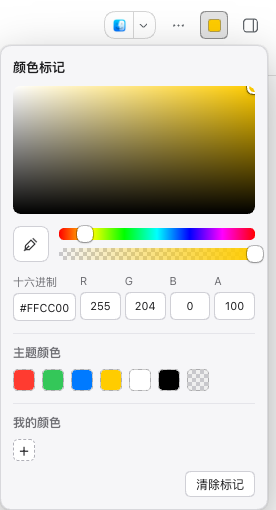
- A system-style colour picker — a large saturation/value field, hue and alpha
sliders, hex and RGBA fields, seven theme swatches, your saved colours, and
screen eyedropper where the browser supports
EyeDropper. It sits in the Session header's utilities, not next to the title. - Marked once, visible everywhere. Marks live on the Host, not in the browser, so a colour chosen on your computer is also there on your phone — over a LAN address or a tunnel alike.
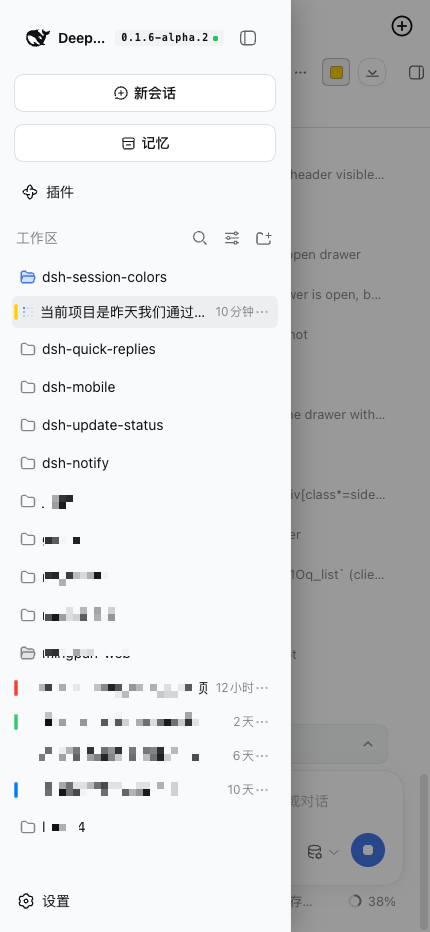
- Visible on a phone too. A phone turns the sidebar into a drawer, and the chips follow it: they travel with the drawer as it slides in, and they are painted above it.
- Changes arrive on their own. The page re-reads marks when it becomes visible again and every 20 seconds, so a colour set on another device shows up without a refresh.
- Never blocks the UI. The chip layer is click-through and clipped to the sidebar's scroll container; the worst case is that a chip does not appear.
- A failure says so. When the store cannot be reached, the header control shows ⚠ with a reason instead of looking like a Session with no colour.
Install
Requirements:
- DeepSeek Harness with a Web profile
- Node.js 20 or newer
- Verified DSH version:
0.1.7-alpha.2(see Compatibility)
dsh plugin --profile <profile> add @idoall/dsh-session-colors@latest
The compatibility table lists the exact versions, if you need to pin one to a specific DSH release.
Working on the plugin itself? Install the directory instead:
dsh plugin --profile <profile> add link:/path/to/dsh-session-colors
Then give it a data directory in the profile's cordis.patch.yml — the same
shape other plugins that need durability use, because the plugin never guesses
the profile path:
- id: dsh-session-colors
  config:
    dataDir: /absolute/path/to/profiles/<profile>/data/dsh-session-colors
Finally restart dsh web (the Host half loads only at boot), then refresh the
Web GUI. It also works without dataDir, but then marks live only for the life of
the Host process.
Usage
- Open the Session you want to mark.
- Click the colour control in the Session header (🎨 when the Session has no colour, the colour itself once it has one).
- Pick a colour, or paste a hex value. The bar appears on that Session's sidebar row immediately.
- To clear it, open the picker again and click Clear mark, or choose the transparent swatch among the theme colours.
Opening the picker on a marked Session starts from its current colour. Colours are stored as HSVA, so alpha round-trips exactly.
Compatibility
Current release: plugin 0.1.3, verified against DeepSeek Harness
0.1.7-alpha.2.
0.1.3 supports DSH 0.1.7-alpha.2 only. On an older DSH — including
0.1.6-alpha.2 — keep plugin 0.1.2: 0.1.3 declares its Host requirement
as >=0.1.7-alpha.2 <0.2.0 and is not verified below it.
| Plugin version | Verified DeepSeek Harness | npm status | What it is |
|---|---|---|---|
0.1.3 |
0.1.7-alpha.2 |
latest |
Adapts to DSH 0.1.7: the Session id now comes from the row's own data-row-key (fiber fallback kept), and chips follow the Web-Animations row gliding 0.1.7 introduced. The Host dependency is declared the way 0.1.7 resolves a linked plugin, and the peer range admits the release. |
0.1.2 |
0.1.6-alpha.2 |
published | Fixes chips staying at their old coordinates for ~20s when a workspace is collapsed or expanded: a second MutationObserver.observe() on the same target had silently replaced the childList watch. |
0.1.1 |
0.1.6-alpha.2 |
published | Documentation only: the packaged README no longer says "not published", and the market screenshots are declared. |
0.1.0 |
0.1.6-alpha.2 |
published | First release: Session colour marks, Host-side storage, visible inside a phone's sidebar drawer |
- Verified DeepSeek Harness is the exact DSH version this plugin was actually
run against. That list has one home —
dsh.compatibility.dshReleasesinpackage.json— and a test keeps both READMEs' compatibility sections word-for-word with it and inside the rangepeerDependenciesdeclares. A DSH version that is not listed is never claimed as compatible. peerDependenciesdeclares>=0.1.7-alpha.2 <0.2.0fordsh-client-ui-layoutanddsh-client-ui-conversation, anddsh.engines.dshdeclares the same range as the Host requirement: that is the range allowed to load, which is not the same as verified. The lower bound names the alpha on purpose — under node-semver's default prerelease rule a range like>=0.1.6-0 <0.2.0does not admit0.1.7-alpha.2, so pnpm reports the peer as unmet even though the plugin runs.@deepseek-ai/schemasteryis a peer, not a plain dependency: DSH 0.1.7 resolves only a linked plugin's peer dependencies from the running installation, so alink:install of this directory would otherwise fail to import the Host half.- DSH moving faster than this plugin does not break it: chips depend on DSH's row DOM (see Limitations), so a large change to the row structure can at worst stop chips from appearing — it cannot block clicking.
Cross-device and LAN
Storage goes through the plugin's own HTTP route
(GET/POST /plugins/dsh-session-colors/marks), persisted to one JSON file in
the profile's data directory. That is deliberate:
DSH's own user-settings service host-backs settings only for loopback pages —
persistence = $host.isLoopback ? "host" : "memory"
— so a page opened over a LAN address or a tunnel gets a permanently unavailable
scope: it can neither read nor write. An own route is not subject to that rule,
which is exactly what makes a mark visible on every device. LAN forwarders
(dsh-bridge, dsh-lan-proxy, and friends) rewrite Host/Origin to loopback
and inject the auth cookie, so a request that arrives over the LAN still looks
like loopback to DSH and the route answers normally.
Configuration
| Field | Type | Meaning |
|---|---|---|
dataDir |
absolute path | Where session-colors.json is written. Without it, marks live in process memory only. |
A mark is one JSON document:
{
  "version": 1,
  "marks": {
    "session-0698599a-…": { "h": 211.3, "s": 1, "v": 1, "a": 1 }
  }
}
Writes are atomic (temporary file, then rename). To drop a mark, use Clear mark in the picker, or remove that line from the file.
Troubleshooting
The colour still is not visible on my phone. First check which build the device runs:
document.querySelector('.dsh-sc-layer').dataset
// { dshScBuild, dshScStatus, dshScWritable, dshScMarks, dshScError }
If dshScBuild is not host-routes+animated-rows, the device is running a
cached client: refresh the page (the browser half reloads on a refresh, no DSH
restart needed). If dshScStatus is not ready, the store cannot be read — see
the next item.
The header control shows ⚠.
That means the store cannot be reached: dshScError carries the reason and
dshScWritable says whether writes are possible. This happens when the Host route
was never registered (the profile did not load the plugin) or the data directory
is not writable. It is not the same as "this Session has no colour".
A LAN page behaves differently.
Since 0.1.0 this plugin behaves identically on LAN/tunnel pages and loopback
pages, because storage uses its own route. If you see the old "settings
unavailable" behaviour, check which version is installed.
Chips are in the wrong place, or gone.
The layer finds rows by ARIA role and reads the Session id from the row's
data-row-key (falling back to React internals). A large change to DSH's sidebar
structure can make it find nothing; chips then disappear, but clicking is
unaffected because the layer is click-through.
Security boundaries
- A mark stores only a Session id and a colour. It never writes Session logs, titles, history, status, archive records, or Workspace membership.
- It never creates, copies, moves, or reorders a Session; a mark is not part of Session data.
- The chip layer never accepts pointer events and is clipped to the sidebar's scroll container: the worst case is a chip that does not appear.
- The Host route reuses DSH's own auth fence (
connection.requestRejection), and writes add a same-origin check on top. - The plugin registers no model Tool, spawns no subprocess, and makes no network requests.
Limitations
- The chip depends on DSH's row DOM. It reads rows by ARIA role and the
Session id from the row's
data-row-key, falling back to React internals. A future DSH release can stop chips from appearing; it cannot break clicking. - Marks are per DSH instance. They live in one profile's data directory, so two independent DSH servers do not share them.
- No permission model. Anyone who can reach the Host's authenticated routes for this profile can read and write marks.
- Colour only. No labels, icons, or emoji.
Uninstall
dsh plugin --profile <profile> remove @idoall/dsh-session-colors
Restart DSH and refresh the Web GUI. session-colors.json in the data directory
is not deleted for you; remove it yourself if you do not want it.
Development
npm test # 38 tests: bundle shape, store, route, cross-device, geometry, docs
The browser half is a hand-authored __ModuleLoader__ bundle, which is the only
format the DSH client loader accepts for a package client half. It is written by
hand on purpose: there is no build step, so nothing can drift from the DSH
version it targets.
src/index.js       Host half: routes, the JSON store, auth fence
src/client.js      Browser half: picker, chip layer, the fetch-backed store
tests/             Unit tests for both halves, plus the doc-consistency checks
docs/              The design record (Chinese) and the README screenshots
demos/             A standalone HTML demo of the picker
Design decisions and measurements live in docs/plugin-design.zh.md (the current part starts at the 「会话颜色标记版」 section).
No comments yet. Be the first to write one.