DSH Quick Replies
Manageable one-tap replies in the DeepSeek Harness session composer.


English | 中文
What it does · Install · Usage · Compatibility · Changelog
A DeepSeek Harness community plugin. It mounts above the session composer and never modifies DSH source.
Supports DSH
0.2.1-rc.3. Compatibility checked against it and still compatible with0.2.1-rc.2,0.2.1-alpha.5,0.2.1-alpha.4,0.2.1-alpha.3,0.2.1-alpha.1,0.2.0-rc.2,0.2.0-rc.1and the0.1.7line — plugin0.1.16.
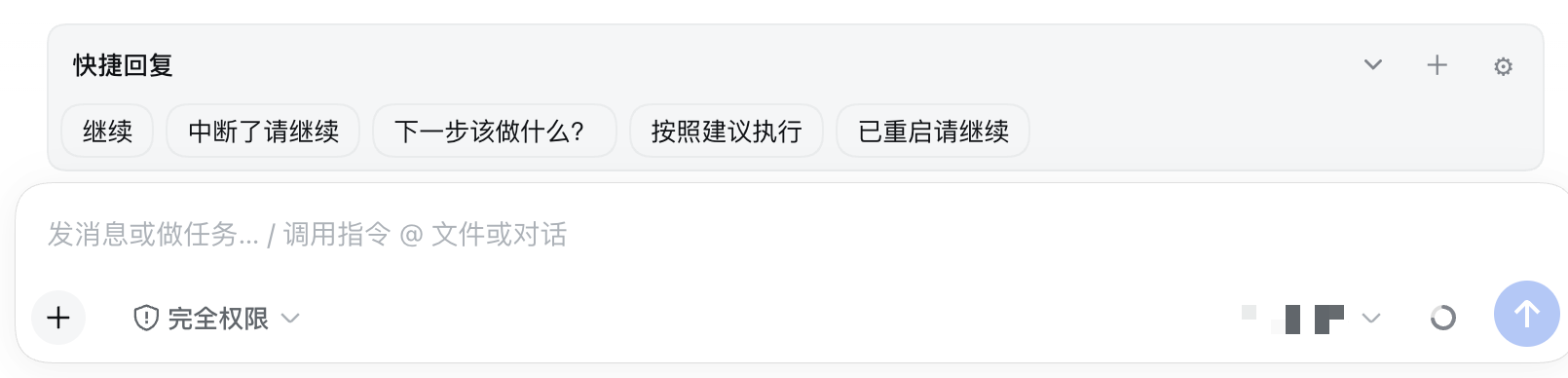
A row of stored text chips sits above the input. Tapping one sends it as an ordinary user message: queued while the session is idle, steered at the next safe boundary while it runs. The plugin never rewrites your draft, never cancels anything, and never stops work.
The reply library is one Host settings entry (dsh-quick-replies), so every browser and device on the same Host sees the same chips. Folding is remembered per browser.
What it does
- One tap to send. Store short phrases (like “continue”) as chips and send them as plain text.
- Queue when idle, steer when running. It never claims to interrupt a turn; DSH decides the timing.
- Your draft stays put. Sending goes through the session's public
promptAPI. Text, references, images and cursor are untouched. - Manageable. Add, edit, delete, enable/disable, reorder, import and export JSON.
- Folds when space is tight. Narrow layouts collapse to one row; long lists scroll inside the bar.
- Blank-session guard. A session with no history refuses to send, so a “continue” chip cannot create an empty conversation by accident.
Install
You need DeepSeek Harness with a Web profile and Node.js 20 or newer.
dsh plugin --profile web add dsh-quick-replies@latest
Working from DSH source instead:
corepack enable; pnpm install
pnpm dsh plugin --profile web add dsh-quick-replies@latest
Or from the plugin market:
dsh plugin --profile web add dshmarket
Restart DSH, then look for dsh-quick-replies under Settings → Plugin market.
Local development links this repo instead:
pnpm install
pnpm run build
dsh plugin --profile web add "link:$(pwd)"
Refresh the web UI after installing. The reply library is stored as that entry's config in the profile's cordis.patch.yml (~/.dsh/profiles/<profile>/cordis.patch.yml), not in the plugin directory — so reinstalling or upgrading the plugin leaves your chips alone.
Usage
- Open a session that already has messages.
- The bar appears above the composer. Narrow layouts start folded; tap the title or chevron to expand.
- Tap a chip to send. An idle session reports it as queued; a running one says it will be handled at the next boundary.
- Tap + to add a reply — label and body, save, and it appears on the bar.
- Tap ⚙ to manage: edit, delete, reorder, import or export JSON.
Four defaults ship with the plugin and stay deleted if you delete them: continue, continue after interrupt, what should I do next?, continue after restart.
LAN pages
On DSH up to 0.2.1-alpha.1 the settings client pinned every non-loopback page to memory mode (persistence = $host.isLoopback ? "host" : "memory"), so the official form answered unavailable and settings-backed surfaces went inert — over a LAN bridge (dsh-lan-proxy, dsh-bridge, dsh-mobile) this bar showed “Reply library unavailable”. The plugin answers with the same public Remote the official settings client talks to, so reads, edits and import/export keep working against the one shared Host entry, and a refused write shows a conflict rather than silently overwriting.
0.2.1-alpha.3 dropped that pin, and the Host never gated settings by origin, so a non-loopback page now gets the official settings form like a loopback one; the fallback above stays for older DSH and goes unused there.
If you would rather have DSH's stock policy — a non-loopback page never persists settings — stay on plugin 0.1.2, or let the bridge declare itself the Host by injecting this into the served HTML before __DSH_BOOT__:
window.__DSH_TRANSPORT__ = { fetch: (input, init) => window.fetch(input, init), ownsHost: true }
ctx.connection.isLoopback then reads true and the surfaces that still gate on it come back. The dsh-mobile gateway already does this.
Compatibility
Current release 0.1.16 has been compatibility-checked against DSH 0.2.1-rc.3, and stays compatible with 0.2.1-rc.2, 0.2.1-alpha.5, 0.2.1-alpha.4, 0.2.1-alpha.3, 0.2.1-alpha.1, 0.2.0-rc.2, 0.2.0-rc.1 and the 0.1.7 line (0.1.7-rc.2, 0.1.7-rc.1, 0.1.7-alpha.2).
| Plugin | DSH | Notes |
|---|---|---|
0.1.0–0.1.1 |
0.1.2-rc.1 |
|
0.1.2 |
0.1.5-rc.1 |
|
0.1.3 |
0.1.5-rc.1 |
Use this one on DSH older than 0.1.7-alpha.2 |
0.1.4 |
0.1.7-alpha.2 |
|
0.1.5 |
0.1.7-rc.1 |
|
0.1.6 |
0.1.7-rc.2 |
|
0.1.7 |
0.2.0-rc.1 |
DSH skips it on 0.2.0-rc.2; upgrade to 0.1.8+ |
0.1.8 |
0.2.0-rc.2 |
|
0.1.9 |
0.2.1-alpha.1 |
|
0.1.10–0.1.12 |
0.2.1-alpha.3 |
|
0.1.13 |
0.2.1-alpha.4 |
|
0.1.14 |
0.2.1-alpha.5 |
|
0.1.15 |
0.2.1-rc.2 |
|
0.1.16 |
0.2.1-rc.3 |
Current release |
Upgrading from any earlier 0.1.x needs no data migration and no config change. DSH releases newer than the ones listed are not declared compatible until they are tested; if the plugin is incompatible, disable or uninstall it rather than patching DSH core.
Uninstall
dsh plugin --profile web remove dsh-quick-replies
Uninstalling keeps your reply library. To wipe it too, export the JSON from Manage first, then delete the dsh-quick-replies entry's config from the profile's cordis.patch.yml.
Development
pnpm install
pnpm run test
pnpm run build
pnpm run test runs tsc --noEmit and the vitest projects — shared and Host logic, client logic, jsdom UI specs, and an artifact lane that loads lib/ the way the harness does. Build first so the artifact lane has something to load.
Pushing a v* tag runs GitHub Actions: a version and release-notes gate, tests, pack, npm trusted publishing over OIDC (no NPM_TOKEN), and a GitHub Release built from docs/releases/<tag>.md.
MIT. See LICENSE.
No comments yet. Be the first to write one.