dsh-skill-mgr
Every skill in one list — the whole profile inventory in a sidebar panel: see what is installed, read a skill's body, enable or disable it, repair a discovery problem, and delete it into a trash you can restore from.
English | 简体中文







If this plugin saves you a hunt through
~/.dsh/skills, a ⭐ star helps the next person find it.
Why this exists
A skill is a folder with a discovery file in it, which is easy to create and hard to keep track of: which ones exist, which are currently switched off (a renamed file is invisible, not absent), which one has a broken frontmatter, and which are duplicates across the two writable roots. This plugin is the one place that answers those questions, without an editor open and without hand-renaming files.
Enabled is the default, and disabling is a filesystem fact first. The discovery file is renamed (SKILL.md → SKILL.md.disabled, or <name>.md → <name>.md.disabled) so the filesystem provider simply stops seeing it; a registry record is what lets the panel still list it and switch it back on.
Screenshots
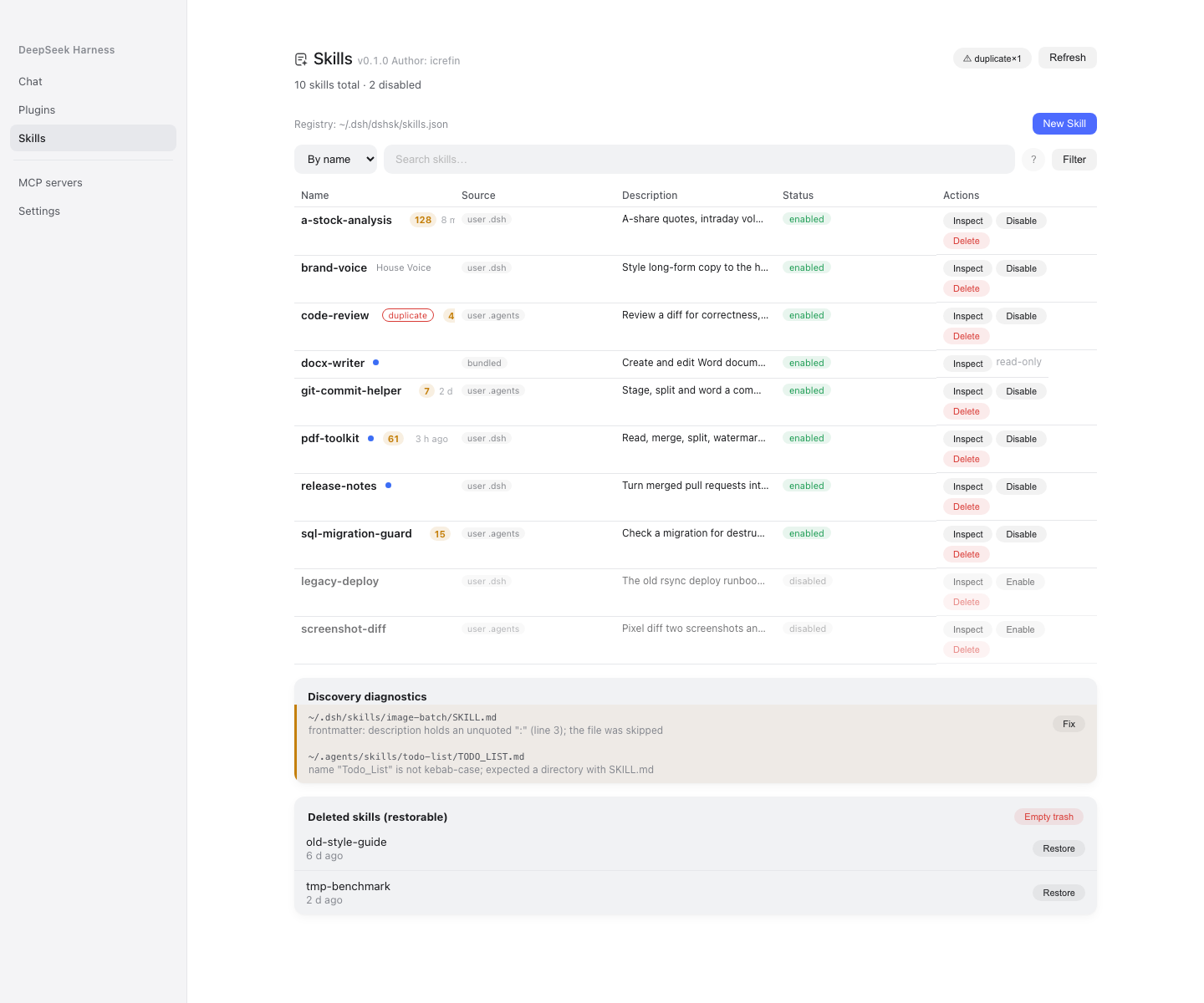
Skills — one flat table over the profile inventory (enabled and disabled alike), with search, a source filter, use-count and last-used chips, the discovery diagnostics and the restorable trash.
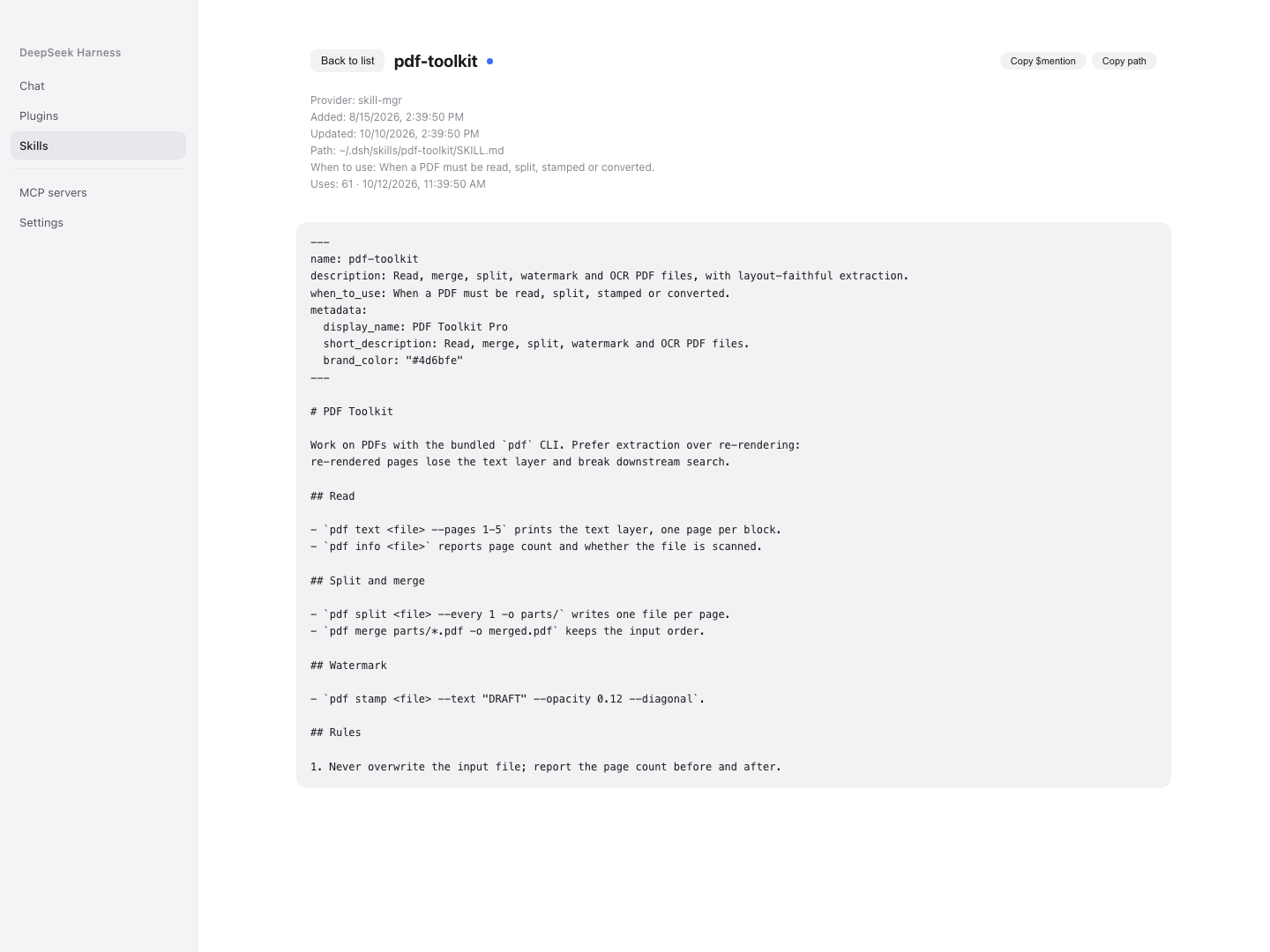
Inspect — the skill's body and metadata, with the enable/disable action for a disabled skill.
The registry file
<profile>/.dsh/dshsk/skills.json the profile's skill management state
One registry holds everything the manager persists: the disabled-skill records, the trash, and the statistics checkpoint. It is reconciled at startup — a .disabled file with no record is adopted (an upgraded or hand-edited install), and a record whose file is gone is dropped. Writes go through an atomic same-directory temp file (wx, mode 0600, then rename), and a read that hits unparsable JSON refuses to overwrite it and reports why.
Features
| Surface | What it does |
|---|---|
| Sidebar row | sits directly under Plugins (order: 1) and opens the Skills page in the centre column |
| Skills table | one flat table of the profile inventory — Name / Source / Description / Status / Actions — with search, sorting and a source filter |
| Enable / disable | renames the discovery file and keeps the record, so the row stays visible (dimmed) and can be switched back on |
| Inspect | reads a skill's body and metadata without leaving the GUI |
| Add skill | scaffolds a new skill in a writable root |
| Discovery diagnostics | lists the skills the provider cannot see, and auto-fixes the repairable ones in place |
| Restorable trash | Delete moves a skill into the root's .trash; the panel lists it with a Restore action, and clearing the trash is explicit |
Chat / menu dots |
marks each candidate row as model-invocable or user-invocable, coloured from the same settings the panel reads |
| Settings card | the plugin's own configuration, in the Plugins manager |
| Attribution | the title chip carries the installed version and the author credit |
Requirements
- Node.js
^22.19.0 || >=24.0.0 - A DeepSeek Harness
0.2.0-rc.2installation (the plugin composes into a profile) pnpm11.8.0 (packageManagerin the manifest pins it)
Installation
pnpm install
pnpm check                        # typecheck → build → tests → verifiers
pnpm pack                         # dist/dsh-skill-mgr-<version>.tgz
sh tools/install-into-profile.sh desktop
Restart DeepSeek Harness afterwards; the sidebar entry appears directly under Plugins.
The package is not on npm: the profile installs it from this repository. dsh plugin (a pnpm passthrough into the profile directory) is what the script uses, and the Plugins page does the same thing. The desktop profile is owned by the Electron application, so dsh --profile desktop itself refuses to compose it, while dsh plugin still works.
Upgrading from dsh-skill-hub? The two packages must not both be installed — they would both claim the plugin-config card. Remove the old bundle first; the new plugin adopts the old state file on its first load and leaves it untouched.
Quick start
- Open Skills in the sidebar. The table lists every skill in
~/.dsh/skillsand~/.agents/skills. - Search for a skill; select Inspect to read it, or Disable to switch it off for the whole profile.
- Select Add skill to scaffold a new one in a writable root.
- Read the diagnostics banner when something is not being discovered, and use its fix action on the repairable entries.
Configuration
The Loader entry's config is the settings card; the host reads the same values through their volatile refs.
| Field | Default | Meaning |
|---|---|---|
enabled |
true |
contribute the skill provider and the announcement; the management panel keeps working either way, because it is the surface that turns the plugin back on |
announceToAgent |
true |
register the system-prompt section that tells an agent this manager exists |
showUseCount |
true |
per-skill invocation-count chip |
showUseTime |
true |
per-skill last-used relative time |
dotModelColor |
unset | #rrggbb for the "model-invocable" dot, in the table and the chat / menu |
dotUserColor |
unset | #rrggbb for the "user-invocable only" dot |
statsWindowDays |
14 |
rolling window for the counts; 0 = all history |
statsScanMinutes |
5 |
background session-log scan interval, in minutes |
Remote surface
The browser half reads and writes through one Typert Remote namespace, skillMgr. Two conventions cover the whole surface: snapshot() is the one read (the panel loads all of its slices from a single call, cached for one render pass), and every write answers SkillApplyResult ({ok:true} / {ok:false, error}) after which the caller refetches.
| Area | Methods |
|---|---|
| Core | snapshot |
| Profile inventory | saveGlobalSkill, removeGlobalSkill, setGlobalSkillEnabled, skillDetail, fixDiagnostic, skillStats |
| Trash | restoreTrashedSkill, clearTrash |
Nine methods in total. Their parameter and result types live in src/wire.ts as zod schemas, and each type is z.infer of its schema, so the host implementation, the descriptors and the browser half cannot drift apart.
Caveats
- Enable/disable is profile-wide, not per workspace. Because toggling renames one discovery file, there is no way to have a skill on in one workspace and off in another; every workspace is offered every skill in the profile inventory. A reader who needs per-workspace on/off cannot have it here.
- Project skills are discovered, not managed. The provider lists a workspace's own roots so an agent still sees the skills beside it, but they are never part of the profile inventory the panel manages: they cannot be toggled, deleted or adopted. Only
~/.dsh/skillsand~/.agents/skillsare writable. - Writable roots are user-level only, and a refusal names the source that owns the skill.
- Deletion is recoverable but has no automatic expiry.
Deletemoves the skill into the root's.trashdirectory and the panel lists it with a Restore action; clearing the trash is permanent. - A local install pins the tarball's path. Delete
dist/dsh-skill-mgr-<version>.tgzand the next install fails withENOENT. - There is no update check. This package is heavily refactored from
dsh-skill-hub, so tracking upstream releases would be misleading and there is no release channel of this package to poll.
License and attribution
MIT — see LICENSE. This package was refactored from dsh-skill-hub 0.3.18 (MIT, "dsh-skill-hub contributors"); that copyright line is kept in the LICENSE file, and the differences from upstream are documented in docs/ARCHITECTURE.md.
Stars are how small projects survive. If this one earned yours, tap ⭐ — it costs nothing and helps someone else find it.
No comments yet. Be the first to write one.