dsh-notify-push
Push DeepSeek Harness agent notifications to your phone and watch via ntfy, Bark, Gotify, Telegram or a webhook — without keeping the browser tab open. English | 简体中文







A DeepSeek Harness (dsh) plugin. It pushes a short notification to your phone — and, through the phone's own notification mirroring, to your watch — whenever an agent finishes a turn, hits an error, or is waiting on your approval.
Unlike a browser notification, this leaves the machine: it goes out over the network to a push service you choose, so it arrives while the Harness tab is closed and the laptop lid is shut.
Settings ▸ Notify Push                          v0.4.1
└── delivery state, an editable configuration form,
    the exact server and topic to subscribe to, armed triggers,
    a live preview, the delivery log,
    and one "Send test notification" button
It is a section of the Settings panel, not a page in the working area: a
notifier is configured once and glanced at occasionally, so giving it a permanent
sidebar icon and a whole centre column overstated it. The Settings shell owns the
trigger, the nav entry, the panel and the scrolling container, so this plugin
contributes only the section body — deliberately with no height, no second
scroll and no horizontal padding, all of which the shell already provides.
The version beside the title is read from the manifest at runtime, not baked in at build time, so it names the build the harness actually loaded. That matters because installing a new package does not re-compose a running profile: a swap on disk leaves the old code live until a restart, and the chip is the fastest way to tell those two situations apart.
What a notification says
Every notification carries the same three facts, in a fixed shape:
| Part | Where | Example |
|---|---|---|
| event type | title | Agent finished |
| host | title | workstation.local |
| session | body line 1 | Fix the login redirect |
| detail | body line 2 | done in 42s |
So a lock screen reads:
Agent finished · workstation.local
Fix the login redirect
done in 42s
The event type is one of Agent finished, Agent error, Approval needed,
Question asked or Test notification. titlePrefix prepends a literal
(DSH · …) when you run more than one Harness.
A Question asked notification carries the question itself, not just word that
one exists — a prompt that only said "the agent has a question" would make you
open the app to find out whether it mattered:
Question asked · workstation.local
Fix the login redirect
Choose Mode — Which deployment should I target?
Blue · Green
The heading, the question and (when there are a few) the offered choices, so the lock screen carries enough to decide whether to answer now. A longer question is truncated here, with a visible ellipsis, rather than left for the OS to cut mid-word.
Screenshots
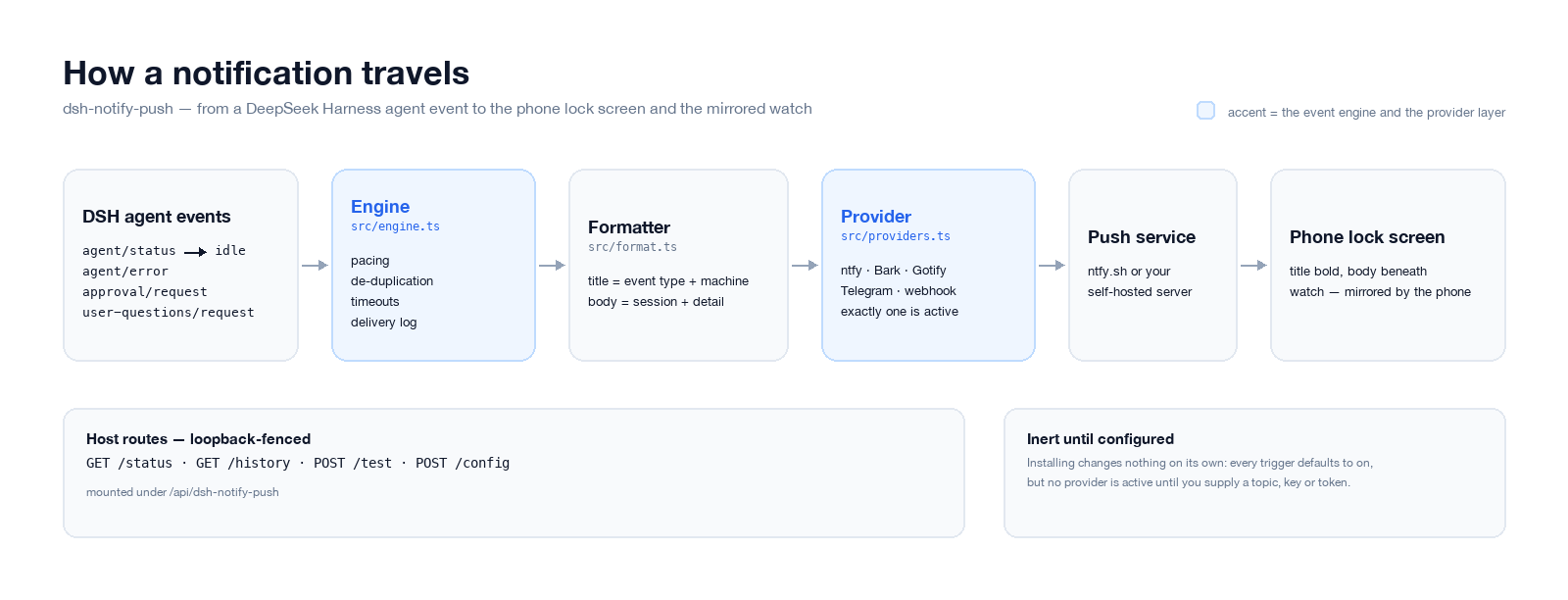 How an event reaches your phone: the engine paces and de-duplicates, the formatter composes the two lines, the provider delivers.
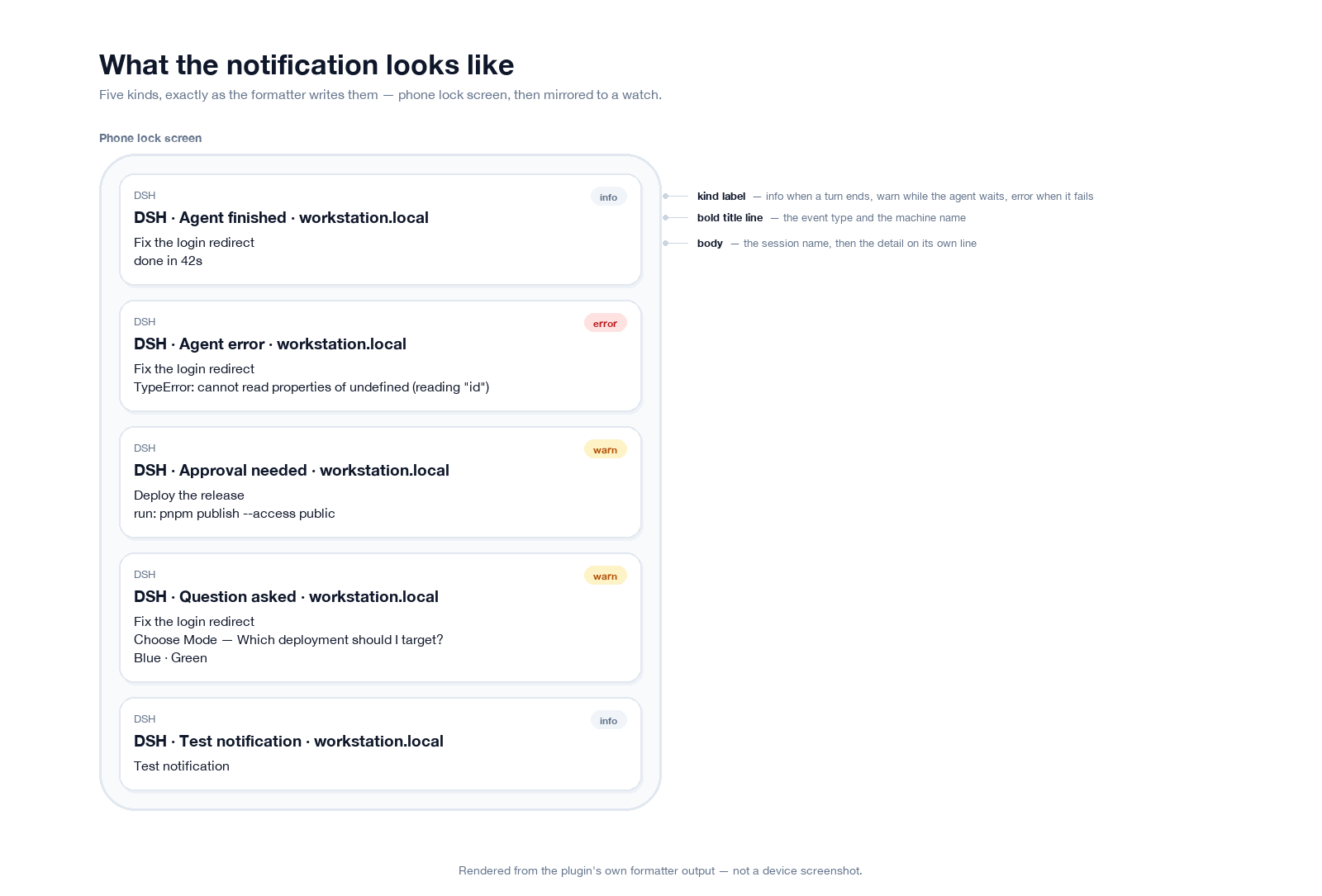 Rendered from this plugin's own formatter output — the exact title and body strings, shown as they appear on a lock screen. Not a device screenshot.
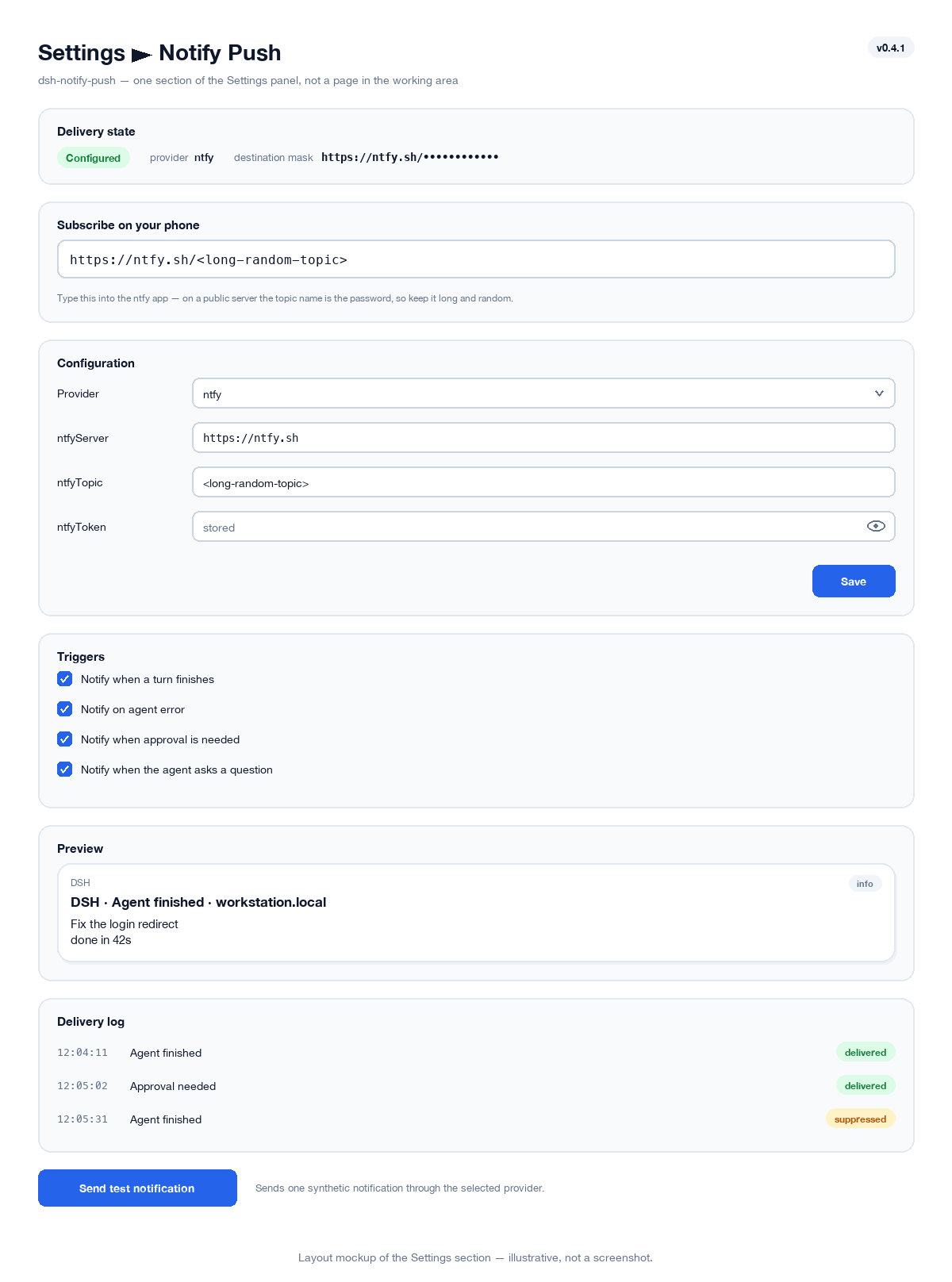 Layout mockup of the Settings ▸ Notify Push section (illustrative, not a screenshot).
Surfaces
| Surface | What it does |
|---|---|
Host route GET /api/dsh-notify-push/status |
provider, destination, armed triggers, counters, live preview, form descriptors |
Host route GET /api/dsh-notify-push/history |
the recent delivery log |
Host route POST /api/dsh-notify-push/test |
send one synthetic notification |
Host route POST /api/dsh-notify-push/config |
merge validated settings into this row's config |
| Settings section Notify Push | the whole surface: status, form, subscribe block, preview, log and test button |
One slot registration, into settings.section — a list slot declared by
@deepseek-ai/dsh-client-ui-settings-general, whose entries carry
{ id, order, label } and whose active entry the shell renders inside its own
scrolling panel. dsh.client.inject names both that package and
@deepseek-ai/dsh-client-ui-settings, which owns the canonical slot contract and
is what makes the registration type-check against the real slot map.
Every route is loopback-fenced, method-checked and body-size-capped. The config route additionally validates its patch against the field specs before anything is written — a rejected key never reaches the settings document, which outlives the process and would otherwise be reapplied on every boot.
Install
pnpm install
pnpm check                              # typecheck both halves, build, then vitest
pnpm run pack                           # -> dist/dsh-notify-push-0.4.1.tgz
The desktop profile is owned by the Electron application, so dsh plugin add
refuses it: install the packed tarball from Settings → Plugins. A bundle
added to a running profile needs a restart before its entry can be imported;
the browser half additionally needs the page reloaded.
Configure
Edit it in the panel. Open Settings → Notify Push; the Configuration
section renders a form for the selected provider: pick the backend, fill in its
fields, press Save. A saved value applies immediately — no restart — because
every field of the row's schema is volatile, so the loader swaps it into the
running fiber rather than waiting for the next boot. It is also written to the
host's settings document, so it comes back after a restart.
Secret fields (tokens, device keys) are write-only: the stored value never
leaves the host, so the input starts blank and shows stored or not set.
Leaving it blank keeps what is there — there is no clear action, deliberately, so
a save can never wipe a working credential by accident.
Each secret field carries its own eye button, which unmasks what you are
typing so you can check a paste before saving. It cannot show the stored value,
because the browser was never given it — an untouched field stays empty with its
stored placeholder, revealed or not.
Configuration also works from the profile's cordis.patch.yml, which survives
plugin upgrades. The row id is dsh-notify-push:
- id: dsh-notify-push
  name: dsh-notify-push
  config:
    provider: ntfy
    ntfyServer: https://ntfy.sh
    ntfyTopic: <a long random topic>
Both paths write the same thing, so you can set a value in YAML and later adjust it in the panel, or the reverse. If a deployment composes no settings service the form renders read-only and says so, rather than accepting a change with nowhere to put it.
Installing changes nothing on its own. Every trigger defaults to on, but no
provider is configured until you supply a topic, key or token, so the plugin is
inert out of the box and cannot surprise you with traffic. The panel says
Not configured and names the missing field.
Triggers and pacing
| Field | Default | Meaning |
|---|---|---|
enabled |
true |
Master switch. Off means events are logged but never sent. |
notifyOnIdle |
true |
Notify when a turn finishes (agent/status → idle). |
notifyOnError |
true |
Notify on agent/error. |
notifyOnApproval |
true |
Notify when a tool awaits approval (approval/request). |
notifyOnQuestion |
true |
Notify when the agent asks you a question (user-questions/request). |
minTurnDurationMs |
5000 |
Ignore turns shorter than this, so quick replies stay quiet. |
minIntervalMs |
3000 |
Minimum gap between deliveries; faster events are suppressed. |
dedupeWindowMs |
15000 |
Drop an identical event seen again inside this window. |
timeoutMs |
10000 |
Per-delivery HTTP timeout. |
includeHostName |
true |
Put the machine name in the title. |
includeSessionName |
true |
Put the session title in the body. |
titlePrefix |
'' |
Optional literal prefix, e.g. DSH. |
historyLimit |
50 |
Rows kept for the panel. |
Pacing and de-duplication are what keep a noisy agent from becoming a noisy
phone: an error that repeats per step, or a burst of short turns, is collapsed
and counted as suppressed in the panel rather than delivered.
The two waiting triggers are observed, never claimed
approval/request and user-questions/request are both waterfalls, and the
listener that claims one owns the outcome. This plugin only ever observes: both
listeners notify and then delegate with next(), propagating whatever the real
answerer returns.
For questions that is not a style preference. The answerer behind
user-questions/request is the only thing that lets the agent continue, so a
listener that returned early would not merely drop a notification — it would
block the turn forever, behind a prompt nobody could reach. test/questions.spec.ts
asserts that the answerer runs and that its return value survives the
round trip.
Both are registered { prepend: true }, and that is load-bearing
Observing is not enough on its own. A waterfall composes outermost-first, and
next() walks inwards — but a listener that claims the request does not walk
at all: it resolves with the user's answer and the chain stops there.
@deepseek-ai/dsh-api-remotes is exactly that claimer and it is already
registered by the time this plugin loads, so a listener appended behind it is
never invoked.
That was a real bug here, not a hypothetical. 0.4.0 registered both listeners
plainly; when a question was asked the delivery log stayed completely empty — not
even a suppressed row, because the listener never ran — while the question
appeared in the UI perfectly normally. prepend: true puts the observer
outermost, where it can notify and then hand the request on, leaving the claimer
to own the outcome exactly as before.
The regression test is built on Cordis's own ordering rules (prepend unshifts,
appending pushes, the chain stops at a non-delegating listener) and registers a
claimer before the plugin. Removing the prepend makes it fail with a
request timeout — the production symptom. A test that only asserted "a listener
is registered" passed throughout the outage, which is why it was replaced.
Providers
Exactly one provider is active, selected by provider.
ntfy — iOS, Android, desktop
The simplest path, and the one that needs no account. Subscribe to a topic in the ntfy app, then publish to it.
provider: ntfy
ntfyServer: https://ntfy.sh
ntfyTopic: <long random topic>
| Field | Default | Meaning |
|---|---|---|
ntfyServer |
https://ntfy.sh |
Base URL; point it at your own server to self-host. |
ntfyTopic |
'' |
Topic to publish to. |
ntfyToken |
'' |
Optional access token, sent as Authorization: Bearer. |
ntfyClick |
'' |
Optional URL opened when the notification is tapped. |
On a public ntfy server the topic name is the password. Anyone who guesses it can read your notifications, which will contain session titles. Use a long random one, or self-host with authentication.
The panel prints the full server and topic under Subscribe on your phone, so the string you type into the app is never something you have to go read out of the profile YAML. Clicking a value selects all of it.
That is the one place a credential is shown in full, and it is deliberate: the
topic is the subscription identifier, so masking it makes the phone
impossible to set up. Publish tokens and device keys — which only authorize
sending — stay masked everywhere, and the target line remains a masked
summary for the log.
The topic therefore appears twice in the status payload: once here, and once as
the current value of the form's ntfyTopic field, which is what prefills that
input. Both are required for the page to be usable, and a test asserts it appears
nowhere else — not in target, the sample, or the counters.
Priority follows the event (3 info, 4 warn, 5 urgent) and each kind gets a
recognisable tag.
Bark — iOS
Reliable on iOS, including Focus-breaking delivery for approval requests.
provider: bark
barkKey: <your device key>
| Field | Default | Meaning |
|---|---|---|
barkServer |
https://api.day.app |
Bark base URL. |
barkKey |
'' |
Device key from the Bark app. |
barkGroup |
DeepSeek Harness |
Notification group. |
barkSound |
'' |
Optional sound name, e.g. minuet. |
barkLevel |
'' |
active, timeSensitive, passive or critical. Empty derives it: timeSensitive for errors and approvals, active otherwise. |
Gotify — Android, self-hosted
provider: gotify
gotifyServer: https://gotify.example.com
gotifyToken: <application token>
Priority is 2 / 5 / 8 for info / warn / error.
Telegram
provider: telegram
telegramBotToken: <bot token>
telegramChatId: <chat id>
Generic webhook
Posts the event JSON to any URL — Slack, Discord, n8n, a script of yours:
provider: webhook
webhookUrl: https://example.com/hook
The body carries the resolved title, body and a Slack-compatible text
(plus content for Discord), alongside the raw kind, level, host,
session, detail and ts fields so a receiver can route on them.
Self-hosting ntfy
Any ntfy server works; point ntfyServer at it and add a token.
provider: ntfy
ntfyServer: https://ntfy.example.com
ntfyTopic: <long random topic>
ntfyToken: <access token>
A Docker deployment with authentication on:
services:
  ntfy:
    image: binwiederhier/ntfy
    container_name: ntfy
    restart: unless-stopped
    command: serve
    environment:
      NTFY_BASE_URL: "https://ntfy.example.com"
      NTFY_LISTEN_HTTP: ":80"
      NTFY_CACHE_FILE: /var/lib/ntfy/cache.db
      NTFY_AUTH_FILE: /var/lib/ntfy/auth.db
      NTFY_AUTH_DEFAULT_ACCESS: deny-all
      NTFY_BEHIND_PROXY: "true"
      NTFY_ENABLE_LOGIN: "true"
    volumes:
      - ./data:/var/lib/ntfy
    ports:
      - "127.0.0.1:8080:80"
Create a user and a token, then keep the token server-side and give the phone app the username and password:
docker exec -it ntfy ntfy user add --role=admin <user>
docker exec -it ntfy ntfy token add <user>
Two things to get right:
- Terminate TLS in front of it. The ntfy apps are unreliable against plain
http://on a public host, and on iOS an unsigned plain-HTTP origin is rejected outright. ntfy speaks plain HTTP; put Caddy, nginx or a tunnel in front of it, and setNTFY_BASE_URLto thehttps://origin. - Do not bind it to
0.0.0.0before TLS is in place. The example above binds loopback so only the reverse proxy can reach it.
Why not just use the remote-control tunnel
dsh-remote-control already puts the real Harness client on your phone. It
still cannot deliver these notifications: a backgrounded browser tab's
WebSocket is suspended by the OS, so when the screen is off nothing arrives.
Reliable delivery needs a real push path — which is exactly what this plugin
adds. The two are complementary: the push tells you that something needs you,
the tunnel lets you act on it.
Limitations
agent/errorcarries no agent or session in its payload, so the session name is resolved by registering a second listener on each agent's own context viaagent/created. If that context is unreachable the notification is still sent, with the host and event type but no session line.- One provider at a time. Use the
webhookprovider if you need to fan out. - The delivery log is in memory and resets when the host restarts.
- Suppressed events are counted and logged, but are not themselves notified.
License
MIT
If this plugin saves you a trip back to your desk, a ⭐ star helps other DSH users find it.
No comments yet. Be the first to write one.