dsh-model-retry-settings
A DeepSeek Harness (dsh) plugin: a max retries control on the web GUI's Settings → Model page, the one preference the shipped composition has no surface for. English | 简体中文







Request retries — one card at the foot of Settings → Model that decides how many times a failed model request is retried, for every provider in the profile.
What it does
dsh resolves a request-retry policy per provider route: an adapter's
providerRetryPolicy() is captured when that route registers
(@deepseek-ai/dsh-llm/retry-policy), the agent loop carries the resolved policy
into the agent/request-error waterfall on every failed attempt, and the
optional @deepseek-ai/dsh-llm-retry plugin executes it as durable llm/retry
events. Nothing in the shipped composition lets a person change that number
without hand-editing provider configuration.
This plugin owns the preference instead:
- it rides its own Loader entry's
Configas its settings namespace — since dsh 0.1.7 an entry's Config is its settings namespace, so both fields are.volatile()and become writable through the ordinary settings transport; - the browser half renders the control into the Models page's designed
extension seat,
settings.models.footer; - the host half rewrites the policy the retry executor is about to read.
| Field | Type | Default | Meaning |
|---|---|---|---|
enabled |
boolean | true |
While off, every provider's own retry policy applies untouched. |
maxRetries |
integer 0–50 | 5 |
Retries one failed model request may make. 0 disables retrying. |
5 is dsh's own shipped default (DEFAULT_MAX_RETRIES in
@deepseek-ai/dsh-llm/retry-policy), so a fresh install behaves like a stock one
until you change the value.
Where it sits in the page
Settings ▸ Model
├── DeepSeek account                     [provider row]
├── Example provider                     [provider row]
├── + Add provider
└── Request retries                      ← this plugin
     ├── Override provider retry policy  [switch]
     └── Max retries                     [whole number, 0–50]
(Provider rows are whatever this deployment has configured; the second one is a placeholder.)
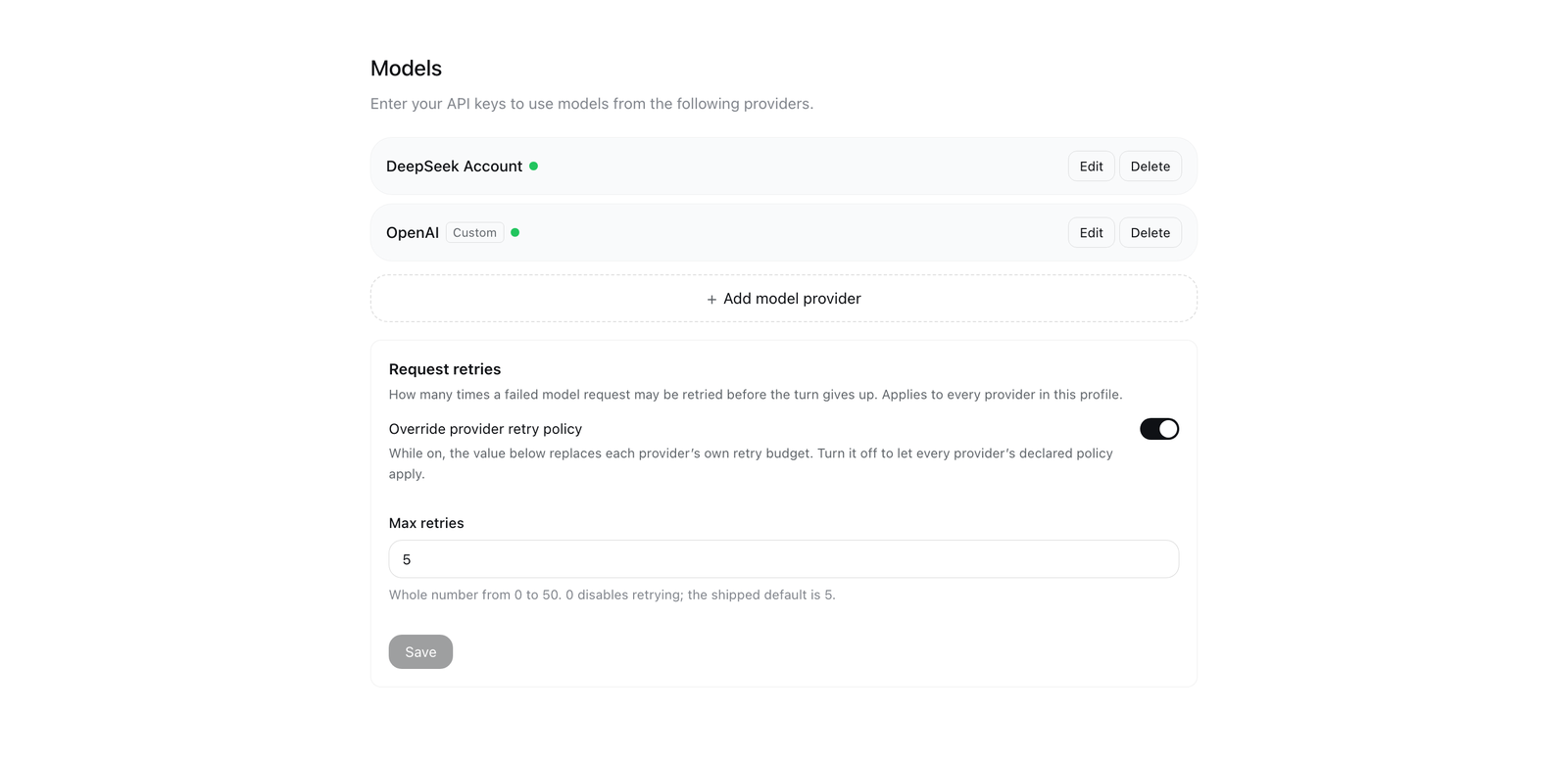
The card renders below the provider rows and the add controls. Rendered from
the shipped bundle by tools/preview.mjs.
How the override lands
The host half registers one listener on the agent/request-error waterfall with
{ prepend: true }. ctx.waterfall composes listeners outermost-first, so a
prepended listener runs before the retry executor registered by dsh-base — and
the substituted policy is what that executor destructures out of the very same
payload object:
ctx.on('agent/request-error', (payload, next) => {
  const { enabled, maxRetries } = resolveEffectiveConfig(config)
  const policy = payload?.retryPolicy
  if (enabled && policy?.mode === 'normal' && policy.maxRetries !== maxRetries) {
    payload.retryPolicy = Object.freeze({ ...policy, maxRetries })
  }
  return next()
}, { prepend: true })
Everything mechanical stays with dsh-llm-retry: the durable retry counter and
its sessionProjections state, the backoff schedule, and the llm/retry /
llm/retry-started session events the trajectory renders. This plugin changes
only the number.
Consequences worth knowing:
- Only
mode: 'normal'policies carry amaxRetries. Analwayspolicy is left exactly as its provider declared it, and so is an absent policy. - The value replaces, not caps. Setting it above a provider's declared budget
raises it; the provider's
retryPolicyKeychanges with it, so the durable retry counter tracks the new policy cleanly. - Without
dsh-llm-retrycomposed, the preference has no effect — with no executor, no request is retried at all.dsh-llm-retryis indsh-base, so every shipped profile has it. - Volatile values are updated in place on the running fiber, so the listener
reads the current value on every failure: no subscription, no re-
apply(), no restart. The Settings page's own save is the only write.
Requirements
| Requirement | Why |
|---|---|
DeepSeek Harness 0.2.0-rc.2 |
the version this plugin is built and verified against; the card needs the Models settings page's settings.models.footer seat |
Node ^22.19.0 || >=24.0.0 |
the range declared in package.json (engines) |
@deepseek-ai/dsh-llm-retry composed |
the retry executor itself; it ships inside dsh-base, so every stock profile has it |
Google Chrome, for node tools/preview.mjs only |
the preview harness renders the card outside the GUI and screenshots it with headless Chrome; neither the plugin nor the suites need a browser |
Node, for sh scripts/verify.sh |
plus the DeepSeek Harness desktop app and network access on its first run, see below |
sh scripts/verify.sh extracts the real @deepseek-ai/* packages out of the
installed desktop app's app.asar, so it needs that app present (set DSH_ASAR
for a non-default location) and network access on its first run. For that reason
the suites are not wired into hosted CI: this repository ships no workflow, and
sh scripts/verify.sh is the gate you run on a machine that has DeepSeek Harness
installed.
Install
This repository is a standalone plugin package: lib/index.js (host) and
lib/client.js (browser) are committed in the forms dsh loads them in.
git clone https://github.com/icrefin/dsh-model-retry-settings.git
cd dsh-model-retry-settings

sh scripts/install.sh                 # pack to dist/, then print what to do
sh scripts/install.sh --profile tui   # pack and install into a CLI-managed profile
sh scripts/verify.sh                  # check the checkout against the real dsh SDK
For the desktop profile the app owns the profile, so dsh plugin add refuses
it: install the packed tarball from Settings → Plugins, or hand
dist/dsh-model-retry-settings-<version>.tgz to the plugin-manager tool.
Two things are load-bearing:
- Install the tarball, not the directory. A
link:dependency points outside the profile'snode_modules, so the harness host can only reach it once it has registered that path as a linked root — which happens at boot. A packed tarball installs as a real directory under<profile>/node_modules/, the same shape a registry plugin has, so the installation's module-interception layer resolves its@deepseek-ai/*peers the moment the profile loads it. - Restart the harness after adding it. A bundle added to an already running
profile cannot be imported by that process: the new module path is not in the
resolution the host computed at boot, so the entry reports
failed to importand stays inactive. This is true of any newly added bundle, not this plugin specifically — a deliberately minimalexport function apply() {}substituted into the installed copy fails the same way, and the same bundle activates cleanly on the next start. The plugin manager reports this case asrestart-required.
After the restart, open Settings → Model; the card sits below the provider rows and the add controls. Saving writes the preference through the shared settings transport.
To iterate on the plugin: edit lib/, run sh scripts/install.sh, and restart —
or install into a throwaway profile with sh scripts/dev-profile.sh, where
link:-style iteration is cheap.
Configuration
The card is the only surface. There is no Loader config file to edit and no plugin-specific state outside the settings document.
| What | Where |
|---|---|
| the preference | the fields enabled and maxRetries of the model-retry-settings settings namespace |
| what that namespace is | this plugin's own Loader entry Config (id: model-retry-settings in cordis.patch.yml) — since dsh 0.1.7 an entry's Config is its settings namespace |
| how the card reads and writes it | ctx.configForms.get('model-retry-settings'), the same shared fenced form the host publishes, so a save is an ordinary settings mutation and the host stays the only authority on whether a value was accepted |
| what happens to the running process | nothing to restart: both fields are .volatile(), so a save updates the value in place on the running fiber and the next failed request reads the new number |
The entry id, the settings namespace, the client's ctx.configForms.get(...) and
the settings.models.footer registration id are all model-retry-settings and
must agree; cordis.patch.yml carries the same value.
There is no build step. lib/index.js (host) and lib/client.js (browser)
are hand-authored in the forms dsh loads them in — plain ESM for the host, and
the module loader's window.__ModuleLoader__.load({ id, factory }) factory form
for the browser, which is also why the plugin needs no bundler.
Development scripts, all run from the clone:
sh scripts/verify.sh           # 37 checks against the real dsh SDK (host + browser halves)
sh scripts/install.sh          # pack to dist/ and print the install path
sh scripts/dev-profile.sh boot # boot this plugin in an isolated profile on :19499
sh scripts/dev-profile.sh dump # print the composed profile tree
sh scripts/dev-profile.sh url  # print the served client-bundle URL
sh scripts/dev-profile.sh remove
sh scripts/dev-profile.sh writes only under .dev-home/ inside the clone: a
private dsh home with its own profile, so the profile the desktop app is using is
never touched. That is also where a change is cheapest to check — a fresh boot
composes the profile with the plugin already in it, so it activates.
test/README.md documents exactly what each suite proves.
Limits
- One global preference. Per-provider retry budgets remain a provider-config
concern (
providers.<name>.retryPolicyindsh-llm-pi-ai). - The
alwaysretry mode is not addressable — it has nomaxRetriesby design. maxRetriesis capped at 50. The schema and the browser field share the bound so a rejected draft never reaches the Host, but a deployment that wants a higher ceiling must changeMAX_RETRIES_LIMITin both halves.- No retry-budget surface for a single session; the value is process-wide.
Troubleshooting
The card is missing from Settings → Model.
The client half registers the card only while the host serves the
model-retry-settings namespace (ctx.configForms.whileServed), so a profile
that never composed the host half shows no card at all — a card that could not
save must not appear. Check that the bundle is in the profile and that the
harness has been restarted since it was added.
The entry reports failed to import after I installed it.
Expected for a bundle added to an already running profile: the host computed its
module resolution at boot, so the new path is not in it. Restart the harness; the
bundle activates cleanly on the next start. The plugin manager reports this case
as restart-required.
I changed the number and nothing was retried.
Check the switch first: while Override provider retry policy is off, every
provider's own policy applies untouched, and 0 disables retrying on purpose.
Then check the provider's mode: only mode: 'normal' policies carry a
maxRetries, so an always policy is left exactly as declared. Finally, nothing
is retried at all in a profile without dsh-llm-retry composed.
I lowered the number below a provider's budget and it still retried that many times. The value replaces the policy rather than capping it, so a stale card, a second running harness, or a provider whose policy is re-resolved can look like the setting was ignored. Re-open the card to see the value the host actually serves, and make sure only one harness is serving the profile.
The Save button refuses my draft. The field accepts only a whole number from 0 to 50; anything else is marked invalid in place and blocks the save, so a rejected draft never reaches the host. An empty field clears the value, which falls back to the composition default.
License
MIT — see LICENSE.
If this card saves you a hand-edit of provider configuration, a ⭐ star helps other dsh users find it.
Built against DeepSeek Harness 0.2.0-rc.2 · MIT
No comments yet. Be the first to write one.