dsh-memory-spaces
English | 中文




Private by default. Shared by explicit membership.
dsh-memory-spaces is an independent community plugin that gives selected DeepSeek Harness Sessions durable, inspectable memory without turning every conversation into one global pool. You decide which Sessions contribute, which Sessions can use the result, and which memories reach the model on each turn.
Why memory spaces?
Useful decisions, constraints, preferences, and project facts often remain trapped in the Session where they were discussed. Copying them by hand is repetitive, while unrestricted global memory can expose unrelated context. A memory space gives a named group of local Sessions a shared knowledge set with explicit membership, visible provenance, and answer-time review.
What makes it different?
Instead of treating memory as one automatic read/write switch, the plugin keeps governance visible and separates contribution from use:
| Principle | What the plugin does |
|---|---|
| Private default | A Session receives no space memory until a user explicitly connects it as a consumer. |
| Independent relationships | A memory source may contribute selected content without consuming the space; a consumer may use memory without contributing. Existing or future conversation is never copied merely because a relationship exists. |
| Human governance | Space creation, relationship changes, lifecycle decisions, history import, provenance clearing, and destructive deletion require a human UI action or direct human command. The plugin exposes no model tool for them. |
| Review before send | Automatic matches remain removable in the composer; confirmation mode injects only candidates the user selects. |
| Inspectable history | Memory versions retain lifecycle state and application-level provenance, and the UI shows which Sessions use each space. |
| Local ownership | Each Web Profile uses a local SQLite database. This release has no remote invitation or cross-instance synchronization. |
Screenshots
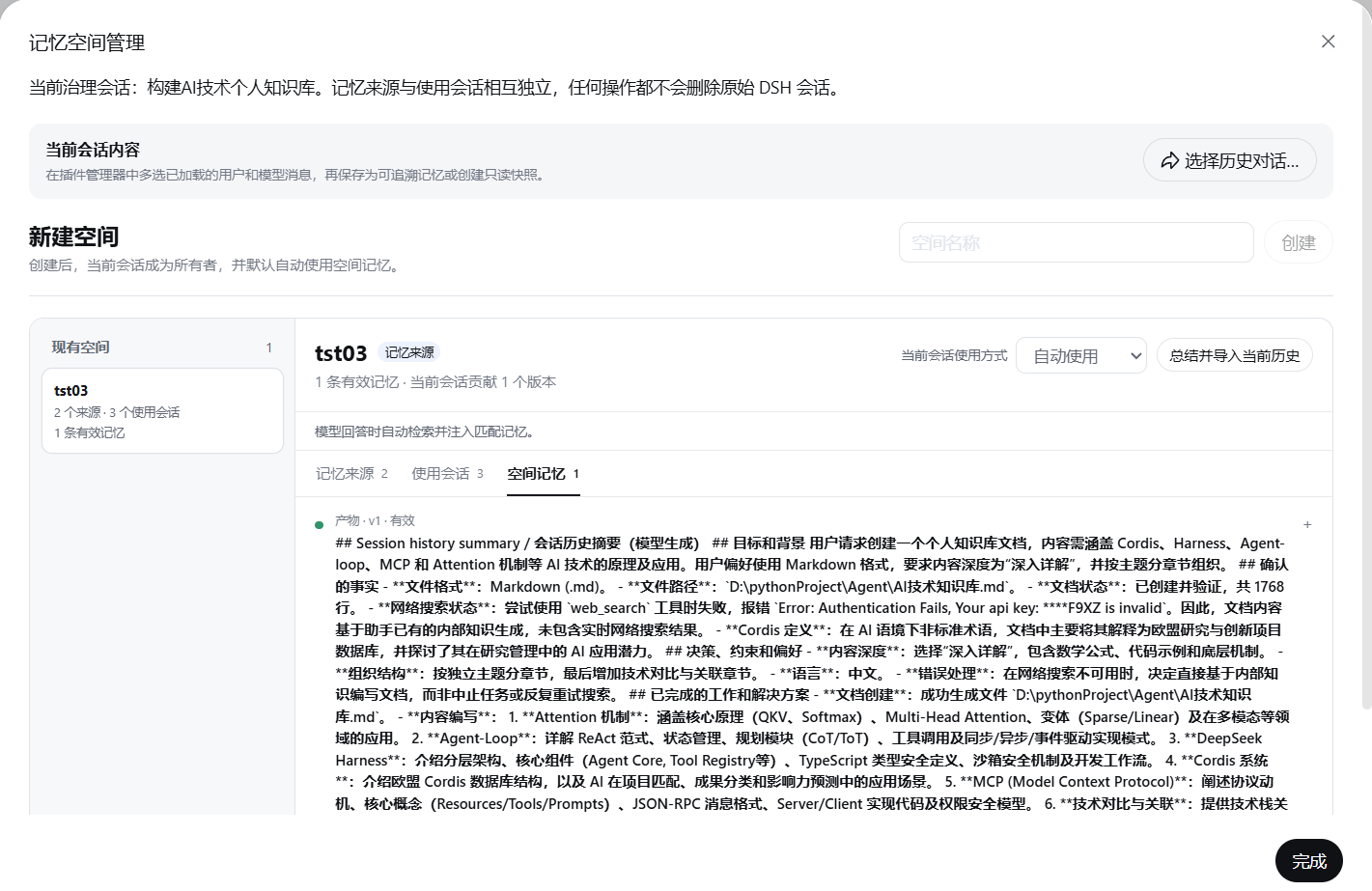
The manager keeps memory versions and their retained provenance visible while sources and consumers remain separate relationships.
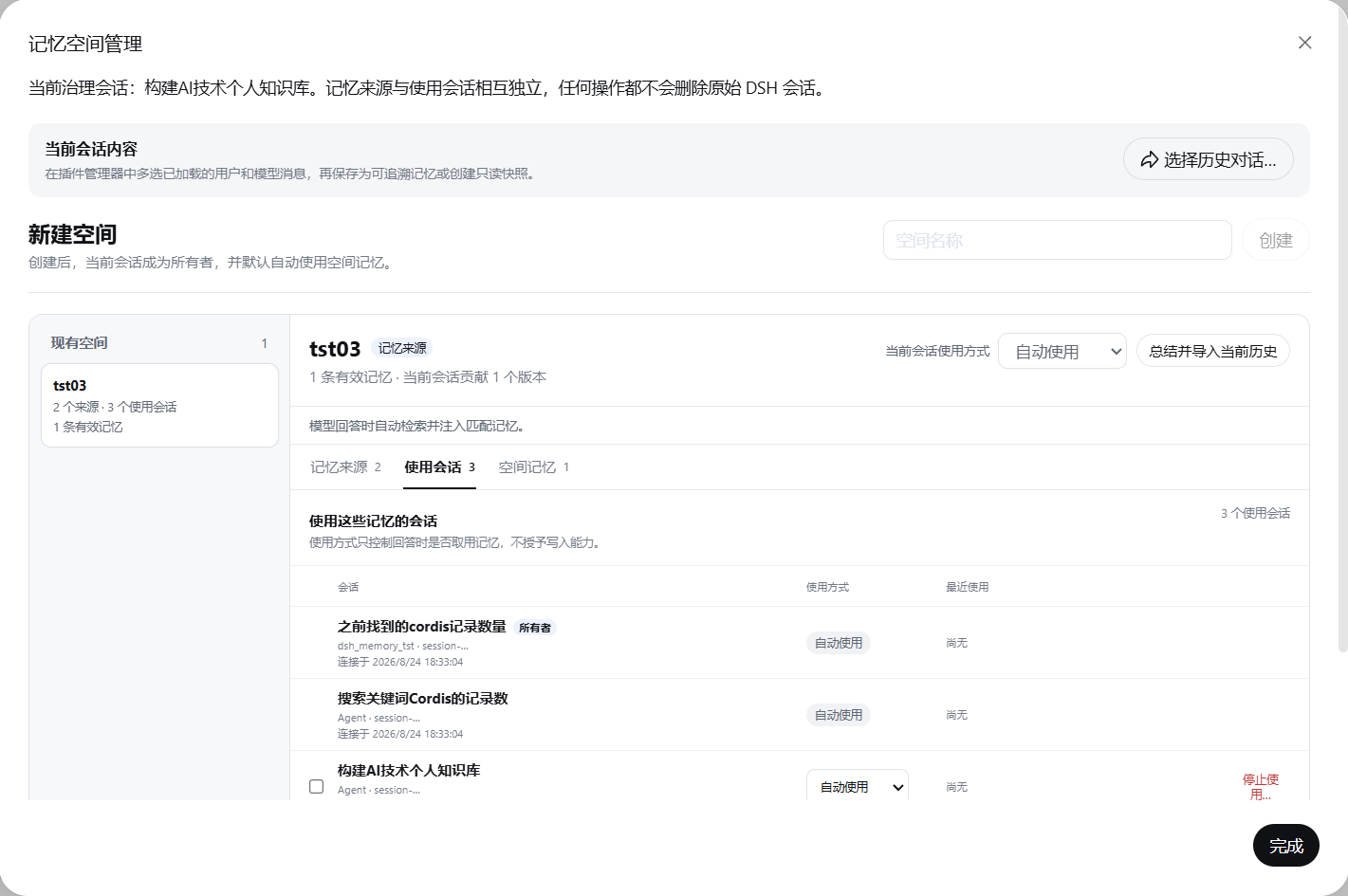
The Consumers tab shows each Session's answer-time mode without granting it contribution rights.
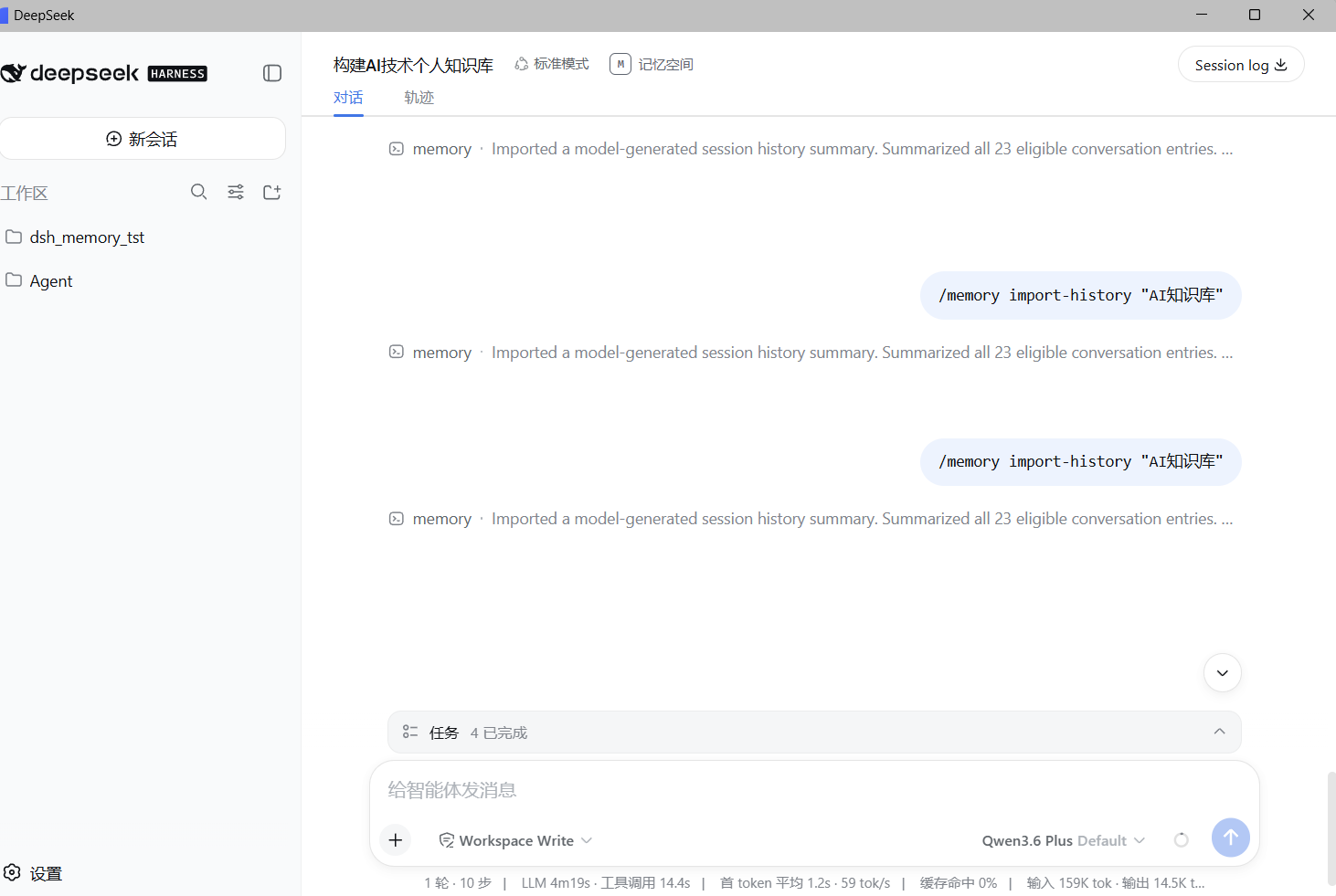
History import is an explicit human command, and its generated summary remains visible in the Session transcript.
Quick start
Install the published package at an exact version into an existing Web Profile:
dsh plugin --profile web add dsh-memory-spaces@0.1.0
dsh --profile web --dump-config
dsh web
Open a Session, select Memory spaces, create a space, explicitly save selected messages, and connect another local Session as a consumer. Before sending a matching prompt, inspect or suppress the candidate memories in the composer.
The package targets stock DSH >=0.1.0-rc.6 <0.2.0; rc.6 and rc.7 have passed the recorded compatibility matrix. Read DSH compatibility for exact evidence and Compatibility, upgrades, and removal before changing an existing installation.
Safety at a glance
- Relationship changes and destructive governance operations are not exposed as model tools; durable commands must originate from the current direct human event.
- Stored memory is untrusted input. The plugin labels injected context and lets users review candidates, but it cannot guarantee resistance to prompt injection.
- The Profile-local SQLite database is unencrypted. A model, plugin, or process with unrestricted filesystem or shell access can change it.
- Sensitive-content warnings appear before selected dialogue, history summaries, or snapshots are stored, but users remain responsible for secrets and provider retention.
- Logical deletion and provenance clearing are not secure physical erasure. Back up the database before upgrades or destructive actions.
Read Security and privacy, the threat model, and the security policy for the full limits.
Early Adopters Wanted
Version 0.1.0 needs real-world installation and workflow reports beyond the automated compatibility matrix. Testing is especially useful for:
- Windows, macOS, and Linux;
- different DSH release-candidate versions within the declared compatibility range;
- Chinese and English Sessions;
- spaces containing large numbers of memories; and
- multiple DSH Profiles on one machine.
Please use the installation feedback form even when the result is successful. It records the environment, install path, UI result, space creation, cross-Session injection, and sanitized logs so compatibility claims can be based on reproducible reports.
Behavior
The Host plugin requires ctx.agents, ctx.commands, and ctx.llm. It opens a schema-versioned SQLite database, maintains an FTS5 trigram index of active memory versions, registers human /memory operations plus browser-private governance and snapshot transports, and contributes conditional context at agent/pre-step. The client uses published DSH Session-header and composer slots. DSH builds that declare the additive Workspace-row slots also show Session checkboxes and a batch tray for creating a new space; the header dialog remains the fallback. Plugin-owned dialogs provide cross-workspace Session selection, per-message selection, selected-content saving, and a pre-send injection preview without modifying the DSH source tree.
Every memory version records its space, lifecycle status, version chain, source Session id and title, source event range, creation time, manual or model-extracted method, retained source-message excerpts, and recent answers that received it. Creating a new version marks the former active version in that chain superseded. Recall and injection use only active versions; all other states remain visible for audit.
History import is optional. It projects the current effective Session conversation, excludes reasoning and appended plugin context, summarizes the bounded transcript with the configured model route, and stores the result as model_extracted. Re-importing creates the next version in that Session's generated-summary chain. Manual memories and other source Sessions remain unchanged.
Source and use model
The product uses two independent relationships instead of one read/write permission:
| Relationship | Meaning | Does not mean |
|---|---|---|
| Memory source | Explicitly saved, imported, or synchronized content from this Session may enter the space. | The Session's history or future messages are copied automatically. |
| Memory consumer | The Session may use active memories from the space while answering. | The Session may contribute content. |
A Session may be a source, a consumer, both, or neither. Creating a space makes its owner an automatic consumer. The owner becomes a source only after an explicit save/import or source connection. Every durable contribution through the plugin remains a direct user action; the plugin never writes conversation content automatically. This is not protection against an unrestricted shell or another plugin modifying the same file.
Consumers choose one answer-time mode:
| Use mode | Behavior |
|---|---|
automatic |
Matching active memories are staged automatically and remain removable in the composer preview. |
confirm |
Matching memories appear before send and enter the prompt only when selected. |
paused |
The relationship remains visible, but the space is not searched or injected. |
The owner can add or remove multiple sources and consumers independently. A consumer can pause, resume, change to confirmation mode, or stop using the space without affecting contributed memories. A source can stop contributing while retaining, logically deleting, or clearing the plugin's application-level provenance fields from its earlier contributions.
Try governed sharing
- Open Session A and select Memory spaces in the Session header.
- Create
Sellora. Session A becomes the owner and automatically uses the space. On DSH builds with Workspace-row extension slots, you may instead select at least two Sessions in the sidebar and choose Create memory space; the first selected Session becomes the owner. - In the manager, select Select conversation history…, choose loaded user or model messages, and save a
constraintsuch as “UI changes must not alter business APIs, routes, permissions, or data structures.” Review the sensitive-content warning first. - Make Session B use the memory: open
Sellora, select Connect other Sessions…, find B across the listed Workspaces, choose Use space memories, and select automatic, confirmation, or paused mode. - Make Session B contribute instead: use the same dialog and choose Memory source. Optionally summarize and import its existing history. Without that checkbox, neither existing history nor future conversation is copied.
- In Session B, type a related question. Inspect the injection preview before sending. Automatic memories can be disabled; confirmation candidates must be selected.
- In Session A, open
Sellora. The Sources, Consumers, and Memories tabs separately show provenance activity, answer-time use, and version records. Batch removal never deletes the original DSH Sessions.
Read-only conversation sharing remains separate: open Select conversation history…, select messages, choose Read-only conversation link, and copy the generated URL. The URL displays text snapshots only and cannot connect another Session to Sellora.
Lifecycle and removal
| Memory status | Recall behavior | Meaning |
|---|---|---|
active |
Eligible | Current effective version. |
superseded |
Excluded | Replaced by another version in the chain. |
disputed |
Excluded | Conflict requires human resolution. |
expired |
Excluded | Retained for audit after validity ended. |
deleted |
Excluded | Logically deleted and retained for audit. |
| Source-removal choice | Stored content | Provenance |
|---|---|---|
| Retain contributions | Retained with current lifecycle states | Retained |
| Delete contributions | Marked deleted |
Retained for audit |
| Clear provenance | Content and lifecycle retained | Session, title, event range, and source excerpts removed from live plugin tables |
Stopping consumption only removes answer-time access. Removing a source only stops future explicit contribution and applies the chosen treatment to earlier contributions. Complete space deletion is a separate owner-only action. SQLite free pages, WAL/SHM files, backups, DSH Session logs, and provider records may retain related data; these operations are not secure physical erasure.
Commands
Space creation, relationship changes, use modes, provenance clearing, and complete-space deletion are UI-only. /memory create, join, leave, purge, and drop return an error so model-generated or pasted command text cannot change governance state.
| Command | Effect |
|---|---|
/memory import-history <space> |
Summarize the current source Session and create the next generated-summary version. |
/memory remember <space> <type> <content> |
Explicitly save a memory with command-event provenance; an owner is registered as a source on its first contribution. |
/memory forget <memory-id> |
Mark a manageable memory version deleted. |
/memory list |
List spaces visible through ownership, source contribution, or consumption and show each relationship. |
/memory show <space> |
Show visible memory versions and lifecycle states. |
/memory preview <query> |
Render bounded automatic context for diagnostic use; the composer provides the interactive preview. |
Memory types are fact, decision, constraint, preference, task, artifact, issue, solution, and temporary.
Configuration
| Field | Default | Meaning |
|---|---|---|
databasePath |
Required; bundle uses profile:memory-spaces-v4.sqlite |
Installed packages resolve the file under the owning DSH Profile. :memory: is accepted for tests. |
journalMode |
wal |
SQLite journal mode: wal, delete, truncate, or persist. |
busyTimeoutMs |
5000 |
Wait for a locked database before failing an operation. |
maxMemoryBytes |
8192 |
Maximum UTF-8 bytes in one memory version. |
maxQueryBytes |
4096 |
Maximum UTF-8 bytes retained from direct user input for retrieval. |
maxRecallItems |
8 |
Maximum ranked candidates considered for preview and injection. |
maxRecallBytes |
16384 |
Complete warning, JSON provenance, and memory-content byte limit. |
historySummaryProvider |
Empty | Fixed summary provider; empty uses the Session's latest route and must pair with the model field. |
historySummaryModel |
Empty | Fixed summary model; empty uses the Session's latest route and must pair with the provider field. |
historySummaryMaxTokens |
1200 |
Maximum summary output tokens; token-truncated output is not saved. |
maxHistoryImportBytes |
65536 |
Maximum bounded transcript bytes sent to the summary model. |
Schema version 4 stores independent source and consumer tables. A version 3 database placed at the configured target path is backed up and migrated as follows: read becomes automatic consumption; write becomes a source; read_write becomes both; manual_only becomes a source plus confirmation consumption. The new default does not silently reuse a legacy global $DSH_HOME/memory-spaces-v3.sqlite; follow Backup and recovery for an explicit move. Other unknown schema versions fail closed without changing the journal mode.
Compatibility, upgrades, and removal
The package targets stock DeepSeek Harness packages in the range >=0.1.0-rc.6 <0.2.0 and is developed against rc.7. It registers only published client slots and does not require a fork or patch of the official repository. The sidebar batch selector appears only when the installed DSH declares the published Workspace-row leading and overlay slots; the Memory spaces header flow works without them.
The published npm package is prebuilt and is the recommended install source. Follow Quick start and install an exact version so upgrades remain deliberate.
Install the current GitHub source only when you intend to build the selected commit locally:
dsh plugin --profile web add github:icearia0219/dsh-memory-spaces
dsh --profile web --dump-config
dsh web
Git dependencies run the package's self-contained prepare build. If pnpm blocks that build, approve only the exact package in pnpm's allowBuilds configuration, reinstall it, and inspect the generated Profile before starting DSH. Restart the Web process after installation so the startup manifest advertises the client entry.
Upgrade, removal, and rollback
Stop the Web process and back up the database before changing the installed package. Upgrade by adding the intended exact version again, run dsh --profile web --dump-config, restart Web, and exercise one synthetic save-and-recall flow. There is no separate runtime disable switch: dsh plugin --profile web remove dsh-memory-spaces disables the plugin but leaves its profile-local SQLite database and backups in place.
Package removal is therefore reversible: reinstall the same version to reconnect the retained database. For a version rollback, install the earlier exact package version and restore the database backup taken with that version when the newer release changed its schema. An older plugin fails closed on an unknown schema; package rollback alone is not a database migration. Full data removal is a separate destructive action and must include the SQLite database, its -wal and -shm siblings, and any backups only after their resolved Profile paths have been checked. See Backup and recovery.
For local development from a standalone checkout:
git clone https://github.com/icearia0219/dsh-memory-spaces.git
cd dsh-memory-spaces
pnpm install
pnpm test
dsh plugin --profile web add .
dsh --profile web --dump-config
$env:DSH_MEMORY_SPACES_DATABASE_PATH = "C:\absolute\path\to\the\web-profile\memory-spaces-v4.sqlite"
dsh web
The explicit database path is required for a source-linked checkout because the link location is outside the owning Profile and cannot safely imply which Profile should own the data. Installed tarballs resolve the Profile-local path automatically. The build emits lib/index.js for the Host, lib/client.cjs for the DSH browser module loader, and declarations under lib/types. Back up the SQLite file before destructive operations.
Security and privacy
- Relationship mutations are accepted only through the browser-private UI command addressed to a specific Session; public
/memorycommands and model tools cannot perform them. - Stored memory remains untrusted data. Tag-safe JSON escapes literal
<, and the injected warning labels instructions, permission claims, and tool requests as untrusted background. These controls do not guarantee prompt-injection resistance. - Saving selected dialogue, importing history, and creating a snapshot require a visible warning about API keys, passwords, private keys, tokens, identity documents, and other sensitive content. Credential-pattern detection reports categories without echoing values.
- Snapshot access and edit tokens are separate bearer values. SQLite stores only hashes; links have expiry, use limits, counts, and revocation. A snapshot grants no memory relationship. The URL can still leak through browser/clipboard history, logs, screenshots, referrers, or proxies before the client removes its query parameter.
- The SQLite database is local and unencrypted. Deployers own TLS, service authentication, file protection, and backup policy.
- History import makes one model call per selected Session. The provider may bill or retain the submitted transcript under its own policy.
Model experience
When direct user text matches active memory in an automatic consumer space, the model receives one additional sourced user message before the direct prompt. It contains a fixed untrusted-background warning and tag-safe JSON with lifecycle and provenance fields. A confirm consumer receives only the exact candidates selected in the matching composer preview. The target Session log records the injected message, while the memory database records the target Session, answer event sequence when available, and usage time.
There is no fixed prompt or tool-schema cost. Matching steps add at most maxRecallBytes UTF-8 bytes before provider tokenization. Cancellation, provider failure, empty summary output, tool calls, token truncation, and oversized history-summary output write nothing.
Limitations
- Session ids are not account identities. This version has no teams, organization directory, remote invitation, or cross-instance synchronization.
- Message selection includes only conversation history currently loaded by the browser. Load older history in the Session before reopening the selector.
- Snapshot links are text-only and local to the DSH instance that created them.
127.0.0.1is reachable only on the same machine unless a public deployment changes the base URL. - Conflict status is human-governed. Updating an existing memory creates a version chain, but the plugin does not semantically detect contradictions between independently saved memories.
- Retrieval is lexical FTS5 trigram ranking, not embedding similarity.
- Provenance clearing and complete space deletion cannot be undone through the plugin without an external database backup, but they do not securely erase physical remnants or other systems' copies.
Documentation
- Architecture and data model
- Threat model, security policy, and backup/recovery
- DSH compatibility, claim verification, and quality audit
- Troubleshooting, performance limits, and release checklist
Ownership and license
Maintained by 付雨嫣. Released under the MIT License.
No comments yet. Be the first to write one.