
DSH Notch Pet
Your DSH agent, living in the MacBook notch.
A native companion that shows the current session, the exact step the agent is on,
and how far the turn has come — without opening a window.



Jump to: Screenshots · Highlights · Install · Controls · Settings · Architecture · Troubleshooting · License
What it looks like

Collapsed: the title and live step sit beside the notch, with a progress hairline underneath. It never adds height to the strip.
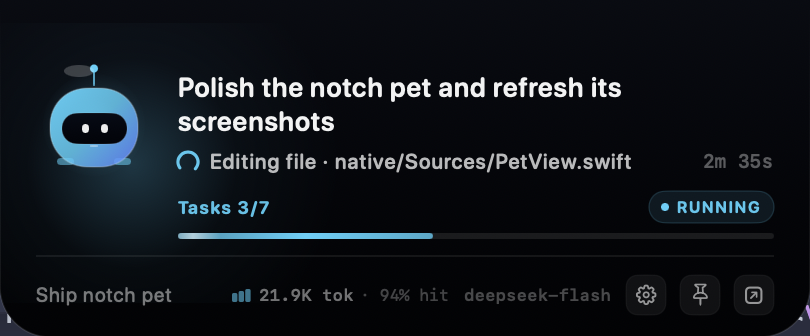
Expanded: up to two title lines, live step, elapsed time, Tasks 3/7, active
agents, the session's token usage and cache hit, the goal, the model, and the
controls.
Highlights
- Live, not decorative. The line under the title mirrors the step DSH shows
below the assistant message: a changing reasoning preview while the model
thinks,
Editing file · native/Sources/PetView.swiftwhile a tool runs, and elapsed turn time on the right. It deliberately avoids the finished assistant reply. - Progress without invented percentages. It uses
todo_writecompletion when DSH has tasks, and falls back to goal rounds when it does not. With no countable unit, the bar shimmers indeterminately while the agent works, then freezes or disappears when it stops. - The session's bill, not a guess. The expanded footer reads the same
provider-reported
tokenUsageprojection as DSH's own Usage pill: cumulative billed input plus output, with the cache-hit share beside it. No estimator and no extra model calls. - Gets out of the way. Turn on Only while working and the panel is ordered out entirely whenever no task is running. A pawprint takes its place in the menu bar, and a second switch hides that too. Pinning overrides it.
- Six accents, honest status colors. Glacier (the default cyan), Aurora, Iris, Sakura, Tangerine, and Mint, plus a custom hue/saturation/brightness picker. Waiting stays amber, errors stay red, and completed turns stay mint.
- At home on macOS. A nonactivating AppKit/SwiftUI panel with no Dock icon, no focus stealing, Reduce Motion support, and a 60 fps progress animation.
- Local by design. The host talks to the panel over a private Unix socket. No telemetry, no network calls, no account.
Requirements
- macOS 14 Sonoma or newer.
- DSH Desktop, or a DSH host running inside a macOS GUI session.
- Apple Silicon or Intel — the bundled helper is a universal binary.
- Xcode Command Line Tools only if you rebuild the helper from source.
A notched MacBook is not required: on other Macs the panel floats at the top center of the main display with rounded top corners.
Install
- Open Plugins in DSH and click Add plugin
- Paste this plugin name
dsh-notch-petinto the dialog: - Confirm. DSH fetches the bundle and installs it for you.
Prefer the terminal? The same bundle installs from a public repository with:
dsh plugin --profile web add dsh-notch-pet
web is the DSH Desktop profile; keep the profile you actually run.
The pet appears at the top of the display a moment later. If it does not, make sure the plugin is enabled in Plugins, disable and re-enable it, or restart DSH.
The package ships a prebuilt ad-hoc-signed universal helper, so nothing is compiled on install. DSH launches the helper itself; there is no app to open. When the plugin is disabled or DSH quits, the helper stops with it.
Controls
| Input | Result |
|---|---|
| Hover the panel | Expands, and stays open while the pointer is inside. |
| Click the robot | Pins or unpins the panel. A pinned panel ignores hover-out and Only while working. |
| Gear in the footer | Opens settings. |
| Pin / Open DSH in the footer | Pin the panel, or focus DSH (falling back to the web origin). |
| Right-click the panel | Open DSH, pin or unpin, open settings, or quit. |
| Pawprint in the menu bar | Appears while the panel is hidden: Settings, Open DSH, the Only while working switch, and Quit. |
| Launch | Peeks open for about three seconds, then settles back to the collapsed strip. |
What the pet shows
Which session?
The panel focuses one session: a running root session when there is one, preferring the most recently active. If only subagents are running, the most recent subagent takes the spotlight. Running subagents count toward the active-agent total.
The title is DSH's own session title, so an auto-generated or user-renamed title wins. The first prompt is a fallback, then the workspace folder name.
The live line
The narrow line mirrors the live step, not the final answer. While the model is
thinking it is Thinking · <latest reasoning>, built from reasoning deltas and
trimmed to a sentence-aligned preview that keeps changing. While a tool runs it
is Editing file · native/Sources/PetView.swift, Running command · Build the native app, and so on. The elapsed time on the right is the current turn's
duration.
The collapsed strip has room for two compact lines under the hardware notch, so it shows the session title plus the live step. The new information uses the empty width beside the notch instead of adding height.
Progress
With a todo_write list, the bar tracks Tasks 3/7. Without tasks but with a
goal that has rounds, it tracks Goal 2/6 rounds. Without either, it becomes an
indeterminate band while the agent is busy. When the agent is idle, the
indeterminate band is hidden and any determinate bar is frozen, so the notch does
not keep flashing.
Token usage
The expanded footer shows the focused session's cumulative provider-reported
tokens — the same tokenUsage projection behind DSH's own Usage pill — as
21.9K tok · 94% hit. The total is billed input (uncached, cache read, and cache
write) plus output; hit is the cache-read share of prompt-side input, and a
partial hit never rounds up to 100%. Hover the readout for the exact breakdown.
If dsh-token-meter is not mounted, the host falls back to folding each
assistant/message usage record.
The expanded panel also shows the goal objective, the last error, or a short status hint in the footer. The step text itself does not move; the loading arc and the progress shimmer animate while the agent works.
Privacy
Everything stays on your Mac. The host writes the current state to a per-process
Unix socket (0600) under ~/Library/Application Support/DSHNotchPet/, and the
panel reads it. The plugin makes no network calls, collects no telemetry, and
needs no account.
Limits
- macOS only; the host half is a no-op on other platforms.
- One focus session at a time. Subagents contribute to the active count, but the panel does not show a session list.
- The panel lives on the first notched display. It does not follow the DSH window to another screen.
- Live state only: no history, no transcript, and no controls for the agent. The pet is a viewer, not a controller.
License
MIT © 2026 WengXiang. See LICENSE.
Built with AppKit, SwiftUI, and a Unix socket.
No comments yet. Be the first to write one.