DSH Client UI Shortcuts



English | 中文
Browser-safe, profile-aware keyboard control for DeepSeek Harness Web.
This plugin runs inside DSH Web, adds predictable keyboard control for question and approval flows, and provides Session and Workspace navigation when the corresponding DSH capabilities are available. It does not modify DSH core, the agent loop, or the model protocol.
Why install it
- Answer DSH questions and approvals without leaving the keyboard.
- Choose read-only Standard and Vim profiles, or create and switch between multiple named Custom profiles for interaction cards and global actions.
- Navigate Sessions and Workspaces with explicit physical
Meta,Ctrl,Alt, andShiftmodifiers. - Automatically expand a collapsed target Workspace before opening an existing eligible Session.
- Keep unavailable actions out of routing and shortcut lists when DSH does not provide the required capability.
- Stay within browser and operating-system boundaries: reserved shortcuts may never reach a web page.
Screenshots
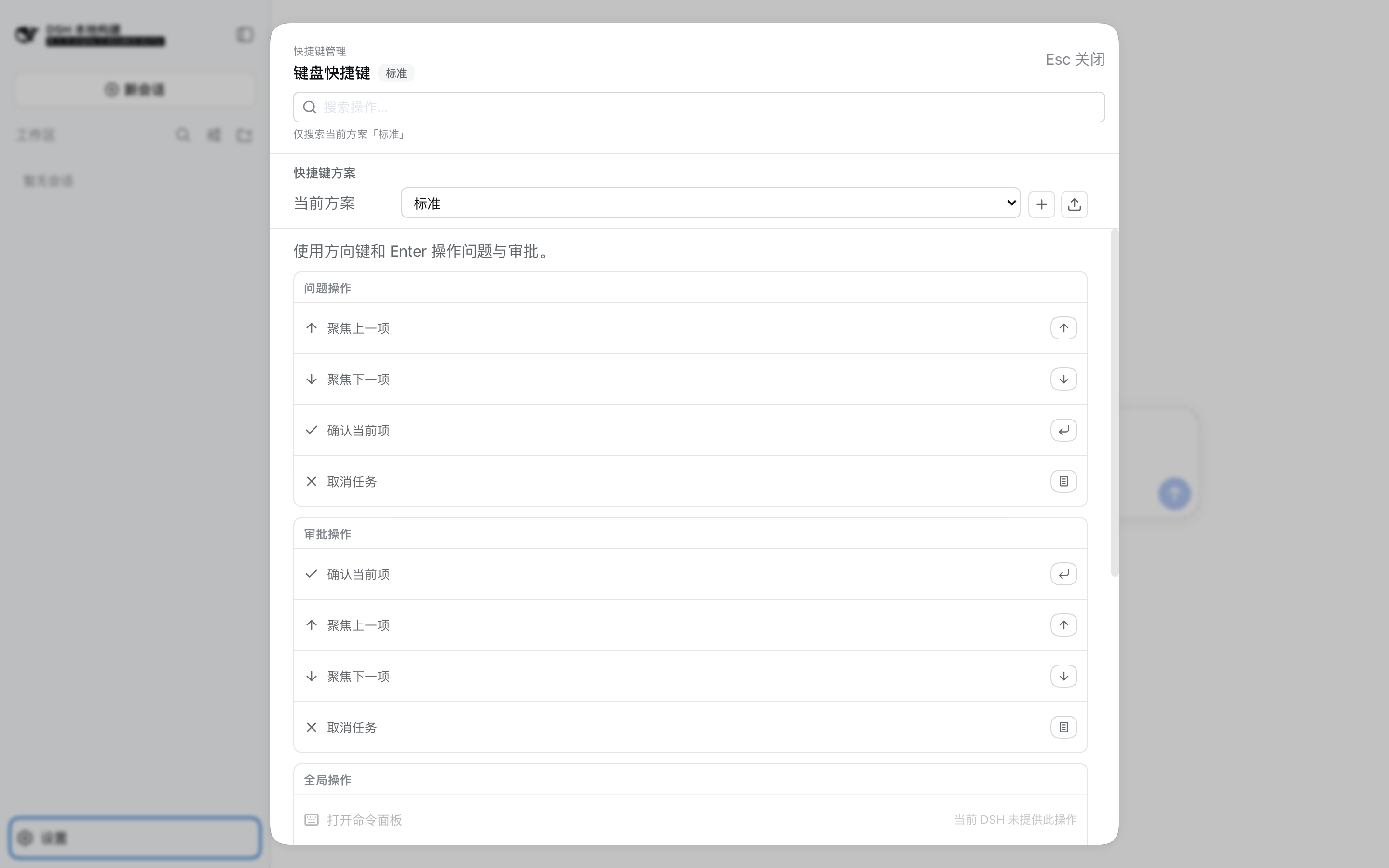
The unified shortcut manager panel opened with Meta+Alt+Shift+S (read-only Standard profile):
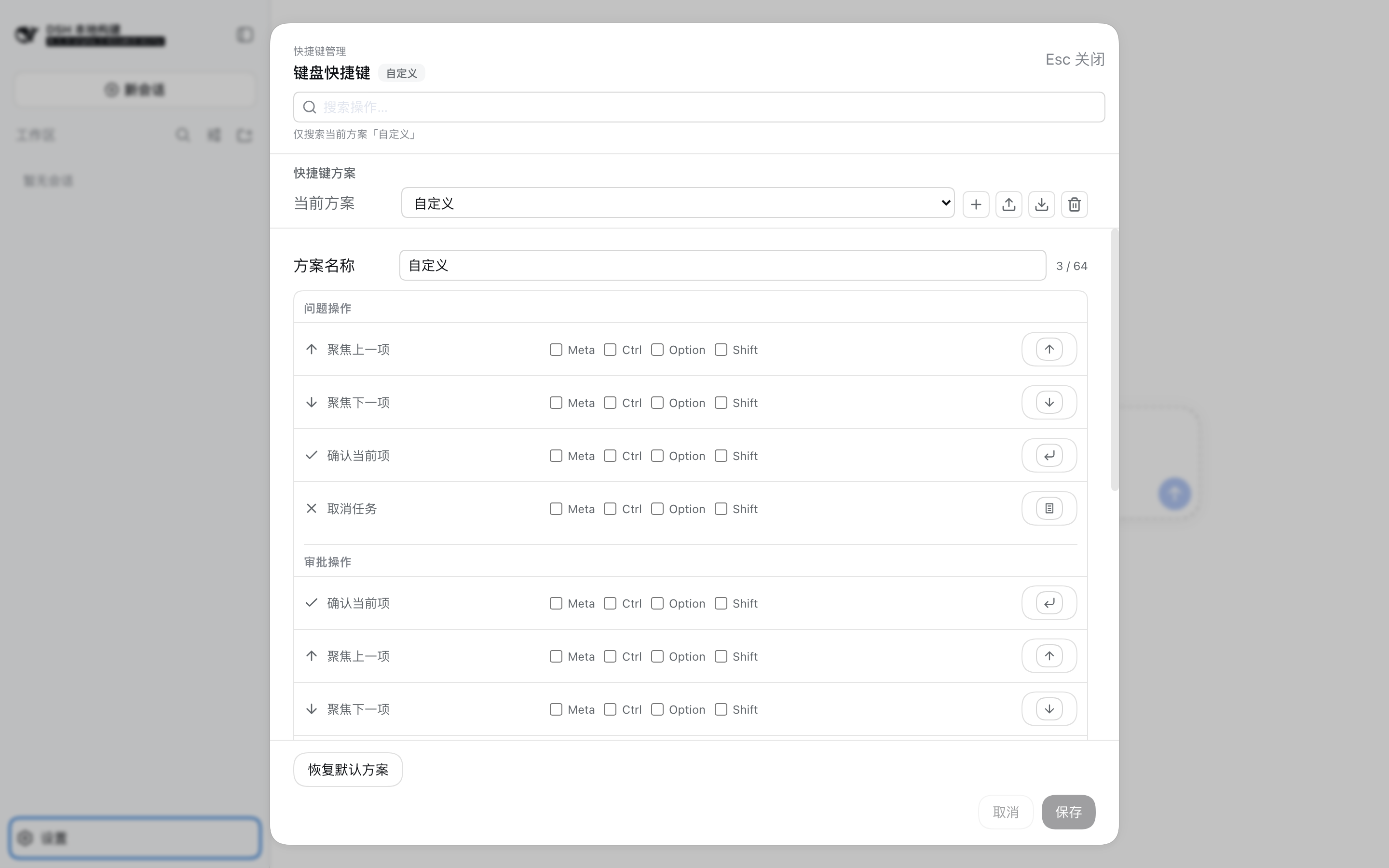
A Custom profile edits in the same list, with Save / Cancel / Reset pinned to the panel footer:
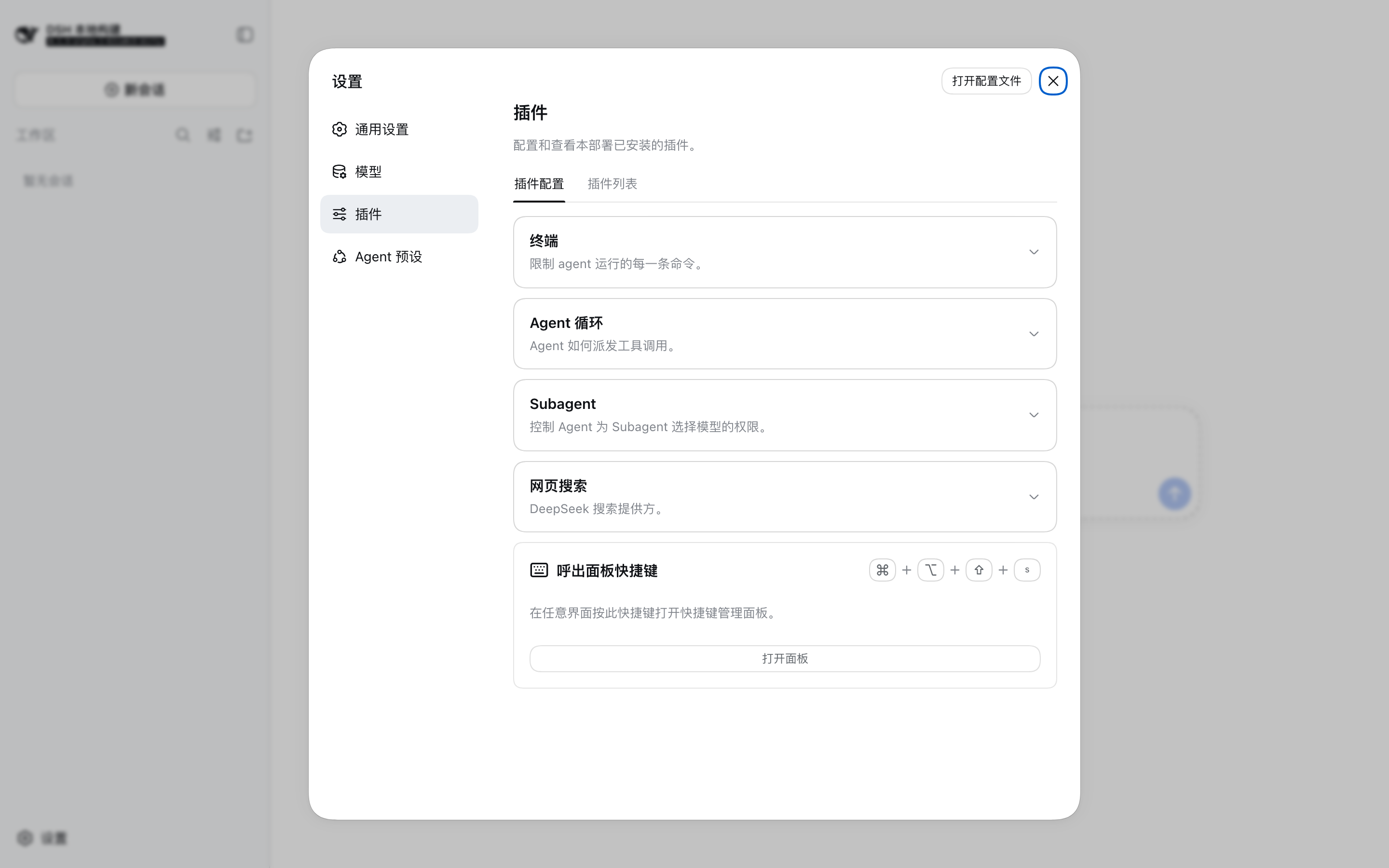
The "open-panel shortcut" entry in the DSH plugin settings section opens the panel and locates that row:
Install in 60 seconds
The recommended path is the npm release because it includes prebuilt lib/ artifacts and requires no install-time build. Install it through the DSH CLI, then restart or reload the Web composition:
dsh plugin --profile web add @hytime/dsh-client-ui-shortcuts@0.1.21
dsh --profile web
To install the GitHub source instead, pin a release tag or commit rather than the default branch:
dsh plugin --profile web add github:hytime/dsh-client-ui-shortcuts#v0.1.14
A Git install runs the package's prepare script during installation. pnpm may require the exact package key from its error message to be added to the profile's allowBuilds; grant that permission only for trusted, pinned source. The installation guide has the complete steps.
The plugin is not a standalone React or Vite application. Do not open apps/web directly and do not install it into a DSH profile with npm install, pnpm add, or manual edits to the profile manifest or lockfile.
For upgrades, removal, local tarballs, profile inspection, and troubleshooting, see the installation guide.
What is included
- Question cards with single-select, multi-select, custom-answer, skip, previous-question, and submit flows.
- Approval cards with allow once, reject, details, cancel, and keyboard-confirmation flows.
- Read-only Standard and Vim profiles plus multiple named, editable Custom profiles, with one active profile at a time.
- New, Import, Export, and Delete controls for managing portable Custom profiles; exports contain one saved profile and no internal ID.
- Explicit physical
Meta,Ctrl,Alt, andShiftmodifiers, alternatives, and two-stroke chords. - Browser-reserved shortcut denylist and conflict validation.
- Capability checks for DSH features that are not available in the current composition.
- Session, Workspace, session-branch, and theme actions when the corresponding DSH capabilities are available.
- A
Meta+Alt+Shift+Sshortcut manager panel: profile switching (Standard / Vim / Custom), New / Import / Export / Delete, in-panel Custom binding editing, and one searchable unified shortcut list grouped by Question/Approval/Global. - A lightweight "open-panel shortcut" entry in the DSH plugin settings section: it shows the current summon key, opens the manager panel on click, and locates that row so the key is easy to change.
Shortcut reference
Question and approval cards
| Command | Question | Approval |
|---|---|---|
| Focus previous item | ArrowUp |
ArrowUp |
| Focus next item | ArrowDown |
ArrowDown |
| Activate current item | Enter |
Enter |
| Cancel current task | Escape |
Escape |
The Vim profile replaces the two focus bindings with k and j; confirmation and cancellation keep Enter and Escape. These bindings are scoped to the active interaction card.
Global actions
The active profile's default global bindings are:
| Action | Default binding |
|---|---|
| Create a Session | Meta+Alt+Shift+N |
| Previous Session | Meta+Alt+Shift+J |
| Next Session | Meta+Alt+Shift+K |
| Previous Workspace | Meta+Alt+Shift+H |
| Next Workspace | Meta+Alt+Shift+L |
| Fork current Session | Meta+Alt+Shift+B |
| Toggle light/dark theme | Meta+Alt+Shift+T |
| Show shortcuts | Meta+Alt+Shift+S |
Global actions are registered only when DSH provides the required capability. Show shortcuts is pure browser behavior and is always available: it opens the full shortcut manager panel for the active profile. Its default key, Meta+Alt+Shift+S, can be rebound in a Custom profile, and the settings-page "open-panel shortcut" entry locates it whenever you want to change it.
Profiles and Custom bindings
Standard uses arrow keys, Enter, and Escape for question and approval interactions. Vim uses j/k, Enter, and Escape. These built-in profiles are read-only.
Create multiple named Custom profiles and switch the active profile from the shortcut manager panel (open it with Meta+Alt+Shift+S). A new profile copies the current profile's bindings; its name and bindings are saved together. Import always creates a new internal profile ID, while duplicate names receive a continuing numeric suffix such as Name 1, Name 2, and so on. Export is available only for the active, saved Custom profile and writes a single-profile JSON v1 document without the internal ID. Delete requires confirmation and returns to Standard before removing the active Custom profile. See the installation guide for the JSON format and limits.
Custom profiles can edit question, approval, and capability-backed global bindings, including explicit modifiers, alternatives, and two-stroke chords.
The resolver matches physical KeyboardEvent.code values, normalizes aliases such as Esc/Escape and Return/Enter, rejects prefix conflicts, and limits chords to two strokes. On macOS, Meta is displayed as Command and Alt as Option; on other platforms, Meta is displayed as Windows key and Ctrl as Control.
Browser and platform boundaries
The router uses capture-phase listeners in the browser. It yields to unmatched text input, IME composition, repeated events, pending question or approval takeover, and host-owned popup focus. A matching global action can run from an input or contenteditable element because it is an explicit global binding.
The browser denylist covers known Chrome, Safari, Firefox, and Edge combinations. It cannot query arbitrary OS or browser shortcut ownership, and capture listeners can prevent only shortcuts the browser has dispatched to the page.
Workspace and Session navigation
Session navigation follows the current Workspace's stored Session order and skips archived, subagent, and blank Sessions. Workspace navigation opens an existing non-blank Session in the target Workspace. When a target Workspace is collapsed, the plugin expands it automatically before opening the eligible Session; navigation does not create a blank Session or call connectWorkspace to manufacture a target.
Languages
The panel ships Simplified Chinese and English, the two languages DSH provides itself, plus Japanese and Korean, which this package contributes as selectable languages. Choose one in DSH settings under Language; every surface this plugin renders follows it, and each contributed language falls back to English for a key it does not carry.
Making Japanese and Korean selectable relies on the locale service's addLanguage, which 0.1.0-rc.8 and 0.1.1-rc.2 do not expose. On those two releases the plugin still loads normally and simply offers Chinese and English.
DSH compatibility
One published package supports the DSH 0.1.0-rc.8 through 0.1.1-rc.2 line, 0.1.2-alpha.1, and 0.1.5-alpha.1 and later, and no longer depends on @deepseek-ai/dsh-client-runtime (which is no longer published in 0.1.5-alpha.1). The browser adapter detects capabilities at runtime instead of branching on a DSH version: it uses current remote.settings when available and falls back to the legacy Connection settings API; it selects uiWorkspace.startSession or legacy workspaces.startSession; it reads pending interactions from uiSession or the legacy Session summary; and it contributes the Japanese and Korean language entries only where the locale service exposes addLanguage. The package is loaded only through a real DSH Web composition and DSH boot/module loader. Installing an update does not replace code already running in an open page; reload the Web composition to load the new Client bundle.
Development and verification
These commands develop this package. They are not profile installation commands:
pnpm install
pnpm run bundle
pnpm run typecheck
pnpm exec vitest run tests
For the full DSH composition workflow, use the installation guide. Browser verification must run through a real DSH Web profile with boot data; the apps/web Vite entry is not a standalone validation target.
FAQ
Does this change model behavior?
No. The plugin changes browser interaction only. It does not add tools, prompt sections, model-visible events, or model request context.
Why does a global action not appear?
Global actions are available only when the current DSH composition provides the required capability. Actions that are unavailable are not registered, and their shortcut rows are not shown.
Why is the settings shortcut hidden?
DSH does not provide a public settings opener, so the retained Meta+, binding stays hidden and is not activated.
How do I view and manage the active profile's shortcuts?
Press Meta+Alt+Shift+S at any time (the default key; rebindable in a Custom profile) to open the full shortcut manager panel. It searches the active profile's commands and separates Question, Approval, and Global actions, and it also provides profile switching, New / Import / Export / Delete, and in-panel Custom binding editing — no DSH settings page required.
How do I change the open-panel shortcut?
The "open-panel shortcut" entry in the DSH plugin settings section shows the current summon key. Clicking it opens the manager panel and locates that row. When the active profile is the read-only Standard or Vim profile, the panel tells you to switch to a Custom profile first; once you do, edit the key and save — the next summon uses the new key.
Why did installing an update not change the open page?
DSH must reload the Web composition so the new Client bundle is loaded. Installing a package does not replace code already running in the browser.
Can I use it without DSH Web?
No. The browser artifact is a DSH loader factory and depends on DSH boot injection, slots, settings, locale, and runtime services.
Links
- Installation guide
- 中文 README
- Changelog
- 中文变更日志
- DeepSeek Harness extension documentation
- DeepSeek Harness
License
MIT
No comments yet. Be the first to write one.