dsh-activity-board — a session activity board for DSH
English | 中文
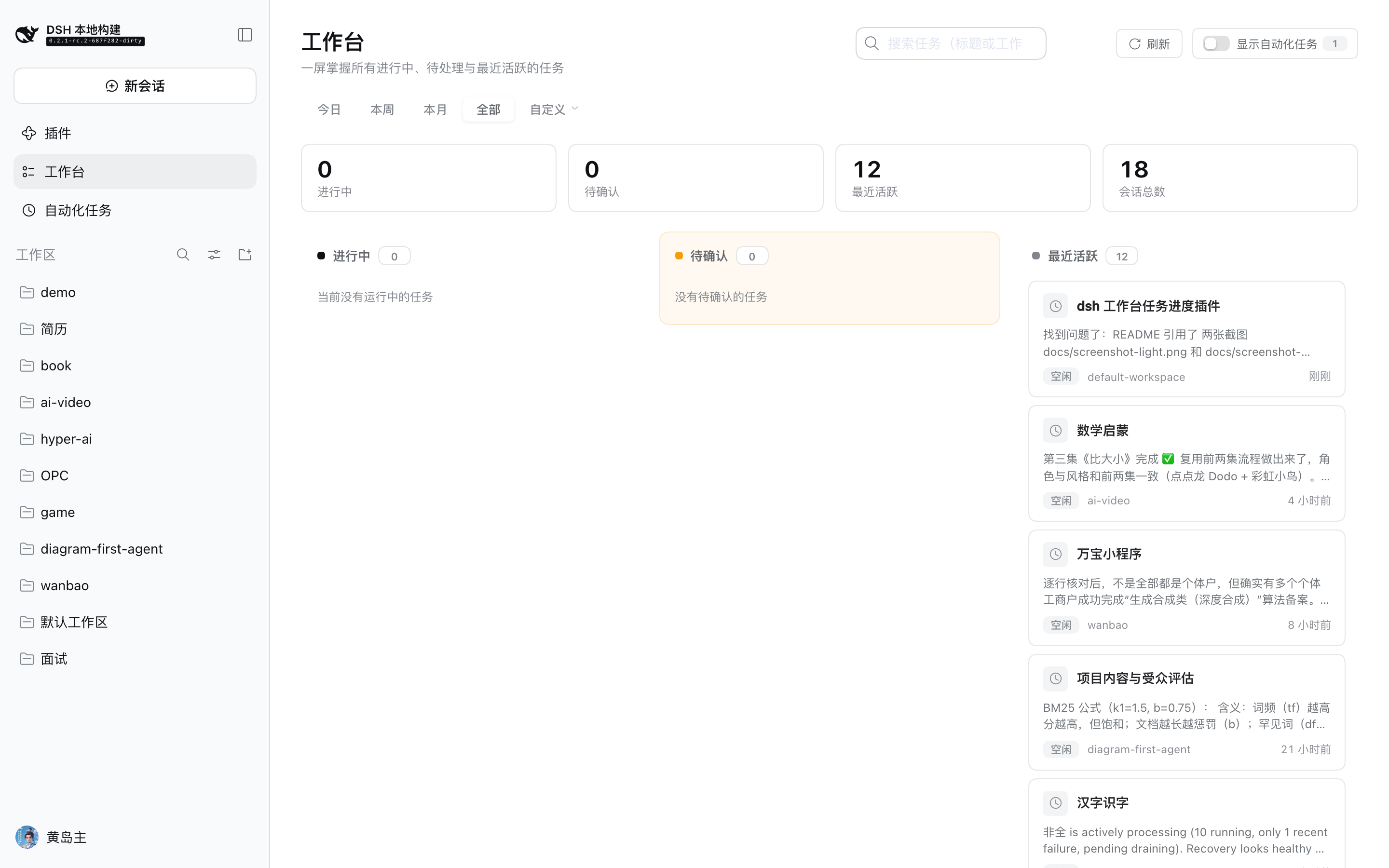
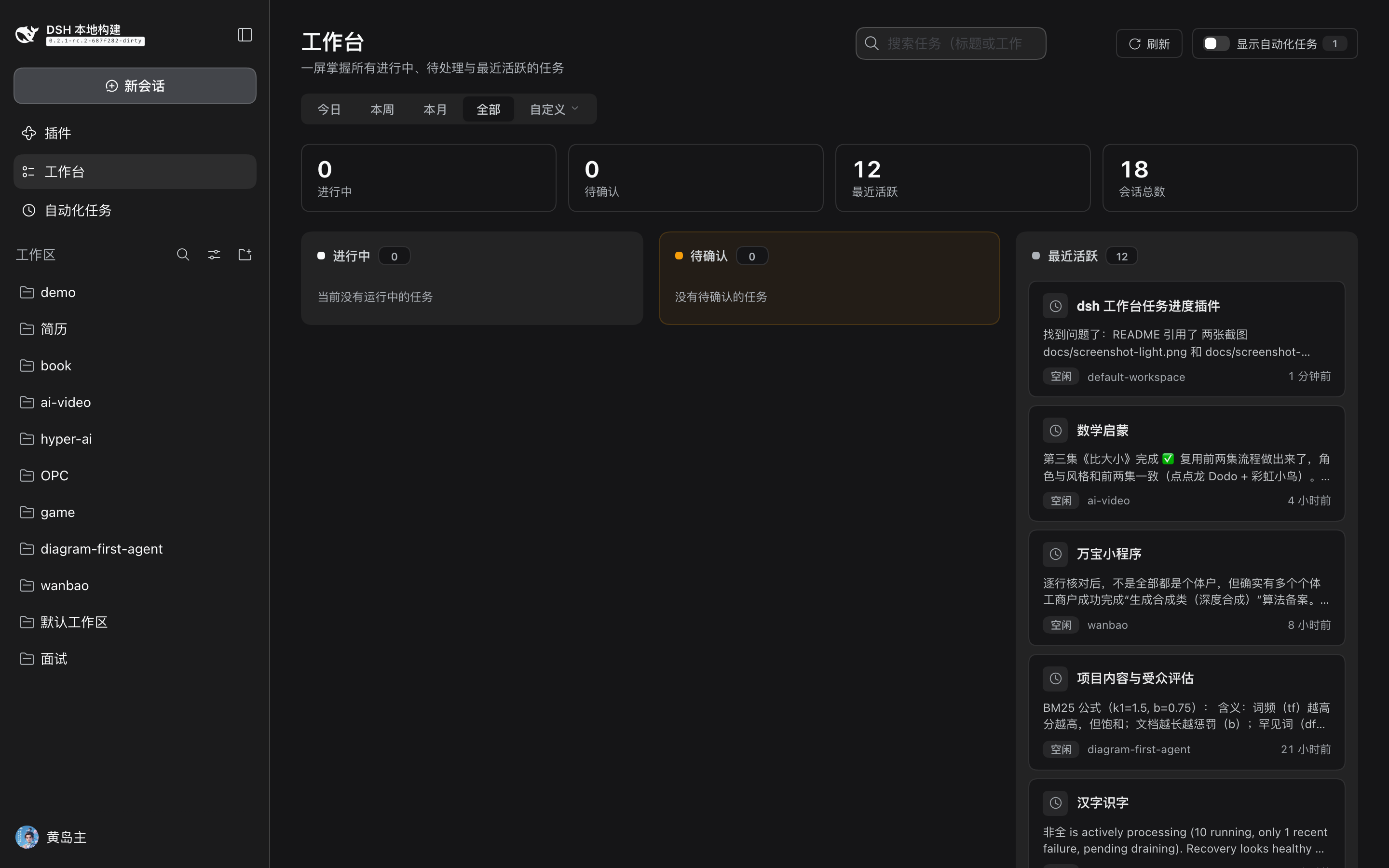
A Web client plugin for DSH (DeepSeek Harness) that turns what your sessions are actually doing right now into a three-column activity board — In progress, Needs confirmation, and Recent activity — where each card shows status, workspace, live background-job progress, and the last assistant reply excerpt. Click a card to open that conversation.
Different from a task board. This is not another place where you hand-build tasks. Its cards are a read-only projection of your real session activity — it reads what sessions are running, blocked on you, or recently touched and mirrors them, including live jobs and the latest reply. Nothing to create, nothing to keep in sync; it reflects your actual work the moment it happens.
- A read-only projection of Host state; it changes no session, message, or model-visible input.
- No user configuration; it works once installed and reads the same data source as the sidebar.
Why not a task board / dashboard?
The DSH ecosystem already has several task-management plugins (e.g. dsh-taskboard,
dsh-kanban, dsh-workbench-tasks) and a widget dashboard (dsh-workboard). They
are built around a task store you own: you create cards, agents claim or update them,
and the board is a record of that store. They are great at that — but they answer
"what did I plan?", not "what is happening in my sessions right now?".
This plugin answers the second question and only the second: a zero-maintenance activity mirror of your sessions. No task ledger, no model-facing tools, no injected prompt — just the live state you would otherwise have to open each conversation to see.
Features
- Three-column board
- In progress: sessions whose turn is running, have running subagents, or
still have live background jobs (a job that outlives its turn), showing the
job's live progress line (e.g.
3/10, current command/phase). - Needs confirmation (human-in-the-loop): sessions blocked on you —
approval (
approval), an answer (question), or a plan review (plan-review). - Recent activity: recently updated idle sessions (paginated, see below).
- In progress: sessions whose turn is running, have running subagents, or
still have live background jobs (a job that outlives its turn), showing the
job's live progress line (e.g.
- Top stats: In progress / Awaiting / Recent / Total sessions.
- Time-range filter: Today / This week / This month / All / Custom (popover with presets — today, yesterday, last 3/7/30 days — or an explicit start/end date, precise to the day). Defaults to Today. The range scopes the Recent column and the totals.
- Per-card excerpt: the session's last assistant reply as plain text (Markdown stripped), clamped to two lines and expanded on hover/focus. Excerpts are read only for the newest 20 sessions to bound cost.
- Automation hidden by default: sessions bound to an active scheduled task (reminder) are hidden; a header toggle reveals them and shows how many are hidden.
- Search: filter by title or workspace instantly.
- Infinite scroll / load more: the Recent column starts at 12 and loads +12 as you scroll to the bottom (or via a Load more button). Every column is capped so a huge session count never renders all at once.
- Bilingual (English/Chinese) and light/dark aware.
Screenshots
Three-column kanban (stats bar, in-progress / needs-confirmation / recent, per-card reply excerpt, time-range filter):
| Light | Dark |
|---|---|
 |
 |
Install
Recommended: install from npm (the package ships a prebuilt lib/).
# into the default profile, or name one
dsh plugin add dsh-activity-board
dsh plugin --profile web add dsh-activity-board
Then restart dsh web (or close and reopen the GUI) and refresh the page. A
An Activity board entry appears in the sidebar between Plugins and Automation tasks.
Or install from the in-app plugin market if you configure a market index that lists this plugin (see "Ecosystem" below).
From a Git source install (advanced)
A Git install fetches sources, not built artifacts, so it needs a local DSH
source checkout to build (the client bundle preset, CSS handling, and
@deepseek-ai/* type declarations live in the monorepo):
DSH_CHECKOUT=/path/to/deepseek-harness dsh plugin add 'github:<you>/dsh-activity-board#<sha>'
pnpm will refuse the package's prepare build script on the first attempt; add
the exact package key it prints to the profile's pnpm-workspace.yaml:
allowBuilds:
  dsh-activity-board: true
and retry. To avoid asking users to build, publish to npm (prebuilt) instead.
How it loads
DSH's Web plugin mechanism: any Host Loader package that declares dsh.client in
its package.json and exports ./client (built to lib/client.js, wrapped as
window.__ModuleLoader__.load({ id, factory })) is scanned by
@deepseek-ai/dsh-client-modules, which injects the browser bundle into the
window.__DSH_BOOT__ module graph.
The page registers a root-level main keyed slot (key: 'workbench') plus a
sidebar.panellist entry that selects it via ctx.layout.selectPanel('workbench'),
becoming a global page beside Plugins and Automation tasks.
All data is ambient; the plugin holds no transport state:
| Source | Purpose |
|---|---|
useSessions (ui-session root source, injected as a global prop) |
session ids / byId (displayTitle, cwd, running, updatedAt) |
useSessionStatus (same) |
per-session running / pendingInteraction |
hooks.jobs = ctx.jobs.state |
background-job roster and progress (with ctx.jobs.watchRows) |
hooks.schedule (ctx.remote.schedule.catalog) |
sessions bound to an active reminder (for default-hiding) |
hooks.workspaces = ctx.workspaces.list |
archived session ids (archived sessions are hidden) |
ctx.uiWorkspace.openSession |
open a conversation |
ctx.remote.session.follow (newest 20 sessions only) |
last assistant reply excerpt |
Develop / build
# 1) link the DSH source checkout's packages into this project's node_modules (once)
npm run link-deps
# 2) build: tsc emits lib/types → tsdown emits lib/index.js + lib/client.js
npm run build
The default checkout path is ../../../source/deepseek-harness (relative to this
project); override with DSH_CHECKOUT=/path/to/deepseek-harness. It uses the
checkout's tsc and tsdown; if the checkout was never built, run pnpm run build
there first (or at least ensure each packages/*/*/lib/types exists).
Publishing to npm ships the prebuilt lib/ (see the files list), so consumers
never build.
Ecosystem
This is a community DSH plugin. To help others find it:
- Add the
dsh-plugintopic to the GitHub repo. - (Optional) Host a format-1 plugin market index JSON (validated by
@deepseek-ai/dsh-plugin-market-index:parseMarketIndex/marketInstallTarget). Users add it as an index URL and can then find and one-click install the plugin from the GUI's Discover page. The repo'sapps/plugin-market-generatorcan generate/validate an index.
The official DSH repository currently does not accept external pull requests (see its
CONTRIBUTING.md); community plugins are the encouraged path.
Known limitations
- "In progress" progress comes from background jobs (
JobView.progress/label); plain conversation turns have no unified milestone/percentage field, so those show only a "Running" state. pendingInteraction.kindis mapped by string; a new upstream kind falls back to the generic "Needs confirmation" wording.- The time range scopes the Recent column and totals; In-progress / Needs-confirmation are always shown (active work should always be visible).
- Excerpts read a handful of recent records; very long replies are clipped to ~4000 chars (two-line clamp on the card, full text on hover).
Contact
- Technical questions / bug reports: please open an Issue so the answer stays searchable for others.
- Chat / collaboration / licensing: add me on WeChat (scan the QR code, note "GitHub").

No comments yet. Be the first to write one.