S7R — System 7 Reimagined for DeepSeek Harness




S7R is an original System 7-era workstation shell for the DeepSeek Harness Web UI. It turns real DSH Agents, Workspaces, files, terminals, tools, and persisted history into a coherent multi-window desktop instead of placing a retro skin over a chat page.
S7R is the desktop environment. Knowledge Desk is its Workspace, Agent, and conversation application.
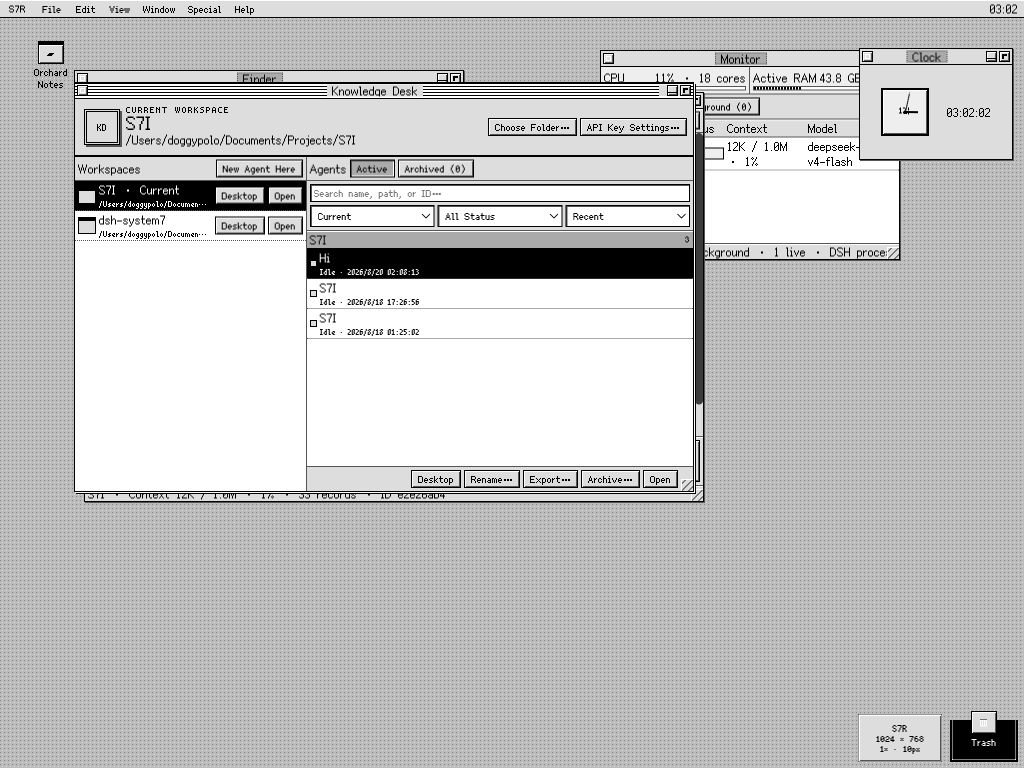
Expanded 1024 × 768 at native 1× magnification. Knowledge Desk remains the center of the workflow while the active Agent, Finder, Monitor, Clock, desktop aliases, and Trash coexist on one persistent desktop.
DSH remains the source of truth. S7R does not copy conversations into its own chat database, start an unrelated shell server, or expose arbitrary host paths. It presents the capabilities already owned by DSH and keeps only desktop preferences—window positions, aliases, display choices, Scrapbook cards, and similar UI state—in the browser.
[!IMPORTANT] S7R's published-package runtime baseline is DSH
0.1.0-rc.7. The adapter has also been built, installed, and browser-tested from the official0.1.0-rc.8source merge. At the verification date, rc.8 packages were not yet available from npm, so ordinary installs still resolve rc.7. DSH is in developer preview and later releases may require adapter updates. See Compatibility.
Feature map
| Area | What it does |
|---|---|
| Workspaces | Registers a real folder with DSH, remembers recent folders, and uses the selected Workspace as the filesystem boundary for Agents, Finder, Preview, TextEdit, Terminal, and Find. |
| Knowledge Desk | Makes the current Workspace explicit; groups and filters Agents by Workspace/state; sorts by recency/name/status; and creates, reopens, renames, exports, archives, restores, or places Agents on the desktop. |
| Agent windows | Streams real DSH output and reasoning, shows tools and attachments, accepts steering/cancellation, reloads persisted history, and optionally renders completed Markdown safely. |
| Native DSH controls | Exposes the selected Agent's real model/reasoning route, Agent Preset, slash-command modes, project Skills, and read-only plugin-loader inventory without inventing parallel S7R settings. |
| Agent Preset Stationery | Creates a new Workspace-owned Agent from an installed DSH Agent Preset, with only an optional name and opening prompt. |
| Context and Timeline | Shows provider-reported context length and pressure, estimates content shares, requests compaction or a summary-carrying successor, and exposes the complete event stream with adjacent chunks folded into runs. |
| Files | Provides Workspace-contained Finder, conflict-aware plain-text editing, image/PDF Preview, and portable path drops into Agents. Host paths are validated again on every request. |
| Terminal | Opens an owner-scoped DSH terminal running /bin/zsh -f -i, even when no Agent window is open, with retained low-latency output and visible command acknowledgement. |
| Find | Searches file/folder names, source contents, visible messages, or all persisted Agent events as independent scopes, then opens the matching file, Agent, or Timeline location. |
| Monitor and notices | Combines live Agent state, background jobs, context pressure, host CPU/active RAM, and DSH process RSS; minimal notices appear when an Agent completes. |
| Desktop | Restores window geometry and z-order; supports Workspace, Agent, Finder-item, and Scrapbook aliases; marquee selection; group dragging; and reversible alias-only Trash. |
| Contextual help | Adds keyboard-accessible right-click menus and optional delayed Balloon Help whose positions stay sharp and bounded at exact 1×/2× magnification. |
| Scrapbook and accessories | Captures editable conversation cards with one-click copy and desktop placement; includes Clock and a legally shuffled, always-solvable 4×4 Puzzle. |
| Display and wallpaper | Offers Fit Browser or fixed logical work areas, 10px/12px bitmap UI masters, exact 1×/2× magnification, monochrome or restrained-color System UI, Preview filters, coordinated blue-green built-in patterns, a seamless Cat tile, and processed imported wallpaper. |
| Credentials | Reads only DSH's configured/source/writable status and writes DEEPSEEK_API_KEY through DSH's loopback credential service; the saved secret is never returned to the page. |
Requirements
- Node.js
22.19+or24+ - DeepSeek Harness
0.1.0-rc.7 - pnpm for DSH profile plugin management and source development
- A modern Chromium-based DSH Web UI browser is the primary tested target
Install
Prebuilt release
Download dsh-s7r-0.9.3.tgz from the latest GitHub Release, then install it into the DSH Web profile:
dsh plugin --profile web add ./dsh-s7r-0.9.3.tgz
dsh --profile web --dump-config
dsh web
Open the loopback URL printed by DSH, normally http://127.0.0.1:3080.
The Release also contains SHA256SUMS. Verify the downloaded archive on macOS with:
shasum -a 256 -c SHA256SUMS
On Linux, use sha256sum -c SHA256SUMS.
Install from source
git clone https://github.com/hunter118/dsh-s7r.git
cd dsh-s7r
pnpm install --frozen-lockfile
pnpm check
pnpm build
dsh plugin --profile web add .
dsh web
Remove or replace
dsh plugin --profile web remove dsh-s7r
Remove the installed version before adding a different tarball. S7R's browser-local display, desktop, and Scrapbook preferences may remain in that browser profile; real DSH Workspace files and session logs are not removed.
First run
- Open S7R → Settings…. If DSH does not already receive
DEEPSEEK_API_KEYfrom its launch environment, save it here. S7R can report configured/source/writable state but cannot read the stored value back. - Choose File → Choose Folder…. The native DSH picker registers that external directory as a Workspace before an Agent begins work.
- Use Knowledge Desk to create, search, reopen, rename, archive/restore, or export Agents.
- Use File → New from Stationery… to start from a real DSH Agent Preset, or S7R → DSH Control Center… to inspect the active model, commands/modes, Skills, and plugin inventory.
- Use File → New Terminal for zsh even when Finder and every Agent window are closed.
- Turn on Help → Show Balloon Help for delayed hover/focus explanations, and open S7R Guide… for the compact workflow reference.
Browser-owned shortcuts such as Command-N and Command-W are intentionally not advertised because a page cannot reliably override the browser tab.
Knowledge Desk and Agents
Knowledge Desk is both a Workspace launcher and an Agent browser. Its header and highlighted Workspace row make the current folder explicit, and New Agent Here always uses that selection. The Agent side defaults to the current Workspace, can broaden to all Workspaces, filter by run state, sort by recency/name/status, and group results under their Workspace. Opening an existing result reconnects a window to the real DSH SessionRuntime rather than creating a second chat record.
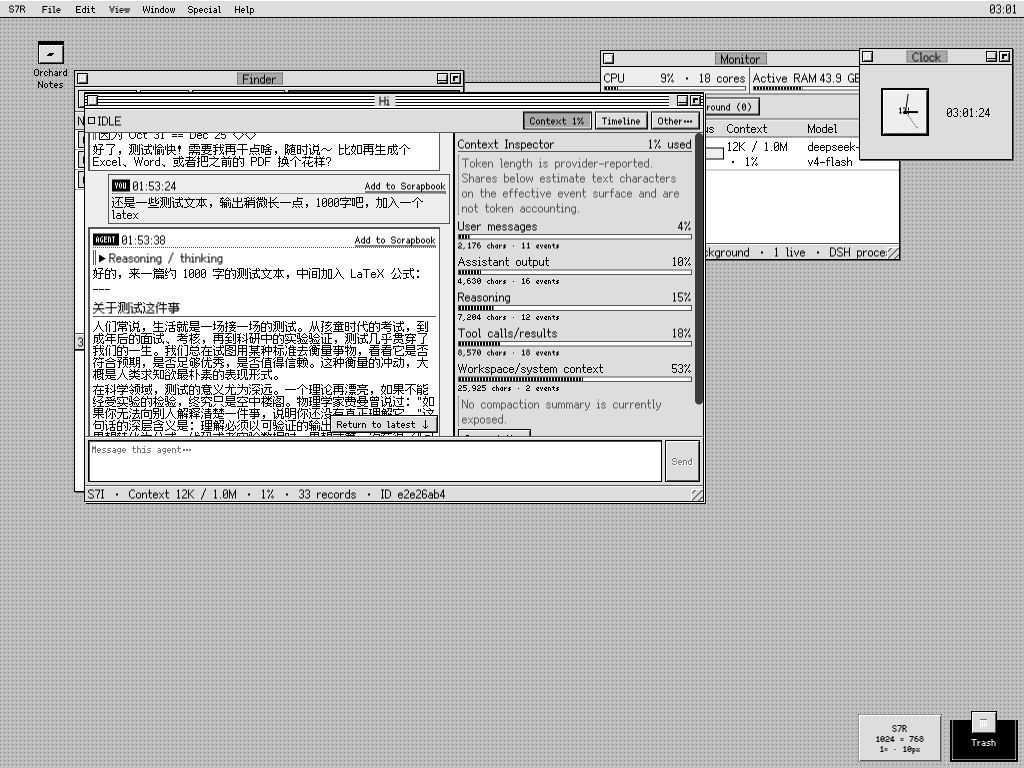
The Agent stays in context: its Markdown conversation and Context Inspector share the foreground while Finder, live system pressure, Clock, Knowledge Desk, and desktop objects remain available behind it.
The Agent lifecycle is deliberately explicit:
- New Agent starts in the selected Workspace. Closing its window only closes the view.
- Open returns to the same persisted DSH session, including its historical events.
- Rename changes the human-facing title without changing the session ID.
- Export produces a complete Markdown transcript plus a machine-readable JSON event archive.
- Archive hides the Agent in S7R without deleting its DSH log; the Archived view can restore it.
- Desktop creates a reopenable alias. Removing that alias does not archive or delete the Agent.
Every Agent window keeps a compact single-line toolbar:
- Context opens provider-reported token length/percentage when available, estimated shares for user/assistant/reasoning/tools/Workspace material, 75%/90% warnings, Compact Now, and New Agent with Current Summary. Shares are character-based diagnostics, not fake token accounting.
- Timeline opens the complete live or cold persisted event ledger. Adjacent same-type events such as
assistant/chunkfold into expandable runs. - Other… provides rename, complete Markdown/JSON export, reversible archive, desktop placement, and a persistent Markdown-rendering toggle.
Completed output can safely render headings, emphasis, inline/fenced code, lists, quotes, and tables. Streaming remains plain text until the message is complete, raw HTML is never injected, and LaTeX remains source text. The rendering switch is per browser profile and never rewrites stored conversation data. Color Emoji are displayed as monochrome pixel-font symbols or short text for visual consistency.
Streaming follows the newest output only while the reader is already near the bottom. Scrolling upward keeps the reading position stable; a New output ↓ button reports fresh content and returns to the live edge on demand.
Native DSH controls and Agent Preset Stationery
S7R → DSH Control Center… is an adapter over the selected Agent's public DSH services, not a second configuration database. It shows and applies real provider model/reasoning routes, allows DSH's Preset to change only while an Agent is still blank, lists Agent-scoped slash commands (including modes registered by its Preset), exposes project Skills through the same invocation path as the composer, and reports the loader's complete plugin inventory. DSH rc.7 publishes plugin inventory as read-only, so S7R intentionally does not draw switches that cannot be committed safely.
File → New from Stationery… is a deliberately small Stationery Pad built on DSH Agent Presets. Choose a Workspace and installed Preset, optionally supply a display name and opening prompt, and S7R asks DSH to create the Agent with that composition. Preset descriptions and broken/local status come from DSH; S7R creates no competing template format.
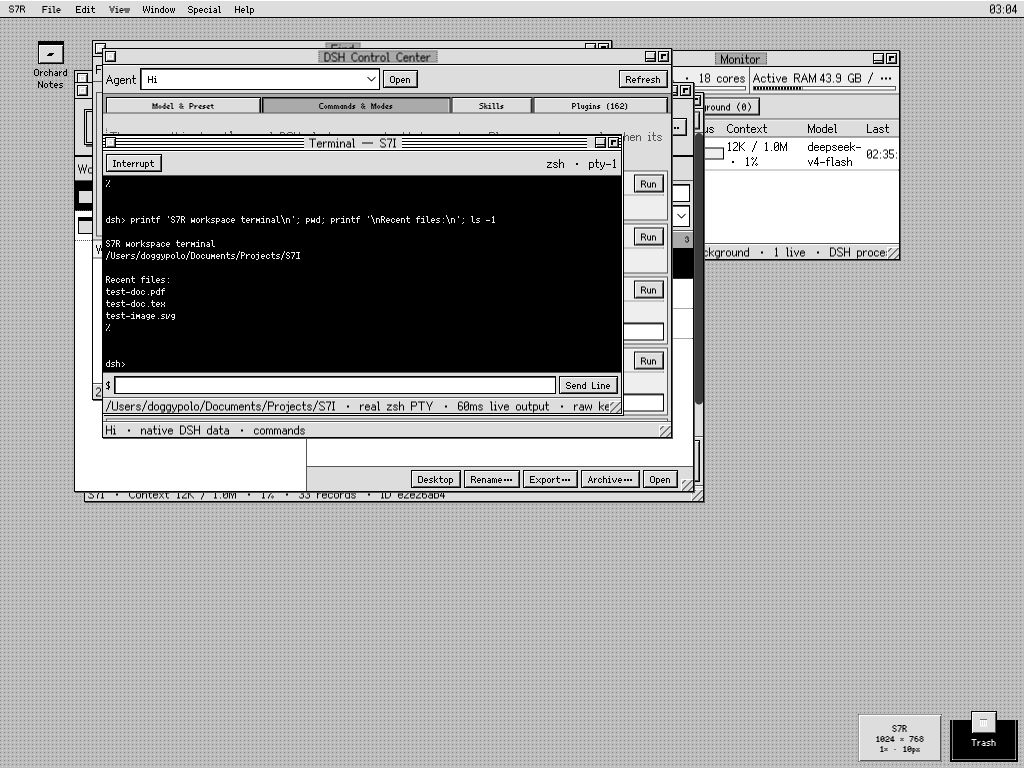
The same Expanded desktop can run a real Workspace-scoped zsh terminal over DSH's native command surface while Find, Knowledge Desk, and Monitor continue operating underneath.
Workspaces, Finder, TextEdit, and Preview
Choosing a folder uses DSH's native picker and registers that external directory as a Workspace; S7R is not limited to the folder from which the Web UI was launched. The most recently used valid Workspace can be reopened on the next visit. Finder then reads the selected session's canonical root through DSH, and every host path is resolved again and rejected if it escapes that root.
- Double-click a directory to navigate; Open in Terminal starts zsh at that directory.
- Text and source files open in TextEdit. Saves carry the last-read filesystem version so an external edit is reported as a conflict instead of being silently overwritten.
- Images and PDFs open in Preview. PDFs are rasterized locally with PDF.js; page, zoom, fit, and temporary Inspect Original controls do not alter the file.
- Drag a Finder item onto the desktop to create an alias, or into an Agent to insert its path. Paths inside the Agent's Workspace become
./relative/path; outside paths remain absolute.
Display can filter Preview images and PDF pages through either ordered 1-bit black/white dithering or direct luminance grayscale. Filtering is cached, non-destructive, and never rewrites the source file.
Terminal
Terminal uses the official DSH terminal service and shell backend with /bin/zsh -f -i. DSH owns process spawning, sandbox policy, scrollback, signaling, terminal identity, and Agent ownership. S7R acknowledges submitted lines immediately and polls retained foreground output without overlapping reads.
File → New Terminal works independently of visible Agent and Finder windows. When no live owner exists, S7R creates a fresh blank owner in the current/recent Workspace, so the terminal does not fail with a missing Knowledge Desk session. Open in Terminal from Finder starts at the displayed directory.
DSH rc.7 is line-oriented: it does not expose a raw browser keystroke stream or post-spawn PTY resizing. Terminal therefore behaves like a responsive real line console, not an xterm-style raw attachment.
Find, Timeline, and Monitor
File → Find… has independent search depths:
- Names — file and folder names only; useful for navigation without reading file contents.
- Source contents — text/code inside the active Workspace, with hidden directories and
node_modulesskipped. - Conversation messages — visible user and assistant messages across persisted Agents.
- All Agent events — the complete cold event stream, including tools, reasoning, chunks, and context records.
Matches route to Finder/TextEdit/Preview, the Agent, or the exact Timeline event. Traversal stops at 5,000 files, skips hidden and node_modules directories, reads at most 1 MiB per source file, and returns at most 200 results.
Monitor combines:
- Agents — live status (
RUNNING,IDLE, or terminal state), model, latest event time, and provider-reported context pressure. - Background — DSH jobs that may continue after an Agent window is closed.
- System — host-wide CPU and active RAM, plus DSH process RSS so process memory is not confused with whole-machine pressure.
On macOS, inactive/file-cache pages are excluded from active RAM so reusable cache does not appear as application pressure. Minimal desktop notices appear only when an Agent crosses into a completed state; selecting one opens that Agent. Monitor is visible in the desktop overview above rather than presented as an isolated full-screen panel.
Desktop workflow
Window bounds, z-order, zoom/collapse state, desktop aliases, reversible Agent archives, Trash, and Markdown preference survive reload. Terminal windows are the intentional exception because serialized windows cannot safely reattach live owner-scoped PTYs.
The menu bar follows the active application: File and View expose only relevant commands, while Window switches between open windows and the most recently active Agents. S7R → Settings… controls whether Window shows 1–9 Agents (default 5). Tile Windows records the exact pre-tile geometry, and Restore Previous Layout restores it even after repeated tiling.
Workspaces, Agents, Finder items, and individual Scrapbook cards can become desktop objects. Drag empty desktop space to marquee-select several aliases; then drag any selected item to move the group while preserving its layout. Opening an alias routes to its real object rather than a browser-local copy.
Contextual menus are available on empty desktop space, desktop aliases, Trash, Knowledge Desk Agent/Workspace rows, and Finder entries. Depending on the object they provide Open, DSH Controls, Finder/Workspace placement, rename/export/archive, relative or absolute path copy, desktop placement, and Get Info. Delete operations in these menus affect only S7R aliases or its reversible Agent archive layer; Finder's menu never deletes a real file.
Folders have two explicit desktop meanings:
- Finder Alias opens the directory within its existing Workspace.
- Workspace Alias registers the directory as a Workspace and connects its Agent.
Delete/Backspace or a drop on Trash moves only aliases into S7R's reversible Trash. Put Away restores them; Special → Empty Trash… permanently discards aliases only. Real files, Workspaces, Agent logs, and Scrapbook cards are never deleted by desktop Trash.
Paths dropped into an Agent become portable ./relative/path references when they are inside that Agent's Workspace and remain absolute otherwise.
Help → Show Balloon Help enables delayed yellow explanations on marked controls. The preference persists locally. Balloons also appear for keyboard focus, disappear on typing/clicking/scrolling or while a menu/dialog is open, flip and clamp at desktop edges, and calculate from logical coordinates so exact 2× magnification does not double the offset.
Scrapbook and desk accessories
Add to Scrapbook captures a message into a browser-local editable card while retaining its source Agent reference. The capture link immediately takes on a visited-style state as feedback, each card has one-click copy, and a single card can be placed on the desktop without opening the whole Scrapbook.
Clock is a live analog/digital desk accessory. Puzzle is an original 4×4 sliding-number implementation; shuffling performs only legal moves, so every generated board is solvable.
System applications and preferences live in their workflow menus. Clock and Puzzle remain in the S7R application menu as desk accessories.
Display and wallpaper
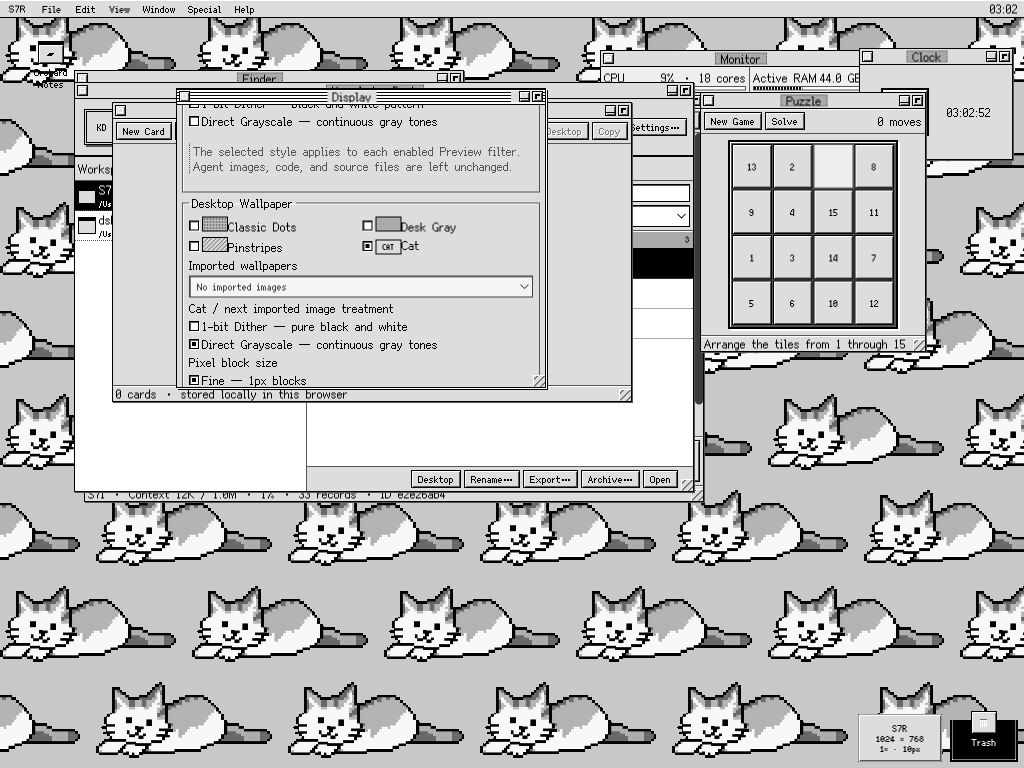
Display is scrolled directly to wallpaper treatment while the seamless Cat tile, solvable Puzzle, Scrapbook toolbar, Knowledge Desk, Finder, Monitor, and Clock demonstrate that display changes do not suspend the rest of the desktop.
Display separates four concerns:
- Logical work area: Fit Browser recomputes the usable desktop from the current viewport; Classic 512×342, Compact 640×480, Standard 832×624, and Expanded 1024×768 preserve fixed period-style work areas.
- Interface size: Compact 10px and Comfortable 12px are separate bitmap masters. Their semantic small text also switches to a native 8px or 10px master, respectively. Menus, title bars, controls, spacing, scrollbars, and default window sizes all change together instead of merely enlarging text.
- Pixel magnification: 1× or exact 2× integer layout magnification. Fit Browser halves the logical work area at 2× before magnifying it, and pointer deltas are mapped back to logical coordinates.
- Content filters: Preview images and rasterized PDF pages can independently use ordered 1-bit black/white dithering or direct grayscale. Conversation images and source files are left unchanged.
Classic Dots is the default wallpaper. Desk Gray, Pinstripes, seamless Cat, and imported images are also available. Cat and imports are sampled onto a genuine low-resolution grid, filtered, and baked into an integer nearest-neighbor PNG. Imports accumulate in a named dropdown library and can tile at pixel size or fill the desktop. Re-rendering offers 1px or 2px blocks; the original imported file is not retained after processing.
Persistence and data ownership
| Owner | Data |
|---|---|
| DSH | Agents, conversation/event logs, Workspace registration, files, terminal owners/processes, tools, credentials, and background jobs. |
| S7R browser profile | Display preferences, processed imported wallpaper, Scrapbook cards, window and desktop layout, alias Trash, reversible S7R archives, Markdown preference, and Balloon Help setting. |
Browser-local records are versioned; malformed records fail closed and known older formats migrate explicitly. Closing an Agent window never deletes its DSH session. Clearing browser site data resets S7R's local desktop customizations but does not delete DSH conversations or Workspace files.
Security model
- Credential status and mutation use DSH's official loopback-only service; stored secrets are write-only from the browser's perspective.
- Package-specific host RPC is loopback-authorized and validates identifiers.
- Every file request is contained under the selected live or persisted Workspace root.
- Existing-file saves require the version returned by the previous read.
- Binary reads are capped at 25 MiB.
- Terminal IDs remain owner-scoped through DSH.
- Markdown rendering creates React nodes from a restricted grammar and never injects raw HTML.
Please report credential exposure, path traversal, unsafe writes, terminal ownership errors, or injection privately as described in SECURITY.md.
Compatibility and known limitations
This release is runtime-tested against official DeepSeek Harness commit 99f6f02fecdb7dff40c3fbc9470f5907c29f74ca (0.1.0-rc.7) and was also built, installed into a clean Web profile, and browser-tested from commit 141eb6fef83422698aef7a981029e843e8161534 (the 0.1.0-rc.8 release merge, verified 2026-08-20). Exact adapter seams and the rc.8 validation are documented in COMPATIBILITY.md.
- DSH rc.7 has fixed backend PTY dimensions and no supported resize method or raw browser byte stream.
- TextEdit is a robust plain text/code editor, not a language server or syntax-highlighting IDE.
- Preview renders raster PDF pages but has no selectable PDF text layer.
- DSH exposes archive but no public unarchive API. S7R therefore uses a reversible local hide/archive layer for new actions; older DSH-native archived IDs cannot be restored through a supported seam.
- The S7R client intentionally replaces the root slot; native DSH surfaces remain installed but are not mixed into the simulated desktop.
Development
pnpm install --frozen-lockfile
pnpm check
pnpm pack
pnpm check runs strict host/client TypeScript checks, 68 deterministic tests, and production host/client bundles. PDF.js and its worker implementation are embedded so Preview needs no CDN or runtime network dependency.
Project references:
- Architecture
- Compatibility notes
- Product and design specification
- Development notes
- Changelog
- Contributing
License and asset provenance
S7R is MIT licensed. It is an independent project and is not affiliated with or endorsed by Apple Inc. or DeepSeek. No Apple artwork, system files, proprietary fonts, sounds, screenshots, or extracted resources are bundled. Icons and patterns are original CSS/text constructions; the Cat wallpaper is an original generated bitmap processed by S7R's local grayscale pipeline.
The browser bundle includes Simplified Chinese proportional and monospaced 8px/10px/12px faces from Fusion Pixel Font under SIL OFL 1.1 and PDF.js under Apache-2.0. Copyright notices and full license texts are included in THIRD_PARTY_NOTICES.md and THIRD_PARTY_LICENSES/.
No comments yet. Be the first to write one.