dsh-recent-sessions
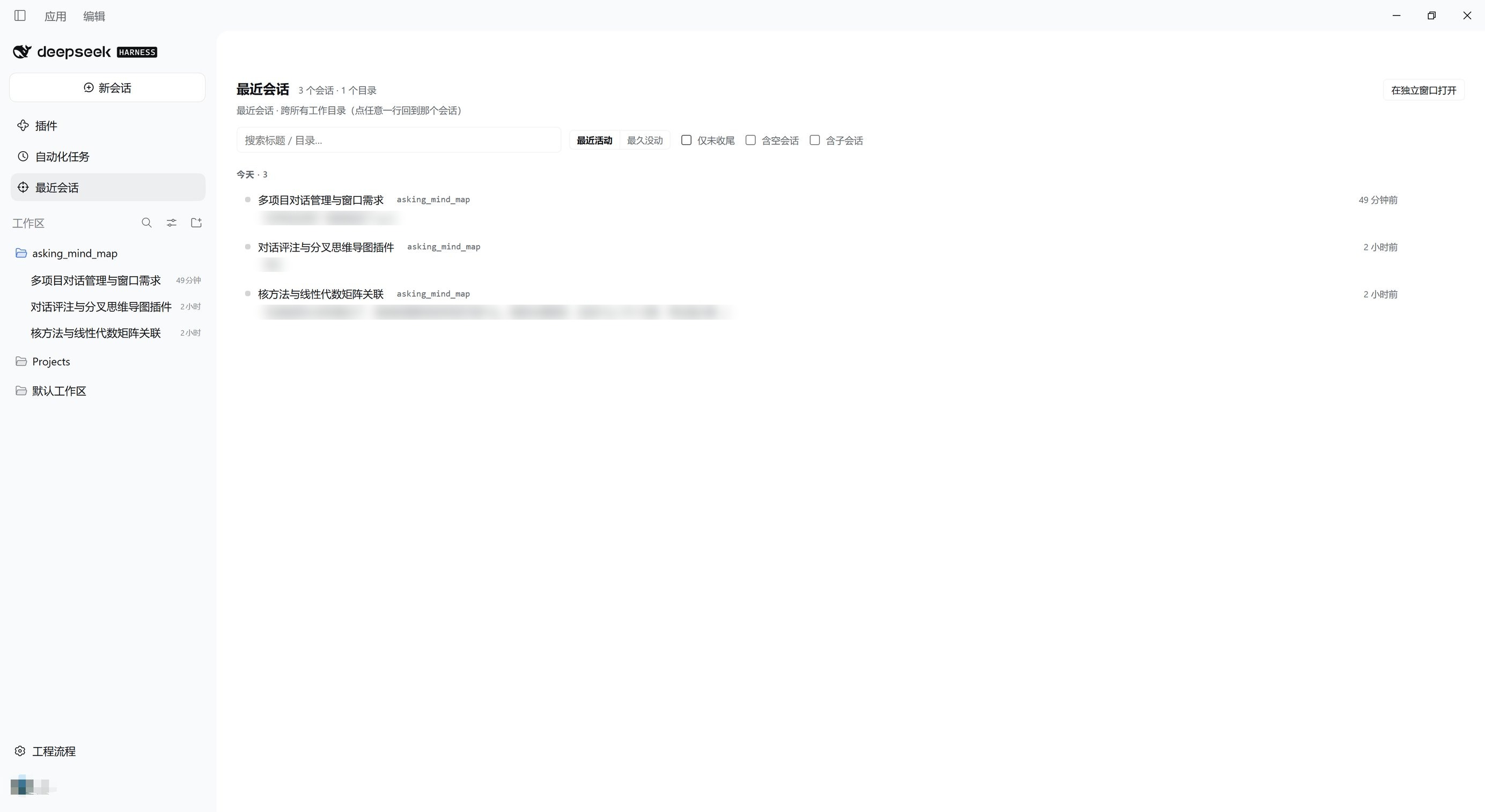
Every session you have been working in, across every workspace, in one panel — plus a place to jot down a thought and have it come back to you when you reopen that conversation.
A DSH (DeepSeek Harness) client plugin. 中文说明见 README.zh.md.
Why this exists
DSH's sidebar groups sessions by workspace, shows the newest few rows per workspace, and only lists workspaces you registered. Once you work in a dozen directories at once, a project you have not touched for a while is simply not on screen — and a session that lives in a directory you were not looking for is effectively lost.
There is a second, quieter problem: the thought you have about an answer twenty minutes later, while doing something else, has nowhere to go. You either remember it or you lose it.
This plugin adds a global panel that is not tied to any session — one flat list of every session across every workspace — and a way to capture a deferred thought without waking anything up.
What you get
- One flat list across all workspaces. Every session, newest first, including sessions the sidebar is currently hiding (collapsed workspaces, unregistered directories). Each row carries its workspace as a clickable chip — click it to filter to that workspace, click the chip in the toolbar to clear.
- "What was I asking?" — a second line per row with that session's last human prompt, read from the host's
turnOutlinesession projection. Hover it to see a preview of the last assistant reply. - Time grouping and two sort orders — Today / Yesterday / This week / Earlier; sort by most recent or by least recently touched (for cleanup — the time buckets flip as well).
- Filters — only unfinished / include blank sessions / include subagent sessions; archived sessions stay hidden by default. Your view state is remembered locally.
- Find it again — full-text search over message content (host index), instant local title/path filtering, and per-row actions: open the session, reveal its folder in your file manager, copy the path.
- Deferred thoughts. Jot one line on any row. It is stored locally and nothing is sent. When you open that session, a one-line strip appears above the composer: expand it to insert the text into your draft (an official, undoable editor insertion), say not now (the thought stays, it just stops nagging), or discard.
- A separate window. Open the panel in its own same-origin window; it selects itself on load.
- Quiet by design. No notifications, no red badges, no auto-archiving. "Long untouched" is expressed by grouping, not by alarm.
Install
From the plugin market inside DSH, or:
dsh plugin --profile <your-profile> add dsh-recent-sessions
How it works
Everything goes through documented extension points — no DOM hacks, no monkey-patching:
| What | Where |
|---|---|
| Global panel | main keyed slot, key recent-sessions |
| Sidebar entry | sidebar.panellist (its id must equal the panel key) |
| Floating entry | shell.overlay (the layer is click-through; only the pill takes pointer events) |
| Thought strip | conversation.input.dock (session scope) |
| Draft insertion | InputActions.captureInsertion() + insertText(text, span) |
| Session list | root hooks useSessions / useSessionStatus / useWorkspaces |
| Prompt previews | ctx.sessions.refreshProjections(id) → the turnOutline projection |
| Content search | ctx.sessions.search(query, signal) |
| Reveal folder | ctx.remote.session.canOpenWorkspacePath() / openWorkspacePath({ path, action: "reveal" }) |
Privacy and footprint
- The host half does nothing at all (empty
apply): no tools, no HTTP routes, no session events. The plugin never writes to your conversations. - Notes, thoughts and view state live in your browser's
localStorageonly, under the keydsh-recent-sessions:store:v1. - The only write path is one you trigger yourself: inserting a thought into a draft, and the message you then choose to send.
- No build step.
lib/client.jsis a hand-written bundle in the platform's own module format (window.__ModuleLoader__.load({ id, factory })), so the published tarball is two small JS files and nothing else runs at install time.
Compatibility
- DSH
>= 0.2.0-rc.2, declared inengines.dsh. - No
@deepseek-ai/dsh-*peer requirements are declared on purpose: a mismatched DSH peer range blocks activation, so the requirement stays advisory instead of becoming a hard gate. - Node
^22.19.0 || >=24.0.0for the host half.
Known limitations
- The separate window still boots the whole DSH shell (it only switches to this panel). A chrome-less compact window is planned.
- Prompt previews are fetched for the first 30 rows only.
- Bundled UI strings are Chinese and English; more locales are welcome.
- Reveal in file manager depends on the host reporting a desktop; the button is hidden when it does not, and falls back to copying the path.
Development
The client half is discovered from exports["./client"] and served by the platform's module loader:
window.__ModuleLoader__.load({
  id: "dsh-recent-sessions",
  factory: (require) => {
    const React = require("react"); // ← the shell's PLATFORM_MODULES baseline
    // ...
    return module.exports;          // ← needs apply / inject
  },
});
Editing lib/client.js is picked up by a running browser within about a second (client HMR polls bundle revisions). Editing lib/index.js or changing the package version needs an app restart.
License
MIT
No comments yet. Be the first to write one.