dsh-notifier-plugin
English | 中文
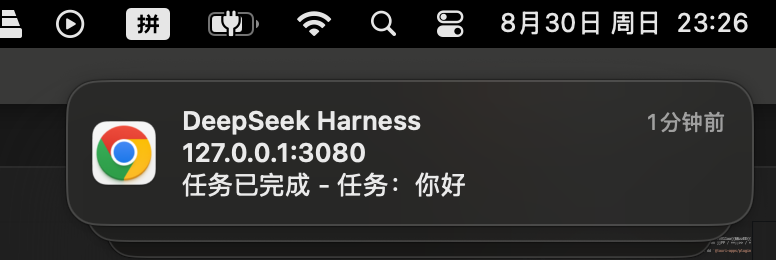
Desktop notifications for DeepSeek Harness (dsh): get a system notification when a run finishes, and an immediate one when the model asks you a question (ask_user_question) or waits for approval (sandbox escalation / tool permission). The body reflects the result (completed / error / aborted / max-tokens / blocked / interrupted). Delivery is pluggable at bundle time: browser-native Notification() (default) or Tauri's @tauri-apps/plugin-notification.
Install
From npm (recommended)
The published npm package ships prebuilt browser assets — no local build permissions needed:
dsh plugin --profile web add dsh-notifier-plugin
From GitHub
You can also install the source straight from the git repo; the prepare script builds it automatically after install:
dsh plugin --profile web add github:hotpot-labs/dsh-notifier-plugin
pnpm ≥10 blocks git dependencies from running build scripts. If the install skips the build, allow it in the profile's
pnpm-workspace.yamland re-runadd:allowBuilds: dsh-notifier-plugin: true
From a local checkout
For development; rebuild after edits:
dsh plugin --profile web add ./dsh-notifier-plugin
The install command runs pnpm add in the profile directory and appends packages that declare dsh.bundle to dsh.profile.bundles.
Verify the mount:
dsh --profile web --dump-config | grep -n dsh-notifier
Tauri desktop shell
- Build the Tauri variant:
pnpm run build:tauri(orDSH_NOTIFIER_BACKEND=tauri tsdownfor just the client bundle). - macOS delivery channel: macOS refuses notification permission for ad-hoc-signed apps (no Developer ID) —
UNUserNotificationCenterrejects them outright, and tauri-plugin-notification swallows the delivery error. So on macOS the client posts to the host endpointPOST /dsh-notifier/notifyinstead; the host (dsh's node process) delivers viaosascript, and banners appear under the system-signed "Script Editor" identity — no signing needed. Windows / Linux are unaffected and still use@tauri-apps/plugin-notification. - On Windows / Linux the host Tauri app must install the Rust side:
tauri-plugin-notificationinsrc-tauri/Cargo.toml+.plugin(tauri_plugin_notification::init()), and grantnotification:defaultin its capabilities. Without it, permission requests fail and notifications are skipped (warned once in the console). The focus check behind foreground suppression (isFocused) is part ofcore:window:default(granted viacore:default), so it needs no extra capability.
Configure
Two ways, user layer wins over the entry config:
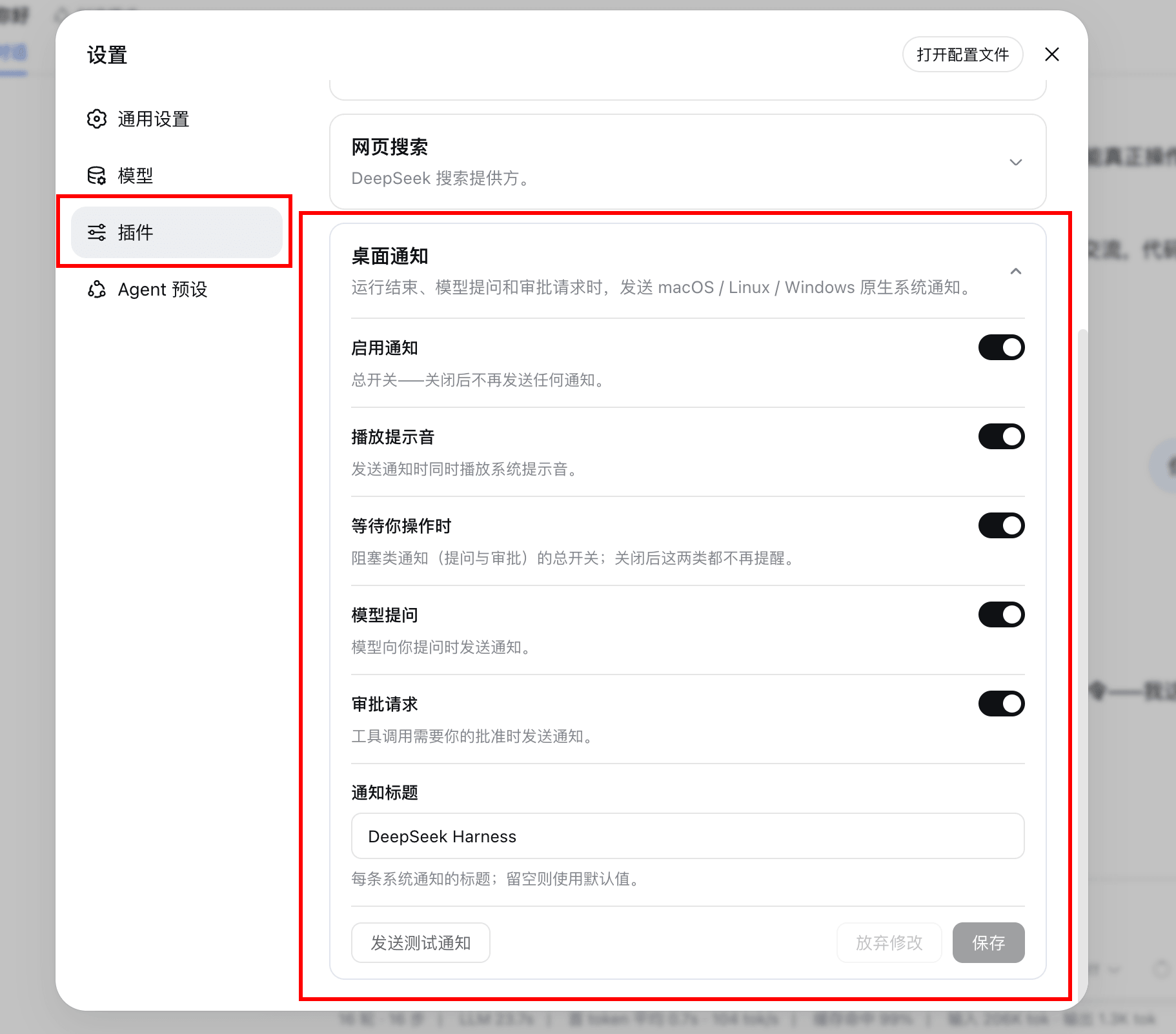
Web UI (recommended): open dsh web → Settings → Plugins → Plugin configuration → expand the notification card. Toggle the switches and Save.
Config file: declare the row in the profile's cordis.patch.yml (~/.dsh/profiles/<name>/cordis.patch.yml):
- id: dsh-notifier
  name: dsh-notifier-plugin
  config:
    enabled: true        # master switch
    title: DeepSeek Harness
    sound: true          # allow the platform notification sound; false = silent request
    onBlocked: true      # master switch for blocking notifications
    onQuestion: true     # question notifications (only when onBlocked)
    onApproval: true     # approval notifications (only when onBlocked)
All fields are optional with the defaults shown above. A later layer replaces the whole config of the same-id row (no per-key deep merge).
Usage
- After installing, restart the web process (
dsh --profile web web) and hard-refresh the page. - Grant the notification permission: open the settings card and click Send test notification — the recommended way, since browsers require a user gesture for
requestPermission(). - Toggle options in the card; changes take effect live, no restart.
Notifications fire only while a dsh web page (or the Tauri desktop window) is open — delivery lives in the webview, so a headless CLI run with no connected page produces none.
Notification bodies
| Event | Body |
|---|---|
| run completed | 任务已完成 - 任务:<session title> |
| run failed | 任务失败 - 任务:… |
| aborted / max-tokens / blocked / interrupted | 任务已中止 / 任务达到 token 上限 / 任务被阻塞 / 任务被中断 |
| question | 需要回答:<question text> — <session title> |
| approval | 需要批准:<toolName> — <reason> — <session title> |
The session title comes from the session list row (a host projection) — very early notifications may omit it.
Permissions
- Browser: the first notification (or the card's Send test notification button) triggers the permission prompt. Note that a
requestPermission()call without a user gesture is silently denied by modern Chrome — if the first real notification doesn't prompt, click Send test notification once (a real click counts as the required gesture). If you previously denied it, re-enable notifications for the dsh origin in your browser's site settings. - Tauri: granted via
requestPermission()from the notification plugin; macOS may additionally ask at the OS level on first use.
macOS: the OS level can still block banners
Even with the site permission granted, macOS decides whether banners actually appear:
- System Settings → Notifications → Google Chrome (or your browser / the Tauri app): enable Allow notifications, and pick the Banners style (Alerts work too but stay until dismissed). Chrome posts web notifications through Google Chrome Helper (Alerts) — if that entry exists, check it as well.
- Focus / Do Not Disturb: an active Focus mode suppresses banners without any error anywhere.
- Quick self-check in the DevTools console of the dsh page:
If the manual notification also shows nothing, the cause is in macOS settings, not the plugin.Notification.permission // must be "granted" new Notification('测试', { body: '手动测试' }) // granted but no banner => OS-level blocking
The plugin logs every delivery decision at debug level (filter the console by dsh-notifier-plugin): notify delivered means the notification was constructed successfully — if no banner follows, it's the OS/browser layer; notify skipped (permission) means the site permission is missing.
Features
- One notification per run, not per turn: the plugin records the latest
turn/endreason of each root session and fires once when the session flips from running to idle — a multi-round goal run produces a single notification with the true final result. - In-session blocking notifications: fires immediately when the model calls
ask_user_question, or when an approval request waits for you — controlled byonBlocked/onQuestion/onApproval. - Top-level runs only: subagent sessions are filtered out (
origin === 'subagent'in the session list), so one run produces one notification. - No nagging while you're watching: no system notification while you're already looking at dsh — on web that means the dsh tab is visible and the browser window is focused (
visibilityState+hasFocus); in the Tauri shell it means the app window is focused (getCurrentWindow().isFocused()). The console logsnotify suppressed (app in foreground); the settings card's Send test notification button bypasses this. - Settings card in the web UI: every option is editable under Settings → Plugins → Plugin configuration, styled after the built-in plugin cards; changes take effect live, no restart. The card also has a Send test notification button — the recommended way to grant the browser notification permission (it requires a user gesture).
- Resilient streams: the event streams reconnect automatically after disconnects; notification failures are swallowed (warned once), never breaking the run they report on.
Development
How it works
The browser half of the plugin (src/client/) opens its own pair of host event streams (events.mux / events.host — the host implementation is multi-subscriber) and runs the notification state machines against the same session/event passthrough frames the host sees. The host half only owns the dsh-notifier settings namespace (schema + user layer), which both the settings card and the notification runtime resolve live.
Delivery is pluggable at bundle time via DSH_NOTIFIER_BACKEND:
| Variant | Build | Delivery |
|---|---|---|
| web (default) | pnpm run build |
browser-native new Notification(title, { body }) |
| Tauri desktop shell | pnpm run build:tauri |
@tauri-apps/plugin-notification (bundled into client.js) |
The unselected implementation never enters the module graph (#notifier-backend alias in tsdown.config.ts), so the web bundle contains no @tauri-apps/* code and vice versa. Tauri is a separate variant because its WKWebView does not support the browser Notification API.
Build and test
pnpm install
pnpm run build          # tsc (host, ESM) + tsdown (client, web variant) -> lib/
pnpm run build:tauri    # tsc + tsdown with DSH_NOTIFIER_BACKEND=tauri
pnpm run typecheck      # tsc --noEmit, host + client
pnpm test               # vitest: result text / body building / state machines / watcher
npm pack --dry-run      # the tarball ships only lib/ + cordis.patch.yml + README
Source layout
src/index.ts                  host entry: name / Config schema / settings section
src/notifier.ts               run-end state machine (fire once at idle) + blocking notifier
src/notify.ts                 result text + notification body building (platform-agnostic)
src/types.ts                  structural event types (no dsh internal packages)
src/client/index.ts           client entry: settings card + watcher wiring + styles
src/client/watcher.ts         notification runtime: mux/host stream subscription driving the state machines
src/client/backend.ts         backend interface + build-time selection (#notifier-backend alias)
src/client/backend-browser.ts browser-native Notification() delivery
src/client/backend-tauri.ts   @tauri-apps/plugin-notification delivery
src/client/NotificationCard.tsx / locale.ts   settings card component + dictionaries
FAQ
Q: Installed but no notification?
- Confirm it loaded:
dsh --profile web --dump-config | grep dsh-notifier, and hard-refresh the page. - Open the settings card and click Send test notification — this surfaces the permission state immediately (a bare
requestPermission()without a user gesture is silently denied by modern Chrome). - Filter DevTools console by
dsh-notifier-plugin:notify delivered= constructed fine, look at the OS layer;notify skipped (permission)= grant the site permission;notify suppressed (app in foreground)= you're already looking at the dsh page, working as intended. - macOS: even with the site permission granted, check System Settings → Notifications → Google Chrome (Allow notifications + Banners style) and Focus / Do Not Disturb — verify with a manual
new Notification('测试')in the console; if that also shows nothing, it's the OS settings. - Confirm it's a root-session run (subagent subtasks don't trigger).
- Tauri: confirm the host app installed
tauri-plugin-notificationand granted the capability (console shows a one-time warning otherwise).
Q: How many notifications per run?
One. It fires only when the session flips from running to idle (the whole activity has converged), so multi-round goal runs don't spam; intermediate turns never fire early. Blocking interactions (question/approval) notify immediately, once each.
Q: The settings card doesn't appear?
The card only shows in a web profile after the web process restarts and the page is hard-refreshed.
License: MIT
No comments yet. Be the first to write one.