dsh-md-export
Export DeepSeek Harness conversations as clean Markdown.
A button in the session header, a native save dialog, and a CLI over the same renderer.



Install ·
Output ·
Features ·
Usage ·
Compatibility ·
How it works ·
Development
English · 中文 ·
Format contract ·
Architecture ·
Contributing ·
Changelog
Install
From the app
- Open Plugins in the sidebar → Add plugin.
- Paste the repository URL:
https://github.com/hoshF/dsh-md-export. - Restart DSH, then hard-refresh the page (⌘⇧R / Ctrl+Shift+R).
git clone https://github.com/hoshF/dsh-md-export.git && cd dsh-md-export
./install.sh
install.sh packs the package, removes its previous dependency, and installs the
new tarball with pnpm add --force. It retains the profile's lockfile and other
plugins, registers this bundle, and reports the result. It auto-detects node and
pnpm; override anything with:
| Variable | Default |
|---|---|
DSH_HOME |
~/.dsh |
DSH_PROFILE |
desktop |
DSH_PROFILE_DIR |
$DSH_HOME/profiles/$DSH_PROFILE |
DSH_NODE |
first node found (PATH, then the DSH runtime) |
DSH_PNPM |
first pnpm found (PATH, then the bundled pnpm.mjs) |
Then restart DSH for the host half, and hard-refresh the page (⌘⇧R / Ctrl+Shift+R) for the client half.
Updating and uninstallingThere are no npm releases. The app installs whatever the default branch holds,
resolved to a specific commit, so updating means installing again: paste the
repository URL into Plugins → Add plugin a second time, or re-run
./install.sh. To pin a version, install from a tag rather than from the branch.
To remove it, uninstall dsh-md-export from the Plugins page; that drops both
the dependency and its bundle registration.
Output
The button saves the conversation without thinking or tool records by default. Here is the first question and answer from the default output:
Complete default Markdown source🧑💻 User
Deploy notes
- build:
make release- target:
s3://notes-prodSee https://user-side.example.com/internal for context.
🤖 Assistant
Build passes. Recorded the steps above.
## Metadata
- **Model:** `deepseek-flash`
- **Time:** 2026-09-21 07:13:20 -07:00
- **Session:** `session-1a2b3c4d-5e6f-7a8b-9c0d-1e2f3a4b5c6d`
- **Workspace:** `/home/you/notes`
- **URL:** http://127.0.0.1:8080
## Conversation
### 🧑💻 User
**Deploy notes**
- build: `make release`
- target: `s3://notes-prod`
See https://user-side.example.com/internal for context.
### 🤖 Assistant
Build passes. Recorded the steps above.
### 🧑💻 User
What about rollback?
### 🤖 Assistant
Roll back with `make rollback TAG=<previous>`. The checklist is at https://example.com/release-checklist?utm_source=chat.
### References
- [1] [https://example.com/release-checklist](https://example.com/release-checklist)
Pass --tools --reasoning in the CLI, or set tools=1&reasoning=1 in an HTTP
request, to include these records. The button uses the default options.
node bin/dsh-md-export.mjs <sessionId> --tools --reasoning --stdout
## Metadata
- **Model:** `deepseek-flash`
- **Time:** 2026-09-21 07:13:20 -07:00
- **Session:** `session-1a2b3c4d-5e6f-7a8b-9c0d-1e2f3a4b5c6d`
- **Workspace:** `/home/you/notes`
- **URL:** http://127.0.0.1:8080
## Conversation
### 🧑💻 User
**Deploy notes**
- build: `make release`
- target: `s3://notes-prod`
See https://user-side.example.com/internal for context.
### 🤖 Assistant
#### 🤔 Thought Process
The user wants the deploy steps captured. I should confirm the build passes before writing them down.
#### 💡 Response
Build passes. Recorded the steps above.
<details><summary>Tool calls (1)</summary>
##### 1. `bash`
```json
{"command":"make release","description":"Build the release"}
```
**Result**
```
built 42 files in 6.1s
```
</details>
### 🧑💻 User
What about rollback?
### 🤖 Assistant
Roll back with `make rollback TAG=<previous>`. The checklist is at https://example.com/release-checklist?utm_source=chat.
### References
- [1] [https://example.com/release-checklist](https://example.com/release-checklist)
Features
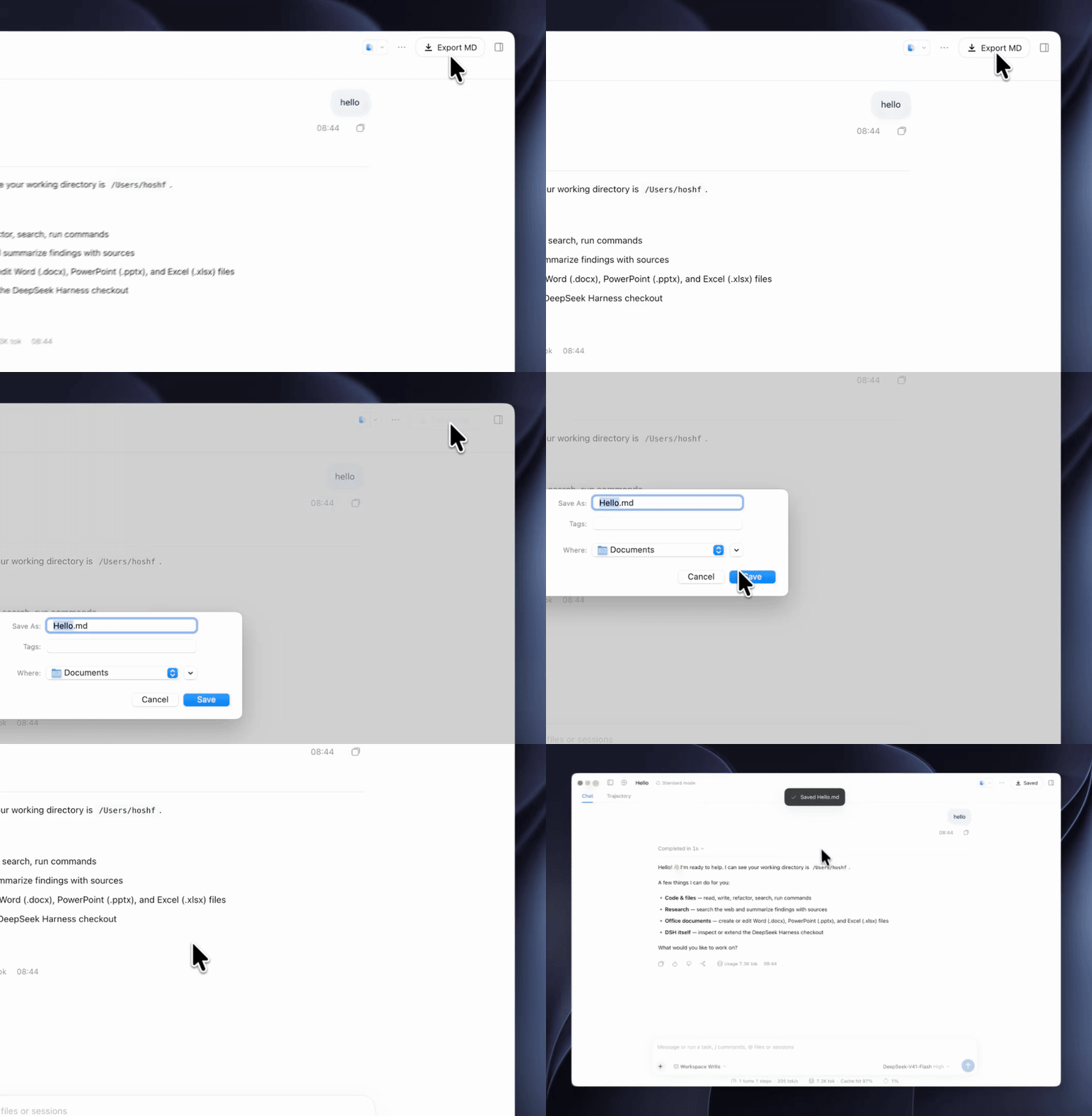
- One click, one file. Select Export MD in the session header and choose
where to save. The suggested filename is the conversation title —
Refactoring the parser.md. - Conventional Markdown.
## Metadata→## Conversation→### Referenceswith emoji role headings and no H1, following the AfterChat / ChatFormat convention. See Output format. - Verified session formats — v0, v3 and v4, including multi-frame zstd logs.
- CLI and HTTP access.
bin/dsh-md-export.mjsandGET /api/md-exportrun the same renderer, for scripting and for the UI. - Zero dependencies, no build step. Node builtins and relative files only, so the app can install the package straight from a git URL.
- Localised feedback. UI copy follows the app's language setting (English and Chinese); a toast reports the saved filename or an error.
- Local logs and files. Reads the DSH host's session logs and saves Markdown to your chosen destination. See Security for route access rules.
Usage
In the app
Select Export MD in the session header, choose a location in the system
save dialog, and save. The button label follows the app's language setting:
Export MD in English and 导出 MD in Chinese.
The suggested filename is the conversation title. You can rename it in the dialog; the completion toast reports the filename that was written. Only one export can run at a time.
CLI
node bin/dsh-md-export.mjs                        # newest session
node bin/dsh-md-export.mjs <file|sessionId>       # a specific session
node bin/dsh-md-export.mjs --list                 # list sessions
node bin/dsh-md-export.mjs --all -o out.md        # tool calls, thinking, injected, system
Defaults to ~/dsh-transcripts/<title>.md. --stdout prints instead.
--list lists every session. -o / --out requires a path; use ./-name.md
for a filename beginning with -. Invalid output arguments fail before any file is written.
For a standalone note, use --h1 to include the conversation title in the document:
node bin/dsh-md-export.mjs <sessionId> --h1 -o notes.md
HTTP
GET  /api/md-export?sessionId=<id>[&tools=1][&reasoning=1][&injected=1][&system=1][&h1=1]
GET  /api/md-export?meta=1&sessionId=<id>          # lightweight JSON metadata
POST /api/md-export   {"sessionId":"…","tools":true,…}
The response is text/markdown; charset=utf-8 with a Content-Disposition
header (ASCII fallback plus RFC 5987 filename*) and an X-Dsh-Filename header
carrying the true filename for the client to read.
Output format
Follows the AfterChat / ChatFormat conversation-export convention:
| Rule | Rationale |
|---|---|
No H1 — the document starts at ## Metadata |
The title lives in the filename. Pass h1=1 to add # Title. |
| Metadata as a bullet list, bold keys, backticked values | Model and session values remain easy to scan. |
### 🧑💻 User / ### 🤖 Assistant, no turn numbers, no --- |
Role headings carry the structure. |
| Demote message headings outside code fences | # Heading → **Heading**, preserving the document outline. |
| Preserve blank lines in message bodies and tool fences | Exporting does not compress code or tool output whitespace. |
| References from assistant prose and search results, deduped by normalised URL | Remove fragments, tracking parameters and trailing slashes; exclude loopback addresses and number by first appearance. |
| Document labels are English | UI copy is localised separately. |
Thinking (reasoning=1) folds into the same assistant message as
#### 🤔 Thought Process + #### 💡 Response. Tool calls (tools=1) appear in
collapsible details. Both options are off by default.
Bare links exclude sentence-ending punctuation; explicit Markdown link targets
retain their punctuation. Mixed bare and Markdown links share the same appearance order.
Compatibility
| Compatibility | |
|---|---|
| DSH | Verified on 0.2.0-rc.2. Other releases are unverified. |
| Session format | v0, v3 and v4 — verified against real logs of each. Parsed by event shape. |
| Node runtime | 22.15+. The node:zlib zstd API the log format needs does not exist in 20 or 21. Verified on 22.15, 24 and 26. |
| Host | Desktop app and web profile. The route is a normal ctx.webServer registration. |
| Platforms | The core uses Node builtins; install.sh requires POSIX sh. |
Formats v1 and v2 are unverified. The plugin reads an internal DSH format;
docs/FORMAT.md records the expected shapes, what they were
verified against, and the failure policy. Reading logs instead of the sanctioned
ctx.sessionQuery seam is a deliberate trade, written down in
Architecture.
How it works
The host finds the latest session log, decodes its zstd frames, and renders finalized messages into Markdown. The browser refreshes the suggested filename, opens the save picker, then requests and writes the document. Browsers without the picker API use a download. The CLI calls the same reader and renderer directly.
See Architecture for module boundaries and the save lifecycle, and Format contract for log structures and failures.
Security
The route requires a loopback Host or an entry in trustedHosts. If an
Origin is present, it must match the request host; requests carrying
Sec-Fetch-Site: cross-site are rejected. Disallowed requests return 403.
Development
The package has zero dependencies and no build step, so there is nothing to install:
npm test                        # hermetic suite — no DSH, no session data
npm run test:smoke              # against the newest real session
node test/smoke-real-session.mjs <sessionId>
The hermetic suite runs on Node 22.15, 24 and 26 in CI, including compression integrity, Markdown rendering, HTTP routes, CLI child processes and simulated client save interactions. Start with Architecture for the module map, runtime boundaries and change-to-test guide, then read CONTRIBUTING.md for setup, contribution rules and licensing.
Project layout
| Path | Purpose |
|---|---|
src/session.js |
Session enumeration and lookup (highest generation wins), multi-frame zstd decompression |
src/render.js |
Event stream → Markdown (stripHashes, reference collector) |
src/index.js |
Cordis host plugin: registers GET/POST /api/md-export |
lib/client.js |
Handwritten DSH loader factory: session-header button and save dialog |
bin/dsh-md-export.mjs |
CLI over the same core |
cordis.patch.yml |
Bundle patch that inserts the host plugin row |
docs/FORMAT.md |
The session-log format contract we depend on |
docs/ARCHITECTURE.md |
Runtime boundaries, export lifecycle and contributor change-to-test map |
test/fixtures.mjs |
Synthetic session logs, including a deliberate multi-frame layout |
test/*.test.mjs |
Hermetic tests; see the architecture guide's change-to-test map |
test/sample.mjs |
Synthetic session used to verify both README output samples |
test/smoke-real-session.mjs |
Manual check against a real session |
Known constraints
- Host-side changes require a DSH restart; client-side changes require a hard refresh. Loaded host modules and cached client bundles are otherwise reused.
- Streaming-only content is omitted. Steps interrupted before a finalized message was written can be missing partial thinking or other content.
- Files are read directly, not flushed first. Exporting a session that is actively streaming yields everything up to the most recent flush.
- This reads an undocumented internal format. Format changes may require updates to the reader or renderer.
Acknowledgements
The document format — ## Metadata, emoji role headings, ### References,
title-based filenames — follows the convention popularised by
AfterChat — LLM Chat Exporter and comparable chat
exporters.
No comments yet. Be the first to write one.