tvision


A character-cell window manager for DeepSeek Harness agents. Overlapping framed windows on a textured desktop, a Borland menu bar, a function-key strip, mouse dragging, and five skins — installed as an ordinary dsh profile bundle, not a fork.
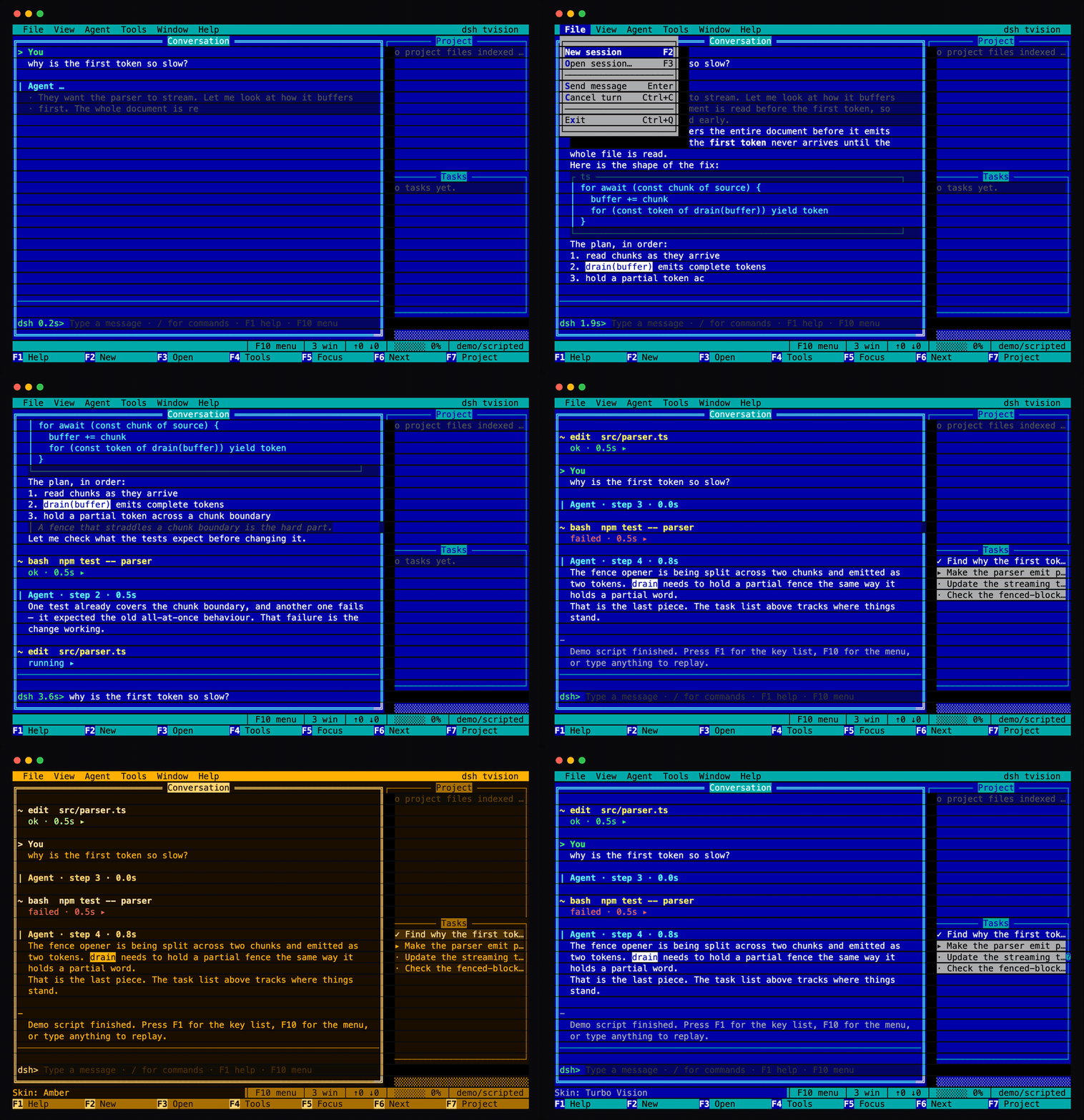
The blue your hands remember from Turbo C — and four more looks ship in the same binary:
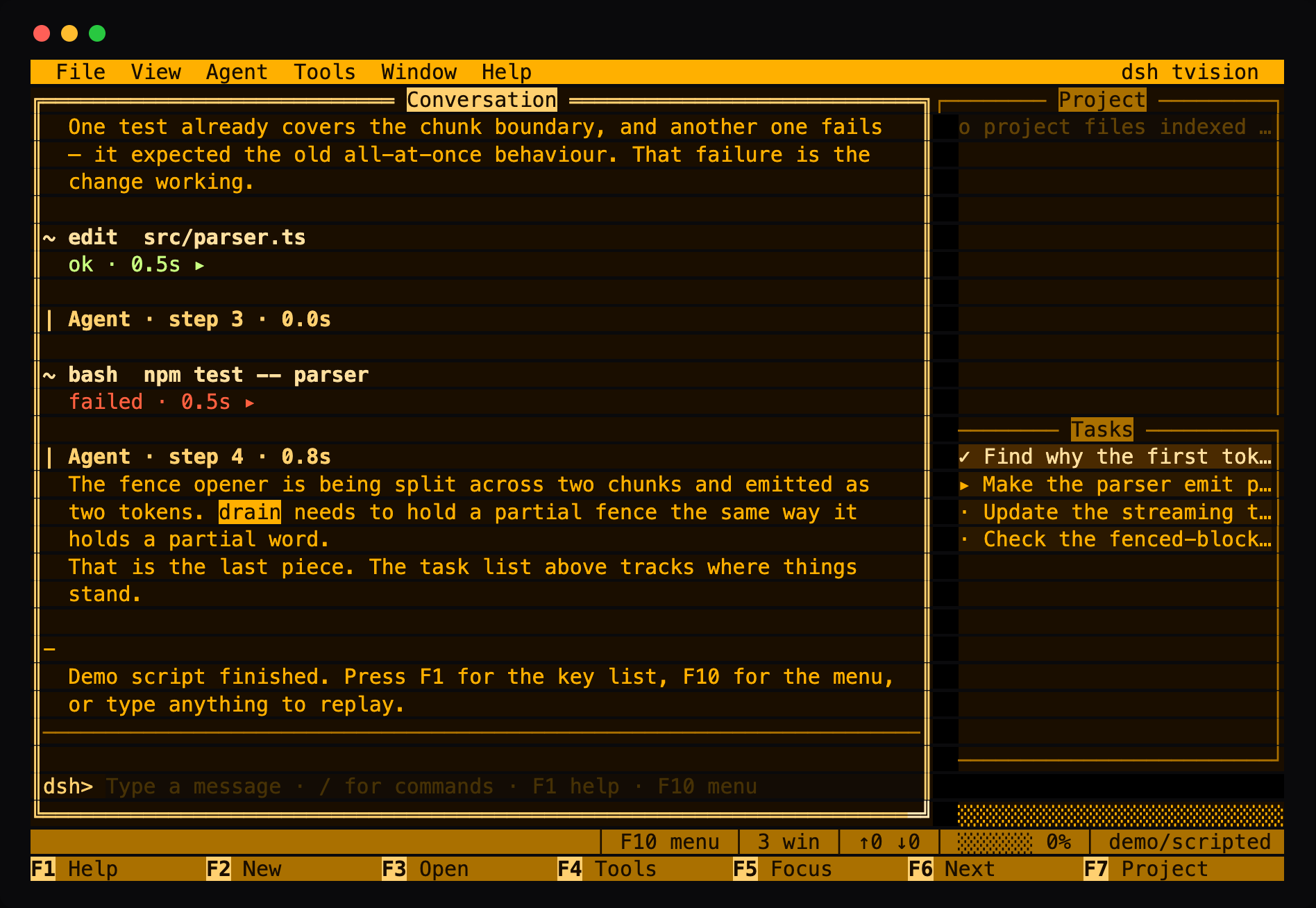
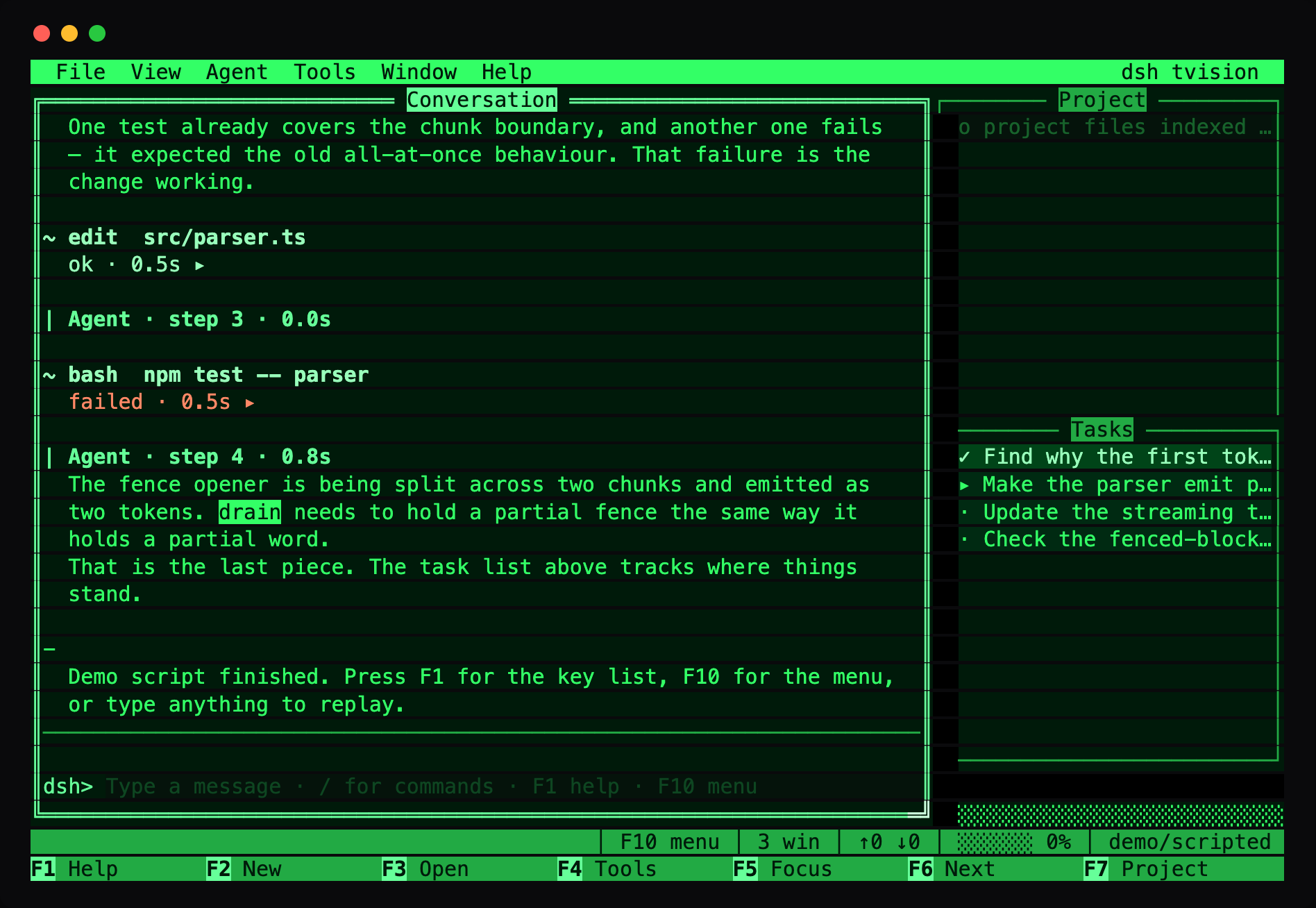
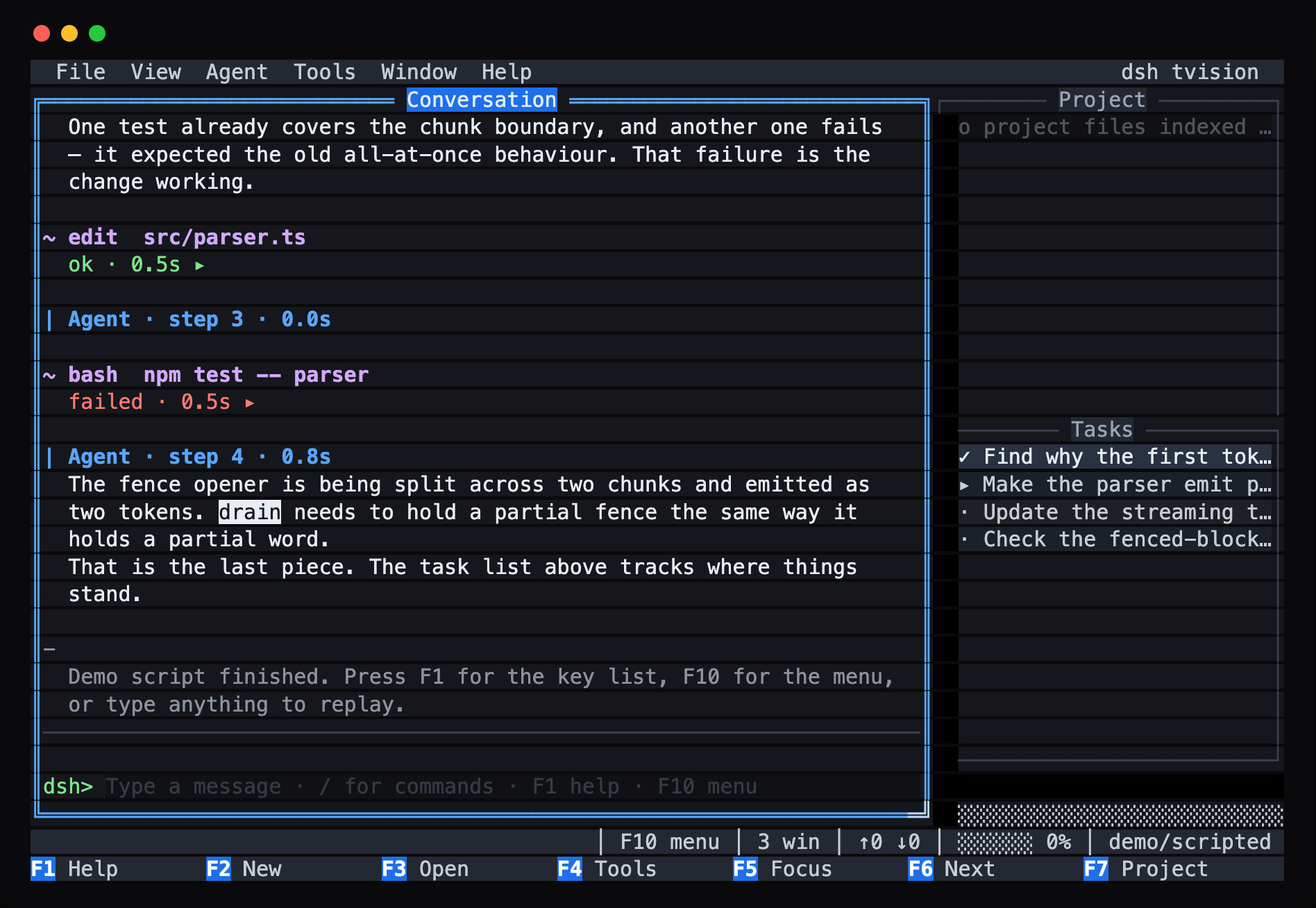
| Amber CRT | Phosphor | Slate | ANSI (One Dark style) |
|---|---|---|---|
 |
 |
 |
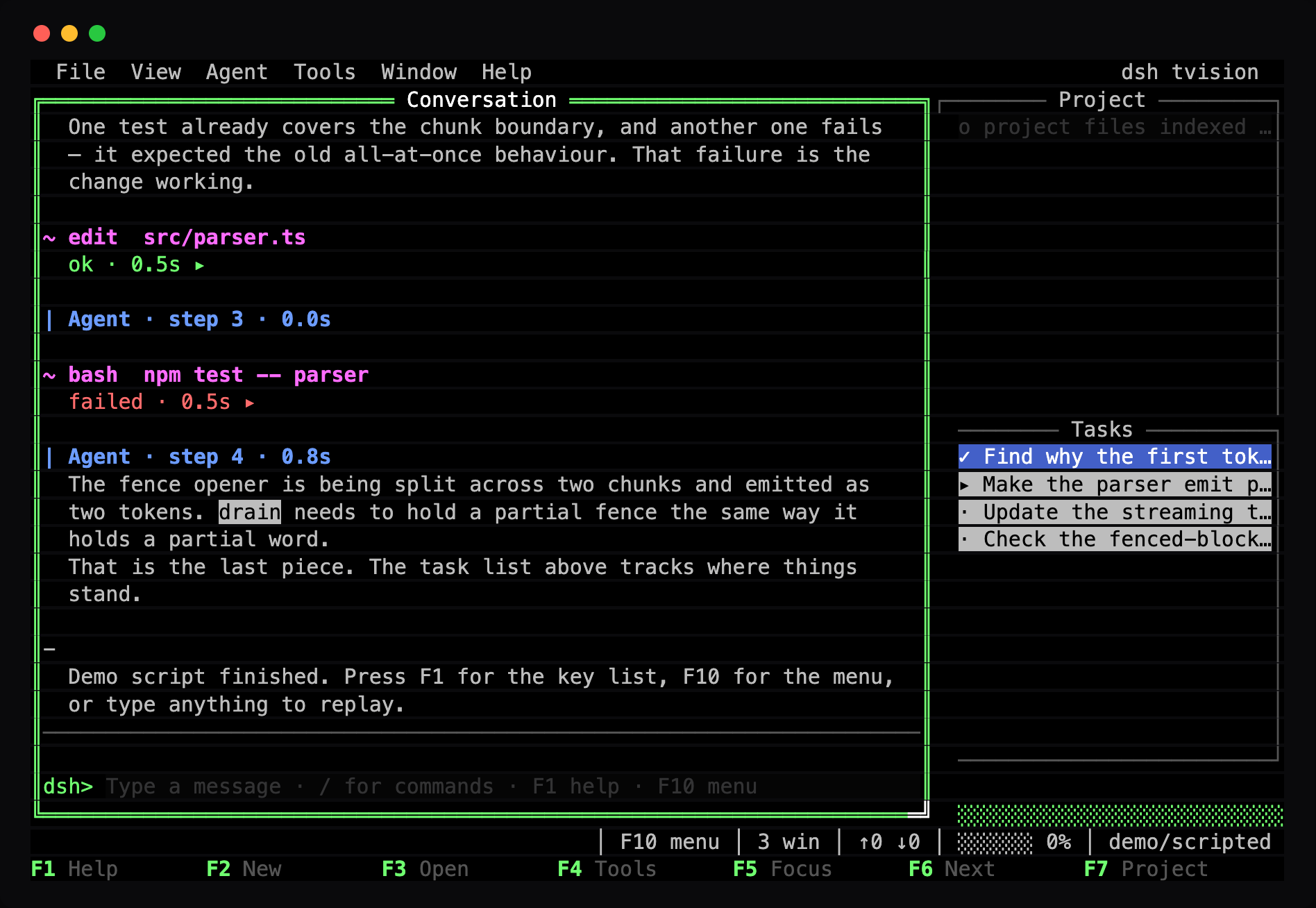 |
  File  View  Agent  Tools  Window  Help                        dsh tvision
╔═════════════════════════ Conversation ═════════════════════════╗┌───── Project ──────┐
║> You                                                            ║  o src/parser.ts   │
║  why is the first token so slow?                                ║  o src/stream.ts   │
║                                                                 ║  o README.md       │
║| Agent · 1.4s                                                   ║                    │
║  The parser buffers the whole document before it emits          ║                    │
║  anything, which is why the first token never arrives until     ║                    │
║  the whole file is read.                                        ║                    │
║                                                                 ║                    │
║~ bash  npm test -- parser                                       ║┌────── Tasks ───────┐
║  ok ▸                                                           ║  ✓ Find why it is  │
║                                                                 ║  ▸ Make the parser │
║─────────────────────────────────────────────────────────────────║  · Update the test │
║dsh> refactor it so it streams                                   ║                    │
╚═════════════════════════════════════════════════════════════════╝  ░░░░░░░░░░░░░░░░░░░
             │ F10 menu │ 3 win │ ████░░ 62% │ ↑12.4k ↓3.1k │ deepseek-flash
F1 Help      F2 New       F3 Open      F4 Tools     F5 Focus     F6 Next      F7 Project
English | 中文
Try it without an agent
No key, no profile, no network. The demo drives the real desktop with a scripted agent:
npm install
npm run build
node lib/demo.js                 # the Turbo Vision blue
node lib/demo.js --skin amber    # P3 amber CRT
node lib/demo.js --list-skins
Type anything and press Enter to replay the script; F1 lists the keys and F10 opens the menu.
Install as a dsh profile
Requires Node ^22.19 || >=24 and the dsh CLI.
git clone https://github.com/hongxin/dsh-tvision
cd dsh-tvision && npm install && npm run build
dsh plugin --profile tvision add "$(pwd)"
dsh --profile tvision                                    # start in the current directory
dsh --profile tvision --resume <session-id>              # resume a persisted session
dsh --profile tvision --skin amber --no-mouse            # start options
Once the package is published to npm, the clone-and-build steps collapse to
dsh plugin --profile tvision add dsh-tvision.
Set DEEPSEEK_API_KEY in the environment, or in a .env in the launch directory or $DSH_HOME. A local or self-hosted endpoint needs no code change — point DEEPSEEK_BASE_URL at it, or set llm-deepseek.baseURL in $DSH_HOME/settings.yaml.
Status. Verified: the desktop mounts against a real
dsh --profile tvisionagent and draws in a real terminal (python3 scripts/pty-profile.py); the full stack — streaming, reasoning, approvals, tool round trips — runs end to end against a scripted model endpoint (python3 scripts/pty-wire.py); the standalone demo passes an 18-scenario real-terminal sweep with zero invariant defects; and live model turns have been run against the real API. The golden corpus is hand-written synthetic content pinned to real event shapes — real transcripts are never committed. See the design doc's scope section.
Keys
Always
| Key | Action |
|---|---|
F1 |
Help — the full key list and the mouse reference |
F2 |
New session |
F3 |
Sessions window |
F4 |
Expand / collapse every tool card |
F5 |
Focus the composer |
F6 |
Next window |
F7 |
Project window — choosing a file references it in the composer |
F8 |
Tasks window |
F9 |
Cycle skin |
F10 |
Menu bar |
Ctrl+Q |
Quit |
Ctrl+C |
Cancel the current turn |
Ctrl+O |
Expand / collapse tool cards |
Ctrl+R |
Show / hide the agent's reasoning |
Ctrl+Z |
Zoom the focused window |
Ctrl+F |
Search the transcript — Enter next hit, Shift+Enter previous, Esc back where you were |
Ctrl+L |
Redraw the screen |
Menus
F10 enters the menu bar; ←/→ walk it and ↓ opens a list. Alt plus the underlined letter opens a menu directly, and the same letter inside an open list invokes the item.
Composer
| Key | Action |
|---|---|
Enter |
Send |
Alt+Enter |
Insert a newline instead of sending |
Tab |
Complete a /command or an @file |
↑ / ↓ |
Walk the input history |
Ctrl+A / Ctrl+E |
Start / end of line |
Ctrl+U / Ctrl+K |
Delete to the start / end |
Ctrl+W |
Delete the previous word |
Transcript
| Key | Action |
|---|---|
PageUp / PageDown |
Scroll a page |
↑ / ↓ |
Scroll a line |
Home / End |
Jump to the start / end |
Scrolling away from the end stops new output from pulling you back down. End re-arms it.
Sessions and Jobs
| Key | Action |
|---|---|
| type | Filter the Sessions list — title, workspace, or id |
Backspace / Esc |
Edit / clear the filter |
k |
Kill the selected job (asks first) |
Enter |
Resume the session / describe the job |
Without a configured API key the status line says so, and Tools ▸ API key… collects one into $DSH_HOME/.credentials.yaml — the key is never
echoed back after entry. External edits to the workspace reach the Project
window on their own now; no tool needs to run first.
Mouse
Drag a title bar to move a window · drag the bright bottom-right corner to resize · click [■] to close · click [↑] or double-click a title to zoom · wheel-scroll whatever the pointer is over, including the function-key strip.
Skins
--skin |
|
|---|---|
tvision |
Turbo Vision — the Borland blue: cyan frames on a dark blue desktop |
phosphor |
P1 green CRT — one hue, brightness carries the hierarchy |
amber |
P3 amber — warmer, easier for long sessions |
slate |
Modern dark — the window manager without the costume |
ansi |
A One-Dark-style editor palette in your terminal's own sixteen colours |
Each skin is a complete set of ~55 semantic roles rather than a palette swap, so any skin that renders one widget legibly renders them all.
The installed default is tvision — the Borland blue is the whole point; --skin ansi (or F9) follows your terminal's own theme. The standalone demo keeps tvision as its showcase.
Why
The short version: an agent is a good fit for a text-mode IDE. Its activity is already a stream of file edits, shell commands, diffs, task lists, and subagents — which is what Borland built this interface for, minus the debugger.
This is not a chat TUI with a border. It is a window manager:
- Overlapping windows with drop shadows, because depth should be legible before you read a word.
- A double-line active frame and single-line inactive ones, so you can see where the keyboard is going from across the room.
- A menu bar above all windows, so no capability is keyboard-only folklore.
- A function-key strip generated from the keymap, so the legend cannot lie about the keys.
- A fixed single-line composer, because a growing input box shoves the conversation around.
- Modal dialogs as real windows, so an approval prompt gets the same keyboard, mouse, and focus handling as everything else.
The transcript has a one-character gutter — > you, | the agent, · reasoning, ~ a tool, ! an error — so the shape of a conversation is visible before its words are. Tool calls are one line collapsed and a framed body expanded, with colour-coded diffs.
Read docs/DESIGN.md for the full reasoning, the architecture, and what is deliberately not finished.
Development
Until the package is published, install the working tree into the profile as a
linked directory (the profile then runs whatever lib/ is currently built):
dsh plugin --profile tvision add "$(pwd)"
python3 scripts/pty-profile.py --profile tvision   # non-interactive mount check
npm install
npm run typecheck     # tsc --noEmit
npm test              # 505 tests
npm run build         # bundles lib/
npm run demo          # the demo
The tests are worth a note. tests/compositor.spec.ts paints frames and replays the bytes into a real terminal emulator (xterm.js headless), then compares the resulting grid cell for cell — which is the only way to catch a rendering bug that is invisible in the escape strings. tests/snapshot.spec.ts checks in whole-desktop frames as ASCII, so a reader can see the entire interface in a diff:
Tvision_SNAPSHOT=refresh npx vitest run tests/snapshot.spec.ts
Verifying in a real terminal
The emulator proves the escapes produce the grid we think they do. It cannot prove a real terminal agrees, and it cannot reach the interactive paths at all. So there is a pty harness for that:
# Drive the demo under a real pty, typing and dragging at it.
python3 scripts/pty-drive.py '{"argv":["node","lib/demo.js"],"columns":104,"rows":30,"timeout":8}' > /tmp/capture.bin

# Read back what the real terminal had on screen.
npm run verify:pty -- /tmp/capture.bin 104 30
It is how the mouse drag, the menu dropdown, the help window, and the truecolour palette were confirmed on a real screen rather than an emulated one.
scripts/pty-sweep.py drives a matrix of sizes and key sequences and checks the
invariants a terminal enforces silently — no row written past the edge, no frame
that scrolls the screen, chrome that has not drifted:
python3 scripts/pty-sweep.py --json .tools/sweep.json   # needs a pty
npx vitest run tests/sweep.spec.ts                      # check the captures
It reads .tools/sweep.json and skips itself when that file is absent, so the
suite stays green on a machine that cannot allocate a pty.
Found a bug?
Run the report tool, use tvision as you normally would, then quit with Ctrl+Q:
python3 scripts/tv-report.py
It writes .tools/report-<timestamp>.txt holding your terminal's size, the
environment the app read, the final screen replayed as text, and the raw byte
stream — which is enough to see the bug without a description of it. Ctrl+C
exits the tool early.
Layout
src/kit/        cell · text · styles · screen · painter · widget · wm · input · skin
src/session/    the retained document
src/views/      transcript · dialogs
src/widgets/    frame · menubar · statusbar
src/app/        app · composer · questions · events · project · sessions
src/term/       the real terminal
kit/ imports nothing above it and knows nothing about agents; it would work as a general text-mode windowing library.
Credits
MIT. The implementation is original; the integration follows the open-source DSH terminal front end that shipped in deepseek-harness before being removed upstream and recovered as @dsh-tui/dsh-tui (MIT, DeepSeek and OpenGuardrails) — the Cordis plugin shape, the session-event fold's responsibilities, the waterfall seams for approvals and questions, and the approach to the test harness are all modelled on it. Reading it is also how the two API drifts it carries were found.
The interface owes its shape to Turbo Vision (Borland), Midnight Commander, and moc.
No comments yet. Be the first to write one.