READMESource: master@6bd7a7e1
dsh-startup
给 DeepSeek Harness 做的一次深海下潜式启动动画:深度尺与探测器、鲸鱼娘出场视频、海底地形与珊瑚礁、气泡与生物荧光。
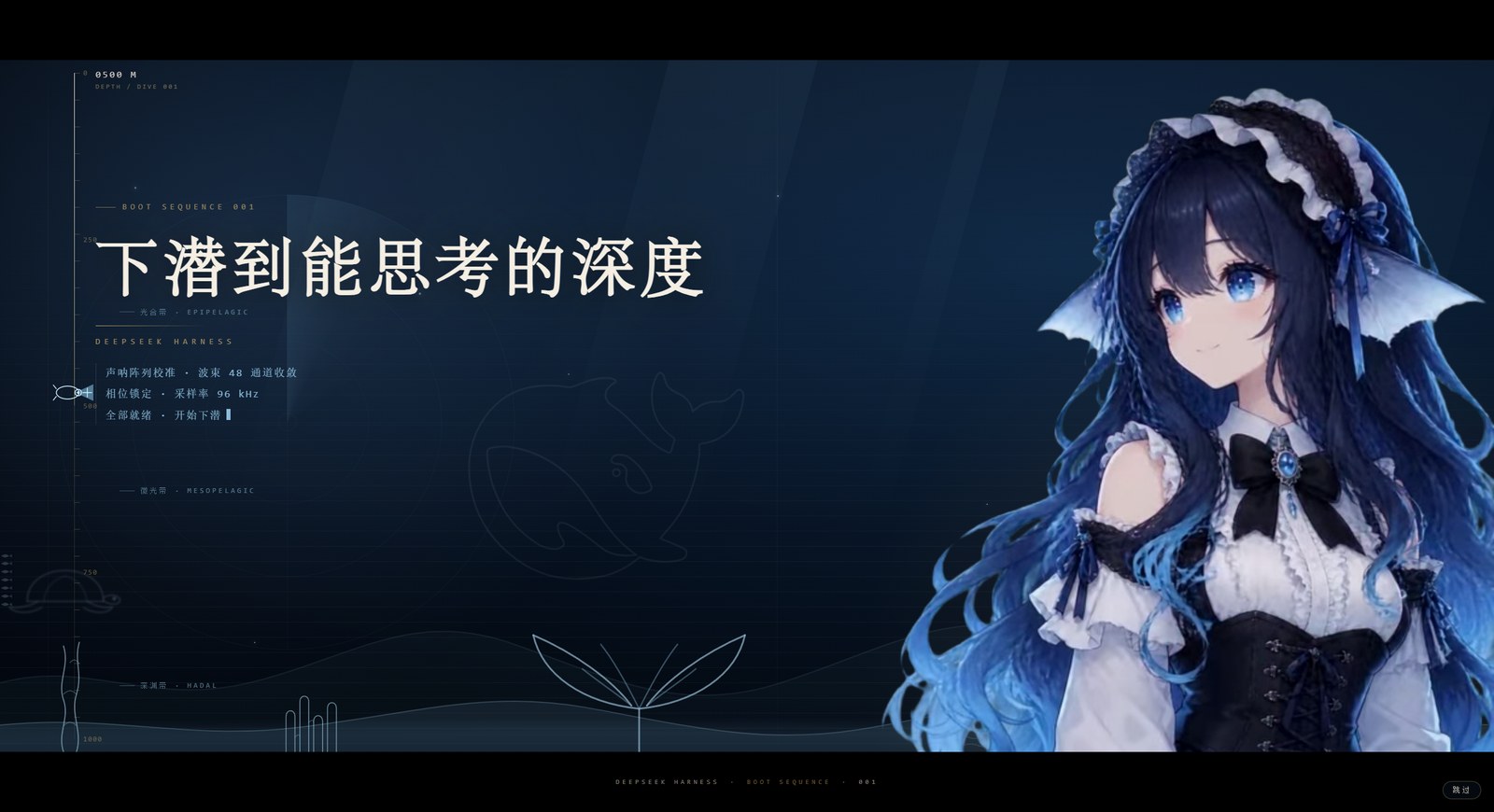
A deep-sea dive splash screen for DeepSeek Harness — depth gauge, submersible probe, a character reveal video, seafloor relief, coral reef and bioluminescent particles. Pure HTML/CSS/JS, no build step, no framework.
它长什么样
整段约 9.4 秒,然后自动消失:
0.0s  黑场淡出,海底背景亮起
1.0s  主标题「下潜到能思考的深度」以字距收紧 + 模糊对焦浮出
1.6s  第一行读数:声呐阵列校准 · 波束 48 通道收敛
2.4s  金色细线扫开
2.55s 她的出场视频切到无缝循环段 —— 之后一直在动
2.6s  第二行读数:相位锁定 · 采样率 96 kHz
3.6s  第三行读数:全部就绪 · 开始下潜
4.6s  深度走到 1000m,探测器停在尺底
9.4s  收尾
深度是有意义的:左侧深度尺的读数决定出现什么生物。
| 深度带 | 生物 |
|---|---|
| 0–250m 光合带 | 海龟(远处的影子) |
| 250–600m 微光带 | 鱼群 |
| 600–1000m 深渊带 | 海马 |
珊瑚礁、气泡、浮游、海雪、体积光则一直在。
安装
方式一:插件市场
在 DSH 的插件市场里搜索 dsh-startup 安装(发布到 npm 后可用)。
方式二:本地链接(开发用)
# 1. 克隆到任意目录
git clone https://github.com/holy-ovo/dsh-startup.git D:/dev/dsh-startup

# 2. 在 profile 里登记(Windows 示例,路径换成你的)
#    编辑 %APPDATA%\dsh-desktop\harness\profiles\web\package.json
#    a) dependencies 增加:  "dsh-startup": "link:D:/dev/dsh-startup"
#    b) dsh.profile.bundles 增加:  "dsh-startup"

# 3. 建一个目录链接(Windows)
mklink /J "%APPDATA%\dsh-desktop\harness\profiles\web\node_modules\dsh-startup" "D:\dev\dsh-startup"

# 4. 重启 DSH 桌面端
安装成功后在 插件 → 已安装 里能看到 dsh-startup 0.1.0。
卸载
从 dependencies 和 dsh.profile.bundles 里删掉 dsh-startup,删掉
node_modules\dsh-startup 链接,重启。
它怎么工作(给改代码的人)
DSH 的插件是宿主半边:通过 webServer 注册路由,再往首页注入两行。
// index.js
export default {
  name: 'dsh-startup',
  inject: ['webServer'],
  apply(ctx) {
    // 1) 视频路由(带 Range,<video> 才能 seek)
    ctx.webServer.register({ kind: 'exact', path: '/dsh-startup/intro', handler: createVideoHandler(ASSET) })
    ctx.webServer.register({ kind: 'exact', path: '/dsh-startup/idle',  handler: createVideoHandler(ASSET_IDLE) })

    // 2) 首页注入:一行 html(结构 + 样式)+ 一行 script(驱动)
    ctx.on('webserver/index-inject', (table) => {
      table.push({ kind: 'html',   placement: 'body', html: readText('splash.html') })
      table.push({ kind: 'script', placement: 'body', text: readText('client.js') })
    })
  },
}
三个刻意的设计:
- 必须发生的事全部由纯 CSS 完成。 开屏的消失是一条 CSS 动画
(
@keyframes dsh-sp-hide),脚本挂了、视频挂了,它照样在 9.4 秒后收掉。 脚本只做增强。 - 每次渲染首页时重读
splash.html/client.js。 改样式只要刷新页面, 不用重启宿主(只有index.js的改动才需要重启)。 - 时间锚点 kill switch。 一旦
<html>被打上dsh-splash-done, 之后任何重复注入的副本都会直接不可见,不会再播一遍。
可调参数
| 项 | 位置 | 当前值 |
|---|---|---|
| 开屏时长 | splash.html 的 animation: dsh-sp-hide 9.4s |
9.4s |
| 切到循环段的时刻 | client.js 的 SWITCH_AT |
2.55s |
| 深度带阈值 | client.js 的 setZone()(0.25 / 0.6) |
250m / 600m |
| 深度推进节奏 | client.js 的 DROPS |
4 个落点,每行 250m |
| 气泡数量 | splash.html 的 .sp-bubbles |
28 颗 |
| 鲸鱼线稿 | splash.html 的 .sp-mark |
19vw / 6% |
已知限制
- 视频分辨率:538×646,在 2K 屏上会被放大近 2 倍,边缘偏软。
要更清晰需要重出 1080×1296 的素材,改
assets/即可,代码不用动。 - 生物是手绘路径:海龟、海马、鱼群是手写的 SVG 曲线,做了模糊 + 降透明度的 "远处影子"处理。近看仍然能看出是手绘。
- Windows 合成层:视频和文字层都加了
translateZ(0),否则 Electron 里 硬件解码的视频可能跑到 overlay 平面、盖住文字。 - 每次刷新都会播:目前没有"每次启动只播一次"的节流。
开发
index.js          宿主半边:两条路由 + 注入行
splash.html       结构与全部样式(单文件,无构建)
client.js         切段 / 深度尺 / 深度带 / 收尾
assets/           intro.webm(出场 4.04s)· idle.webm(循环 2.92s)
改完 splash.html 或 client.js → 刷新页面即可看到。
改 index.js → 需要重启宿主。
No comments yet. Be the first to write one.