Agent Workflow Viewer
See what your Harness agent is doing while it works. A Workflow icon in the left navigation, below Plugins, opens an application-level canvas of all sessions; ◇ Workflow beside the conversation input opens the panel for the current conversation.
Session canvas
The left-hand icon opens a full page that is not bound to the open conversation:
- Search by session, project, or model. Filter the picker to running or selected sessions.
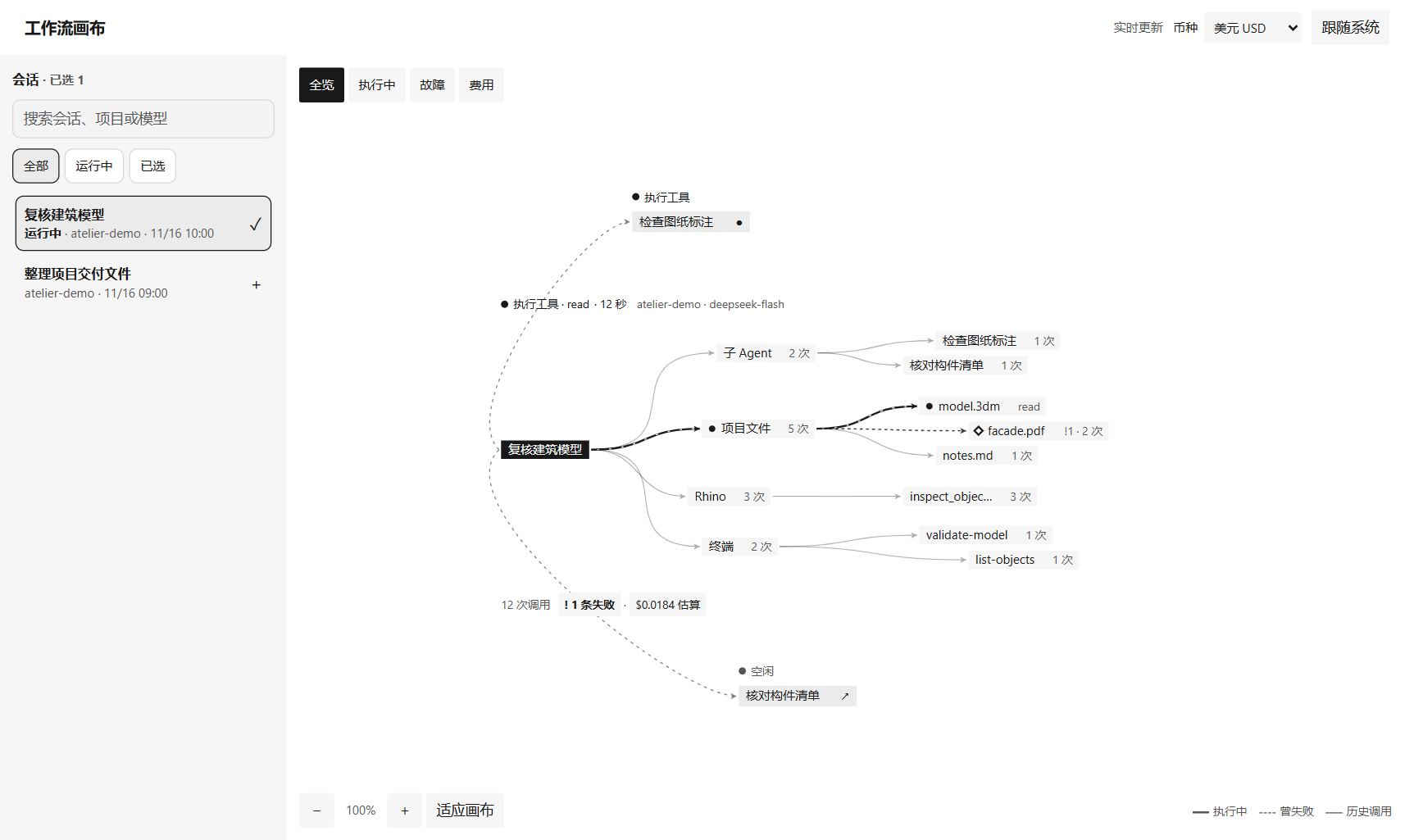
- Drag or select a session to see its model, capabilities, and objects directly on the shared canvas. Drag the session label to move its graph, drag the background to pan, and scroll to zoom around the pointer. Fit canvas brings every selected graph into view.
- Thick lines mark active paths, dashed lines and diamonds mark failures, and thin gray lines show past calls. Switch between overview, active calls, failures, and estimated spend.
- Child tasks appear automatically around their parent session. Select a child label to expand its workflow on the same canvas.
- Select a capability or object for its tools, duration, and failure evidence. The spend view links expensive model requests to their token breakdown and timeline.
- The browser remembers the selection and moved node positions. After reloading Harness, use the sidebar icon to reopen the canvas.
Open /agent-workflow/canvas directly while signed in to DSH Web. In DSH Desktop, choose Open in browser to carry your current selection over and add other recent sessions from the browser sidebar. Switch estimated spend between USD and CNY in the canvas toolbar. The CNY view shows the reference rate and its date. View logs, object paths, and error text inside Harness.
Install
Install version 0.3.0 from GitHub in the DSH Web profile:
dsh plugin --profile web add github:hgognav233-netizen/agent-workflow-viewer#v0.3.0
In DSH Desktop, open Plugins and paste the Git source:
git+https://github.com/hgognav233-netizen/agent-workflow-viewer.git#v0.3.0
Enable the bundle, restart the Harness host, and choose Workflow in the sidebar.
To try the development version, clone this repository and install the checkout as a local bundle. Pass the absolute checkout path to the Plugins page or the plugin manager's install_bundle action. Restart the Harness host after changing index.js and reload the interface after changing client.js.
Use the viewer
- Overview shows tool calls, failures, active calls, token usage, and estimated spend. Follow the moving paths to see which tools are running. Select a dot to open its detail card next to it. Repeated access to the same object appears as one dot; crowded maps grow taller so names stay readable.
- Running now lists simultaneous calls. Select a call to open its event in the timeline.
- Timeline shows message excerpts, the model's reasoning, call status, duration, and result excerpts. Filter by all, tools, thinking, or failures, and page through retained activity.
- Spend (estimated) shows the total and the most expensive steps; select one to open it in the timeline. Prices are the public API list with peak and off-peak rates. Tools that share one request cannot be split further, and this is an estimate rather than a bill.
- Subagents lists who dispatched which subagent — using the label given at dispatch — with its call count and estimated spend.
- Session selector opens a subagent's own activity when Harness reports it as a descendant of the current conversation.
The graph groups activity into web tools, local processes, files and skills, and external services. It prioritizes active, failed, and recent objects when space is limited. Counts reflect the latest 3,000 events owned by the selected session. The timeline shows up to 400 matching entries per page. The interface uses Simplified Chinese when the page language is Chinese and English otherwise.
Use Browser board in DSH Desktop or Detach in DSH Web to open the viewer beside your conversation. The board opened from DSH Web is the same page as the panel — overview, timeline with filtering and paging, session selector, object detail cards, and zoom/pan — and adds a colour-scheme button (follow system, light, dark). The DSH Desktop browser board keeps its reduced summary. Detached windows and split screen
Data and access
The plugin reads Harness session logs and serves the map and timeline through the Harness web server. It does not modify logs or send them to another service. Activity responses can contain message excerpts, the model's reasoning text, tool results, local paths, or command summaries. Review screenshots and diagnostics before sharing them. Spend is estimated by the plugin from the public price list; Harness itself records no money.
Activity routes request authenticated Harness access. On older hosts without route admission, a peerless request is allowed only through a loopback listener with a local authority and no cross-site browser context. Keep older hosts local and avoid publishing their viewer routes through a proxy. Harness Web Server documentation
Contribute
Run the tests with Node.js 22 or 24. The tests use the built-in runner and synthetic session logs.
npm test
The host projection is in index.js and the conversation panel is in client.js. To report a problem, open an issue with your Harness version, operating system, and the steps needed to reproduce it. Use a synthetic or redacted session when attaching examples.
No comments yet. Be the first to write one.