DeepSeek Harness Design
简体中文 | English
A community plugin for DeepSeek Harness that turns a conversation into an interactive HTML prototype. The model edits the page, the Design sidebar previews it, and element selection supplies context for the next model request.
This project is independently maintained and is not affiliated with DeepSeek.
Download release · Examples · Chinese introduction
Features
- Live preview with phone, tablet, and desktop viewport widths.
- Element selection for focused edits.
- Separate design alternatives, revision history, and side-by-side comparison.
- Durable session storage with restart recovery and rollback on failed writes.
- Optional HTML exports to the session workspace.
- Script-enabled sandboxed previews.
Requirements
- A DeepSeek Harness Web or Desktop profile providing
tools,fs,webServer,systemPrompt,storageDomain,sessions, andsessionPersistence. - Node.js 22.12+ (22.x) or 24+ for development and tests. The Host runtime requires Node.js 22+.
The plugin has been tested with DeepSeek Harness Desktop 0.2.0-rc.2, using its Web profile. Compatibility with other Harness versions has not been verified.
Download and install (recommended)
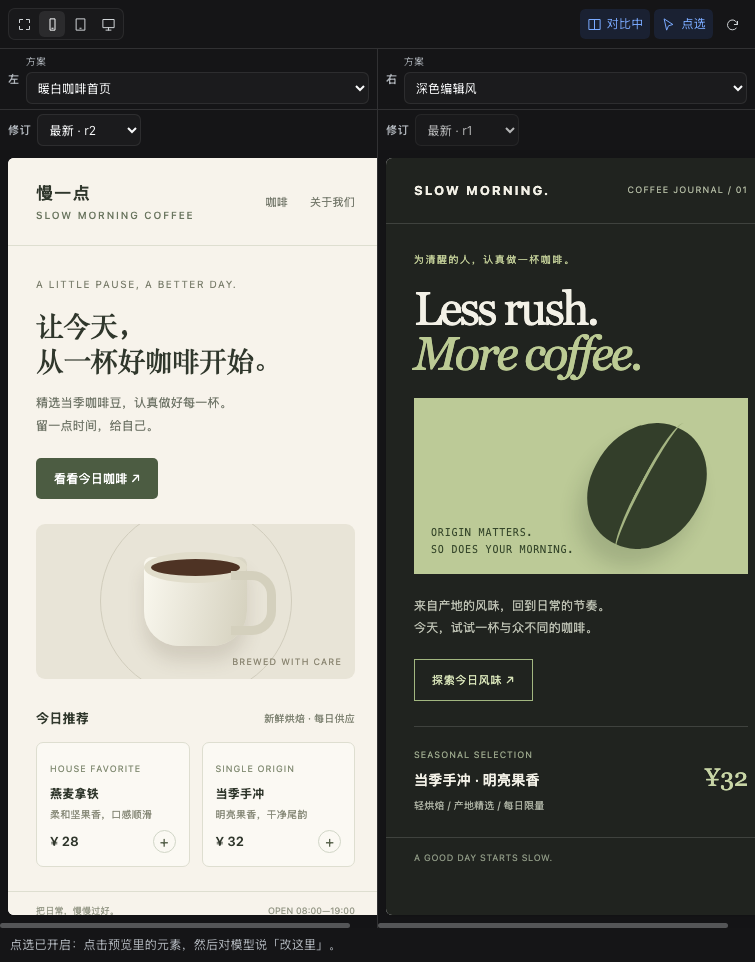
Screenshots show the real Harness UI with original example HTML from this repository.
Download deepseek-harness-design-0.6.1.tgz from GitHub Release v0.6.1. From the download directory:
# Harness Desktop
npx @deepseek-ai/dsh@0.2.0-rc.2 plugin --profile desktop add ./deepseek-harness-design-0.6.1.tgz

# Harness Web
npx @deepseek-ai/dsh@0.2.0-rc.2 plugin --profile web add ./deepseek-harness-design-0.6.1.tgz
Node.js and pnpm must be available; Node.js 24 is recommended. If pnpm is missing, install it with npm install -g pnpm@11. An existing dsh CLI can replace the npx prefix. Commands pin the tested Harness CLI version.
Fully quit and reopen Harness after installation. Web users restart npx @deepseek-ai/dsh@0.2.0-rc.2 web. Open the right sidebar, choose Design from +, and follow the welcome guide.
The release also provides BUILD.json and SHA256SUMS. The package is not published to npm yet; GitHub Release tarballs are the supported distribution.
Install from source
For development, build a tarball from this repository:
git clone https://github.com/heureux831/deepseek-harness-design.git
cd deepseek-harness-design
npm ci
./release.sh
The first build produces dist/r1/deepseek-harness-design-0.6.1.tgz; later builds use the next rN directory. Install the printed tarball path:
dsh plugin --profile web add ./dist/r1/deepseek-harness-design-0.6.1.tgz
# For the Desktop profile, use --profile desktop.
Restart Harness after installation or upgrade. Only one version of the Design plugin should be installed in a profile. If upgrading from a local dsh-design or @local/dsh-designer-rN package, remove its exact package name first:
dsh plugin --profile desktop remove dsh-design
# Then add the new tarball to the same profile.
dsh-design and dsh-designer are existing npm packages maintained by other projects. This project's package name is deepseek-harness-design.
Use
- Open the right sidebar and choose Design from the
+guide cards. The empty panel shows a quick-start guide with example prompts. - Ask the model to create a page. A successful
design_applyupdates the preview within about a second. - Enable element selection, click an element, and describe the change you want.
- Disable selection to use the prototype's own buttons and scripts.
Name alternatives by content or visual style, such as “Warm coffee homepage” or “Dark editorial”. Request another direction to preserve the current draft and create an alternative. Further edits append r1 / r2 / r3 revisions to that alternative. Compact dropdowns switch alternatives and revisions without growing the toolbar; comparison mode has independent selectors on each side.
Use the pencil beside the alternative picker to rename it. Titles accept 1–80 characters, including Chinese; duplicate titles show a correction message. Renaming updates only the label, preserving prototype state and element selection without appending a revision. Existing drafts receive labels from their HTML headings or previous names, retaining stable IDs, export paths, and history.
Historical revisions are read-only previews. To edit from one, tell the model its alternative name and revision number so it can read that version and append a new revision.
Phone, tablet, and desktop use actual 390 / 834 / 1280 px viewport widths in either view; scroll horizontally when a sidebar is narrower. Loading errors show a retry message instead of the welcome guide. Document and revision requests retry automatically; the refresh button restarts document loading.
The selection receipt means the Host recorded the click. It does not mean the model has already read or acted on it. Selection is scoped to the current session, expires after ten minutes, and is marked delivered only when its prompt enters that session's context snapshot.
Reopening Design restores the session's inspect switch and retained selection receipt. Changing the displayed alternative, revision, or comparison mode clears the binding; a successful edit to the selected alternative also clears it. Inspect toggles preserve prototype state. A failed switch or clear shows its synchronization state and retries automatically. Stale clicks are rejected, and a historical click includes its revision number. An unnamed edit targets the selected alternative, otherwise the most recently edited one.
Examples and troubleshooting
Try asking for a “Warm coffee homepage”, then a separate “Dark editorial” alternative for comparison. Select a button and ask the model to give it an outlined style. examples/ contains standalone HTML demos; a model must call design_apply to store a draft in Design.
- No Design tab: check the installed profile, restart Harness, then add Design from the sidebar's
+cards. - Prototype controls do not respond: turn element selection off.
- Model returns code without a preview: ask it to save with
design_apply, and ensure its tool set includes that tool. - Saved draft but no exported file: inspect
persistedandexportedseparately; read-only sessions cannot export workspace HTML. - Upgrading an old local package: remove its exact package name first; keep Harness storage to retain drafts.
Storage and recovery
The Harness designer storage domain holds alternatives, HTML, revision numbers, revision HTML, and edit notes. The plugin saves before updating its in-memory state. Restarting Harness restores drafts in the original session.
Limits per session: 32 alternatives, 40 historical revisions per alternative, and 400,000 characters per HTML document. Back up Harness storage to retain these records.
When a session has a workspace, the latest HTML is also exported to:
<workspace>/.dsh-design/<SHA-256 session ID>/<stable alternative ID>.html
design_apply reports persisted and exported separately. A storage failure returns ok: false and preserves the previous draft. An export failure is reported explicitly but does not discard the durable draft. Sessions without a workspace can still save.
Exports use the current session's standing sandbox policy, resolved through sandboxPolicy when a sandboxed filesystem is mounted. In workspace-write mode, the session workspace is the write boundary; in read-only mode, Harness drafts can still persist but HTML exports are denied. The plugin does not request a wider mode.
The storage domain and export path retain their original names for compatibility. Existing session-hashed HTML exports are imported without rewriting the originals. Only their latest HTML can be recovered; old revisions and drafts that existed only in the previous process's memory cannot be migrated.
Legacy import requires valid UTF-8, at most 32 eligible HTML files, and at most 400,000 characters per file. An invalid import stops before saving any imported draft and leaves source files intact. Correct the file named in design_apply's restoration error (or move excess files out of that session's import directory), then retry. Evicted history returns found: false from design_read; the panel falls back to the latest revision.
Model tools
| Tool | Purpose |
|---|---|
design_apply |
Create or patch HTML; title is the descriptive label and name the stable ID. Use the name from design_list for existing alternatives; asNew: true creates a separate draft. |
design_list |
List the current session's alternatives and revisions. |
design_read |
Read current or historical HTML; use html: false for metadata only. |
design_selection |
Read the selected element's tag, text, selector, outer HTML, and position. |
Runtime boundaries
Previews use sandbox="allow-scripts" and an HTTP Content-Security-Policy: sandbox allow-scripts header. Prototype scripts can interact with their page but cannot access the Harness parent page or its same-origin storage. Native form submission is blocked. API-backed prototypes need a service that permits cross-origin requests.
The plugin uses Harness's local HTTP server and adds no separate authentication layer. The supported deployment is local, with Harness bound to 127.0.0.1. A network deployment requires authentication and access controls supplied by the deployment.
Development
npm ci
npm test
npm run check
./release.sh
npm pack runs Host, React, and release regression tests and JavaScript syntax checks through prepack. For distributable builds, use ./release.sh: it runs the checks, freezes the package files, and packs that snapshot. It refuses to overwrite a snapshot or rebuild a version already completed in the selected output directory. Reuse the existing tarball for repeated installs; bump the package and lockfile versions before building changed content. Set DSG_RELEASE_DIR to choose another output directory; version uniqueness across separate directories and machines remains a release discipline.
Each completed snapshot includes BUILD.json beside its tarball, recording the package SHA-256, packaged file hashes, source commit, and dirty state. The manifest is excluded from the npm package. Use these hashes to compare source, tarball, and installed files. A process start time after installation is a useful clue, but does not prove which profile, package path, or browser bundle is active.
The release entry supports symbolic link paths, including macOS /tmp. Known local noise (.DS_Store, AppleDouble ._*, .git, node_modules, and npm-debug.log) is excluded from the snapshot and fingerprints. Other hidden resources and log files remain checked; package-content errors list missing and unexpected paths.
The distributable contains the Host, browser entry point, locales, bundle patch, both README files, and MIT license. Test fixtures and the test-only seed route are excluded.
See CONTRIBUTING.md for contribution and release steps, e2e/README.md for browser and native storage checks, and CHANGELOG.md for release notes.
License
MIT.
No comments yet. Be the first to write one.