Multimodal Router for DeepSeek Harness
A zero-config multimodal plugin for DeepSeek Harness. It adds image understanding and enables complete local realtime voice conversation when both a compatible model and the local voice runtime are ready.
Why Multimodal Router?
DeepSeek remains the reasoning agent. Multimodal Router delegates image perception to a local or explicitly configured multimodal model, then returns text evidence to the agent. The default path is private and requires no model name or endpoint configuration.
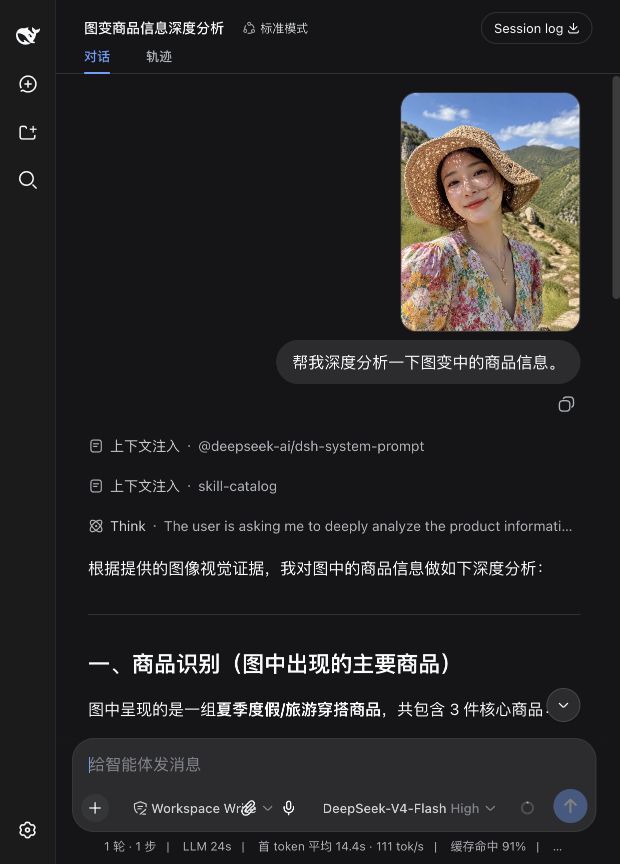
Interface preview
The conversation keeps the uploaded image, the user's question, and the model's answer together in one view.
Features
- Zero-config discovery of vision-capable Ollama models via model metadata
- An image attachment button plus drag-and-drop and clipboard intake with automatic local analysis
- Capability-gated voice conversation: local incremental text in the composer, silence-to-send, and spoken replies
- Image and audio for Gemma 4 E2B, E4B, and 12B; image only for 26B and 31B
- Original thumbnails remain visible in chat; images are archived locally by content hash
- Local-first routing with remote fallback disabled by default
- Multiple prioritized providers
- Ollama and OpenAI-compatible vision APIs
- Explicit provider selection when a task needs it
- PNG, JPEG, WebP, GIF, and image data URL inputs
- Presets for general description, OCR, UI, charts, and visible code/errors
- API keys read from environment variables, never stored in the plugin config
Requirements
- Node.js 22.19+
- DeepSeek Harness
0.1.0-rc.6 - For the default path: Ollama on
127.0.0.1:11434and a multimodal model - Optional high-quality spoken replies: MLX-Audio on
127.0.0.1:8000
Install Qwen3-TTS on Apple Silicon
Qwen3-TTS is not installed through Ollama. The plugin declares MLX-Audio as an optional runtime dependency and provides a one-command installer:
brew install uv
npx @hanchn/dsh-multimodal-router setup-tts
The command asks before downloading and defaults to “no”; it never forces installation. For unattended setup, pass --enable or --disable explicitly. After opt-in, no second service needs to be started manually: Multimodal Router starts and stops MLX-Audio with DSH. The first spoken response automatically downloads mlx-community/Qwen3-TTS-12Hz-0.6B-CustomVoice-8bit (about 2GB) into the local Hugging Face cache. The default voice is the warm female Serena; set tts.voice to Vivian, Dylan, Uncle_Fu, or Eric for another bundled voice.
For diagnostics, run npx @hanchn/dsh-multimodal-router check-tts. Directly running mlx_audio.server --host 127.0.0.1 --port 8000 is only needed for manual troubleshooting.
If the user declines the download or MLX-Audio is not ready, the voice-conversation control stays hidden and no browser/OS voice fallback is used. Image features remain available.
Install
From this repository:
cp .env.example .env
# Edit .env locally and set DEEPSEEK_API_KEY. Never commit .env.
npx @deepseek-ai/dsh@0.1.0-rc.6 plugin --profile web add .
npx @deepseek-ai/dsh@0.1.0-rc.6 web
Then open http://127.0.0.1:3080, use the paperclip button to select an image, drag it into the composer, or paste it with Cmd/Ctrl+V, and ask a question. Multimodal Router analyzes the attachment before a text-only DeepSeek model receives the turn.
When both an audio-capable local model and Qwen3-TTS are available, a voice-conversation control appears in the composer. Local incremental recognition runs about every 1.5 seconds and updates the draft; after a pause it finishes the last transcription, sends automatically, reads the completed response through local Qwen3-TTS, and then listens for the next turn. Click during playback to interrupt and speak, or click while listening/waiting to leave voice mode. Gemma 4's per-utterance audio limit is 30 seconds. Raw audio is sent only to local Ollama and is not archived in the project.
Gemma 4 accepts audio but produces text, not audio. Local MLX-Audio/Qwen3-TTS generates spoken replies. Browser/OS speechSynthesis fallback is disabled by default.
Gemma 4 capability detection
The plugin prefers Ollama's /api/show capabilities and uses this narrow fallback for incomplete manifests:
| Model | Image | Audio |
|---|---|---|
| Gemma 4 E2B / E4B / 12B | Yes | Yes |
| Gemma 4 26B / 31B | Yes | No |
Audio is explicitly removed for 26B and 31B even if a manifest reports it incorrectly. Other model families use only runtime-declared capabilities.
Realtime transcription prefers E2B, then E4B, then 12B. When realtime audio is enabled, automatic image analysis reuses that same model to avoid swapping separate vision and speech models on a 16 GB machine.
The explicit tool also remains available for filesystem images:
Use inspect_image to analyze /absolute/path/to/screenshot.png, then explain the UI issue.
Zero-config behavior
The bundled default provider queries Ollama /api/tags and inspects candidates with /api/show. Runtime capabilities are authoritative; only known Gemma 4 variants receive the narrow fallback described above.
Multiple providers
Edit the plugin row in your DSH profile patch:
- id: multimodal-router
  name: '@hanchn/dsh-multimodal-router'
  config:
    automaticAttachments: true
    archiveDirectory: .dsh-multimodal-router/images
    cacheDirectory: .dsh-multimodal-router/cache
    discoveryCacheMs: 300000
    resultCacheMs: 3600000
    resultCacheMaxEntries: 64
    ollamaKeepAlive: 2m
    ollamaIdleUnloadMs: 60000
    maxVisionTokens: 256
    providers:
      - id: local-auto
        type: ollama
        baseUrl: http://127.0.0.1:11434
        model: auto
        apiKeyEnv: ''
        priority: 100
      - id: company-vlm
        type: openai-compatible
        baseUrl: https://vision.example.com/v1
        model: qwen-vl
        apiKeyEnv: COMPANY_VLM_KEY
        priority: 50
    allowRemoteFallback: false
    timeoutMs: 180000
    maxImageBytes: 20971520
    realtimeAudio: true
    transcriptionLocale: zh-CN
    audioChunkMs: 1500
    maxAudioSeconds: 30
    maxAudioBytes: 10485760
    tts:
      enabled: true
      autoStart: true
      baseUrl: http://127.0.0.1:8000
      model: mlx-community/Qwen3-TTS-12Hz-0.6B-CustomVoice-8bit
      voice: Serena
      responseFormat: wav
      browserFallback: false
      maxTextCharacters: 8000
      keepAliveMs: 300000
Set allowRemoteFallback: true only when images may leave the machine automatically. A prompt can explicitly select a configured provider by passing its id, regardless of fallback policy.
With automaticAttachments: true, the plugin exposes a routed vision capability to DSH's admission layer and reads authorized attachments through its attachment service. The original message and thumbnail stay intact; only the provider-bound request is converted to formatted text at the adapter boundary. Set it to false to use only the explicit inspect_image tool.
archiveDirectory stores a content-addressed local copy of every automatically processed image. The default .dsh-multimodal-router/images directory is ignored by Git. Set it to an empty string to disable the extra archive; DSH's attachment store still supplies the chat preview.
Discovery results are cached for five minutes. Automatic attachments use a stable image-analysis key, so the same image can be reused across differently worded questions. Results are kept both in a bounded 64-entry memory cache and in .dsh-multimodal-router/cache, allowing hits after a service restart. With realtime audio enabled, image and speech reuse the same E2B/E4B model; Gemma is actively unloaded after 60 idle seconds, and the Qwen TTS model after five idle minutes.
realtimeAudio controls realtime voice mode. audioChunkMs defaults to a 1.5-second incremental transcription interval and recognized text is continuously written into the composer. maxAudioSeconds is the recording cap (up to 30), and maxAudioBytes the WAV request limit. The voice control remains hidden when no compatible model or TTS runtime is available.
tts configures local spoken replies. The default manages MLX-Audio on port 8000 and uses Qwen3-TTS 0.6B 8-bit with Serena. Clicking the microphone unlocks a dedicated browser audio channel; the UI distinguishes speech generation from actual playback and exposes playback errors. The TTS model unloads after five idle minutes. browserFallback defaults to false.
Privacy and security
- Automatic routing is local-only unless
allowRemoteFallbackis enabled. - Ollama endpoints must resolve to
localhostor127.0.0.1over HTTP. - Remote credentials are read from the environment variable named by
apiKeyEnv. - Store real secrets only in the ignored local
.env; commit only.env.examplewith empty values. - Never paste API keys into
cordis.patch.yml, prompts, issues, logs, screenshots, or commits. - Enabling remote fallback permits image bytes to be sent to the configured remote provider. Review its privacy policy first.
- Uploaded images are read through DSH's attachment service; internal storage paths are never exposed to the model.
- Archived filenames contain only a SHA-256 digest and image extension, not the original filename.
- Filesystem image paths are read only when the agent calls
inspect_image. - Provider/model identity is included in every result for auditability.
Local secret setup
cp .env.example .env
chmod 600 .env
Then edit .env locally:
DEEPSEEK_API_KEY=
The repository .gitignore excludes .env and .env.*, while explicitly allowing the empty .env.example template.
Tool contract
inspect_image({
  image_path: "/path/image.png",
  prompt: "What is wrong with this UI?",
  mode: "ui",
  provider: "local-auto"
})
mode may be auto, describe, ocr, ui, chart, or code. prompt, mode, and provider are optional.
Troubleshooting
- No local vision model: run
ollama list, then verify/api/showincludes.vision.metadata. - Ollama unavailable: confirm
curl http://127.0.0.1:11434/api/tagssucceeds. - Missing remote key: export the exact environment variable configured in
apiKeyEnvbefore starting DSH. - Timeout: increase
timeoutMs; first model load can be slow. - Slow first image: local models take time to load and infer. Requests use a two-minute
keep_alive, while the plugin actively unloads Gemma 60 seconds after the last local inference; repeated images use the result cache first. - Traditional Chinese transcription: keep
transcriptionLocale: zh-CNand restart DSH; the server normalizes Chinese recognition to Simplified Chinese before updating the composer. - Speaking state but no sound: wait for “generating speech” to change to actual playback, then run
npx @hanchn/dsh-multimodal-router check-ttsif playback reports an error. - Unsupported image: convert it to PNG, JPEG, WebP, or GIF.
- The main model says it cannot see images: confirm
automaticAttachments: true, restart DSH after changing the plugin, and verify thatmultimodal-routeris mounted.
Development
pnpm install
pnpm check
DeepSeek Harness is in Developer Preview and may introduce breaking plugin API changes. This release targets 0.1.0-rc.6.
License
MIT
No comments yet. Be the first to write one.