dsh-markboard · conversation marks for DSH
中文 | English
A conversation markboard for the DeepSeek Harness (DSH) Web UI: turn any conversation turn into a named task card, jump straight back to it later, or quote its answer into the composer and keep working. Marks live in your browser.
Stop scrolling through history to find "that conclusion from earlier". Mark it once, then pick from a handful of rows.
Screenshots
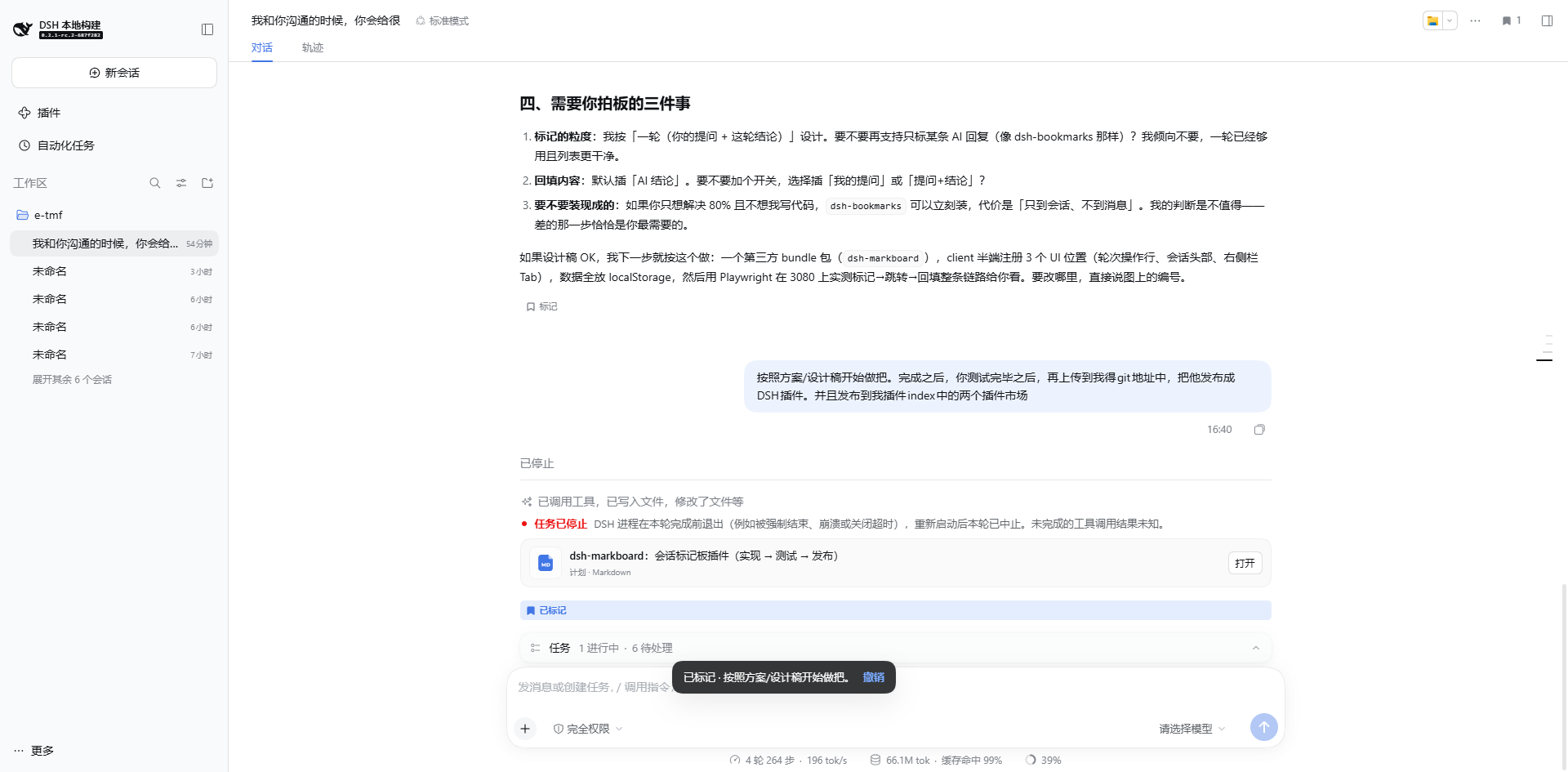
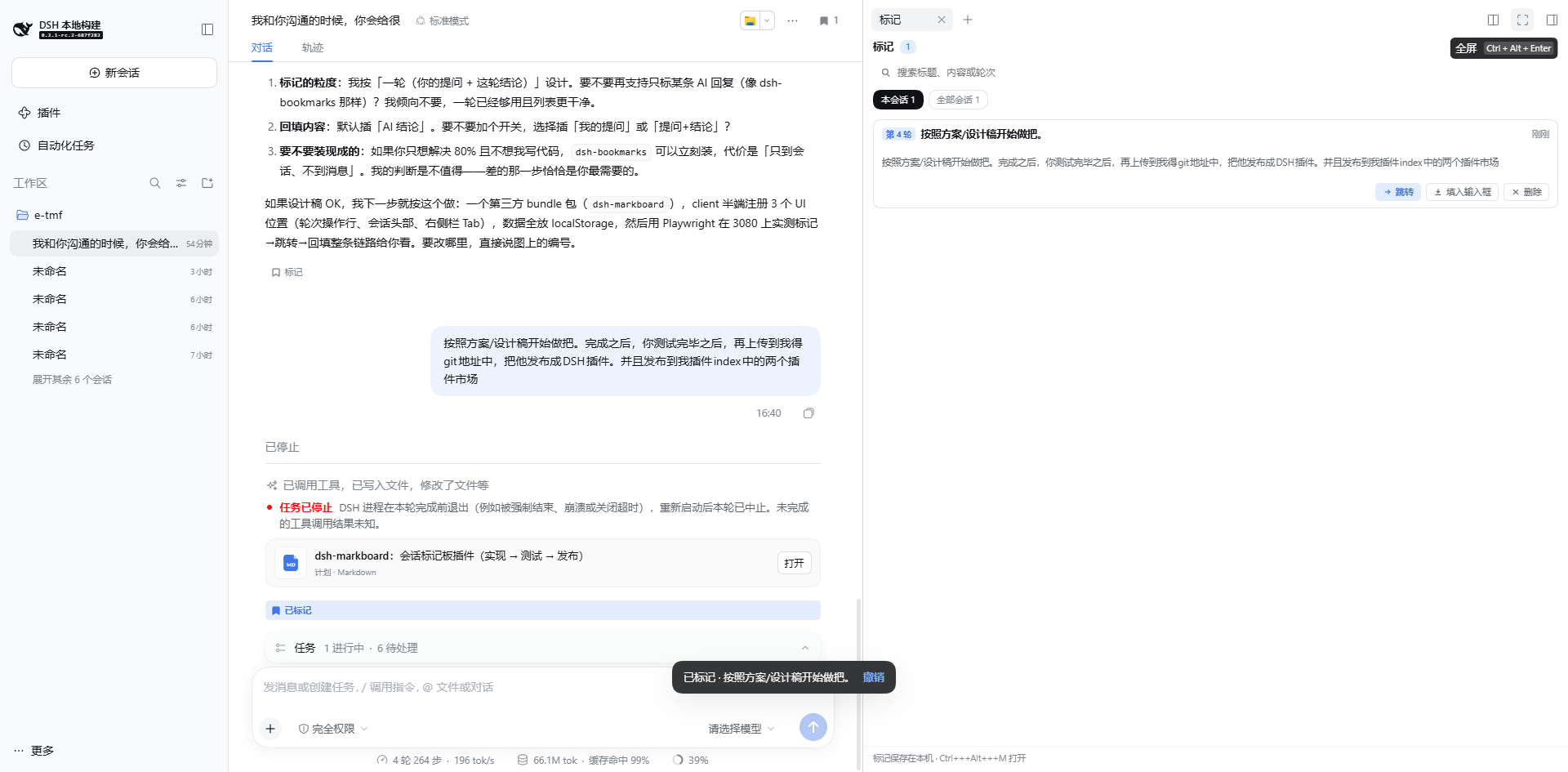
| Mark action on each turn + header count | The markboard in the right Sidebar |
|---|---|
 |
 |
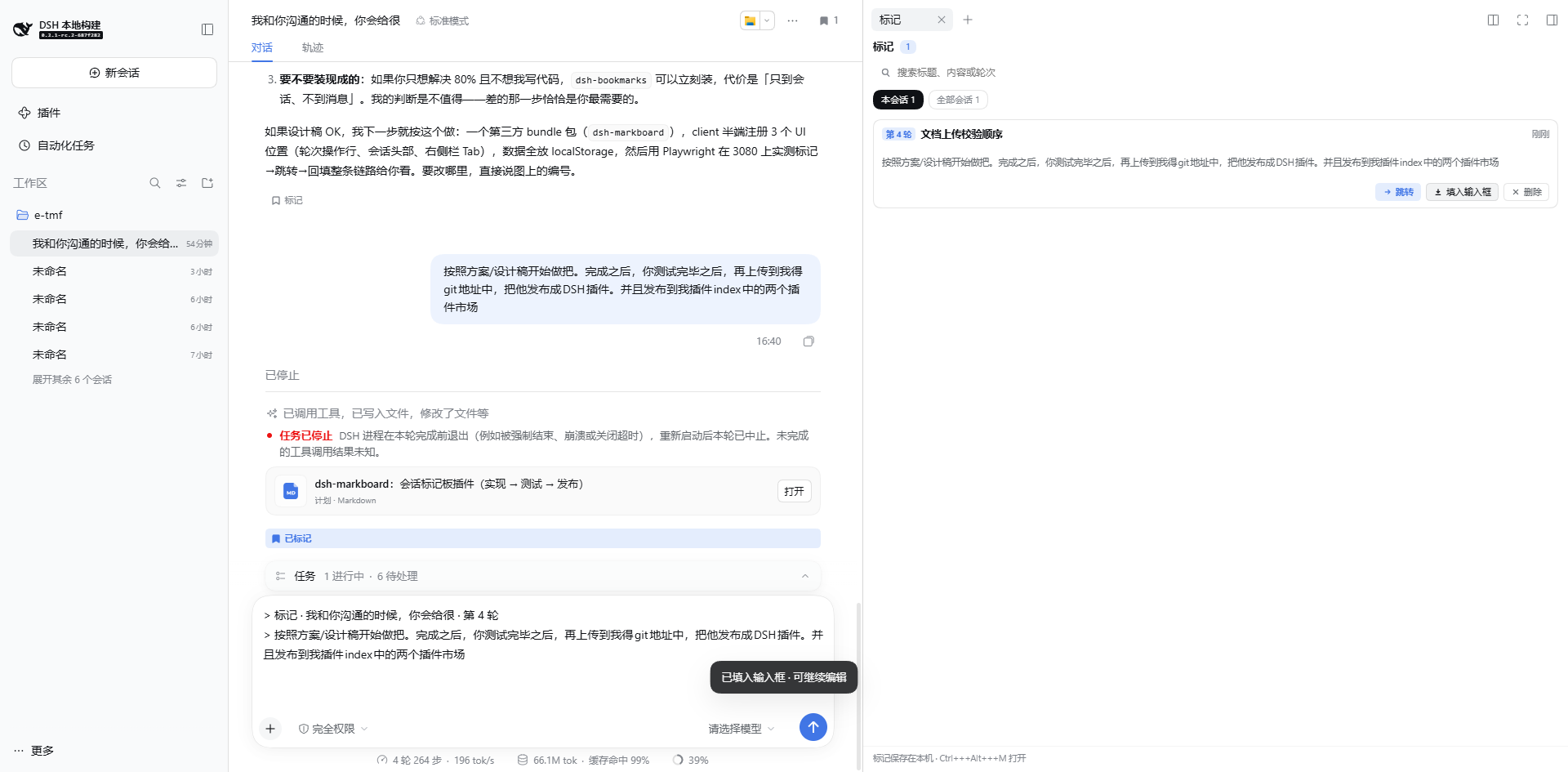
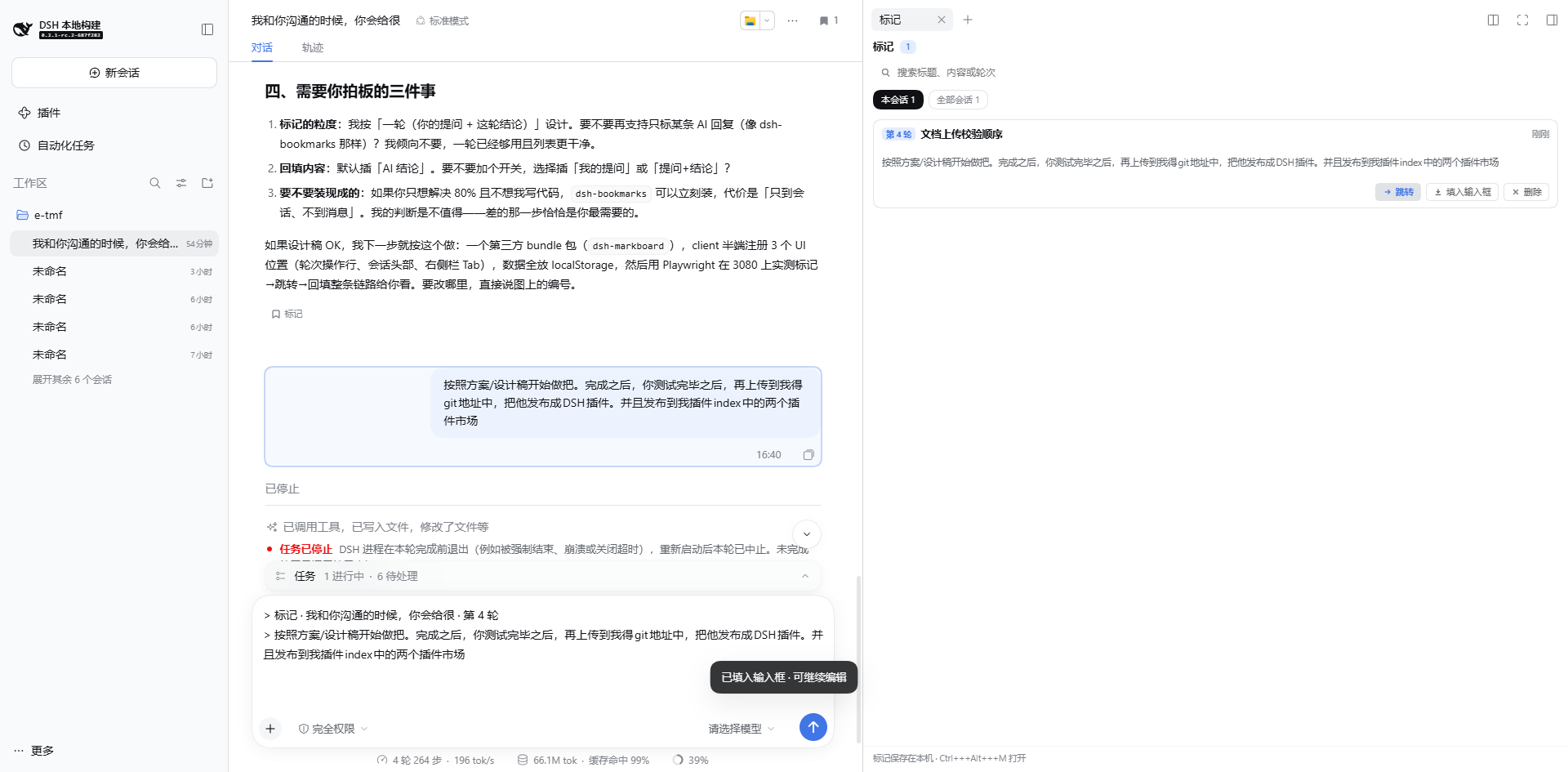
| Fill the composer from a card | Jump back to the turn |
|---|---|
 |
 |
Features
- Mark a whole turn — a Mark action under every completed answer records the turn (your prompt plus this turn's answer) and names it from the prompt's first sentence. Click again to remove it.
- Header count — the Session header shows how many turns are marked; click it to open the board.
- Right-Sidebar page — its own tab beside Files and Browser, with "this session" / "all sessions" scopes and search over labels, content, and turn numbers.
- Rename and delete — click a card's title to rename it; deletion comes with an undo.
- Jump back — opens the owning session and scrolls the turn into view. When that turn is outside the loaded window, history is paged in first through the kernel's exact
loadThrough(seq), and the landing row flashes once. - Fill the composer — writes the turn's answer into the current draft as a plain-text quote (
> 标记 · session · turn N) that you can keep editing or delete; the previous draft is restorable. - Cross-tab sync — another tab of the same origin writing marks updates this one.
- Bilingual copy that follows the interface language.
Install
dsh plugin --profile web add dsh-markboard
Then restart dsh web. The plugin adds itself to the profile's bundle layer; nothing else to configure.
From a local checkout:
dsh plugin --profile web add file:/absolute/path/to/dsh-markboard
Usage
- Find the turn you want to keep and click Mark in the action row under the answer.
- The header shows a count; click it (or press
Ctrl+Alt+M) to open the markboard. - Each card offers Jump (back to the turn), Fill composer (quote the answer into the draft), and Delete (undoable).
- Click a card's title to rename it — the label is your task name.
Shortcut
Ctrl+Alt+M (⌘+Alt+M on macOS) toggles the board. The binding is editable under Settings → Shortcuts.
How it works
Two halves, like any DSH surface plugin:
- Host half (
lib/index.js): an emptyapply. It only makes the package an ordinary Loader entry, which is what letsclient-modulesdiscover thedsh.clientdeclaration inpackage.jsonand compose the browser half intowindow.__DSH_BOOT__. - Browser half (
src/client, built tolib/client.js): registers three existing extension seats plus actx.markboardservice.
| Place | Seat | What it adds |
|---|---|---|
| Turn action row | conversation.chat.turnTail |
the Mark / Marked button |
| Session header | conversation.session.header.utilities |
the mark count entry |
| Right Sidebar | ctx.sidebarRightTabs + sidebar.right.pane.tab |
the markboard page |
| Notices | shell.overlay |
mark / fill / delete toasts with undo |
The data model is pure functions (src/shared/marks.ts); sessionId + turn is the identity, so marking the same turn twice edits that card instead of adding a second one. Marks persist in localStorage['dsh-markboard.v1']. A failed write (quota, private mode) only reports — it never throws, and the in-memory list keeps working.
Why not Host storage: a personal board does not need cross-device sync, and the cost of localStorage is only that a different browser or origin starts empty — which the panel says out loud.
Why the fill is plain text: insertText / setDraft are the kernel's public action face. A rich quote chip would need kernel support for reference fragments — a different order of change that would also drift across kernel upgrades.
Development
npm install     # esbuild, build-time only
npm run build   # src/client → lib/client.js (wrapped as window.__ModuleLoader__.load)
npm test        # data model and persistence rules (Node's own test runner)
End-to-end (opens a real browser window so you can watch the flow):
# 1. boot a disposable DSH home so your own sessions stay untouched
DSH_HOME=/path/to/disposable/home dsh --profile e2e --port 3099 --no-open

# 2. in another shell, hand the printed token URL to the script
node tests/e2e-headed.mjs --url "http://127.0.0.1:3099/?token=…" --slow 700
The script walks through: open a session → mark → open the panel → rename → fill the composer → jump back → reload → search → delete and undo, writing one screenshot per stage to docs/e2e/. Add --headless for CI.
Known limitations
- Turns only. No per-message or text-selection marks; a per-sentence grain makes the card list unreadable fast.
- Local to this browser. No cross-browser or cross-origin sharing, and no export.
- Jumping depends on the turn's row existing: a turn outside the loaded window triggers one exact history page-in first; if that fails the UI says so instead of failing silently.
- The fill is a plain-text quote and does not carry the original message's attachments or images.
- The page is bound to a Session: it follows session switches, and "all sessions" is a view inside the same page.
Ctrl+Alt+Monly. The shell's shortcut registry rejects a Web default that lacks the platform primary on Linux, so the Linux Web profile stays unbound rather than registering a rejected key.
No comments yet. Be the first to write one.