dsh-jev-advisor
English | 中文
A Jev second opinion for you, not the agent.
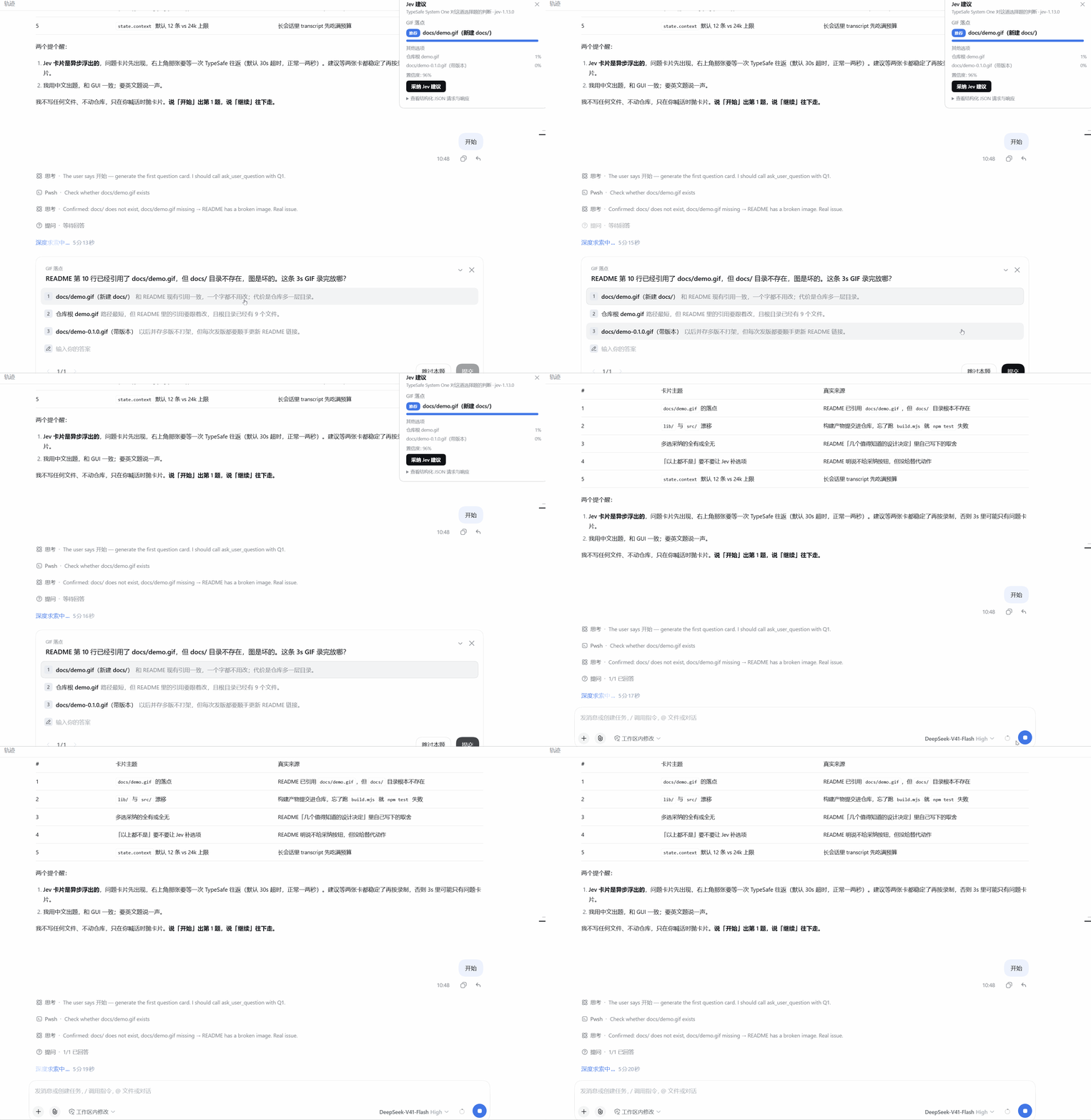
dsh-jev-advisor adds a floating advice card to DeepSeek Harness.
It helps you answer multiple-choice questions, approve or reject tool execution, and review plans.
Advice comes from TypeSafe Jev; nothing is submitted to DSH until you click Adopt.
Quick start
dsh plugin --profile <your-profile> add github:gordan-code/dsh-jev-advisor
- Open Settings → Jev, enter your TypeSafe API key, and save.
- When a supported interaction appears, click Ask Jev.
- Review the advice, then adopt it or answer through DSH's original controls.
Advice is on demand by default, including upgrades without an explicit automatic-mode setting. To enable automatic requests, turn on Settings → Jev → Automatically get Jev advice and save. If Require confirmation before sending is enabled, either mode first shows a local preview; only Confirm and send calls Jev.
Features
| Interaction | Advice and actions |
|---|---|
| Single-choice questions | Recommendation, option probabilities, confidence, and close-call warnings. Copy the suggested answer or adopt it. |
| Multi-select questions | Evaluate each option separately; options with probability ≥ 0.5 form the suggested selection. |
| Tool approvals | Suggest Allow once or Reject, with a risk score: 0 low, 1 moderate, 2 high. Adoption applies only to that invocation. |
| Plan review | Evaluate the available options and show plan readiness: 0 needs revision, 1 has minor gaps, 2 ready to execute. For a single plan-review question, “none of the above” can be adopted as Request changes when DSH provides that action. |
- Trade-off perspectives (optional): compare 1–5 perspectives alongside the main recommendation in one Jev request. Defaults use the interaction type and keyword matching: for example, security/task progress for approvals, or completeness/minimal changes/speed for plans. Add, remove, or enter custom perspectives on the card; set persistent defaults in Settings. Perspective comparisons apply to single-choice questions, not multi-select options.
- Temporary preference: add a requirement such as “prioritize stability” for the current interaction. Saving it before the first request makes no call. After evaluation starts, applying a change requests a new evaluation, or a new local preview in confirmation mode.
- Timed questions: when supported by DSH, starting an evaluation requests a countdown pause, and focusing the card holds the question. A Pause timer button is also available while the host reports an active countdown. This is best-effort, not a guarantee against expiry.
- Inspect and arrange: view request/response JSON, dock left or right, collapse, or dismiss. Docking and collapse state are saved per DSH profile.
- Local diagnostics: check versions and effective settings, then copy sanitized diagnostic facts without calling Jev.
The card does not replace DSH's interaction UI, change the agent prompt, or enforce tool permissions. Scores and probabilities are model judgments, not safety guarantees. You make the final decision.
Install, update and remove
Choose one installation source. Mounting the same package twice can cause duplicate loader entries and routes.
From GitHub
dsh plugin --profile <your-profile> add github:gordan-code/dsh-jev-advisor
The repository includes built lib/ files; no local build is needed for installation.
From npm
dsh plugin --profile <your-profile> add dsh-jev-advisor
# Pin a published release:
dsh plugin --profile <your-profile> add dsh-jev-advisor@<published-version>
npm installs a published release, which may differ from this checkout. The package version alone does not identify a Git revision.
From a local checkout
node scripts/build.mjs
dsh plugin --profile <your-profile> add /absolute/path/to/dsh-jev-advisor
Rebuild after editing src/; local links do not build automatically.
Update or uninstall
dsh plugin --profile <your-profile> remove dsh-jev-advisor
# To reinstall/update, add it again from your chosen source:
dsh plugin --profile <your-profile> add github:gordan-code/dsh-jev-advisor
Follow DSH's reload/restart instructions, then refresh the client. If the host bridge is outdated,
restart the host and refresh the page. After rebuilding a local bundle, use a hard reload
(Ctrl+Shift+R): the browser may retain an immutable cached bundle.
Settings
Open Settings → Jev. Save changes to apply them; leaving the key input blank preserves a stored key.
| Setting | Default | Meaning |
|---|---|---|
| API key | Empty | TypeSafe key from https://console.typesafe.ai/keys. Stored in the profile's Cordis patch in plain text; never returned in settings reads. |
| Endpoint | https://api.typesafe.ai/v1/systemone |
Evaluation endpoint. |
| Model | jev-latest |
Jev model or alias. |
| Enable Jev advice | On | Master switch. |
| Automatically get Jev advice | Off | autoAdvise=false. Turn on to start advice automatically for supported interactions. Confirmation still applies; sending may incur API usage. |
| Send the recent conversation as the state | On | Include the transcript tail as context. |
| Require confirmation before sending | Off | Preview the outbound request locally before sending. |
| Mask common credentials before sending | On | Best-effort masking of common credential patterns in outbound text. |
| Compare trade-off perspectives by default | Off | Enable perspective comparisons; the card can override this for the current interaction. |
| Default trade-off perspectives | Empty | Enter 1–5 labels separated by commas. Empty uses question-adaptive defaults. This does not enable comparison by itself. |
| Context messages | 12 |
Number of recent transcript messages to include. |
| Timeout (ms) | 30000 |
Total evaluation timeout, including response reading and retry backoff. |
Card edits to perspectives and temporary preferences apply only to the current interaction; Settings defaults persist. Editing perspective labels alone does not send a request: save/apply the selection as indicated on the card.
Test connection uses the saved settings to send a small Jev evaluation. It may incur API usage.
Local health check makes no Jev call. It shows the plugin and installed DSH versions, declared compatibility, key-configured status, and mode/privacy flags. Unavailable metadata is Unknown; a declaration match is not proof that every feature works. Copy sanitized diagnostics includes only allowlisted facts, excluding keys, endpoints, user paths, question text, and full configuration.
Privacy, cost and adoption safeguards
- The host sends the question, option text, optional transcript tail, and any explicit preference or enabled perspectives to the configured endpoint. For tool approvals, it also includes approval metadata and tool arguments when found in the session. Turning off conversation context does not remove these decision inputs.
- Credential masking covers common token/password assignments, Bearer tokens,
sk-…keys, private-key blocks, and URL credentials. It cannot detect every secret or personal datum. Inspect the confirmation preview before sending sensitive content. Request/response JSON may contain conversation data; do not share it as sanitized diagnostics. - Confirmation uses the exact local snapshot, valid for two minutes. Changes to request identity or evaluation settings invalidate it. Preparation itself does not call Jev.
- The complete evaluation JSON has a 64 KiB UTF-8 budget. Context is reduced first; oversized decision inputs are rejected locally rather than silently cut.
- One HTTP request can contain several evaluations. Perspective comparison can increase API usage; one request does not mean one fixed-cost question. The card shows token usage when Jev returns it.
- Identical concurrent evaluations share an upstream call within one host. Cancellation cannot undo work already processed or guarantee a billing refund. Reopening a completed result reuses it; reopening a cancelled request in on-demand mode waits for Ask Jev.
- Answers are bound to the current session, interaction and request. Invalid, incomplete or stale results cannot be adopted; double clicks cannot submit the same interaction twice.
- Ordinary single-choice “none of the above” results require a manual answer. The plan-review Request changes action described above is the exception. Multi-question adoption requires a valid answer for every question; no empty answers are invented.
- The four host routes (
status,test,prepare,advise) require loopback connections and same-origin browser requests. These checks do not isolate malicious processes running as the same OS user. Use trusted profiles and protect the plaintext credential file.
Compatibility and limitations
- The only DSH version declaration is an open-ended floor:
"engines.dsh": ">=0.2.0-rc.2". There is no upper bound and no@deepseek-ai/dsh*peer, so DSH never refuses the plugin after a runtime update, and the market shows a definite compatible badge instead of unknown/undeclared (an empty declaration is what produces unknown). Verified against 0.2.1-rc.3; every newer runtime stays inside the range. Add a ceiling only if a future runtime really breaks a public interaction API. Individual features still depend on those host APIs. - The card follows the main session's pending interaction; only when that session has none does it fall back to another supported pending interaction. Historical or closed interactions are excluded.
- Free-text-only questions are not supported. A mixed batch containing unsupported questions cannot be adopted as a complete batch.
- The card uses
shell.overlayandsettings.section. Sidebar avoidance is manual; switch sides or collapse the card if it overlaps another panel. - Context is capped at roughly 24,000 characters and may be shortened further by the byte budget.
Only overload responses
429and529are retried, at most twice.
Troubleshooting
| Symptom | What to check |
|---|---|
| No advice card | A supported interaction must be pending, advice must be enabled, and the client bundle and host routes must be loaded. |
| No request starts | On-demand mode requires Ask Jev. Confirmation mode also requires Confirm and send. |
No API key / 401 |
Save a valid TypeSafe key in Settings → Jev. |
422 |
Inspect the local request; report the error code and byte size without keys or conversation text. |
429 / 529 |
Rate limited or overloaded; retry after the two automatic retries finish. |
| Host bridge outdated / stale UI | Restart the host and hard-reload the page. Verify the installed source/version. |
| Advice for a different request | Restart and refresh. If it persists, report only the comparison flags, not request contents. |
| Duplicate loader entry | Remove the duplicate installation or bundle entry. |
Development
npm ci
npm run build
npm test
npm run check:pack
npx playwright install chromium
npm run test:browser
npm run test:host
npm run test:install
npm run quality
npm pack --dry-run
lib/ is committed. npm test checks it matches src/; check:pack verifies published entry points,
the client bundle, and cordis.patch.yml.
Host/install tests need a pinned real DSH CLI. For example, in PowerShell:
$env:DSH_TEST_CLI = "<cli-directory>/node_modules/@deepseek-ai/dsh/lib/bin.js"
npm run quality
quality runs build, base tests, Chromium, packaging, isolated-host tests, and tarball installation.
Missing prerequisites fail the gate. Tests use mocks and scratch profiles, not real Jev keys or your
DSH profile. Chromium fixtures are not a full Desktop UI test. CI additionally runs Node 20/22/24
checks and a pinned three-runtime DSH quality matrix.
The host uses ctx.sessions and loopback JSON routes; the browser uses public Cordis services
(ctx.slots, ctx.locale, ctx.configForms, ctx.uiSession). It does not import other plugins'
private implementation.
License
MIT. Jev is a TypeSafe AI product. This project is not affiliated with or endorsed by TypeSafe AI or DeepSeek.
No comments yet. Be the first to write one.