资料库(Library)· DeepSeek Harness 插件
一个本地文件库插件:上传、预览、收藏、批量导出,并能把库里的文件作为附件发到聊天。
中文
给 DeepSeek Harness 加一个本地文件库:上传、浏览、预览、收藏、批量导出,并且和聊天打通——agent 交付的文件可以自动入库,聊天里也能把库内文件作为附件发出。纯插件实现,不需要修改 Harness 本体。
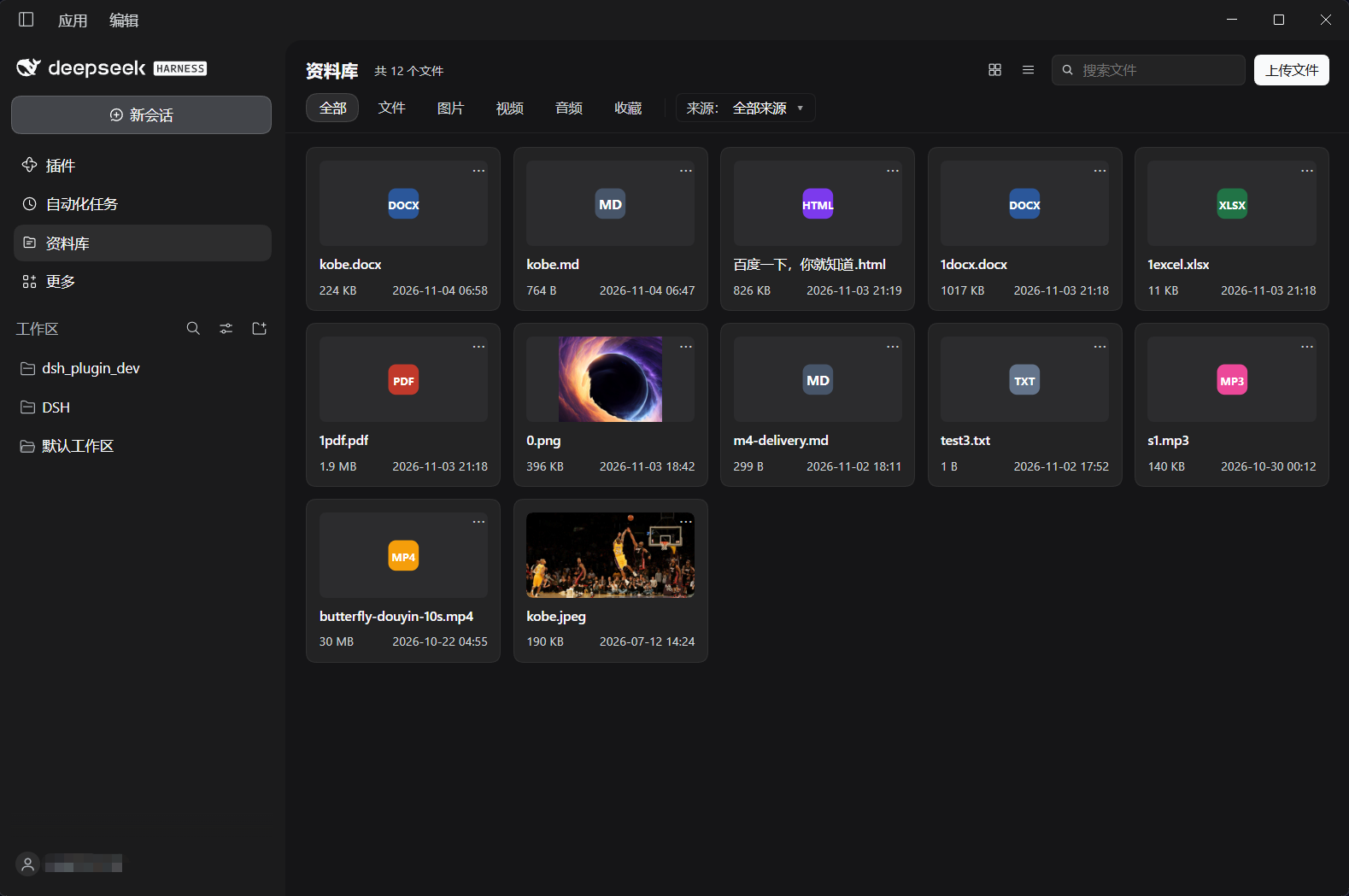
功能
- 上传:按钮或拖拽到面板,单文件上限 200 MB;同名自动加序号
- 浏览:网格 / 列表、按时间 / 名称 / 大小排序、搜索、分类(全部 / 文件 / 图片 / 视频 / 音频 / 收藏)
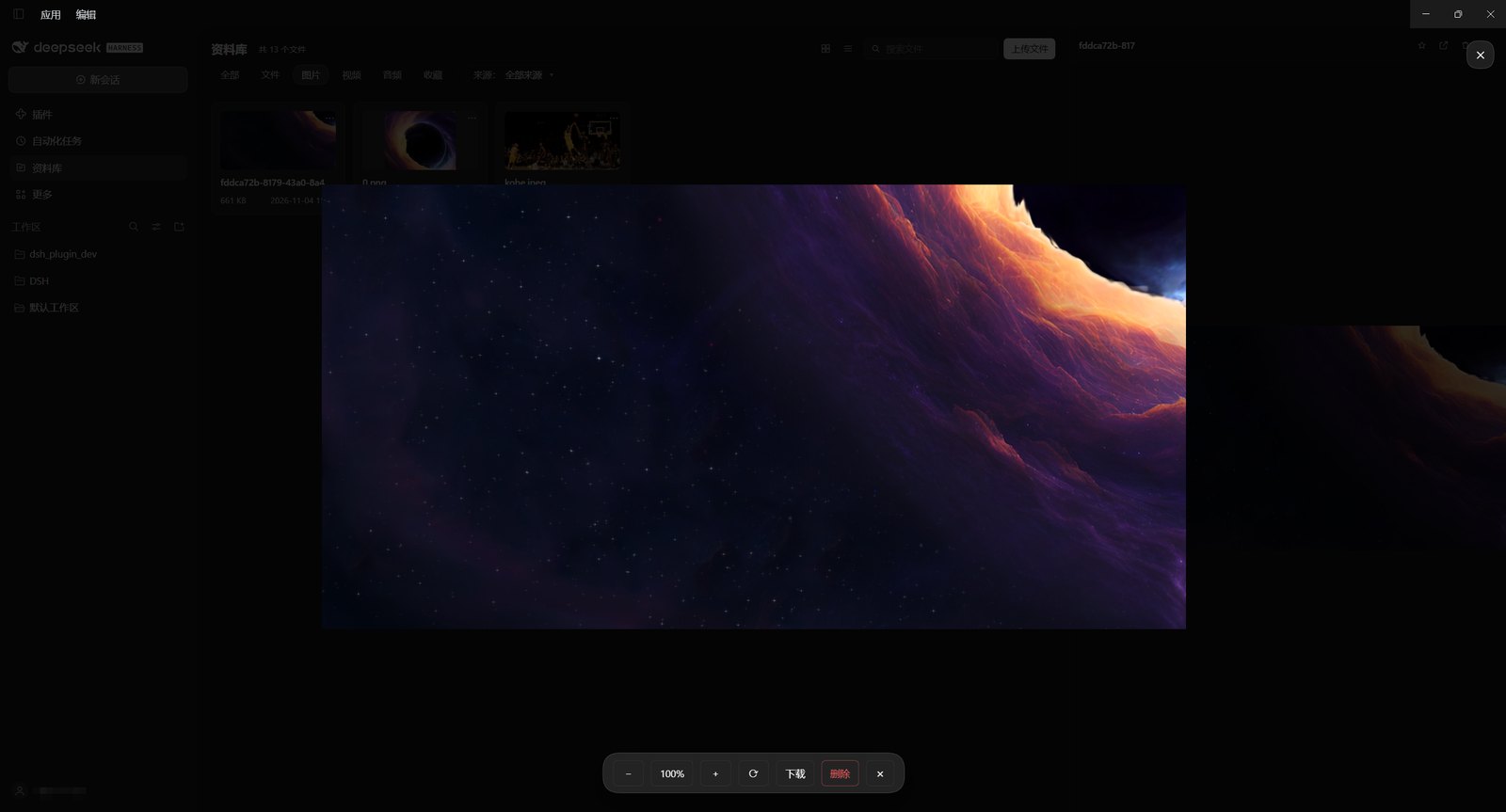
- 预览:文本、Markdown、代码、HTML(沙箱渲染 + 源码切换)、图片(内嵌预览 + 全屏灯箱:滚轮缩放、拖动、旋转、下载、删除)、PDF、Office(docx / xlsx / pptx → PDF)
- 收藏:收藏 / 取消收藏,收藏夹(文件夹)分组,默认「未分类」
- 批量:勾选、Shift 区间、全选、ZIP 打包下载、移到文件夹、发送到当前聊天、删除
- 聊天集成:输入框左侧「+」→ 从资料库选文件加入草稿附件;agent 通过
present交付的文件自动入库并记录来源会话 - 存储管理:设置页可查看位置与占用、迁移到新目录、重建索引
图片灯箱(滚轮缩放 / 拖动 / 旋转 / 下载 / 删除):
安装
前提:本机已安装 DeepSeek Harness,并有一个可用的 profile。
- 把本仓库克隆或下载到任意位置(路径可以包含空格):
git clone https://github.com/gjunyoung/dsh-library.git - 打开 Harness → 设置 → 插件 → 安装插件包,填入该目录的绝对路径(或
npm pack生成的.tgz路径)。 - 在插件列表里启用「资料库」。
- 重启 Harness。
首次启动会在 ~/.dsh/library(Windows:C:\Users\<你>\.dsh\library)创建存储目录。
安装入口在不同版本里名称可能略有差异(「安装」「添加插件」等),本质是把该目录作为当前 profile 的一个本地依赖。
使用
- 侧边栏底部的资料库图标打开面板。
- 上传区支持拖拽;列表右侧「…」菜单有预览、下载、收藏、移到文件夹、删除。
- 预览抽屉:图片和 PDF 可放大,HTML 默认渲染、可切源码,Office 首次打开会转换一次(有缓存)。
- 收藏:根层是文件夹列表(未分类 + 各收藏夹),进入文件夹后可用搜索;「…」里的「收藏」会打开文件夹选择器,已收藏的文件显示「取消收藏」。
- 批量条悬浮在面板底部:全选 / 取消全选 / 下载(ZIP)/ 移到文件夹 / 发送到聊天 / 删除。
存储
~/.dsh/library/
├─ index.json          记录(文件名、大小、哈希、来源、收藏、所属收藏夹)
├─ index.backup.json   上一次的索引备份
├─ blobs/<2>/<sha>.bin 按内容寻址的文件本体(同内容只存一份)
├─ orphan/             失去索引记录的字节(不会被自动删除)
├─ tmp/                临时文件、Office 转换缓存
└─ thumbs/             预留的缩略图目录
- 备份:整个目录复制走即可;恢复时放回同一位置。
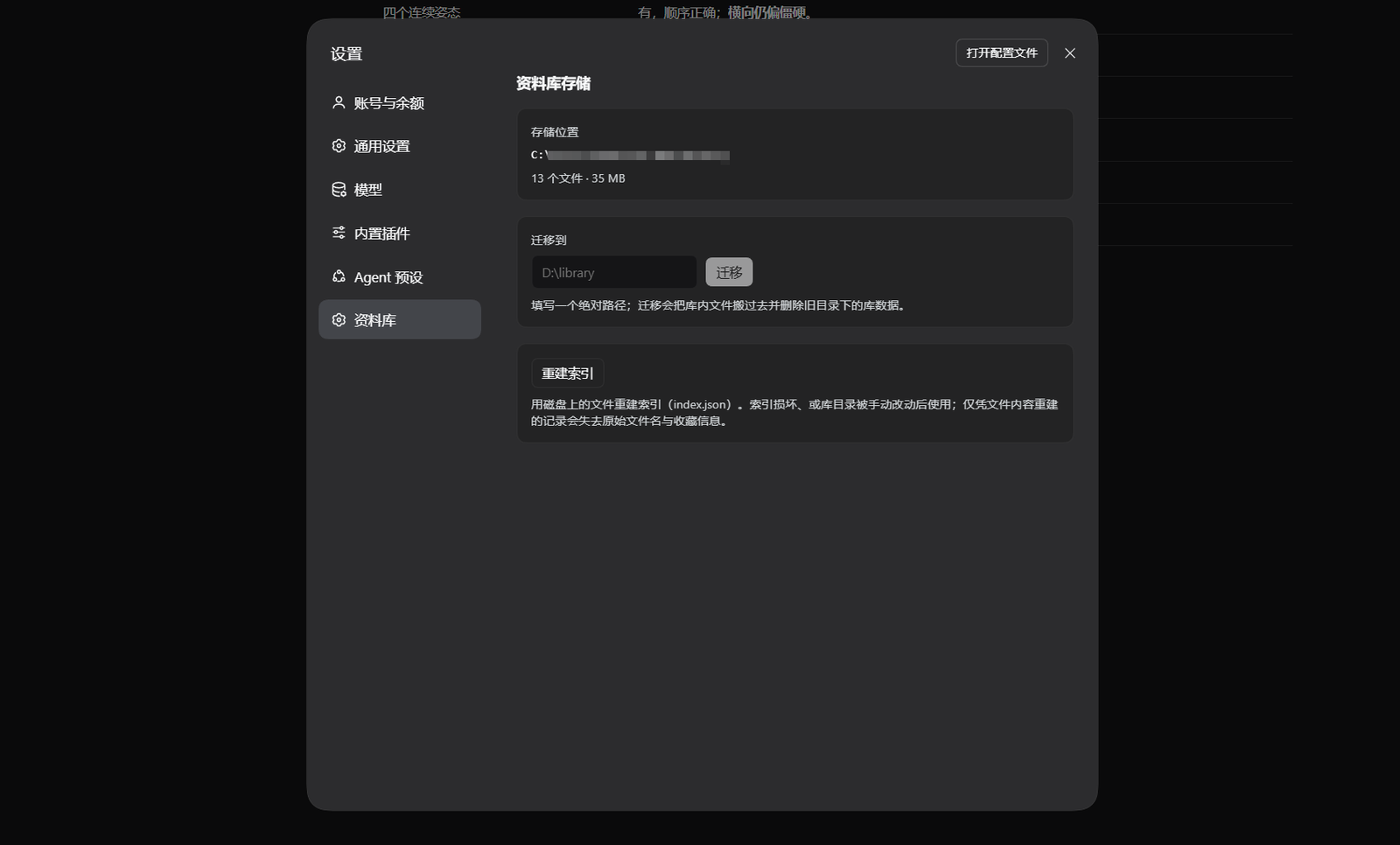
- 迁移:设置 → 资料库 → 填入新目录绝对路径 → 迁移。会搬运文件、校验后删除旧目录里的库数据,并记住新位置(重启仍生效)。
- 重建索引:用磁盘上的字节重写
index.json。索引损坏、或手动动过目录时使用;索引里没有的文件会以recovered-<hash前8位>出现,原名与收藏信息无法恢复。
设置 → 资料库(存储位置、迁移、重建索引):
已知限制
- Office 走 PDF:docx / xlsx / pptx 由 Harness 内置的转换能力转成 PDF 显示,不解析原始表格;Excel 的公式、图表不会单独渲染。
- HTML 单文件:预览在沙箱 iframe 中以
srcdoc渲染,脚本可运行但读不到应用数据、也无法访问外网;./style.css这类相对引用不可用。 - 预览是页内抽屉:Harness 右侧栏的文档预览是会话作用域的,资料库是全局面板,因此预览放在面板内部的抽屉里。
- 自动入库只认交付:agent 用
present交付的文件会自动入库;write/edit直接写进工作区的文件不会自动入库(避免把临时文件都塞进来)。 - 批量收藏未提供:收藏走单条操作。
开发
packages/library/(本仓库根目录)
├─ index.js          Host 半边:路由、会话事件捕获、打开系统程序
├─ client.js         Client 半边:面板、预览、灯箱、批量、设置页
├─ lib/              engine(存储与索引)、http、model、render、capture、zip、office
├─ locale/           zh / en 文案
├─ test/             node:test 用例
└─ cordis.patch.yml  bundle 补丁
运行测试(Node 22+):
node --test "test/*.test.js"
客户端半边只允许 require('react');与 Harness 的交互一律通过 slot 注册与 loopback HTTP 完成,这也是它能作为纯插件工作的原因。
许可证
MIT © 2026 gjunyoung
可以自由使用、修改、分发(包括商业用途),只需保留版权声明与许可证文本;软件按“原样”提供,不含任何担保。
English
A local file library for DeepSeek Harness: upload, preview, favourite, batch export, and attach files to chat.
A local file library for DeepSeek Harness: upload, browse, preview, favourite and batch-export files, wired into the chat — deliverables an agent presents are archived automatically, and library files can be attached to a message. It is a pure plugin: nothing in Harness itself changes.
Features
- Upload — button or drag-and-drop, 200 MB per file, duplicate names get a suffix
- Browse — grid / list, sort by date / name / size, search, and categories (all / documents / images / video / audio / favourites)
- Preview — text, Markdown, code, HTML (sandboxed render with a source toggle), images (inline preview plus a full-screen viewer with wheel zoom, pan, rotate, download, delete), PDF, Office (docx / xlsx / pptx → PDF)
- Favourites — star a file, group favourites into folders,
Unfiledby default - Batch actions — checkboxes, Shift range, select all, ZIP download, move to folder, send to the current chat, delete
- Chat integration — the
+button in the composer picks files from the library; files an agent delivers throughpresentare archived with their source session - Storage management — the settings page shows the location and size, moves the archive, and rebuilds the index
The image viewer (wheel zoom, pan, rotate, download, delete):
Install
Requires DeepSeek Harness with a working profile.
- Clone or download this repository anywhere (paths with spaces are fine):
git clone https://github.com/gjunyoung/dsh-library.git - Open Harness → Settings → Plugins → install a bundle, and give the absolute path of that directory (or of an
npm pack.tgz). - Enable “Library” in the plugin list.
- Restart Harness.
The first start creates the archive at ~/.dsh/library (C:\Users\<you>\.dsh\library on Windows).
The install entry point is named slightly differently across releases (“Install”, “Add plugin”, …); it always ends up as a local dependency of the current profile.
Usage
- Open the panel from the library icon at the bottom of the sidebar.
- Drop files anywhere on the panel; the
…menu on a row offers preview, download, favourite, move to folder and delete. - The preview drawer zooms images and PDFs, renders HTML by default (with a source switch), and converts Office files once on first open (cached afterwards).
- Favourites open on a folder list (
Unfiledplus your folders); inside a folder the search box applies, and the…menu opens a folder picker — already-favourited files show “Remove from favourites”. - The floating batch bar offers select all / clear, download as ZIP, move to folder, send to chat and delete.
Storage
~/.dsh/library/
├─ index.json          records (name, size, hash, source, favourite, folder)
├─ index.backup.json   previous index backup
├─ blobs/<2>/<sha>.bin content-addressed bytes (identical content stored once)
├─ orphan/             bytes whose record disappeared (never deleted automatically)
├─ tmp/                temporary files and the Office conversion cache
└─ thumbs/             reserved for thumbnails
- Backup — copy the whole directory; restore it to the same path.
- Move — Settings → Library → enter an absolute target directory. Files are copied, verified, and the old library data is removed; the new location is remembered across restarts.
- Rebuild index — rewrites
index.jsonfrom the bytes on disk. Use it when the index is damaged or the directory was edited by hand; files unknown to the index come back asrecovered-<first 8 hash chars>and lose their original name and favourites.
Settings → Library (location, move, rebuild index):
Known limitations
- Office renders as PDF — docx / xlsx / pptx go through Harness's built-in converter; the original spreadsheet layout, formulas and charts are not rendered natively.
- HTML is single-file — the preview renders in a sandboxed
srcdociframe: scripts run, but the page cannot read application data or reach the network, and relative references such as./style.cssdo not resolve. - The preview is an in-panel drawer — Harness's right-sidebar document preview is session-scoped, while the library is a global panel.
- Only deliveries are archived automatically — files an agent returns through
presentare captured; plainwrite/editchanges in the workspace are not (that would pull in every scratch file). - No batch favourite — favourites are a per-file action.
Development
index.js         host half: routes, session-event capture, "open in system"
client.js        client half: panel, preview, viewer, batch bar, settings
lib/             engine (archive + index), http, model, render, capture, zip, office
locale/          zh / en dictionaries
test/            node:test suites
cordis.patch.yml bundle patch
Run the tests (Node 22+):
node --test "test/*.test.js"
The client half may only require('react'); everything it needs from Harness goes through slot registration and loopback HTTP, which is what keeps this a pure plugin.
License
MIT © 2026 gjunyoung
Use, modify and redistribute freely (commercial use included) as long as the copyright notice and license text stay with it. The software is provided “as is”, without warranty.
No comments yet. Be the first to write one.