dsh-panel-titlebar



English | 简体中文
Puts the sidebar's global panel entries where a Windows app usually keeps its navigation: in the caption row, right after the 应用 / 编辑 menus.

The problem
A DeepSeek Harness profile that installs a few panels (Plugins, Market, Schedules, Context insight, Memory, More) renders every one of them as a full-width row at the top of the sidebar. On a laptop that is roughly 240px of vertical space taken from the session list, on every screen, permanently:
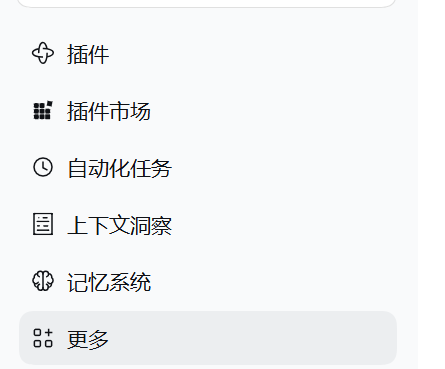
What it changes
The rows keep their icons, labels, active state and click behaviour, and move into the caption band as compact menu items sized like the menus they follow. The sidebar starts directly with the brand row, the New session button and the workspace list:

The session stats that ship below the composer — turn and step counts, decode speed, token total, cache hit and the context meter — move up into the View tab row, right after its … launcher.
How it works
- The navigation stays the sidebar plugin's own registration in
sidebar.panellist. Nothing is copied, wrapped, replaced or removed, so the More launcher, its pin/unpin menu, the active-panel highlight and the analytics of the shipped entries are untouched. - One stylesheet takes that existing
navout of the sidebar's flex flow (position: fixed) and lays its rows out horizontally in the caption band. Row metrics follow the caption menus: 28px high, 14px text, 6px radius, secondary label colour, hover and active from the theme tokens. - The stylesheet is scoped to
html[data-windows-titlebar], a marker only the Desktop preload sets. The plain Web GUI keeps the shipped vertical list. - The left offset is measured, not hardcoded: the plugin reads the right edge of the preload-injected
[data-windows-menu]host into--dsh-panel-titlebar-leftand keeps it current, so collapsing the sidebar (menu start moves 48px → 84px), switching locale, or resizing stays aligned. - The entries work as a toggle: clicking the selected entry again returns to the conversation (
layout.selectPanel(null), the same destination as a panel's own “back to chat”), instead of re-selecting the panel that is already open. The click is stopped before the shipped handler runs; the More launcher never acts as a panel entry, so it keeps opening its menu. - The stats keep their own registration in
conversation.composer.dockand their own dialogs; only their seat moves. The dock still renders the pills, but is positioned from the View tab row's … launcher (--dsh-statbar-top/--dsh-statbar-left), vertically centred in that row. While the anchor is missing — no session, a panel page, a collapsed layout — the plugin removesdata-dsh-statbarand the dock falls back to its shipped place below the composer.
Requirements
- DeepSeek Harness Desktop on Windows — the caption row exists only there. The plain Web build has no caption band, so the plugin is inert by design.
- Harness
>= 0.2.1-0(the sidebar that renderssidebar.panellistrows with the More launcher). - The panel entries themselves come from whatever else the profile installs; the plugin does not create any.
Install
Through the Plugin Manager, pointing it at this checkout:
plugin_manager install_bundle
  target: <absolute path to this repository>
The manager writes the profile dependency, selects the bundle and applies the row. The change is live without restarting the app; a page refresh is enough if the panel row does not appear immediately.
Once the package is published, the same call accepts the name instead of a path:
plugin_manager install_bundle
  target: dsh-panel-titlebar@0.2.0
Manual equivalent — add a dependency on this checkout to the profile and insert its row in the profile patch:
# cordis.patch.yml
- insert:
    - id: panel-titlebar
      name: dsh-panel-titlebar
Uninstall
Disable or remove the panel-titlebar row (Plugin Manager: uninstall the dsh-panel-titlebar bundle). The sidebar returns to its shipped vertical list immediately; no other plugin is affected.
Customize
| Want | Change |
|---|---|
| Start further from the menus | Override --dsh-panel-titlebar-left on :root (defaults to the measured menubar edge + 10px) |
| Move the stats further from the tabs | Override --dsh-statbar-left on :root (defaults to the measured … right edge + 18px) |
| Denser rows | Drop the padding/font-size declarations in the row rule — the shipped 36px metrics apply |
| Softer separators between panels and menus | Add margin-left to the first row via nav:has(> [class*="panelRow"]) > *:first-child |
All of it lives in the CSS constant in client.js; there is no build step.
Compatibility and limits
- The rules address the shipped sidebar's CSS-module class suffixes (
panelRow,panelTitle,panelGlyph) and thenavthat owns the panel rows. A sidebar rewrite in a future Harness release may need this plugin updated; the client module is loaded after@deepseek-ai/dsh-client-ui-sidebarfor that reason. - The caption band is 40px tall and does not wrap: on a narrow window the trailing entries ellipsize and are eventually clipped instead of pushing the window controls.
- The More popover keeps its shipped anchoring (measured from the trigger button when it opens).
- The stats move relies on the View tab row exposing either its
…launcher (button.viewsMore*) or theviewTabscontainer, and on[data-composer-dock]carrying only ambient stat entries. A profile that adds its own ambient panel to that dock would move it along; without any anchor the dock stays where it shipped. - Verified on Windows 11 with DSH Desktop (harness
0.2.1-rc.5) at 150% display scaling: placement, live install, and the reclaimed sidebar space. Hover and the More popover reuse the shipped components; they were exercised manually, and CI covers the static contract only.
Development
client.js            browser half: scoped stylesheet + caption-row alignment
index.js             host half: no-op (everything is browser-local)
cordis.patch.yml     bundle row inserted by the profile
locale/en.json       Plugin Manager title and description (English)
locale/zh.json       Plugin Manager title and description (Chinese)
icon.svg             exported icon used by the plugin inventory
test/bundle.test.mjs static contract tests (manifest, patch, locales, stylesheet scope)
npm run check      # node --check on both modules
npm test           # node --test test/
npm run pack:check # the npm payload this repo would publish
No dependencies, no build tool: the browser module is plain ESM consumed by the Harness client module loader.
License
MIT © 2026 githublmk
No comments yet. Be the first to write one.